Skip to content
| Marketplace
Sign in
Visual Studio Code>Themes>LILYTHIUM Mainframe AccessNew to Visual Studio Code? Get it now.
LILYTHIUM Mainframe Access

LILYTHIUM Mainframe Access

IonShield

|
2 installs
| (0) | Free
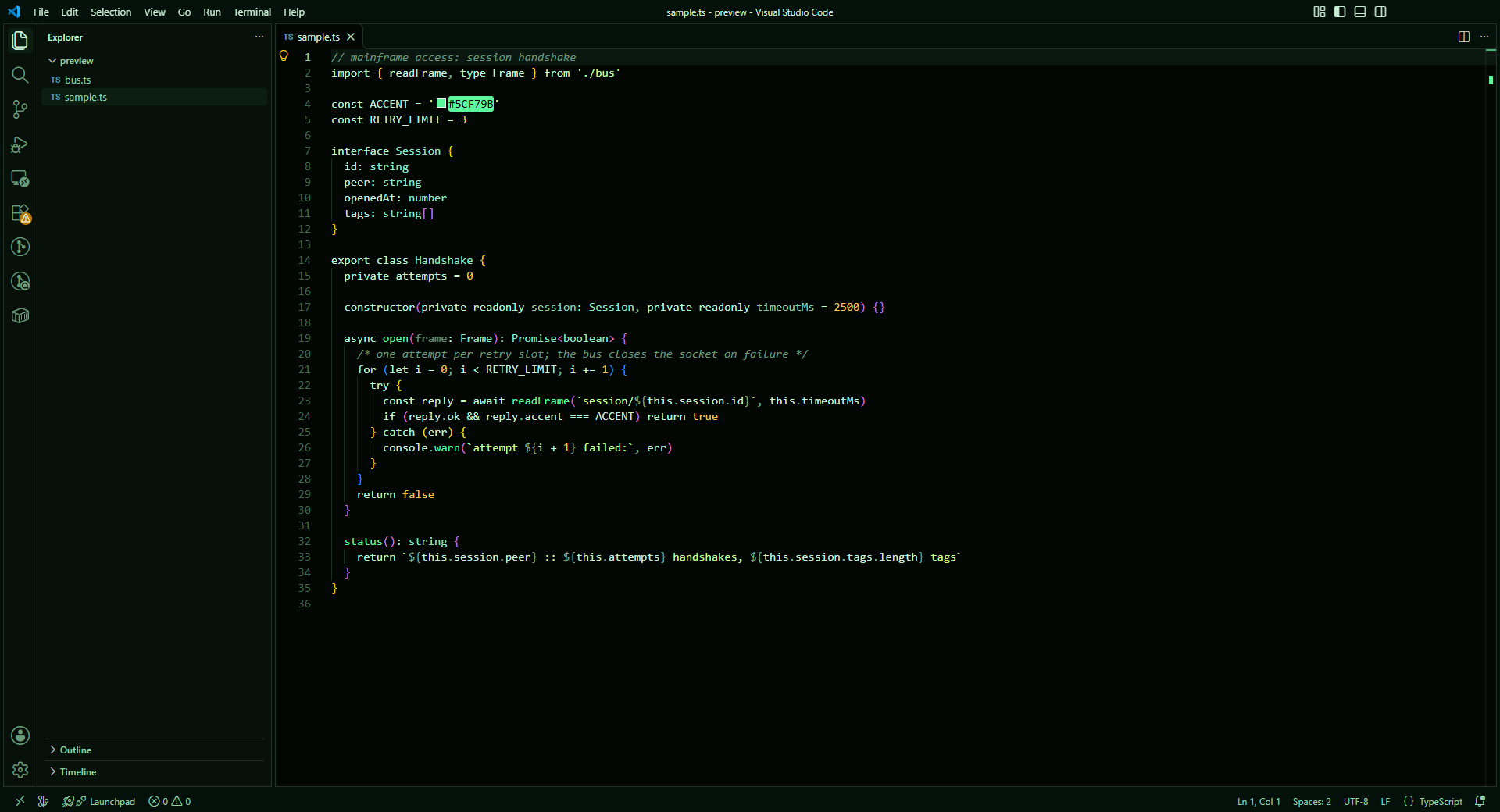
Phosphor-green terminal theme. A machine login: black-green ground, #5CF79B accent, one hue, square edges. Imports into Hermes Desktop as a colour theme.
Installation
Launch VS Code Quick Open (Ctrl+P), paste the following command, and press enter.
Copied to clipboard
More Info

LILYTHIUM Mainframe Access

A phosphor-green terminal theme: #5CF79B on a black-green ground, one hue, square edges, JetBrains Mono for code.

Part of LILYTHIUM, a set of places ported to whatever surface needs a face. This package is the colour-theme edition, so it can be found and installed from a marketplace.

In VS Code

Install in VS Code

Extensions → search LILYTHIUM Mainframe Access → Install → then pick it in File → Preferences → Color Theme (Ctrl+K Ctrl+T).

Install in Hermes Desktop

Hermes imports VS Code colour themes directly: Settings → Appearance → Browse VS Code marketplace, search the name, install. The importer maps the six workbench keys that carry a palette (background, foreground, accent, elevated surface, sidebar, error) and derives the rest.

That import gives you the colours. It does not give you the plates: the Hermes skin builds one lit glass plate per tool call, a hotter prompt and composer, and a lit sidebar seam, which a colour theme has no way to express. For the full treatment install the skin from the hermes-skins repository.

Corners

The theme squares what VS Code lets a package square. 1.148 moved its panel radii out of the colour palette and into the workbench.sizeCustomizations setting, so the extension contributes defaults for six tokens:

"workbench.sizeCustomizations": {
  "activityBar.cornerRadius": 0, "primarySideBar.cornerRadius": 0,
  "secondarySideBar.cornerRadius": 0, "editorArea.cornerRadius": 0,
  "panels.cornerRadius": 0, "toolsPanel.cornerRadius": 0
}

Panel chrome then meets square. The cornerRadius.xSmall … xLarge scale (2, 4, 6, 8, 12 px), used by inputs, menus, list rows and tab corners, rejects customisation in 1.148 — the value is ignored, not clamped. To keep your own radii, write your own workbench.sizeCustomizations: user settings override an extension's contributed default.

Palette

Role Value
Accent #5CF79B
Accent ink #BCF7CE
Body text #C8EED4
Ground #020704
Panel #071009
Alert #FF7070
Warning #FFC04D

Building

cd vscode
npx @vscode/vsce package

That writes lilythium-mainframe-access-1.0.0.vsix next to package.json: a plain zip holding extension/package.json, the theme JSON, the readme and the licence.

Publishing

Needs an Azure DevOps personal access token with Marketplace → Manage on the account that owns the publisher. Nothing in this repo stores one.

# once, in the browser: create the publisher at https://marketplace.visualstudio.com/manage
npx @vscode/vsce login ion-shield-quad        # paste the token when asked
npx @vscode/vsce publish --no-dependencies  # from vscode/, bumps nothing, ships package.json version

vsce login keeps the token in ~/.vsce, not in the repo. Bump version in package.json for every later publish; the Marketplace rejects a version it has already seen.

After the listing is live, Hermes users can reach it from Settings → Appearance → Browse VS Code marketplace by searching lilythium or the extension id ion-shield-quad.lilythium-mainframe-access.

License

MIT.

  • Contact us
  • Jobs
  • Privacy
  • Manage cookies
  • Terms of use
  • Trademarks
  • Your Privacy Choices
  • Consumer Health Privacy
© 2026 Microsoft