CCRelay



Use third-party models in Claude Code, Claude Desktop, and the ChatGPT desktop app (ChatGPT Work and Codex).
CCRelay is a free, open-source desktop app for macOS and Windows. It lets Claude Code, Claude Desktop (third-party inference and Cowork), the ChatGPT desktop app (ChatGPT Work and Codex), and Codex CLI use third-party models such as GLM, Kimi, DeepSeek, Gemini, Qwen, MiniMax, and Xiaomi MiMo, or any OpenAI- or Anthropic-compatible API. Keep the client you already use and switch models from one place. A local proxy converts between Anthropic and OpenAI formats automatically. A VS Code extension is also available.
Download: Latest release — macOS .dmg (Apple Silicon, Intel) · Windows .exe (x64, arm64) · VS Code extension on Marketplace and Open VSX
Website: https://ccrelay.inflab.org · 中文文档 · 日本語 · 한국어
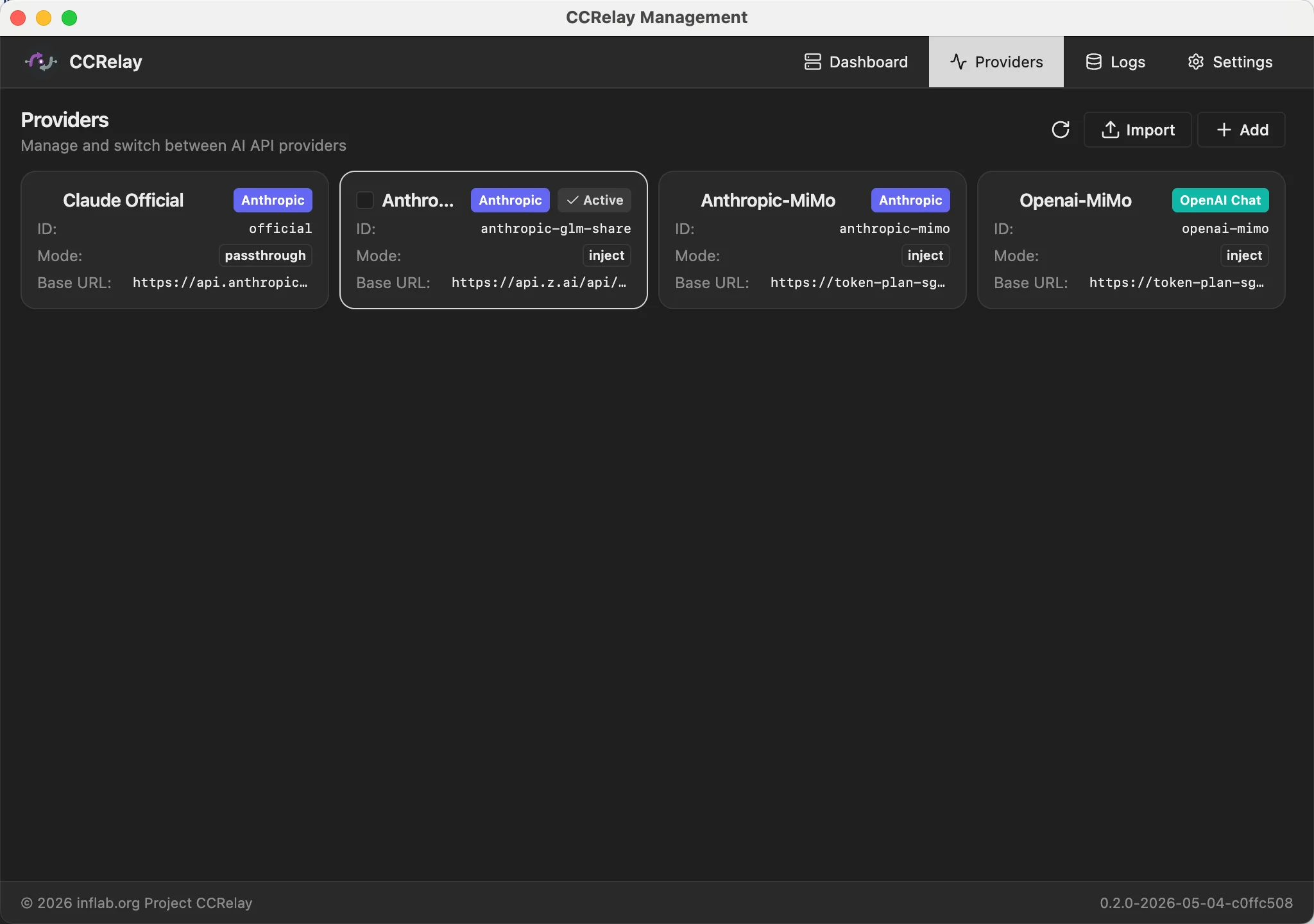
Table of Contents
Supported clients
| Client |
How to connect |
| Claude Code (CLI and IDE extensions) |
Client configuration → Claude Code → Apply |
| Claude Desktop (third-party inference, Cowork) |
Client configuration → Claude Desktop → Apply, then restart Claude Desktop |
| Codex CLI |
Client configuration → Codex → Apply, then restart Codex |
| ChatGPT desktop app (ChatGPT Work, Codex) |
Same ~/.codex/config.toml as Codex CLI: Apply, then restart the ChatGPT desktop app |
| Any tool that accepts a custom Anthropic or OpenAI URL |
http://127.0.0.1:7575/anthropic or http://127.0.0.1:7575/openai |
Details for each client: Client Integrations.
Get started in 3 steps
- Install the desktop app. Download it from Releases and open it. The local proxy starts on
http://127.0.0.1:7575.
- Add a provider. Open Providers → Add provider, pick a preset (GLM, Xiaomi MiMo, DeepSeek, MiniMax, Gemini, Azure OpenAI, Meituan LongCat, Astraflow) or enter any base URL, paste your API key, run the built-in test, and create it.
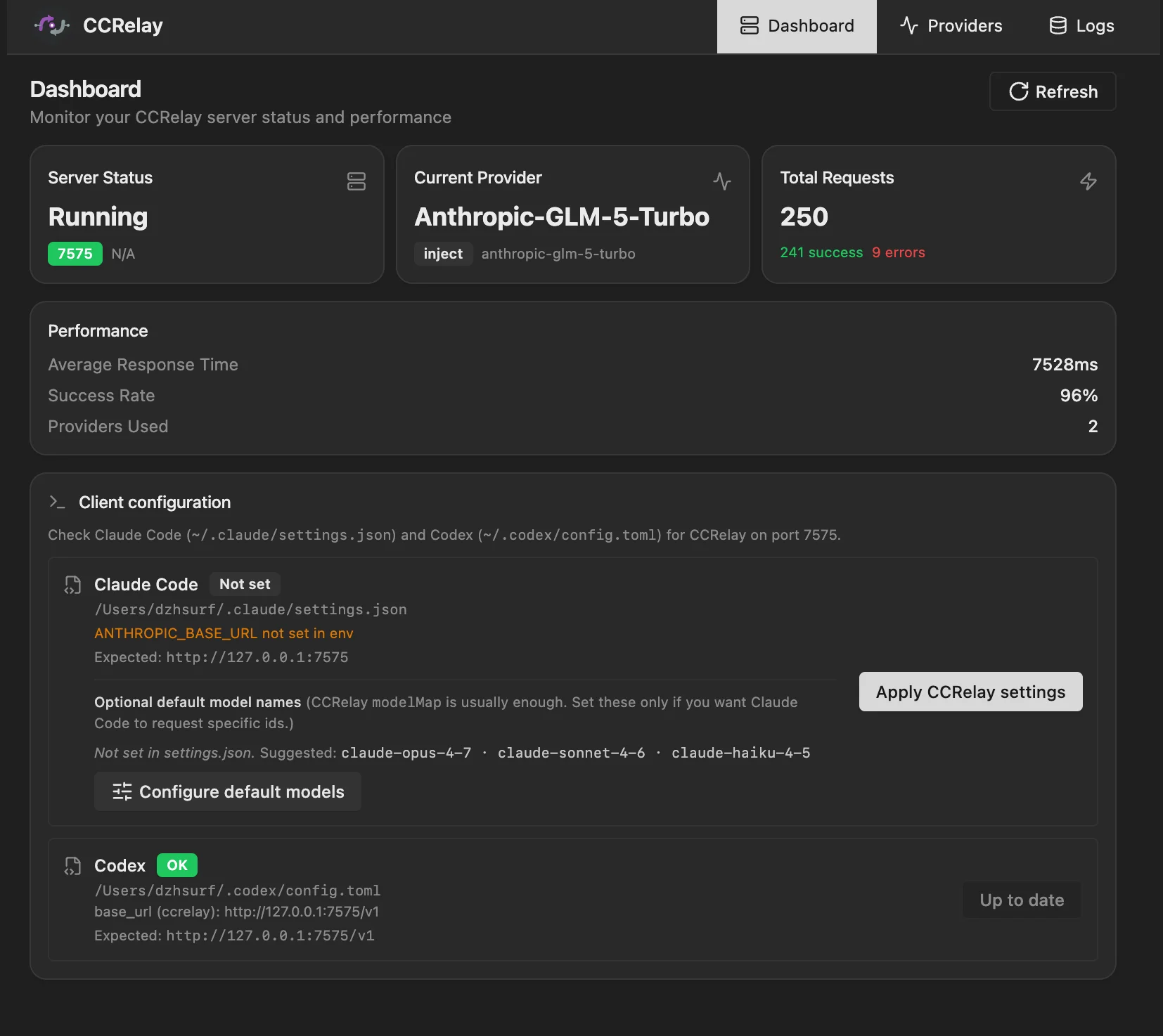
- Connect your client. Open Client configuration, choose Claude Code, Claude Desktop, or Codex, and click Apply. Restart the client if the table above says so.
To switch models later, select another provider card and click Apply, or turn on Smart Routing to list models from every provider at once and pick one inside the client. Restore on the Client configuration page undoes the client changes.
Prefer editing files? See Manual configuration.
Core Features
Use any model in the client you already have
- One local address serves Claude Code, Claude Desktop, Codex CLI, and the ChatGPT desktop app.
- Requests are converted automatically between Anthropic Messages, OpenAI Chat Completions, and OpenAI Responses.
- Model names are mapped with wildcards, and Claude Desktop gets Claude-style aliases it accepts.
- Smart Routing lists models from every provider in one catalog and routes each request by model.
Set up without editing files
- The provider wizard has presets for popular vendors and a built-in endpoint test.
- Client configuration writes each client's settings in one click, and Restore undoes it.
- Config changes apply without a restart;
~/.ccrelay/config.yaml stays available for manual edits.
- Providers can be exported and imported as JSON.
See what is happening
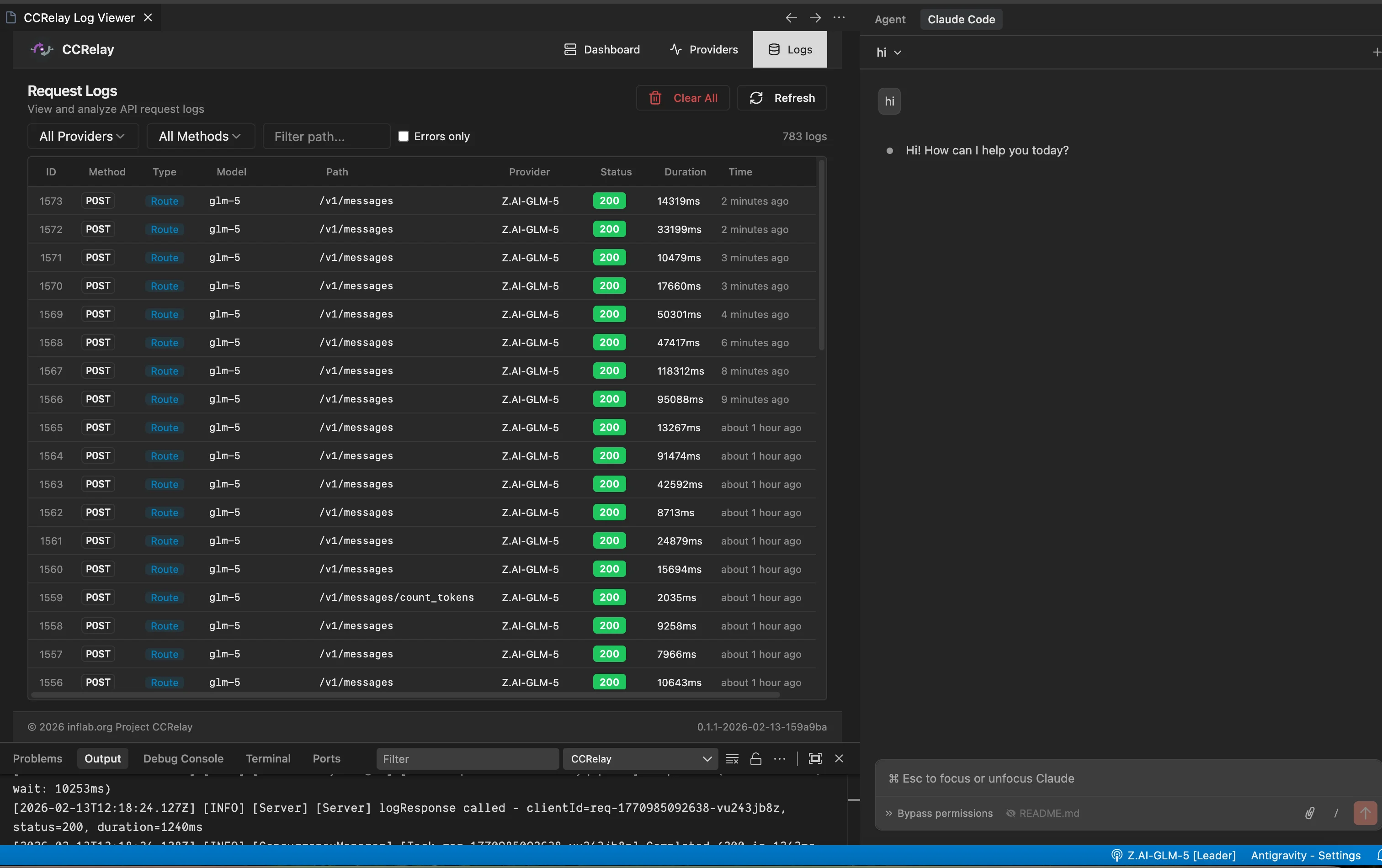
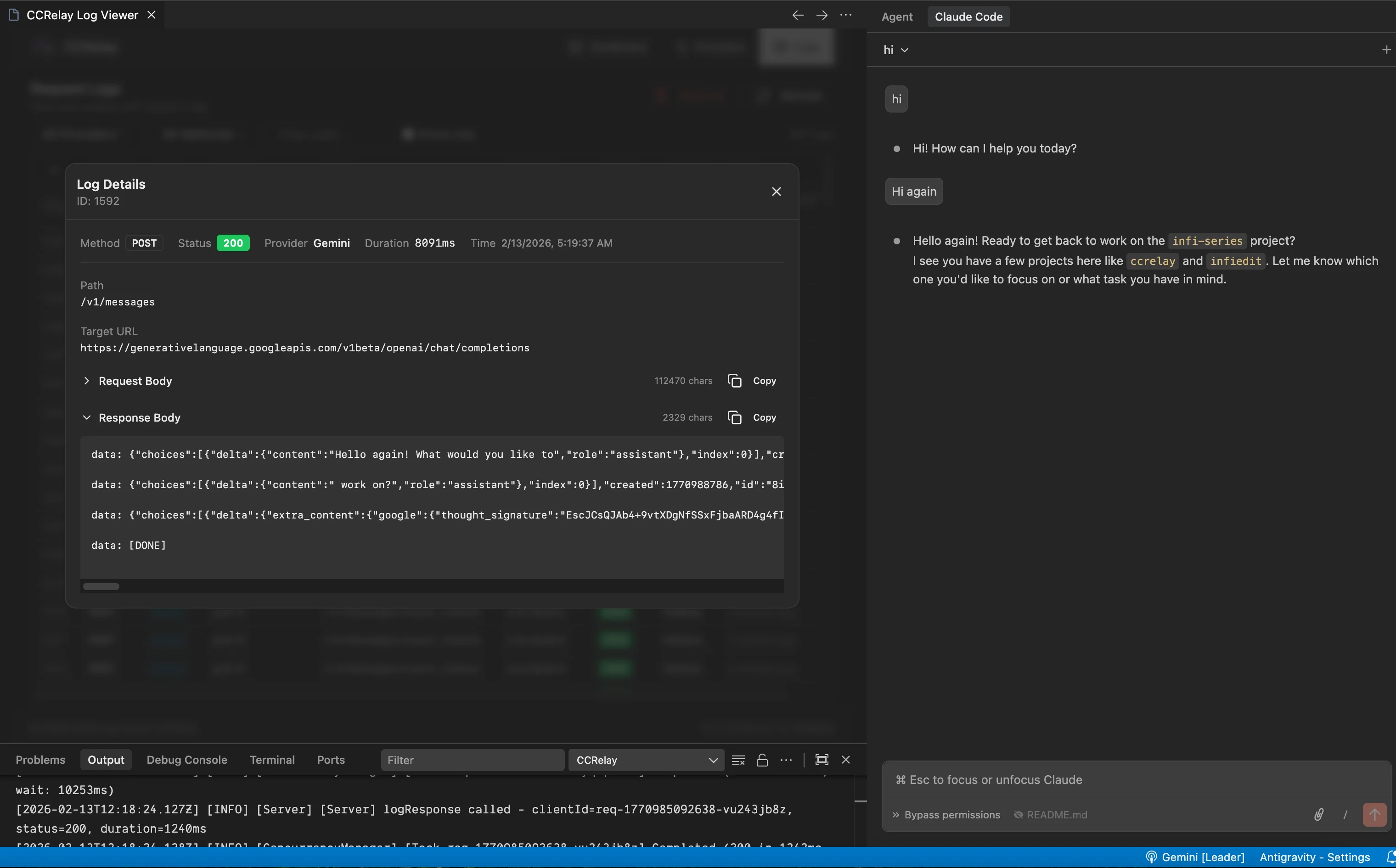
- The Logs tab shows each request's headers and bodies, and exports selected rows as a zip.
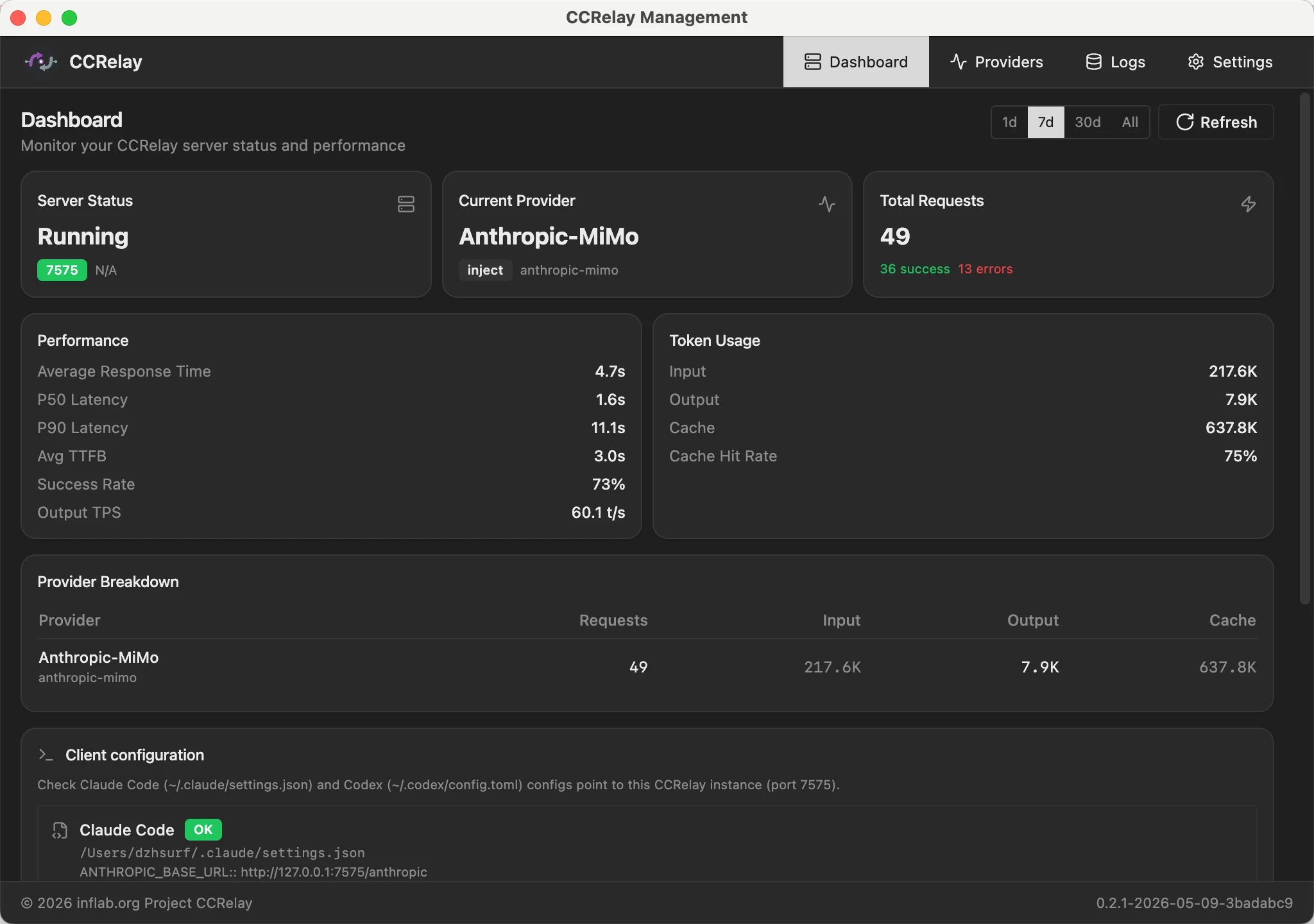
- The Dashboard shows token usage, cache hit rate, time to first token, output speed, and per-provider charts.
- The Chat tab tests any provider without opening another client.
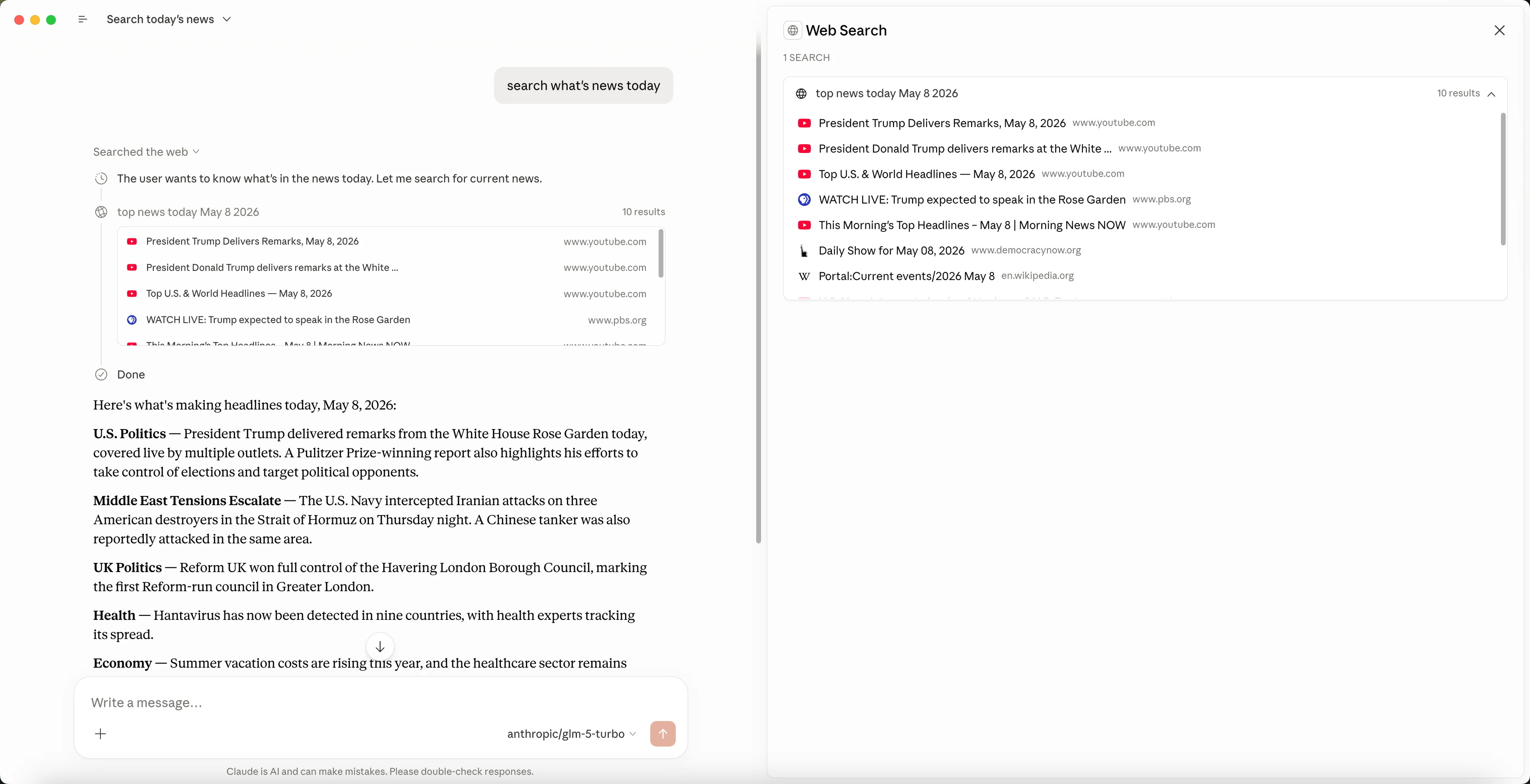
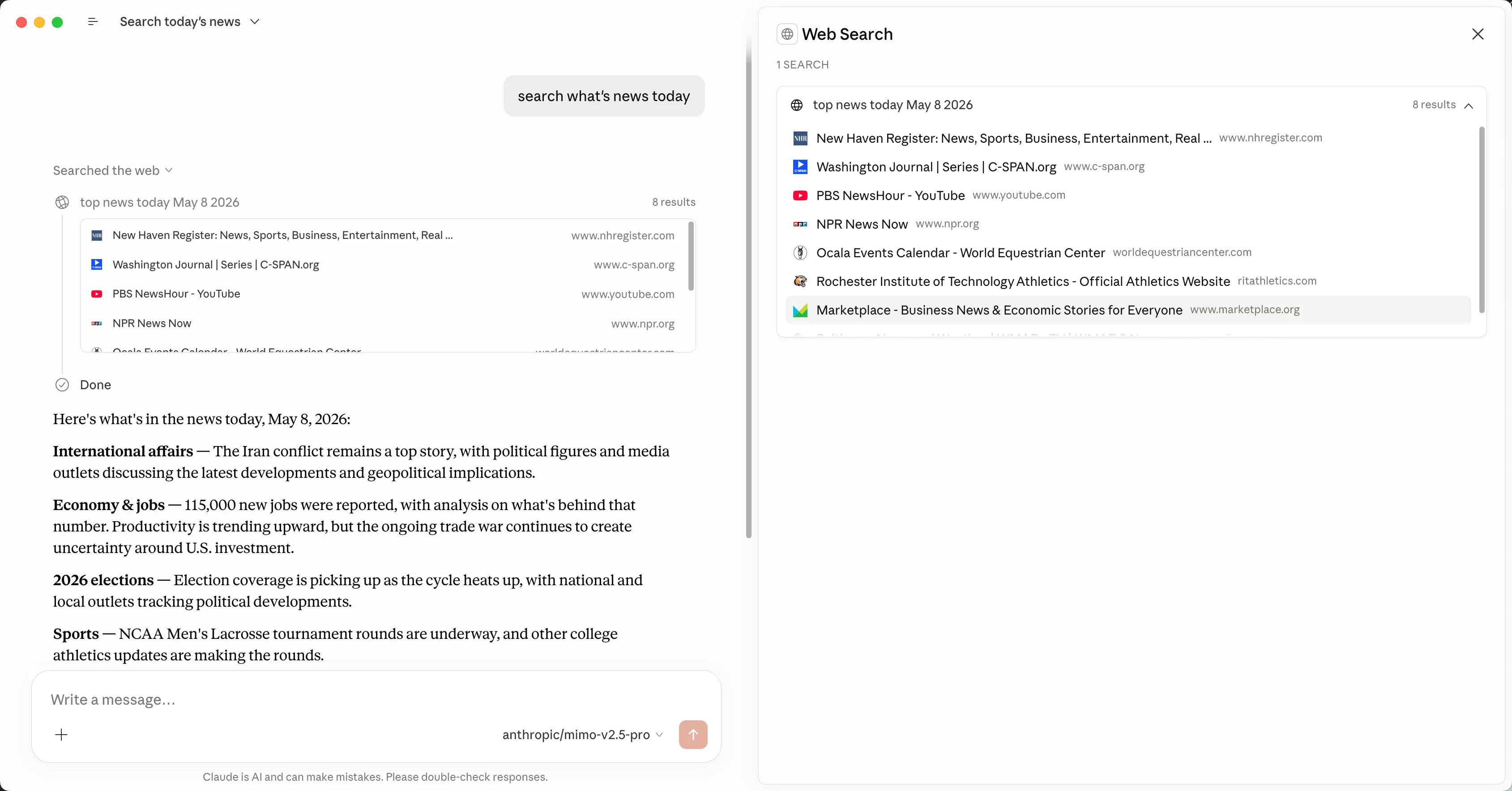
- Optional local web search (Tavily or Parallel) serves providers that lack their own.
Runs where you work
- The desktop app runs on macOS (Apple Silicon, Intel) and Windows (x64, arm64) and updates itself.
- The VS Code extension shares the same config and proxy as the desktop app.
FAQ
How do I use GLM, Kimi, or DeepSeek in Claude Desktop?
Add the provider in CCRelay, then click Client configuration → Claude Desktop → Apply and restart Claude Desktop. CCRelay switches Claude Desktop to third-party inference and gives each model a Claude-style alias, because Claude Desktop rejects model names that contain glm, kimi, deepseek, and similar keywords.
How do I use third-party models in the ChatGPT desktop app (ChatGPT Work or Codex)?
Click Client configuration → Codex → Apply. CCRelay writes ~/.codex/config.toml and a model catalog, which Codex CLI and the ChatGPT desktop app both read. Restart the ChatGPT app, then pick a model from the list in ChatGPT Work or Codex.
Is there a desktop tool so I don't have to edit settings.json or config.toml by hand?
Yes. The CCRelay desktop app writes the settings for Claude Code, Claude Desktop, and Codex when you click Apply, and Restore puts them back.
My provider only has an OpenAI-compatible API. Can Claude Code use it?
Yes. CCRelay converts Claude Code's Anthropic requests to OpenAI Chat Completions or Responses and converts the replies back, including tool calls.
Do I need to restart the client after switching providers?
Claude Code uses the new provider on its next request. Codex CLI and the ChatGPT desktop app need a restart to reload the model list. Claude Desktop may need a restart to refresh its model list.
Are my conversations stored?
Yes, on your computer only, and you can turn it off. See Privacy and local data.
Is CCRelay free?
Yes. CCRelay is open source under the MIT License.
Privacy and local data
| Topic |
What CCRelay does |
| Where it runs |
On your computer. The proxy listens on 127.0.0.1 by default. |
| Outbound traffic |
Requests go to the providers you configure. Tavily or Parallel are contacted only if you enable web search. Update checks use GitHub Releases. |
| Telemetry |
None. |
| Request logs |
Request and response bodies are saved by default in ~/.ccrelay/logs.db so you can inspect them in Logs. |
| Turning logs off |
Set logging.storeBodies: false or switch it off in Settings. Token and speed stats are kept separately. |
| Deleting data |
Clear All on the Logs tab removes saved bodies; Reset stats on the Dashboard removes usage numbers. |
| API keys |
Stored in ~/.ccrelay/config.yaml. Use ${ENV_VAR} to keep keys out of the file. Keys are masked in logged headers. |
Supported providers
The provider wizard includes presets for Z.ai GLM, Xiaomi MiMo, DeepSeek, MiniMax, Google Gemini, Azure OpenAI, Meituan LongCat, and Astraflow (UCloud). Any other OpenAI- or Anthropic-compatible API (for example Kimi, Qwen, OpenRouter, or a self-hosted gateway) works with a custom base URL.
Verified upstreams (by host)
Relaying uses the provider baseUrl hostname. The rows below are upstream endpoints we have validated when you add them as a provider. Vendors may offer Anthropic APIs, OpenAI-compatible APIs, or both — but your client protocol and the upstream protocol are often not the same. When they differ, CCRelay applies generic protocol conversion first, then hostname-specific alignment where we maintain it. When the wire looks the same on both sides, tooling still differs by vendor (for example Web Search Server Tools, strict Chat schemas, or Responses-only tools).
Hosts not listed get generic conversion only (no extra platform layer). Listed hosts get generic conversion plus platform rules for tools, messages, responses, and request URL/body quirks. The last column is where Web Search Server Tools are supported for that vendor; it does not depend on how you reach the relay.
Example — Azure OpenAI: Upstream Web Search Server Tools exist only on the Responses API (hence “Responses API only” in the Web Search Server Tools column). You can still point clients at CCRelay using the OpenAI Chat Completions surface. After you set Azure OpenAI as the provider baseUrl, Chat-shaped calls that include Web Search Server Tools are rewritten in the conversion layer into upstream Responses requests so search keeps working—you do not need the client to call /v1/responses itself.
| Provider (target host) |
Anthropic /v1/messages |
OpenAI /chat/completions |
OpenAI /v1/responses |
Web Search Server Tools |
Z.ai GLM (api.z.ai, open.bigmodel.cn) |
Supported |
Supported |
Not supported |
Anthropic endpoint only |
Xiaomi MiMo (api.xiaomimimo.com) |
Supported |
Supported |
Not supported |
Chat only |
MiniMax (api.minimax.io, api.minimaxi.com) |
Supported |
Supported |
Not supported |
Not supported |
Google Gemini (OpenAI-compatible, generativelanguage.googleapis.com) |
Not supported |
Supported |
Not supported |
Not supported |
Azure OpenAI (*.cognitiveservices.azure.com) |
Not supported |
Supported |
Supported |
Responses API only |
| Other hosts |
Varies |
Varies |
Varies |
Generic conversion only |
Screenshots (Claude Code through CCRelay)
Installation
Desktop app (recommended)
- Download from GitHub Releases:
- macOS:
CCRelay-<version>-darwin-arm64.dmg (Apple Silicon) or -darwin-x64.dmg (Intel)
- Windows:
CCRelay-<version>-win32-x64.exe or -win32-arm64.exe
- The app lives in the tray (menu bar on macOS). Tray → Open Dashboard opens the dashboard; Open Logs Folder opens runtime diagnostics under
~/.ccrelay/logs/.
- Updates are checked about 15 seconds after launch and then every 24 hours. Tray → Check for Updates… checks immediately; confirming downloads the update and restarts the app.
- Tray → Update Channel switches between Stable and Dev builds.
- The desktop app shares
~/.ccrelay/ config and the running proxy with the VS Code extension.
VS Code extension
- Install CCRelay from the VS Code Marketplace or Open VSX, or download the
.vsix from Releases and run Extensions: Install from VSIX....
- Requires VS Code 1.80.0 or higher.
- Switch providers from the CCRelay status bar item or
CCRelay: Switch Provider; open the dashboard with CCRelay: Open Dashboard.
Build from source
git clone https://github.com/inflaborg/ccrelay.git
cd ccrelay
npm install
npm run build
npm run package        # produces dists/ccrelay-vscode-*.vsix
Desktop builds: see Development.
Tauri build (experimental)
A lighter Tauri desktop variant (packages/desktop-tauri) runs the same core with a bundled Node.js runtime. Tauri installers are not included in current releases; build it from source with Node.js 22:
npm install
npm run tauri:dev         # Builds web UI + Node sidecar, then runs Tauri dev
npm run tauri:pack:mac    # Production macOS installer
npm run tauri:pack:win    # Production Windows installer
Manual configuration
Everything in the dashboard is stored in ~/.ccrelay/config.yaml. Use these steps if you prefer editing files.
1. Add a provider
Edit ~/.ccrelay/config.yaml (auto-created on first launch):
providers:
  glm:
    name: "Z.AI-GLM-5"
    baseUrl: "https://api.z.ai/api/anthropic"
    mode: "inject"
    apiKey: "${GLM_API_KEY}"
    modelMap:
      - pattern: "claude-opus-*"
        model: "glm-5"
      - pattern: "claude-sonnet-*"
        model: "glm-5"
      - pattern: "claude-haiku-*"
        model: "glm-4.7"
    enabled: true

defaultProvider: "glm"
2. Point Claude Code at CCRelay
Add to ~/.claude/settings.json:
{
  "env": {
    "ANTHROPIC_AUTH_TOKEN": "ccrelay_apikey_placehold_do_not_need_to_setup_here",
    "ANTHROPIC_BASE_URL": "http://localhost:7575/anthropic",
    "API_TIMEOUT_MS": "3000000",
    "CLAUDE_CODE_DISABLE_NONESSENTIAL_TRAFFIC": 1
  }
}
Optional per-tier model names — only needed if you want to override Claude Code's defaults:
{
  "env": {
    "ANTHROPIC_AUTH_TOKEN": "ccrelay_apikey_placehold_do_not_need_to_setup_here",
    "ANTHROPIC_BASE_URL": "http://localhost:7575/anthropic",
    "API_TIMEOUT_MS": "3000000",
    "CLAUDE_CODE_DISABLE_NONESSENTIAL_TRAFFIC": 1,
    "ANTHROPIC_DEFAULT_OPUS_MODEL": "claude-opus-4-7",
    "ANTHROPIC_DEFAULT_SONNET_MODEL": "claude-sonnet-4-6",
    "ANTHROPIC_DEFAULT_HAIKU_MODEL": "claude-haiku-4-5"
  }
}
You can also set these from the Web dashboard: Client configuration tab.
3. Switch providers
- Desktop app or dashboard: select a provider card on Providers, then click Apply
- VS Code: click the CCRelay status bar item, or run
CCRelay: Switch Provider
- File: change
defaultProvider in config.yaml (picked up automatically)
Client Integrations
CCRelay exposes both Anthropic and OpenAI compatible routes on the same port (default 7575). Use URL prefixes to pick the right protocol:
| Client |
Protocol |
Base URL |
| Claude Code |
Anthropic |
http://127.0.0.1:7575/anthropic |
| Claude Desktop (3P inference/Cowork) |
Anthropic |
http://127.0.0.1:7575/anthropic |
| Codex CLI / ChatGPT desktop app |
OpenAI |
http://127.0.0.1:7575/openai |
Legacy /v1/... paths still work when pointed at http://127.0.0.1:7575 directly.
Claude Code
Use Client configuration → Claude Code → Apply, or see Manual configuration for the ~/.claude/settings.json entries.
Quick test (current shell only):
export ANTHROPIC_BASE_URL=http://127.0.0.1:7575/anthropic
claude
Claude Desktop (third-party inference and Cowork)
Client configuration → Claude Desktop → Apply (macOS and Windows) switches Claude Desktop to third-party inference through CCRelay: gateway URL http://127.0.0.1:7575/anthropic, a placeholder API key, and the x-ccrelay-model-alias header. Restart Claude Desktop afterwards. Restore switches Claude Desktop back to first-party mode.
To set it up by hand, open Configure third-party inference in Claude Desktop, set the gateway URL above, enter any API key, and add the x-ccrelay-model-alias header. Third-party model names need Claude-style aliases; see Claude Desktop / Cowork Model ID Restrictions.
Codex CLI and the ChatGPT desktop app
Codex CLI and the ChatGPT desktop app (both ChatGPT Work and Codex) read the same ~/.codex/config.toml. Use Client configuration → Codex → Apply, or create the file yourself:
model = "gpt-5.4-mini"
model_provider = "ccrelay"
model_catalog_json = "ccrelay-model-catalog.json"

[model_providers.ccrelay]
name = "CCRelay"
base_url = "http://localhost:7575/openai"
Apply writes ~/.codex/ccrelay-model-catalog.json so Codex /model can list your models. The catalog comes from the active provider’s custom models (or exact modelMap entries); with Smart Routing on, it lists routed models from every provider. Each entry advertises reasoning levels low, medium, high, and xhigh, with high as the default. gpt-5.6 and gpt-6 entries also include max. Set model to one of those ids. Restart Codex CLI or the ChatGPT desktop app after Apply or a provider switch so the catalog reloads. Override the level with model_reasoning_effort in config.toml or /model. Codex uses the first catalog model for background work such as thread titles; pick it with First model in the Codex list in the Codex model dialog.
Usage Guide
Multi-Instance Mode
When multiple VS Code windows are open:
- One instance becomes the Leader and runs the HTTP server; others are Followers
- Leader broadcasts provider changes to Followers via WebSocket
- If the Leader exits, a Follower takes over automatically
- Status bar shows role:
$(broadcast) = Leader, $(radio-tower) = Follower
Logging: request logs are persisted only by the Leader. Followers proxy log API calls to the Leader; if the Leader is unreachable, those calls return 503.
IPC lock (~/.ccrelay/ccrelay-lock.sock on Unix/macOS, named pipe on Windows) coordinates Leader election across VS Code and the desktop app.
Provider Modes
| Mode |
Auth behavior |
Use case |
passthrough |
Preserves original auth headers |
Official Claude API with OAuth |
inject |
Replaces auth with provider API key |
Third-party providers (GLM, OpenRouter, etc.) |
Model Mapping
Map Claude model names to provider-specific models with wildcard support:
modelMap:
  - pattern: "claude-opus-*"
    model: "glm-5"
  - pattern: "claude-sonnet-*"
    model: "glm-4.7"
Vision model mapping — separate mapping for multimodal requests:
vlModelMap:
  - pattern: "claude-*"
    model: "vision-model"
modelMap applies only to request bodies (model field). GET /models responses are not rewritten.
Claude Desktop / Cowork Model ID Restrictions
Starting from Claude Desktop 1.7196.0, the client rejects model IDs that contain third-party keywords such as qwen, glm, kimi, deepseek, etc. If you use third-party upstream models, map them to claude- prefixed aliases for Cowork only.
The alias must be claude- followed by a single token without additional hyphens (e.g. claude-a1b2c3d4, not claude-my-model), because multi-hyphen names are parsed as Anthropic model versions.
Canonical alias ids (Wizard, Cowork helper, Smart Routing) use claude-{8 hex}: SHA1(providerId:protocol:upstreamModelId) truncated to 8 hex digits, prefixed with smartRouting.aliasPrefix (default claude-). The same upstream model on different providers or protocols gets a different alias.
Custom model list (customModelsList): each line is realModelId;displayName;alias (or realModelId;;alias when display equals the real id). The real id is what upstream expects; alias is the Cowork-safe id.
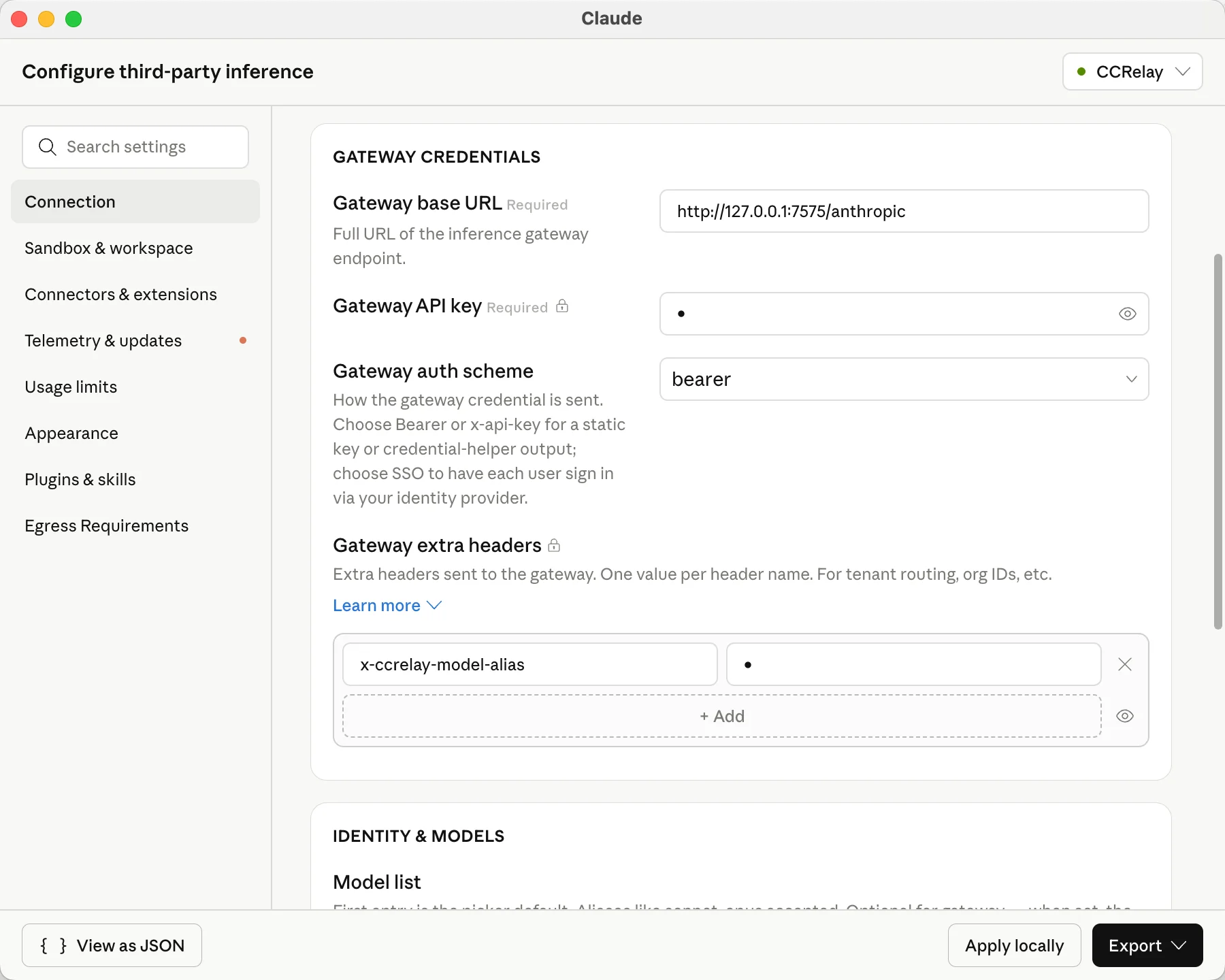
Cowork: In Claude Desktop, add a custom request header x-ccrelay-model-alias with any value (for example 1). With this header, GET /models and GET /models/{id} return alias as the wire id. Without the header, the same list returns real model ids (for other clients).
Model mapping (modelMap): auto-generated entries include alias rules, identity rules (realId → realId), Claude family wildcards (claude-haiku-* / claude-sonnet-* / claude-opus-*), and default claude-* / gpt-* catch-alls. Identity rules ensure clients sending real model ids are not misrouted by wildcards.
Example -- two GLM models; Cowork uses aliases via the header above:
glm:
  name: "GLM"
  baseUrl: "https://api.z.ai/api/paas/v4"
  providerType: "openai_chat"
  mode: "inject"
  apiKey: "${GLM_API_KEY}"
  useCustomModelsList: true
  customModelsList:
    - "glm-5.1;GLM 5.1;claude-363a702b"
    - "glm-4.7;GLM 4.7;claude-02a1bc84"
  modelMap:
    - { pattern: "claude-363a702b", model: "glm-5.1" }
    - { pattern: "glm-5.1", model: "glm-5.1" }
    - { pattern: "claude-02a1bc84", model: "glm-4.7" }
    - { pattern: "glm-4.7", model: "glm-4.7" }
    - { pattern: "claude-haiku-*", model: "glm-5.1" }
    - { pattern: "claude-sonnet-*", model: "glm-5.1" }
    - { pattern: "claude-opus-*", model: "glm-5.1" }
    - { pattern: "claude-*", model: "glm-5.1" }
    - { pattern: "gpt-*", model: "glm-5.1" }
With this configuration:
- Without
x-ccrelay-model-alias: GET /models returns glm-5.1 and glm-4.7 (with display names when they differ from the id).
- With
x-ccrelay-model-alias: GET /models returns canonical alias ids as wire id; Cowork selects those; CCRelay maps them to real upstream ids via modelMap.
- The
claude-haiku-* / claude-sonnet-* / claude-opus-* family wildcards route those Claude models to the first custom model by default (Quick fill lets you pick a different target per family).
- The
claude-* and gpt-* wildcards catch any other model names the client may send and route them to the first model.
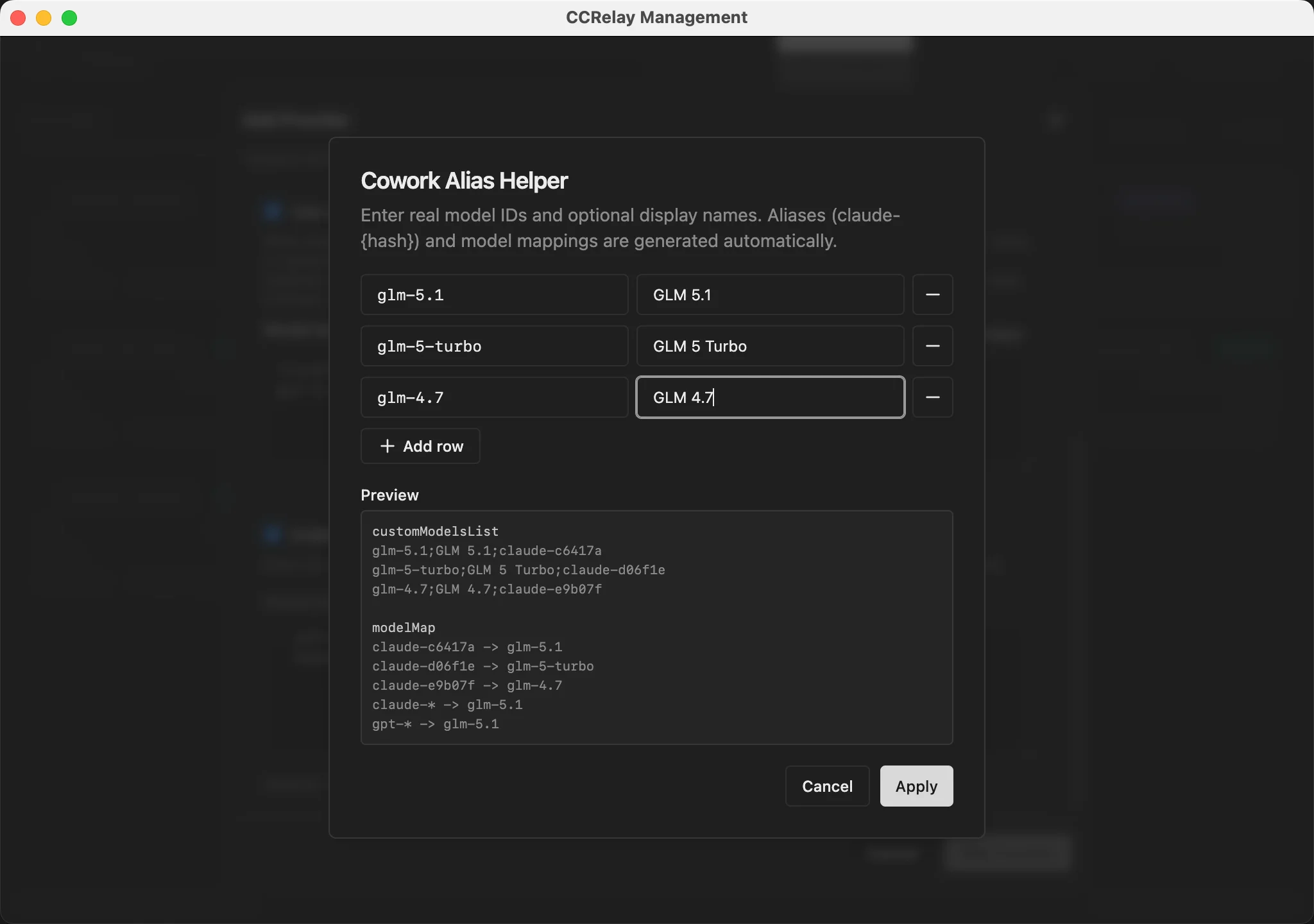
The built-in wizard and Cowork quick-fill helper generate realId;displayName;claude-{hash} lines and matching modelMap entries using the canonical hash above. Add x-ccrelay-model-alias in Claude Desktop for Cowork; omit it elsewhere. Use Rebuild model map in the provider editor to fully rebuild modelMap from customModelsList after manual edits (Claude family wildcard targets are kept when those models still exist; other custom wildcard rules such as gpt-*-mini are not preserved).
Custom model list configuration UI
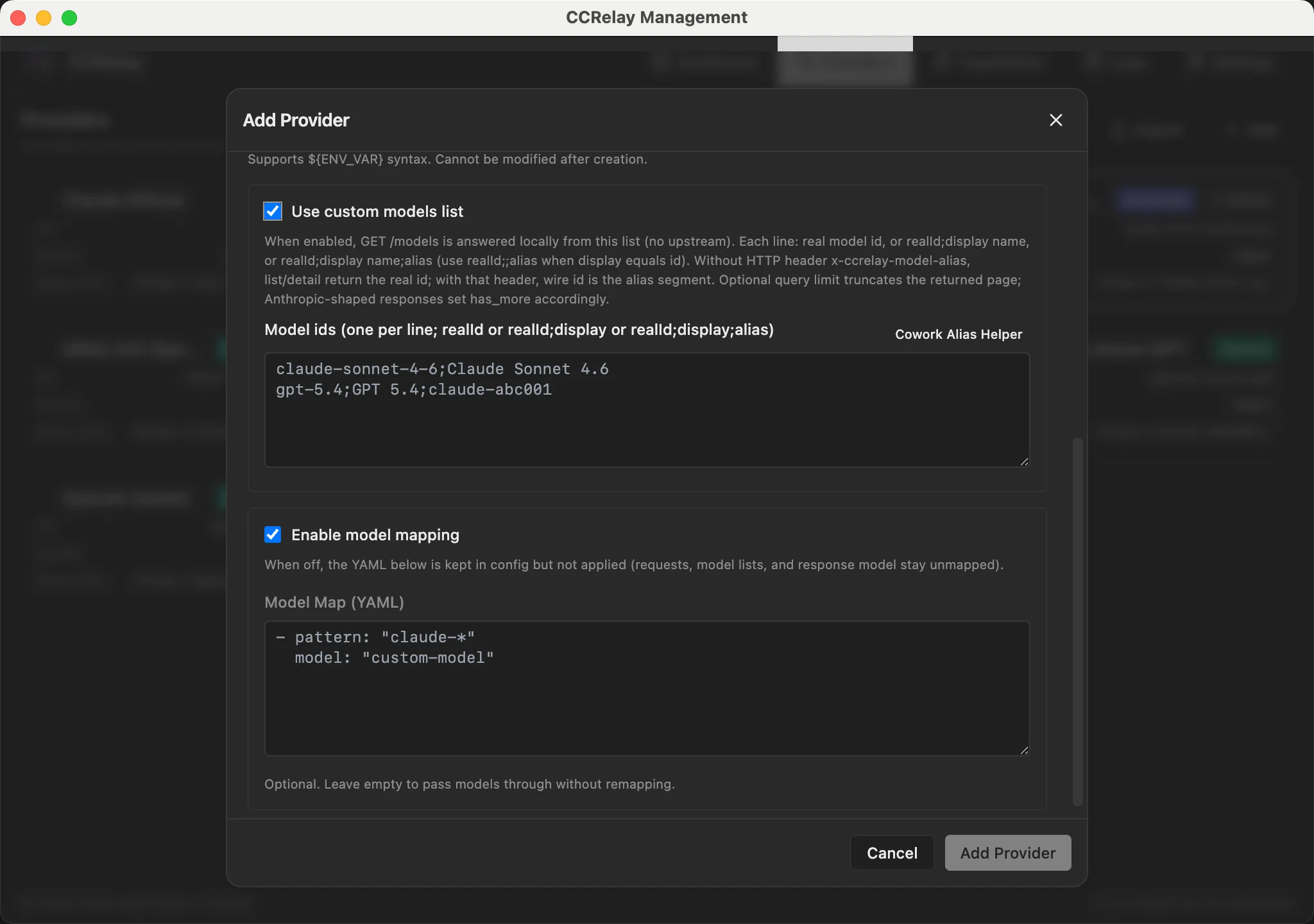
Use Quick fill custom models to enter upstream model IDs and display names, then optionally map claude-haiku-* / claude-sonnet-* / claude-opus-* to a model in the list (defaults to the first). The custom model list and model map are generated automatically.
Enabling alias in Claude Cowork
In Claude Desktop's Configure third-party inference panel, add x-ccrelay-model-alias to Gateway extra headers so that the model list returns aliases instead of real IDs.
CCRelay accepts three inbound protocols and converts when the upstream provider speaks a different wire:
| Inbound path |
Client protocol |
/v1/messages, /anthropic/v1/messages |
Anthropic Messages |
/v1/chat/completions, /openai/chat/completions |
OpenAI Chat Completions |
/v1/responses |
OpenAI Responses API |
/v1/models, /openai/models |
OpenAI models list |
/anthropic/v1/models |
Anthropic models list |
Conversion rules:
- Same family on both sides (e.g. Chat +
openai provider) → passthrough (model mapping and auth still apply)
- Cross-family → request/response body conversion via Chat Completions hub
GET /models → list format converted when entry path and providerType disagree; upstream errors forwarded as-is
Streaming limitations:
- Cross-protocol paths force
stream: false for conversion. If the client sends stream: true, CCRelay synthesizes a minimal SSE envelope so the client SDK can finish; model output arrives in the final payload, not token-by-token.
- Same-family streaming passes through normally.
Example: OpenAI-compatible provider (Gemini)
gemini:
  name: "Gemini"
  baseUrl: "https://generativelanguage.googleapis.com/v1beta/openai"
  providerType: "openai"
  mode: "inject"
  apiKey: "${GEMINI_API_KEY}"
  modelMap:
    - pattern: "claude-*"
      model: "gemini-2.5-pro"
Web UI Dashboard
Built-in web dashboard accessible via Command Palette → CCRelay: Open Dashboard (VS Code) or tray menu → Open Dashboard (desktop app).
- Dashboard — server status, current provider, token usage, performance metrics (TTFB, P50/P90 latency, output TPS) with time range selector
- Smart Routing — aggregate all provider model lists; unified
/v1/models with <providerId>:<modelId> ids; route each request to the matching provider by model (no provider switch / client restart when changing models)
- Providers — configure upstream connections; click a card to select it, then Apply to switch; Select to export or delete
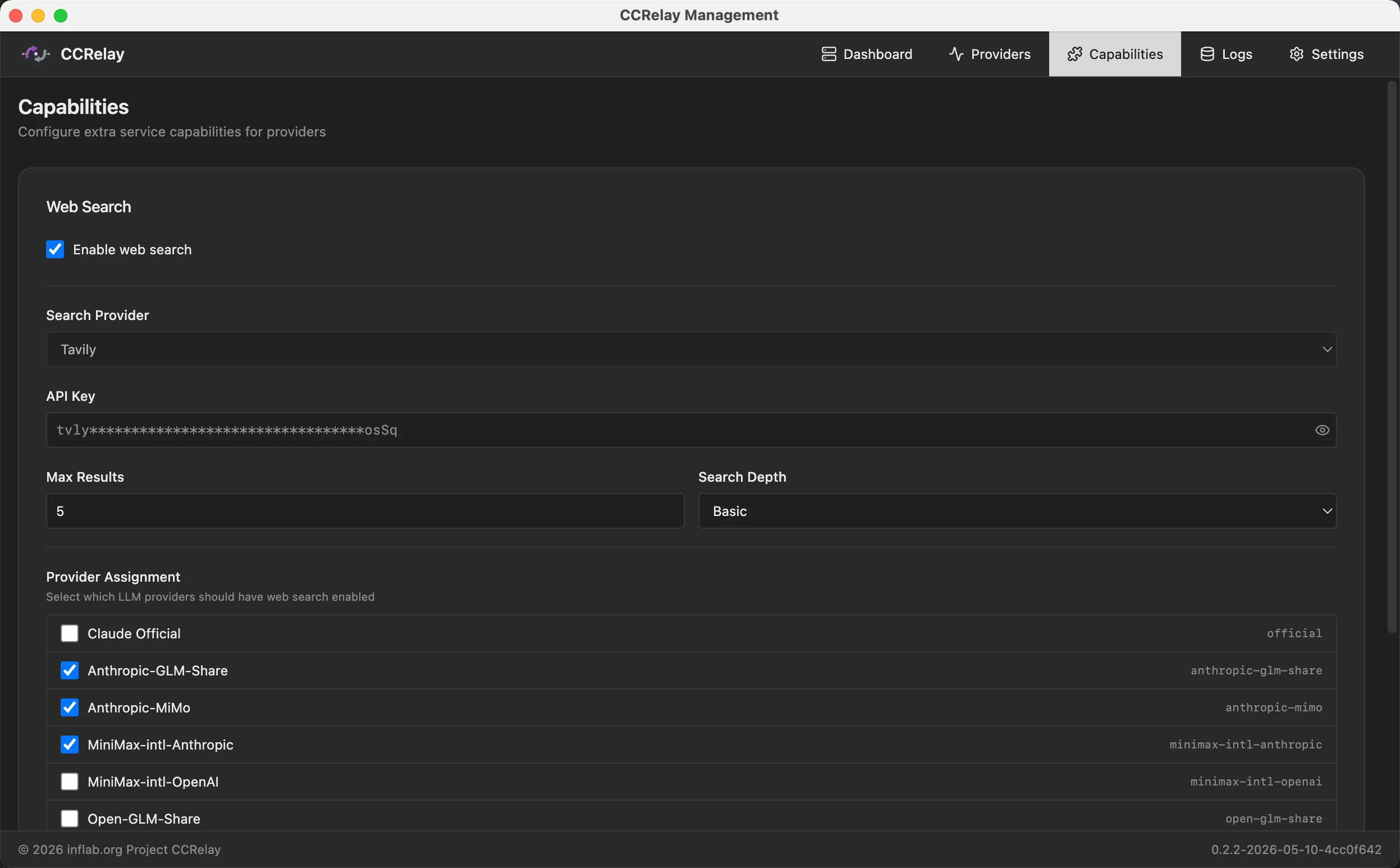
- Capabilities — optional web search backends (Tavily and/or Parallel): API keys, default backend, and which providers answer web search locally
- Logs — request/response log viewer with token columns, TTFB, output TPS, and model mapping; multi-select rows to export a zip of per-id folders (JSON, headers, analysis markdown). Hidden when logging is disabled.
- Settings — manage YAML config in the UI; routing and concurrency hot-reload on save, server and logging changes require a restart
- Client configuration — write Claude Code env vars and Codex config from the UI; shows installed Claude Desktop claude-code bundle versions and Claude Code CLI version (
claude --version, can be disabled on the page)
Note: The dashboard is not accessible by directly opening http://127.0.0.1:7575/ccrelay/ in a browser. Access is restricted to requests originating from within the VS Code extension or the desktop app, which include an internal header. Open the dashboard via the extension command or the desktop tray menu instead.
Web UI
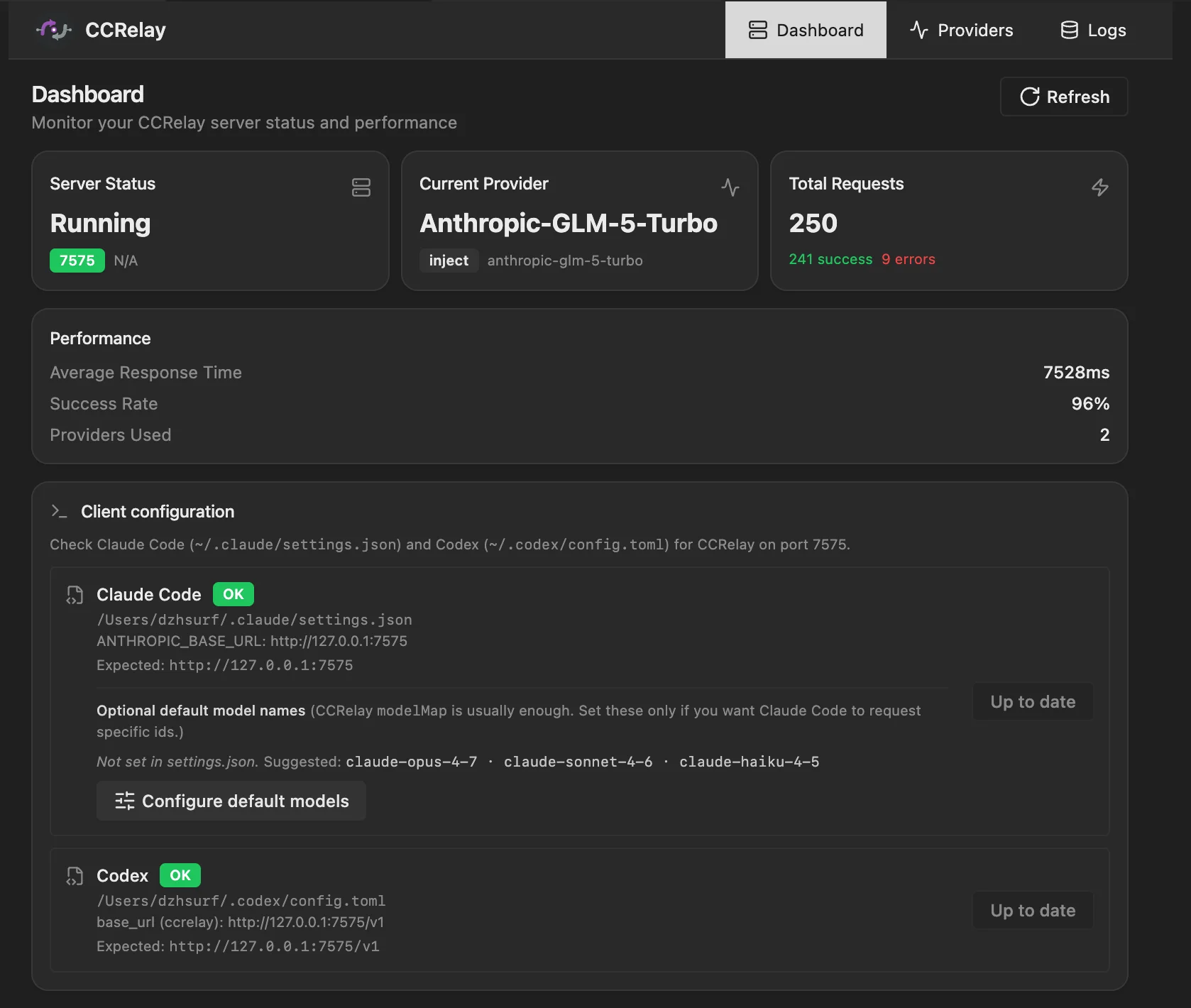
Desktop app
Configuration
CCRelay uses ~/.ccrelay/config.yaml (auto-created on first launch). On startup the bundled defaults are merged with your file — your values always win, missing keys are filled from defaults. List sections (routing.forward, routing.block, concurrency.routes) merge by identity key, with your rows first and new defaults appended. Omit a list to inherit full defaults; set [] for intentionally empty.
YAML config supports both camelCase and snake_case keys.
Server
| Setting |
Default |
Description |
server.port |
7575 |
Proxy server port |
server.host |
127.0.0.1 |
Bind address |
server.autoStart |
true |
Auto-start server on extension load |
server.locale |
"" |
Web UI language ("en", "zh", "ja", or "ko"). First visit shows a picker if unset. |
Providers
| Setting |
Default |
Description |
defaultProvider |
official |
Default provider ID |
providers |
{...} |
Provider map (see below) |
Each provider supports:
| Field |
Default |
Description |
name |
— |
Display name |
baseUrl |
— |
API base URL |
mode |
"passthrough" |
passthrough (keep auth) or inject (replace auth) |
providerType |
"anthropic" |
"anthropic", "openai" (full passthrough), or "openai_chat" (Chat Completions only) |
openaiCompat |
— |
Optional. Set azure_openai for Azure Chat shaping on custom domains (official *.cognitiveservices.azure.com is auto-detected) |
apiKey |
— |
API key for inject mode. Supports ${ENV_VAR}. |
authHeader |
"authorization" |
Auth header name |
modelMap |
— |
Model name mappings ([{pattern, model}], wildcards supported) |
vlModelMap |
— |
Vision model mappings (for multimodal requests) |
headers |
— |
Custom request headers |
enabled |
true |
Enable/disable |
Smart Routing
Enable Smart Routing on the Providers tab (top card). It aggregates all enabled providers' model lists and routes each request to the matching provider by model id. Smart Routing and the single fallback provider are mutually exclusive: when Smart Routing is active, provider cards are not marked in use; select a provider card and Apply to use it and disable Smart Routing.
Use the Smart Routing tab for settings (alias prefix, bare model id fallback, exclude list, custom routing rules, aggregated model table).
| Setting |
Default |
Description |
smartRouting.enabled |
false |
Enable on the Providers tab. Aggregate provider models and route by <providerId>:<modelId> |
smartRouting.aliasPrefix |
"claude-" |
Prefix for canonical alias ids (claude-{8 hex}) when client sends x-ccrelay-model-alias |
smartRouting.exclude |
— |
Wildcard list of public model ids left out of /v1/models and not routed. Requests that would use an excluded id are rejected |
smartRouting.include |
— |
When set, only matching public ids are exposed (mutually exclusive with exclude) |
smartRouting.modelsCache.ttlSeconds |
600 |
Upstream models list cache TTL for non-custom providers |
smartRouting.bareModelFallback.mode |
first-match |
When client sends a bare model id (no prefix), match first provider in YAML order or reject |
smartRouting.modelRules |
— |
Custom rules (pattern, provider, model) matched before the catalog; not exposed in /v1/models |
Routing
| Setting |
Default |
Description |
configVersion |
"0.2.5" |
Config schema version. Older configs auto-upgraded on startup. |
routing.forward |
[{path, provider}] |
Forward rules — first match wins. provider: "auto" = Smart Routing when it is on (unknown models → 404), otherwise the current provider. Unmatched → 404. |
routing.block |
[{path, response, code, condition?}] |
Block rules — return custom response. Optional condition.providers (allowlist) and condition.providerNot (exclusion list). |
Concurrency
| Setting |
Default |
Description |
concurrency.enabled |
true |
Enable request queue |
concurrency.maxWorkers |
3 |
Max concurrent requests |
concurrency.maxQueueSize |
100 |
Max queued requests (0 = unlimited) |
concurrency.requestTimeout |
0 |
Queue timeout in seconds (0 = unlimited) |
concurrency.routes |
[] |
Per-route queue config (by pattern) |
Logging
| Setting |
Default |
Description |
logging.storeBodies |
true |
Store request/response bodies in the Logs tab. Token and performance metrics are recorded separately |
logging.database.type |
"sqlite" |
"sqlite" or "postgres" |
logging.enabled is deprecated. If storeBodies is unset, enabled is used as a fallback.
SQLite:
| Setting |
Default |
Description |
logging.database.path |
"" |
DB file path (empty = ~/.ccrelay/logs.db) |
logging.database.sqlite3_executable |
"" |
Path to sqlite3 binary (empty = resolve from PATH) |
If sqlite3 cannot be resolved, the proxy runs without log persistence (warning in logs).
PostgreSQL:
| Setting |
Default |
Description |
logging.database.host |
localhost |
Server host |
logging.database.port |
5432 |
Server port |
logging.database.name |
ccrelay |
Database name |
logging.database.user |
"" |
Username |
logging.database.password |
"" |
Password (supports ${ENV_VAR}) |
logging.database.ssl |
false |
Enable SSL |
External web search
Optional local handling of Anthropic-style web search (server tool) requests for selected providers. CCRelay can run live retrieval through Tavily or Parallel, then return a synthesized assistant response for that turn so the upstream chat model does not need to implement the tool itself.
| Setting |
Description |
webSearch.enabled |
Master switch (true / false). When omitted, non-empty providers means on. |
webSearch.providers |
Provider IDs (keys under providers:) assigned to web search (kept when disabled). |
webSearch.defaultSearchBackend |
Optional: tavily or parallel (defaults when not inferred per request). |
Tavily
| Setting |
Description |
webSearch.tavily.apiKey |
Tavily API key. Supports ${ENV_VAR}. |
webSearch.tavily.searchDepth |
basic or advanced (optional). |
webSearch.tavily.maxResults |
Number of results, 1–10 (optional). |
Parallel
| Setting |
Description |
webSearch.parallel.apiKey |
Parallel API key. Supports ${ENV_VAR}. |
webSearch.parallel.mode |
turbo, basic, or advanced (optional; default basic). |
webSearch.parallel.maxResults |
Number of results, 1–10 (optional). |
webSearch.parallel.publishedAfter |
Optional RFC 3339 date (YYYY-MM-DD) for freshness filter. |
webSearch.parallel.location |
Geo target: any ISO 3166-1 alpha-2 code (e.g. us, cn, gb); omit for auto. Unsupported codes may be ignored by Parallel. |
webSearch.parallel.includeDomains |
Optional allow-list of domains (YAML array). |
webSearch.parallel.excludeDomains |
Optional block-list of domains (YAML array). |
webSearch.parallel.liveFetch |
Optional: enable live fetch when cache is stale (higher latency). |
webSearch.parallel.maxCharsPerResult |
Optional excerpt size limit per result URL. |
You may use the top-level key web_search instead of webSearch (same nested shape).
webSearch:
  tavily:
    apiKey: "${TAVILY_API_KEY}"
    searchDepth: basic
    maxResults: 5
  defaultSearchBackend: tavily
  enabled: true
  providers:
    - my-provider
Set enabled: false to turn off web search without clearing the providers preset list.
Edit the same fields from the dashboard Capabilities tab.
Full Example
configVersion: "0.2.5"

server:
  port: 7575
  host: "127.0.0.1"
  autoStart: true

providers:
  official:
    name: "Claude Official"
    baseUrl: "https://api.anthropic.com"
    mode: "passthrough"
    providerType: "anthropic"
    enabled: true

  glm:
    name: "Z.AI-GLM-5"
    baseUrl: "https://api.z.ai/api/anthropic"
    mode: "inject"
    apiKey: "${GLM_API_KEY}"
    modelMap:
      - pattern: "claude-opus-*"
        model: "glm-5"
      - pattern: "claude-sonnet-*"
        model: "glm-5"
      - pattern: "claude-haiku-*"
        model: "glm-4.7"
    enabled: true

  gemini:
    name: "Gemini"
    baseUrl: "https://generativelanguage.googleapis.com/v1beta/openai"
    providerType: "openai"
    mode: "inject"
    apiKey: "${GEMINI_API_KEY}"
    modelMap:
      - pattern: "claude-*"
        model: "gemini-2.5-pro"
    enabled: true

defaultProvider: "official"

routing:
  forward:
    - path: "/v1/messages"
      provider: "auto"
    - path: "/v1/chat/completions"
      provider: "auto"
    - path: "/v1/responses"
      provider: "auto"
    - path: "/v1/models"
      provider: "auto"
    - path: "/v1/messages/count_tokens"
      provider: "auto"
  block:
    - path: "/api/event_logging/*"
      response: ""
      code: 200
    - path: "/v1/messages/count_tokens"
      response: '{"input_tokens": 0}'
      code: 200

concurrency:
  enabled: true
  maxWorkers: 3
  maxQueueSize: 100
  requestTimeout: 0

logging:
  storeBodies: true
  database:
    type: "sqlite"
    path: ""
API Endpoints
Management endpoints at /ccrelay/:
| Endpoint |
Method |
Description |
/ccrelay/api/status |
GET |
Proxy status |
/ccrelay/api/providers |
GET |
List providers |
/ccrelay/api/switch/{id} |
GET |
Switch to provider |
/ccrelay/api/switch |
POST |
Switch provider (JSON body) |
/ccrelay/api/providers/export |
POST |
Export providers by ID |
/ccrelay/api/providers/import |
POST |
Import providers (merge by ID) |
/ccrelay/api/queue |
GET |
Queue statistics |
/ccrelay/api/logs |
GET |
Request logs |
/ccrelay/api/config |
GET, PATCH |
Read/write config sections |
/ccrelay/ws |
WebSocket |
Follower sync |
/ccrelay/ |
GET |
Web UI dashboard |
All other requests are proxied to the current provider.
Commands
| Command |
ID |
Description |
| CCRelay: Show Menu |
ccrelay.showMenu |
Show main menu |
| CCRelay: Switch Provider |
ccrelay.switchProvider |
Provider picker |
| CCRelay: Start Server |
ccrelay.startServer |
Start server |
| CCRelay: Stop Server |
ccrelay.stopServer |
Stop server |
| CCRelay: Open Settings |
ccrelay.openSettings |
Extension settings |
| CCRelay: Show Logs |
ccrelay.showLogs |
Output logs |
| CCRelay: Clear Logs |
ccrelay.clearLogs |
Clear output logs |
| CCRelay: Open Dashboard |
ccrelay.openWebUI |
Web dashboard |
Development
npm run compile        # Type-check
npm run watch          # Watch & recompile
npm run lint           # Lint
npm run format         # Format
npm run test           # Unit tests
npm run test:integration
npm run test:all
npm run test:coverage
npm run package        # Build VSIX
npm run build:dev      # Dev build
npm run build:prod     # Prod build

# Electron desktop app
npm run desktop:start
npm run desktop:pack:mac
npm run desktop:pack:win

# Tauri desktop app
npm run tauri:dev
npm run tauri:pack:mac
npm run tauri:pack:win
Project Structure
ccrelay/
├── packages/
│   ├── core/              # Shared runtime (proxy, config, converters)
│   ├── vscode/            # VS Code extension
│   ├── desktop/           # Electron desktop app
│   └── desktop-tauri/     # Tauri desktop app
├── web/                   # Web UI (React + Vite)
├── tests/                 # Vitest unit + integration
├── scripts/               # Build & packaging helpers
└── dists/                 # Packaged .vsix
File Locations
| File |
Location |
Description |
| Config |
~/.ccrelay/config.yaml |
Main config (auto-created) |
| State |
~/.ccrelay/state.json |
Active provider ID |
| IPC lock |
~/.ccrelay/ccrelay-lock.sock (Unix) / named pipe (Win) |
Leader election |
| Log DB |
~/.ccrelay/logs.db |
Request logs (Leader only) |
Contributing
Issues and Pull Requests are welcome!
Acknowledgments
CCRelay is developed with AI coding assistants (Cursor and
Claude Code), with GLM and
Xiaomi MiMo as model backends.
The maintainers design, review, and test every release.
License
MIT License
Copyright (c) 2026 infLab

