Skip to content
| Marketplace
Sign in
Visual Studio Code>Other>FoGames - Micro-BreaksNew to Visual Studio Code? Get it now.
FoGames - Micro-Breaks

FoGames - Micro-Breaks

imtaxu

|
2 installs
| (0) | Free
Zero-friction interactive micro-breaks for your editor. Keep your flow while waiting for builds and tasks.
Installation
Launch VS Code Quick Open (Ctrl+P), paste the following command, and press enter.
Copied to clipboard
More Info

FoGames: Agent Micro-Breaks ⚡️

Keep your flow while waiting for your AI agent to write code.

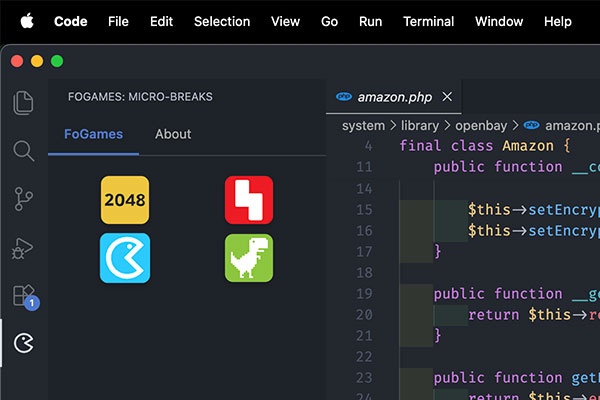
FoGames Preview

Cursor, Windsurf, Antigravity, Kiro or Copilot... We all love AI agents. But what happens during those times when the agent is "thinking" or generating a massive refactor?

You pick up your phone. You open Twitter, TikTok, or Instagram. Your context is shattered, and your flow state is gone.

FoGames is a zero-friction, ultra-lightweight VS Code extension designed specifically for these micro-breaks. It lives in your Activity Bar and offers instant, state-preserved micro-games to keep your brain engaged without breaking your coding context.

🚀 How to Use

  1. Install the extension.
  2. Click the FoGames icon (⚡) in your left-hand Activity Bar.
  3. Pick a game and play while your agent works.

✨ Features

  • Zero-Latency: No loading screens, no heavy frameworks. Built with pure Vanilla JS/HTML.
  • State Preserved: Close the panel mid-game to check your code. When you open it back up, your 2048 grid or block puzzle is exactly where you left it.
  • Zero Idle RAM: The Webview is fully disposed of when hidden. It consumes 0% CPU and RAM while you are actively coding.
  • 100% Privacy: No external tracking, no analytics.

🕹️ The Games (MVP)

  1. 2048: The classic puzzle. Perfect for state-preserved, asynchronous thinking.
  2. Dino Run: The ultimate offline reflex test.
  3. Falling Blocks: Drop a few blocks while your code compiles.
  4. Flappy Bug: Clear your mind with a pure reflex micro-game.

🤝 Sponsorship & Support

FoGames is free and open-source. It is proudly maintained by the team behind Foworker.

If you want to support the development or feature your dev-tool in our native, non-intrusive sponsor banner, check out the "About" tab inside the extension or visit our GitHub Repository.

  • Contact us
  • Jobs
  • Privacy
  • Manage cookies
  • Terms of use
  • Trademarks
© 2026 Microsoft