Skip to content
| Marketplace
Sign in
Visual Studio>Tools>USS Color Preview
USS Color Preview

USS Color Preview

Ildar Toronto

|
1 install
| (0) | Free
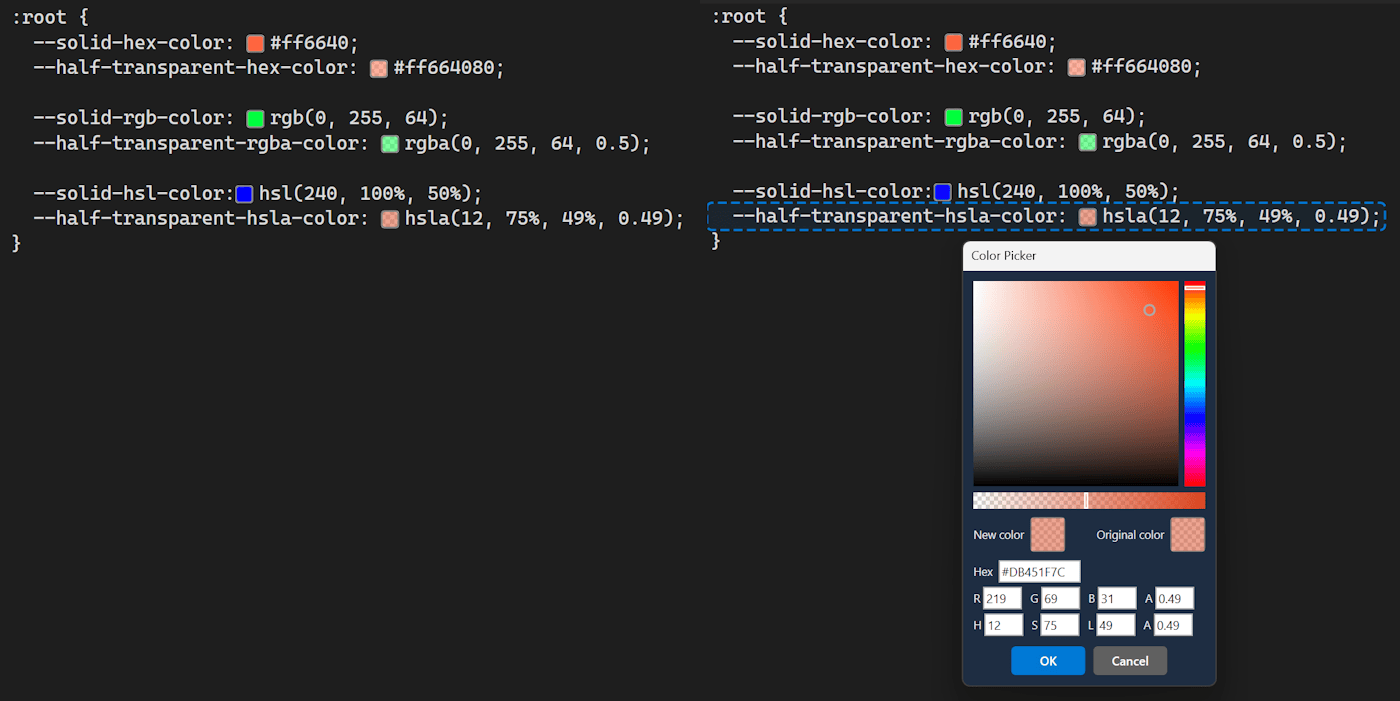
Inline color swatches for Unity USS files. Shows colored squares next to HEX, RGB(A) and HSL(A) values. Click any square to open a color picker and update the value instantly.
Download

See your USS colors live — no more guessing what #3B82F6 or hsl(210, 44%, 92%) looks like.

USS Color Preview adds colored squares next to every color value in your Unity Style Sheet files, right inside Visual Studio. Click any square to instantly open a color picker and update the value.

✨ Features

  • 🟦 Inline color swatches — colored squares appear at the end of every line containing a color
  • 🎨 Click-to-edit — click any square to open a full Color Picker dialog
  • ✏️ Instant write-back — picked color replaces the original value in-place (fully undoable)
  • 🔤 All USS color formats supported — HEX, RGB, RGBA, HSL, HSLA
  • ⚡ Live update — swatches refresh as you type, no save needed
  • 🔧 Zero configuration — install and open any .uss file, it just works

🖱️ How to Use

  • Open any .uss file in Visual Studio
  • Colored squares appear at the end of each line with a color value
  • Click a square → Color Picker opens pre-filled with the current color
  • Choose a new color → click OK → the value updates instantly in your file

🖥️ Requirements

  • Visual Studio 2022 or later (v17.0+), Windows only
  • Unity UI Toolkit project with .uss files
  • Contact us
  • Jobs
  • Privacy
  • Manage cookies
  • Terms of use
  • Trademarks
© 2026 Microsoft