A VS Code extension that shows your Claude Code usage and rate limits directly in the status bar and sidebar.
Features
Status bar — at-a-glance usage with countdown to reset
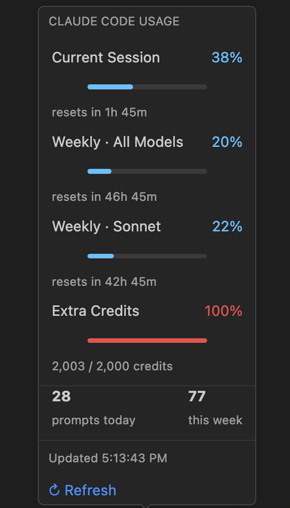
Hover tooltip — per-limit breakdown with progress bars and activity stats
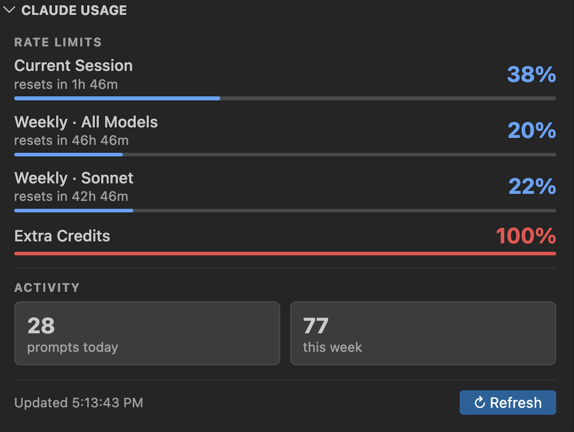
Sidebar panel — full-detail view accessible from the Explorer, opens on status bar click
Auto-refresh — polls on a configurable interval; multiple VS Code windows share a cache to avoid hammering the API
Smart warnings — proactive notifications so you don't get caught off guard:
Session hot — warns when session usage ≥ 80% with 1h+ until reset (you're burning through it fast)
Weekly hot — warns when weekly usage ≥ 80% with 24h+ until reset (may run out before it resets)
Use it or lose it — nudges when weekly usage < 60% with < 2 days until reset (unused capacity about to expire)
429 backoff — automatically backs off for 5 minutes if rate-limited
What's shown
Metric
Description
Current Session
5-hour rolling window
Weekly · All Models
7-day all-models limit
Weekly · Sonnet
7-day Sonnet-specific limit
Extra Credits (Org)
Org-level add-on credits
Prompts today / this week
Counted from ~/.claude/history.jsonl
Requirements
Claude Code must be installed and signed in (credentials are read from the macOS Keychain or ~/.claude/.credentials.json)
macOS (Keychain credential reading), though the file fallback works cross-platform
Configuration
Setting
Default
Description
claudeUsageBar.refreshInterval
60
How often to refresh usage data (seconds)
How it works
Credentials are read directly from the Claude Code OAuth token stored locally — no additional sign-in required. Usage data is fetched from api.anthropic.com/api/oauth/usage and cached in ~/.claude/claude-usage-bar-cache.json so multiple VS Code windows don't each make independent API calls.