Real Java/BeanShell code intelligence and live IdentityIQ environment
integration for SailPoint IdentityIQ development.
This is an independent, third-party developer tool. It is not affiliated
with, endorsed by, or sponsored by SailPoint Technologies, Inc.
SailPoint® and IdentityIQ® are trademarks of SailPoint Technologies, Inc.,
used here only to describe compatibility.
Code intelligence is backed by the actual Eclipse JDT Java engine (via the
"Language Support for Java" extension) resolving your real identityiq.jar
classpath — not a canned snippet list, and not a network call.
What it does
Code intelligence
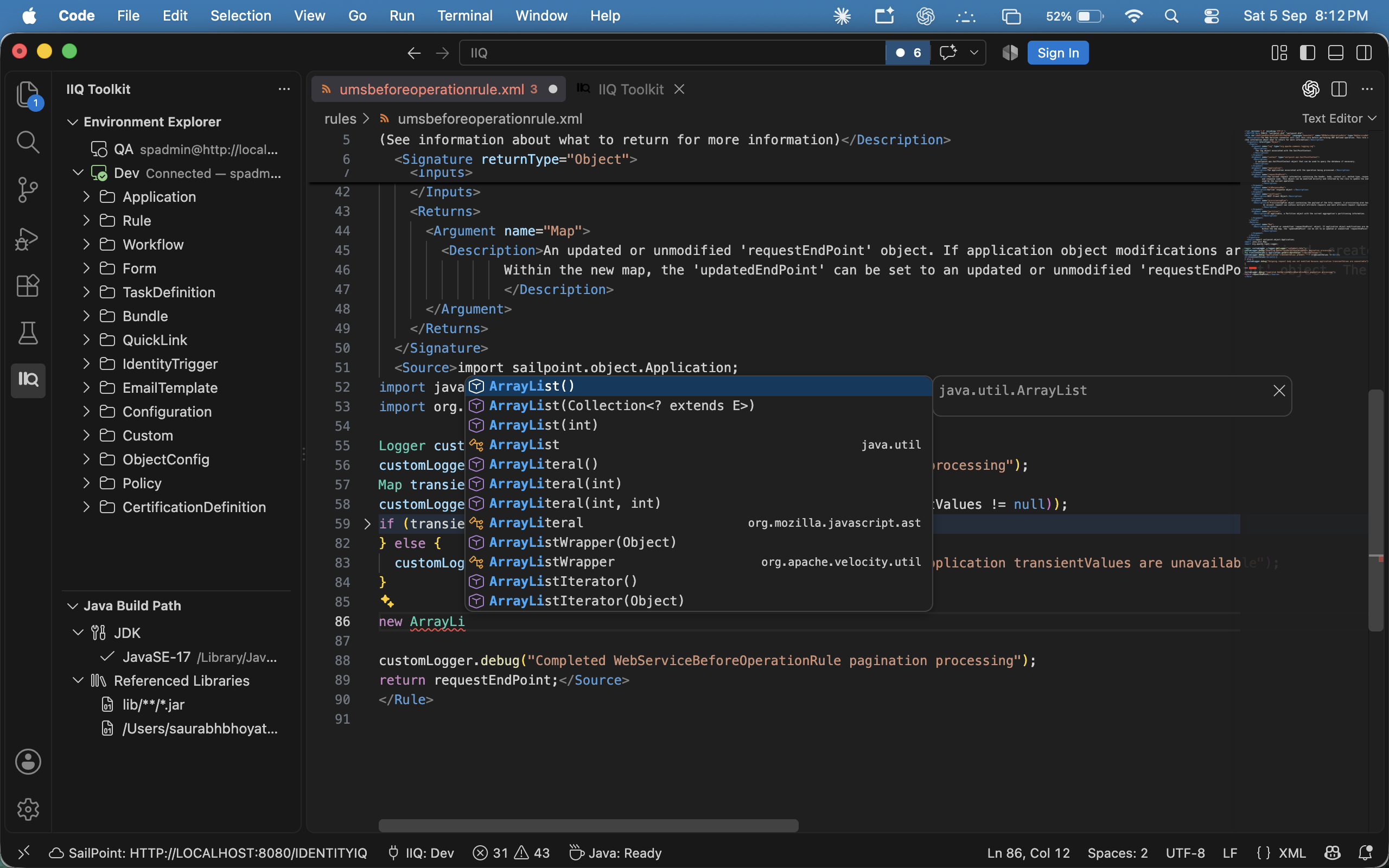
- Real Java/BeanShell completion inside
<Rule>/<Workflow> <Source> blocks — actual member lists, types, and overload resolution from your IdentityIQ install's own jars, including implicit rule variables (context, identity, plan, …) and Workflow libraries="…" shared functions.
- Hover documentation, real compiler diagnostics, and quick fixes — see the real Javadoc for any SailPoint or Java class, catch typos and type errors before you deploy, and one-click fixes like "Assign statement to new local variable."
Working with a live environment
- Connect to any number of IdentityIQ environments and switch between them from a dashboard — Dev, QA, Prod, whatever you have, each with its own saved credentials.
- Browse every object type in a sidebar tree — Rules, Workflows, Applications, Forms, Roles, and more — organized exactly like the environment itself, no SSH or console access needed.
- Pull, export, and import objects as real local files — a single object or every object of a type in one go, as plain
.xml you can open, edit, track in git, and redeploy.
- Run a saved Rule directly against the server and see its actual return value, without a separate debug page.
Deploying safely
- Deploy exactly what you changed, straight from git — point it at your repo and it deploys every Rule/Workflow/etc. you've actually modified (staged, unstaged, or mid-merge), instead of you hunting down and re-deploying files one by one.
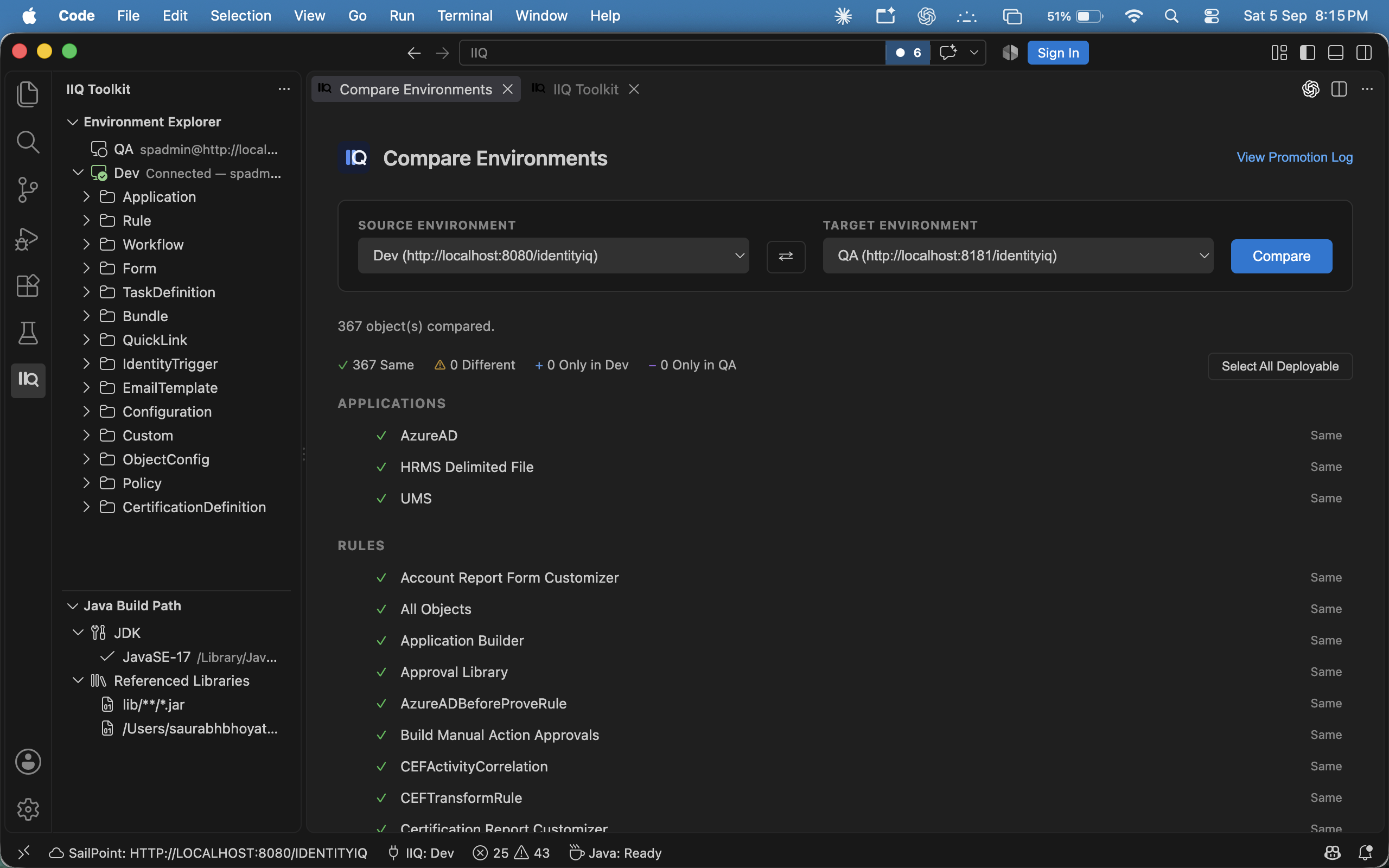
- Compare before you deploy — diff your local file against what's live on the server, or diff two entire environments against each other object by object, before anything gets pushed.
- Promote between environments with a full audit trail — review a Dev-vs-QA comparison, select exactly what to promote, confirm once, and every attempt (success or failure) is permanently logged for later review.
Multi-environment configuration (SSB)
- If your team already uses SailPoint's Services Standard Build pattern — one file per object with
%%TOKEN%% placeholders, resolved differently per environment — IIQ Toolkit understands it natively. Deploying, comparing, and exporting all substitute (or restore) the right values automatically, so a Dev-vs-Prod diff shows real differences, not just different token values.
Nothing is installed on your IdentityIQ server — no plugin, no imported
workflow, no rule, nothing left behind. Every live operation runs over the
stock /identityiq/rest/debug/* resource that ships with every install.
There's also no vendor-operated backend of any kind: this isn't a SaaS tool
routed through servers we run. The extension talks directly from your
machine to your own IdentityIQ instance, and license verification is
entirely offline. The entire product runs locally in your VS Code — nothing
about your environment depends on a service we operate staying up, secure,
or in business.
Free vs. licensed
Connecting to an environment, importing/exporting objects, deploying, and
comparing across environments are free — no license required. These are
exactly the operations a free, server-side-install tool would already give
you, so there's no reason to charge for them.
The Java/BeanShell code intelligence layer (completion, hover, diagnostics,
quick fixes) — the one thing genuinely unmatched by any free alternative —
is a 30-day free trial, then requires a license. The trial starts
automatically on first activation: no key, no account, no sign-up.
License verification is offline, same as everything else this extension
does — see "Zero server-side footprint" above. That matters here
specifically because IdentityIQ environments are frequently air-gapped or
behind egress firewalls, and a license check that needed to phone home
would simply fail in those environments.
Run IIQ Toolkit: Show License Status at any time to see what is active.
Getting started
- "Language Support for Java(TM) by Red Hat" installs automatically with
IIQ Toolkit — it is the Java engine behind BeanShell completion, so it is
a required dependency rather than an optional extra.
- Open a folder containing your IdentityIQ Rule/Workflow XML files.
- Run IIQ Toolkit: Connect to Environment — enter your IdentityIQ base
URL and credentials. The toolkit auto-detects a local IdentityIQ webapp
and configures Java completion against it; if it can't find one, it asks.
- Open a Rule XML file and start typing inside a
<Source> block for live
completion, or right-click an object in the Explorer to pull/deploy it.
Commands
| Command |
What it does |
| IIQ Toolkit: Connect to Environment |
Set up credentials and classpath |
| IIQ Toolkit: Add / Remove / Switch Environment |
Manage more than one saved environment |
| IIQ Toolkit: Export Object to File… |
Checkout one object to a local .xml file |
| IIQ Toolkit: Export All Objects of a Type to Folder… |
Bulk export by object type |
| IIQ Toolkit: Load All Data from Server |
Export every object of every type into one folder tree |
| IIQ Toolkit: Import Object from File… |
Deploy a local .xml file, independent of what's open |
| IIQ Toolkit: Deploy to Server |
Deploy the file you have open |
| IIQ Toolkit: Deploy Files Changed in Git |
Deploy every object your repo shows as changed, in one confirmation |
| IIQ Toolkit: Replace with Server Version |
Overwrite local contents with what's live on the server |
| IIQ Toolkit: Compare with Server |
Diff local vs. deployed |
| IIQ Toolkit: Compare Across Environments… |
Diff one object between two saved environments |
| IIQ Toolkit: Compare Environments… |
Bulk diff every object type between two environments, with governed promotion |
| IIQ Toolkit: Show Promotion Log |
Audit trail of every promotion attempt |
| IIQ Toolkit: Run Rule |
Execute a saved Rule server-side |
| IIQ Toolkit: Enter License Key |
Activate a purchased license |
| IIQ Toolkit: Show License Status |
See trial or license state |
How your data is handled
- Credentials (IdentityIQ passwords, license keys) live in your OS
keychain via VS Code SecretStorage — never in a settings file or a log.
- Nothing about your environment, your objects, or your BeanShell code is
sent anywhere except the IdentityIQ server you explicitly connect to.
Requirements
- VS Code 1.95+
- A local or reachable IdentityIQ install (for classpath resolution and live operations)
- "Language Support for Java(TM) by Red Hat" — installed automatically as a
dependency. On an air-gapped machine, side-load that extension's
.vsix
before IIQ Toolkit's, since it cannot be fetched from the marketplace.
- No JDK installation required — the Java extension ships with its own
runtime. To compile-verify against a specific Java level (Java 8, for
example, as most IdentityIQ 8.x installs run), point IIQ Toolkit at that
JDK with IIQ Toolkit: Set JDK...
Support & feedback
Bugs, feature requests, and reviews:
https://github.com/saurabhbhoyate3050/iiq-toolkit-community
Licensing questions: DM @iiqtoolkit on Telegram.
| |

