Git Branch in Explorer
See at a glance which git branch every project is on — right in the Explorer file tree.
When several repositories are open at once — a multi-root workspace, or one folder holding many projects — answering "which branch is this project on?" means walking through the Source Control panel or checking each folder one by one. This extension puts the answer where you are already looking: a muted branch label next to each project folder, colour-coded by repository state.
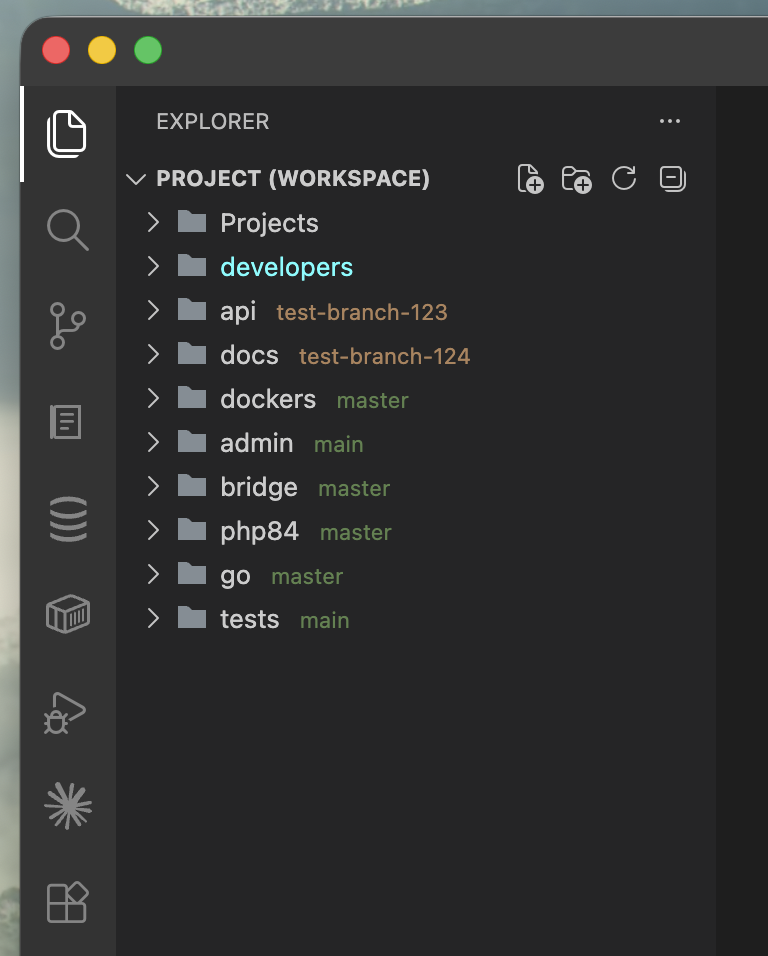
EXPLORER (multi-root workspace)      EXPLORER (plain folder of projects)
 › api      test-branch-123           › app    main
 › docs     test-branch-124           › docs   feature/new-layout *
 › docker   master
 › admin    main
The label is muted green when the repository is clean and in sync, amber when work is in flight (uncommitted changes, commits to push or pull, no upstream), red when it needs attention (conflicts, a rebase in progress, detached HEAD). The folder name itself keeps its normal colour.
Features
- The branch next to the folder, in the real file tree — not in a separate panel you have to open.
- Colour-coded state with compact counters:
* uncommitted, ↑2 to push, ↓1 to pull.
- Multi-root and plain folders — labels workspace roots of a
.code-workspace, repositories nested inside an opened folder, and repositories nested inside other repositories (configurable scan depth; submodules, which always sit on a pinned commit, are left out).
- Reads git directly — the branch comes from
.git/HEAD, the state from git --no-optional-locks status --porcelain=v2. Any host works: GitHub, GitLab, Bitbucket, self-hosted, none. git runs only in repositories inside the folders you opened (and in ones VS Code's own git has opened), by absolute path; a repository above them shows just its branch.
- Stays live — its own
fs.watch on the git directory picks up checkouts made from a terminal or another tool within a moment, even when files.watcherExclude mutes **/.git/** (a common memory-saving trick that silences the built-in git extension).
- Touches nothing of yours — no writes to the
.code-workspace file, folders[].name, or any settings outside branchInExplorer.*.
How it works — read before installing
VS Code's extension API cannot append text to a row of the Explorer tree (the request was closed as out of scope). The only way to draw the label is to patch the workbench, and this extension is transparent about it:
- One marker-tagged
<script> line is added to workbench.html inside your VS Code installation, and two files are placed next to it: the renderer script and a JSON data file.
- The extension host keeps that JSON up to date with every repository's branch and state; the injected script polls it and decorates the matching folder rows. The data holds folder names, branches and counters — no paths.
- The file checksum in
product.json is carried across this edit — and only this one: changes to workbench.html that do not come from this extension are never re-signed. Remove Workbench Patch puts both files back exactly as they were.
Expect one warning from VS Code each time the patch is applied. VS Code checks its files against the checksums it read when it started, so until it next restarts, windows that load the patched workbench report the installation as modified: a notification that it "appears to be corrupt" and [Unsupported] in the title bar. That is this patch. It happens once after installing and once after each VS Code update; after the next restart of VS Code the checksums agree and the warning is gone. An extension cannot avoid it — every file the window loads code from is checksummed, and an extension cannot restart the application.
On macOS the application bundle's code signature does not verify while patched (codesign --verify lists the modified files). VS Code runs normally; tools that audit app signatures will flag it.
You are asked once, the first time. After that the patch is treated as maintenance, because it does not survive a VS Code update:
After every VS Code update — roughly weekly on stable — the application directory is replaced and the patch goes with it. The extension notices on the next start, puts the patch back by itself, and reloads the window once so the labels come back without you doing anything — along with VS Code's one-off "modified" warning described above. The reload waits until you have switched to another window or app for a few seconds, with no editor unsaved and no debug session running; meanwhile the status bar offers it. Both halves can be turned off (branchInExplorer.autoPatch, branchInExplorer.autoReload).
This requires write access to the VS Code installation — standard user-level installs on macOS and Windows, and the Linux .tar.gz unpacked in your home directory, qualify. Read-only installs (Snap, AppImage, Flatpak) cannot be patched at all. An installation shared by every user of the machine — a Linux deb/rpm package, the Windows System Installer — is deliberately not patched either: taking it over would change VS Code for all of them. On macOS, a bundle that another account installed needs a one-off chown, offered ready to copy. In every case the extension says so in the status bar instead of retrying forever.
To remove cleanly: run Git Branch in Explorer: Remove Workbench Patch (restores workbench.html byte for byte and deletes the two files), reload the window, then uninstall the extension. Uninstalling without it is recovered from too — the extension cleans up on uninstall when it can, and any labels left in an open window disappear within 15 minutes.
Commands
| Command |
What it does |
Git Branch in Explorer: Apply Workbench Patch |
Patches workbench.html and reloads the window. Also the answer to the status bar's "Branch labels off". |
Git Branch in Explorer: Remove Workbench Patch |
Restores the original files — run before uninstalling. |
Git Branch in Explorer: Refresh Branches |
Rescans folders and re-reads git state. |
Settings
| Setting |
Default |
What it does |
branchInExplorer.showMarkers |
true |
* ↑2 ↓1 counters next to the branch. |
branchInExplorer.scanDepth |
2 |
How deep to search for repositories below each open folder, including inside other repositories. 0 looks only at the open folders themselves. |
branchInExplorer.autoPatch |
true |
Put the workbench patch back automatically after a VS Code update removed it. |
branchInExplorer.autoReload |
true |
Reload the window once after the patch has been restored — while you are in another window or app, with nothing unsaved and no debug session. |
Limitations
- If the opened folder is itself the repository, it has no row of its own in the tree — the status bar already shows that branch.
- Rows are matched by visible name and tree depth. Two repositories that would land on the same name and depth in one window get no label rather than a possibly wrong one; each window draws only its own labels (an untitled multi-root workspace falls back to every window's).
- Compact folders (
explorer.compactFolders) are supported: each segment of a chain is matched at its own depth, and the label is placed next to the segment it belongs to.
- Remote workspaces (SSH, WSL, Dev Containers) and vscode.dev are not supported.
License
Copyright © 2026 Ihor Petrov. All rights reserved. See the license.

