RegelSpraak for Visual Studio Code
Write a regulation and the rules that compute it in one document, and let the worked example under each provision prove it — with the editor support you expect from a programming language: colour that reflects meaning, errors while you type, model-aware completion, navigation and rename that follow what a name means across every file, and a run you can look inside.
RegelSpraak is the controlled natural language the Dutch Tax and Customs Administration (Belastingdienst) uses to specify legislation as executable rules. Further material is published on the Wendbare wetsuitvoering community pages.
The extension activates on .rgs files — models, the *.test.rgs test sets that go with them, and the .rgs.md notebooks of the mode below. (.rgs rather than the more obvious .rs, which is already established for Rust.)
Two ways to write one model
The mode is the kind of document you open, not a setting, and everything below works in both.
- Juridische modus (the legal mode) — a notebook: an
.rgs.md document in which the text of the regulation and the RegelSpraak that computes it alternate, in the order the text has, with the worked example under the provision it checks. One notebook is one article, and the folders above it are the levels the document itself has. This is the mode of a text and a rule written together, by the person who means both. samples/workspace/sample-notebook/ is the worked example, and samples/sample-wet/ is a real law — the Dutch Minimum Wage Act, consolidated on 1 July 2026, as 27 notebooks.
- Technische modus (the technical mode) —
.rgs and *.test.rgs files in gegevens/, regels/ and tests/, with the document the model renders under bron/ and a // Bron: line from each rule back to the provision it renders. This is the mode of a model somebody else wrote the text for: a converted product specification, a statutory regulation, an ALEF project brought across. samples/workspace/single-folder/ is the worked example.
They are one model. A notebook and a folder of .rgs files under the same workspace folder share one namespace: a rule in a notebook resolves an object type an engineer declared in gegevens/, a test set in tests/ runs the notebook's rules, and a name declared twice is reported once. So a team may split the work by role and the model does not know the split happened. Laying out either, and choosing between them: docs/AUTHORING.md.
Status: Everything below works today. The extension understands your model — declarations, rules and expressions, across every .rgs file and .rgs.md notebook under the workspace folder — and the *.test.rgs test sets that say what it should produce. It checks all of it, lets you navigate, restructure and format it, and runs your test sets — showing the derivation behind every value, why a rule stayed quiet, and, with F5, the run itself one rule at a time. What is next is in the roadmap.
The extension in two minutes
Two short films, each aimed at one half of the work. Both play in the browser,
with Dutch captions.
Film 1 · Rules as Code — a law and its rules in one document
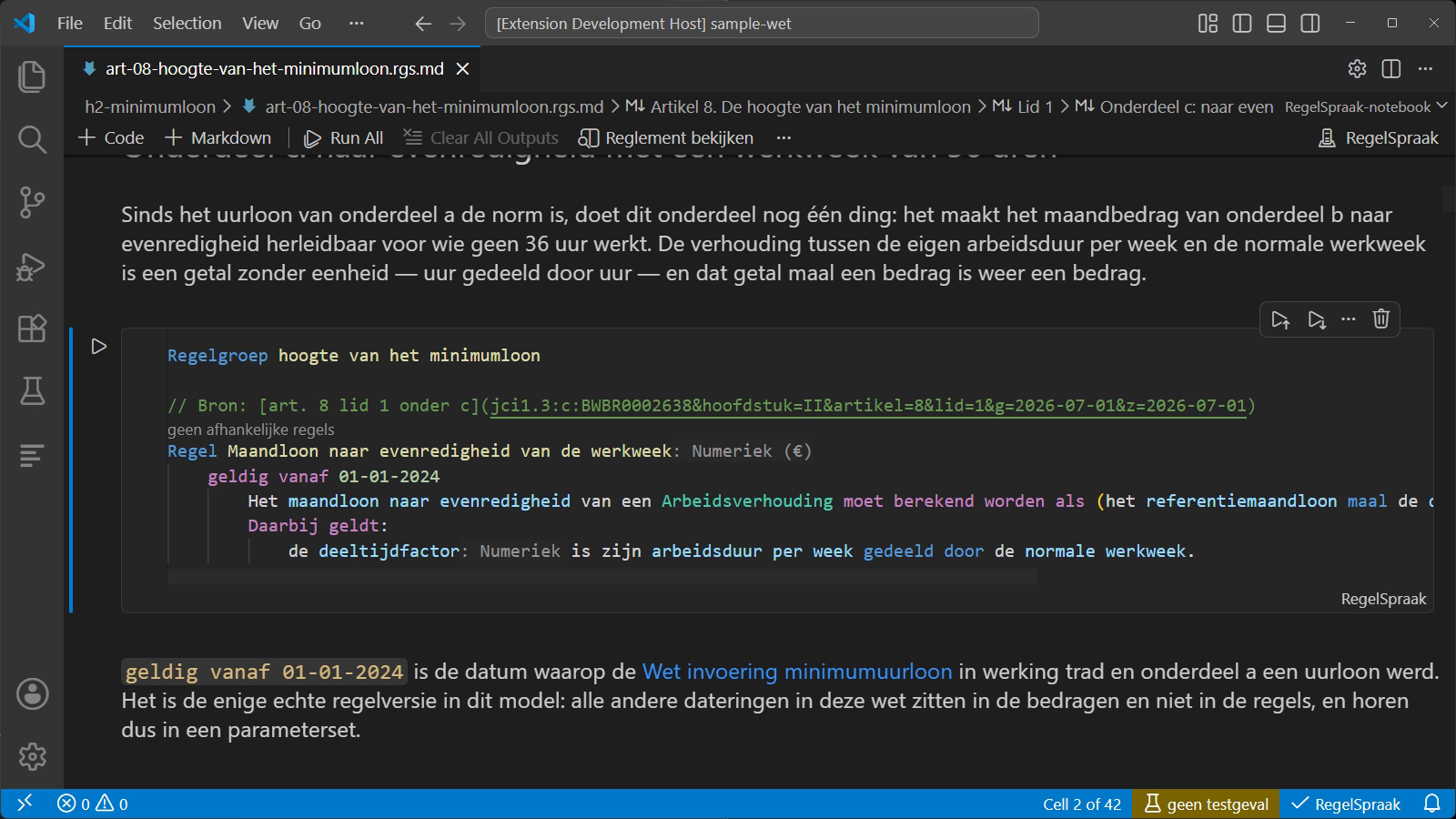
58 seconds. Article 8 of the Minimum Wage Act,
first on wetten.overheid.nl and then as a notebook: the statutory text and the
rule that computes it under one another, the rule naming the paragraph it
renders, the worked example that checks the provision — and turns red the moment
the half cent rounds the wrong way — and four lines of comment that draw the
whole age scale. Over samples/sample-wet/.
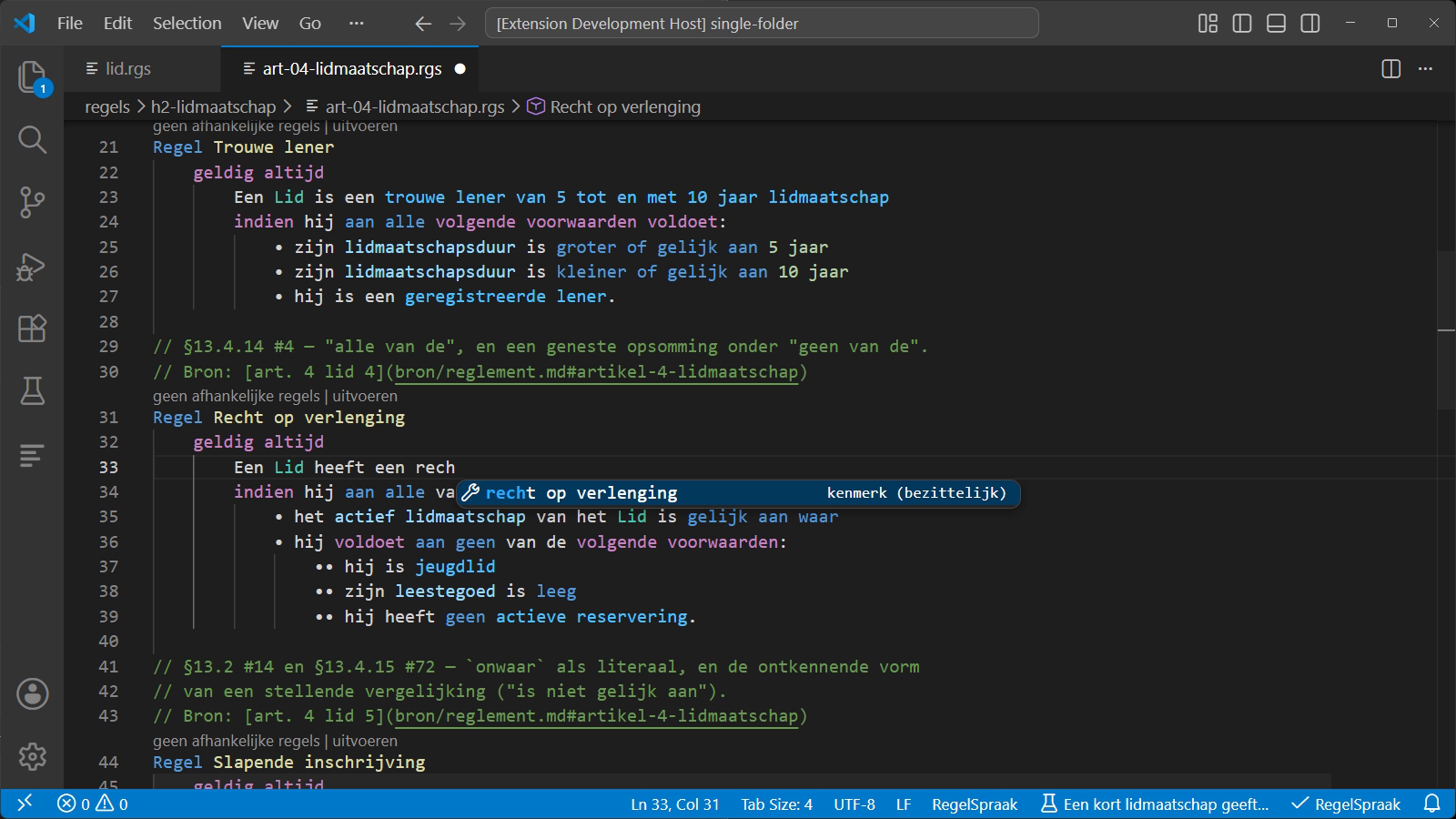
1 minute 31. Writing with completion, two kinds
of mistake the model catches, a test set going red, Leg uit (explain)
opening the whole derivation behind it, the coverage of the rule versions down
to the gutter, navigation and rename across file boundaries, and the formatter.
Over samples/workspace/single-folder/.
Features
The regulation, and what proves it
A regulation as a notebook. In juridische modus an .rgs.md document opens as cells: the text reads as text, the rules stand between the paragraphs and get everything below — colour, checks, completion, navigation, rename, formatting — and the worked example under a provision has a run button that reports each Verwacht (expected) line under the cell. Press the one on a rule cell and it says so: what you run is the worked example, not the rule. Reglement bekijken (view the regulation) renders the whole article as one document, and Openen met → Teksteditor (Open With → Text Editor) shows the Markdown underneath, because that is all it ever was. One notebook is one article — the unit an amending act changes — and the folders above it are the law's own chapters, so the explorer is its table of contents and the audit question (what have we not implemented?) is answered by reading down the numbering.
A // Visualisatie: comment draws what a rule does, beside the rule. A reader of article 8 can see the age scale written out and cannot see that its risers grow towards the top, or that one day of birth date between 20 and 21 is € 3,00 an hour. A test case that seats sixteen people on eight birth dates is the scale and the run already computes every one of those values, so four comment lines above it say what to draw with them and the cell answers with a figure above its verdict:
// Visualisatie: staffel
//   x:      leeftijd van de Natuurlijke persoon
//   y:      staffelminimumuurloon van de Natuurlijke persoon
//   reeks:  leerling in de beroepsbegeleidende leerweg
Testgeval De staffel per 1 juli 2026
The axes name an attribute and the series a characteristic — things the model declares, not colours or scales — and completion offers them by name. Five kinds: staffel (a step), lijn (a line), regime (several rules competing over one axis), balk (bars) and tabel (a table). Colours come from your theme. It is a comment, so the language has never heard of it: the file is still the model and nothing is stored. The test case keeps its Verwacht lines, which is what makes a figure that has gone stale a failing test rather than a wrong picture.
The provision a rule renders. A // Bron: (source) comment above a declaration or a rule links the article it comes from — a document beside the model, or a Juriconnect reference to Dutch legislation (jci1.3:c:BWBR0035878&artikel=13, what wetten.overheid.nl hands out as a permanent link). Hovering renders it readably — Hoofdstuk 2, artikel 13 — BWBR0035878 (geldig op 24-04-2026) — and follows it: a local document opens rendered at the provision, a Juriconnect reference opens at the register. A local path is written from the model root, so a rule file can be moved without its citations going stale. In a notebook a rule that states no source takes the one its position gives it: the heading it stands under, and the law that heading cites.
Worked examples that run. A *.test.rgs test set is part of the language — same colour, checks, formatting and rename, crossing into the model in both directions — and it runs: from the run button under a provision, in the Testing view with failures as diffs, or from a link in the text, one test case or one rule at a time, with the values, the characteristics, the faults and the derivation trace in a panel beside the model. Parameter values several test sets share are declared once as a Parameterset, in a file of its own, with a geldig (valid) period that is checked against the calculation date naming it. A Verwacht (expected) block can also be about an instance the model itself created rather than one your test case declared — navigating the role a (recursief) group's chain, or an ordinary creation rule, fills — checked as you type.
Why a value is what it is. Leg uit (explain) — Alt+E, or a link on the Verwacht line that just failed — goes from a value to the derivation that produced it: the rule that wrote it, the arithmetic it did between its reads and its write, and the rules behind its operands, back to the input or parameter where the chain ends. Where several rules wrote it, the one that still stands is marked eindwaarde (final value) and the rest overschreven (overwritten); where nothing wrote it, a verdict list says what each rule that could have did instead — skipped, not valid on the calculation date, faulted — and a rule that did not fire names the criterion that stopped it. An aggregation opens into the elements behind it, largest first; a time-dependent value is drawn as a dated timeline; and Vergelijk met vorige uitvoering (compare with the previous run) says what moved between two runs.
Which of your model the tests actually run. The Testing view's Dekking (coverage) profile runs the test cases you pick and then marks the model: every rule version a run fired is green in the gutter, every one nothing reached is red, and the Test Coverage view lists them by name and by file. The unit is the version and not the rule, which is the point of it: a calculation date selects one version (§4.2), so a test set reckoning in 2027 can never reach a geldig t/m 2026 beside it, and a count over rules would call that model fully tested. Fired is the strict reading, so a version whose condition never held is uncovered — its derivation has never run. Files nothing touched are in the report too: a file with no coverage is exactly the file you are looking for.
Step through a run (F5 in a test set): breakpoints on a rule or on a Verwacht line — where the mark means "stop where this value comes from" and can be held to one instance — the situation in the Variables pane at every stop, and Watch, the Debug Console and hover evaluating any RegelSpraak expression in the scope the run is standing in. F11 steps inside a rule, stopping at each part of its arithmetic as that part is worked out, with the editor highlighting the phrase rather than the line.
The language, and the editor
- Colour by meaning. Every name in RegelSpraak is an ordinary Dutch phrase, so only a parser plus a model of your declarations can tell an object type from an attribute from a role. Multi-word names are segmented by what each part means.
- The whole diagnostics catalogue (
RS001–RS965), in Dutch, while you type: names, structure, and what your expressions mean — datatypes, unit convertibility, precision and rounding, empty-value hazards, timelines, distributions, decision tables. Where the model cannot be sure, it says nothing.
- Help while writing: completion that proposes only what fits the position, snippets for every frequent construct, signature help for the constructs with named slots, and quick fixes (Ctrl+.) for the checks with an obvious repair.
- Navigation and rename across every file. Definition and type definition (F12), "which rule derives this?", references (Shift+F12), symbol search built for Dutch multi-word names, call and type hierarchy, and a rename (F2) that replaces a multi-word name as a whole and reports what it left alone.
- Formatting that only ever changes whitespace (Shift+Alt+F): indentation from the structure of the model, aligned columns, aligned decision-table pipes — and never a word, because respacing inside a name would rename it.
- What the text does not say, shown beside it: hover with the declaration's
// comment, inlay hints for the datatype and unit a rule derives, reference and derivation counts above a declaration, a grammar-aware outline and folding, and sentence-wise selection expansion.
- The model seen whole: a Model Explorer over every declaration in the workspace, a read-only model view of one file, and a preview for a
Beslistabel (decision table) that shows what the source cannot — which column concludes, and what the case your cursor is in concludes as one sentence.
- A model need not spell out its plurals.
(mv: …) is optional in the specification's syntax chapter, and the editor works the form out: write Objecttype de Vestiging and a rule may still say alle Vestigingen, with navigation, colour, references and rename all following. A derived form never overrides one you wrote and never competes with another declaration, so the worst a wrong guess does is what happens today — the phrase does not resolve, and the editor says so.
- Tables from outside the model. A
Gegevensbron (data source) declares the shape of an externally supplied table — key columns marked (sleutel), one value — and a rule reads one cell with het tarief uit de tarieftabel bij de zone en de gewichtsklasse, checked as it is written: the value name, the number of keys, each key's datatype and unit. The content never enters the model: a test case states a miniature inline, or the test set binds a delivery on disk through its manifest, and a run says which delivery it read. An extension beyond RegelSpraak v2.3.0, marked as one in the grammar, and optional.
- Bring a model in from ALEF. Importeren uit ALEF (import from ALEF) reads the models of an ALEF project and writes RegelSpraak text — declarations, rules and test sets — laid out the way Document opmaken (format document) would. It is a one-shot migration: from that moment the text is the model, and a conversion report beside the files lists everything that was not translated, every reading worth checking, and every word the conversion had to invent.
Each of these in full, with the reasoning behind the shape it takes, is in
docs/FEATURES.md. Per-release detail is in the
CHANGELOG.
Good to know
- All of it resolves across files — and a workspace folder is one model. Rules in one file are coloured, checked, navigated and renamed against the GegevensSpraak declarations in another, wherever under the folder either sits. Open two regulations as two folders and they are two models: each keeps its own
Deelnemer, and neither reports anything about the other.
- Nothing leaves your machine. The language server runs locally as a child process; there is no network service.
- Two constructs go beyond RegelSpraak v2.3.0, and both are optional.
Regelgroep <naam> gives §9.10's rule group the written form the specification withholds — including the (recursief) qualifier a recursive group needs — and Gegevensbron declares an externally supplied table — which §9.3 puts outside its own scope and hands to the execution environment. A model that uses either is not portable to a strict v2.3.0 tool, which is worth knowing you are opting in to. (// comments are the other thing the specification does not define, and have been accepted since the first release; // Bron: and // Visualisatie: are read as comments and change nothing about the language.)
- Interface language is Dutch throughout, matching the language itself; there is no English UI mode.
- Settings, and why line wrapping is off for
.rgs files (a RegelSpraak sentence cannot be broken across lines, and an aligned decision table is wider than any wrap column worth having): docs/SETTINGS.md.
- Laying out a model — how to name and arrange its files in either mode, and why: docs/AUTHORING.md. samples/workspace/sample-notebook/, samples/sample-wet/ and samples/workspace/single-folder/ are the worked examples. samples/workspace/sample.code-workspace opens a notebook folder and a technical one together.
Issues
Bug reports and feature requests are welcome; the templates ask the few things
that make one actionable. One thing worth knowing before cloning: this
repository is the extension client, and the language server it drives is
developed and released separately, so a fresh clone compiles and lints but
cannot exercise any language feature until a server build is linked in — see
NOTICE.
License and third-party notices
This repository's own source is licensed under the Apache License 2.0. See NOTICE for what that does not cover:
- The bundled language server in released extensions is proprietary and is licensed for use only as part of this extension.
- The RegelSpraak specification is © 2025 Belastingdienst and is not redistributed here.
| |

