Flutter EasyLocalization for VS Code





Translate your Flutter app without leaving the file you're working in.
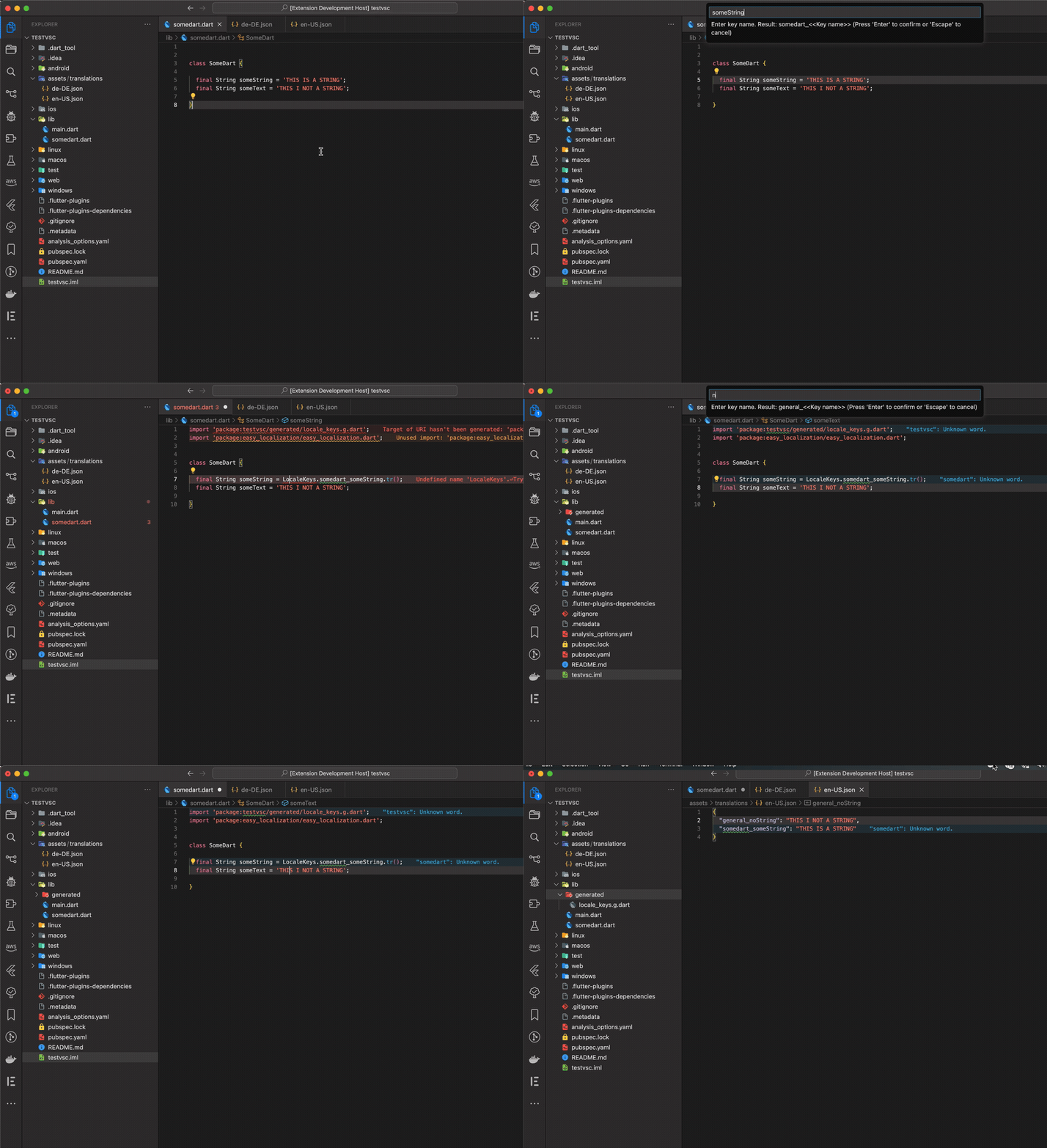
Select a hard‑coded string, hit one shortcut, type the translations, and the extension does the rest: it writes the value into every translation file, regenerates your LocaleKeys, swaps the string for the generated key, and adds the imports for you.
Why you'll like it
Localizing a Flutter app usually means a tedious round‑trip: copy the string, open the en.json, add a key, repeat for every other language, run the code generator, come back, replace the string, fix the imports.
This extension collapses all of that into a single command — so you can stay focused on building your UI / app.
- 🧩 Stay in your file — extract and replace strings right where the cursor is.
- 🌍 Every language at once — you're prompted for the translation in each language file you have.
- 🔑 Keys generated for you — runs
easy_localization's key generator automatically.
- ✨ Imports handled — adds the
easy_localization and generated‑keys imports if they're missing.
- 💡 Lightbulb friendly — available as a Quick Fix (code action) on any selected string.
See it in action
Say you're in home_page.dart with a hard‑coded string:
// Before
Text('Welcome back!')
- Move your cursor to the string
- Run the
Quick Fix EasyLocalization: Extract translation for this file
(also available via Command Palette)
- Enter the key name
welcome
The extension turns it into:
// After  — string replaced, imports added automatically
Text(LocaleKeys.homePage_welcome.tr())
And writes the value into each of your translation files:
(prefixing the key with the file name)
// assets/translations/en.json
{
  "homePage_welcome": "Welcome back!"
}
// assets/translations/de.json
{
  "homePage_welcome": "Willkommen zurück!"
}
The matching LocaleKeys.homePage_welcome entry is generated for you — no manual bookkeeping.
How the file prefix is built: the file name (snake_case) is converted to camelCase — home_page.dart → homePage — and joined to your key by the separator from fluttereasylocalization.fileTranslationPrefixSeparator (default _), giving homePage_welcome. Prefer no prefix? Use Extract translation as custom/specialized key, where the key is exactly what you type.
Quick start
- Add the package. Make sure
easy_localization is in your pubspec.yaml and set up (it powers the actual translation/codegen).
- Point the extension at your translations. By default it looks in
assets/translations for your *.json language files. Change it under Settings → Flutter EasyLocalization if yours live elsewhere.
- Extract a string. Put your cursor inside any string in a
.dart file, then either:
- click the 💡 lightbulb and pick the EasyLocalization action, or
- open the Command Palette (
Cmd/Ctrl+Shift+P) and run one of the commands below.
That's it — the keys, translations, replacement, and imports are all done for you.
Commands
| Command |
What it does |
| EasyLocalization: Extract translation for this file |
Extracts the selected string with a key prefixed by the current file's name (e.g. homePage_…). |
| EasyLocalization: Extract translation as general purpose string |
Extracts the selected string with the shared general‑purpose prefix (default general_). Use it for strings reused across the app. |
| EasyLocalization: Extract translation as custom/specialized key |
Extracts the selected string with no prefix at all — the key is exactly what you type. Use it for one‑off or specialized keys you want to name yourself. |
| EasyLocalization: Regenerate all keys from translation files |
Re‑runs the easy_localization key generator to rebuild the generated keys file from your translation JSON. |
Settings
All settings are available in the VS Code Settings UI under Flutter EasyLocalization (or directly in settings.json). They can also be set per‑workspace.
| Setting |
Default |
Description |
fluttereasylocalization.translationDir |
assets/translations |
Directory holding your translation *.json files, relative to the Flutter project root. |
fluttereasylocalization.generalTranslationPrefix |
general_ |
Key prefix used for general‑purpose (app‑wide) translations. |
fluttereasylocalization.fileTranslationPrefixSeparator |
_ |
Separator between the file‑derived prefix and the key for the Extract translation for this file command. The file name (snake_case) is converted to camelCase to form the prefix — home_page.dart → homePage — so a key welcome becomes homePage_welcome. Set to an empty string for no separator. |
fluttereasylocalization.sortKeysAlphabetically |
true |
Sort keys alphabetically in the translation files after each new entry. |
fluttereasylocalization.generatedKeyFileDir |
lib/generated |
Directory for the generated keys file, relative to the Flutter project root. |
fluttereasylocalization.generatedKeyFileName |
locale_keys.g.dart |
Name of the generated keys file. Tip: add lib/**/*.g.dart to your analysis_options.yaml analyzer excludes. |
Note on the underlying package
This extension is a workflow helper around the
EasyLocalization package — you need
that package in your pubspec.yaml for it to work.
Not affiliated. This plugin is not affiliated with the package in any way.
All credit for the translation engine and code generation itself goes to the
EasyLocalization package and its authors.
Found a bug? Have an idea?
Please open an issue — it genuinely helps:
Flutter EasyLocalization · GitHub Issues
Contributing
Pull requests are very welcome! If you can fix a bug or add an improvement, please don't hesitate to open one.
And even if you think you're not skilled enough — that's pure nonsense. We're all beginners, all the time. :)
Support this plugin
If this extension saves you time and you'd like to support it — open a feature request, send a pull request, or buy me a little coffee. Thank you! ☕


