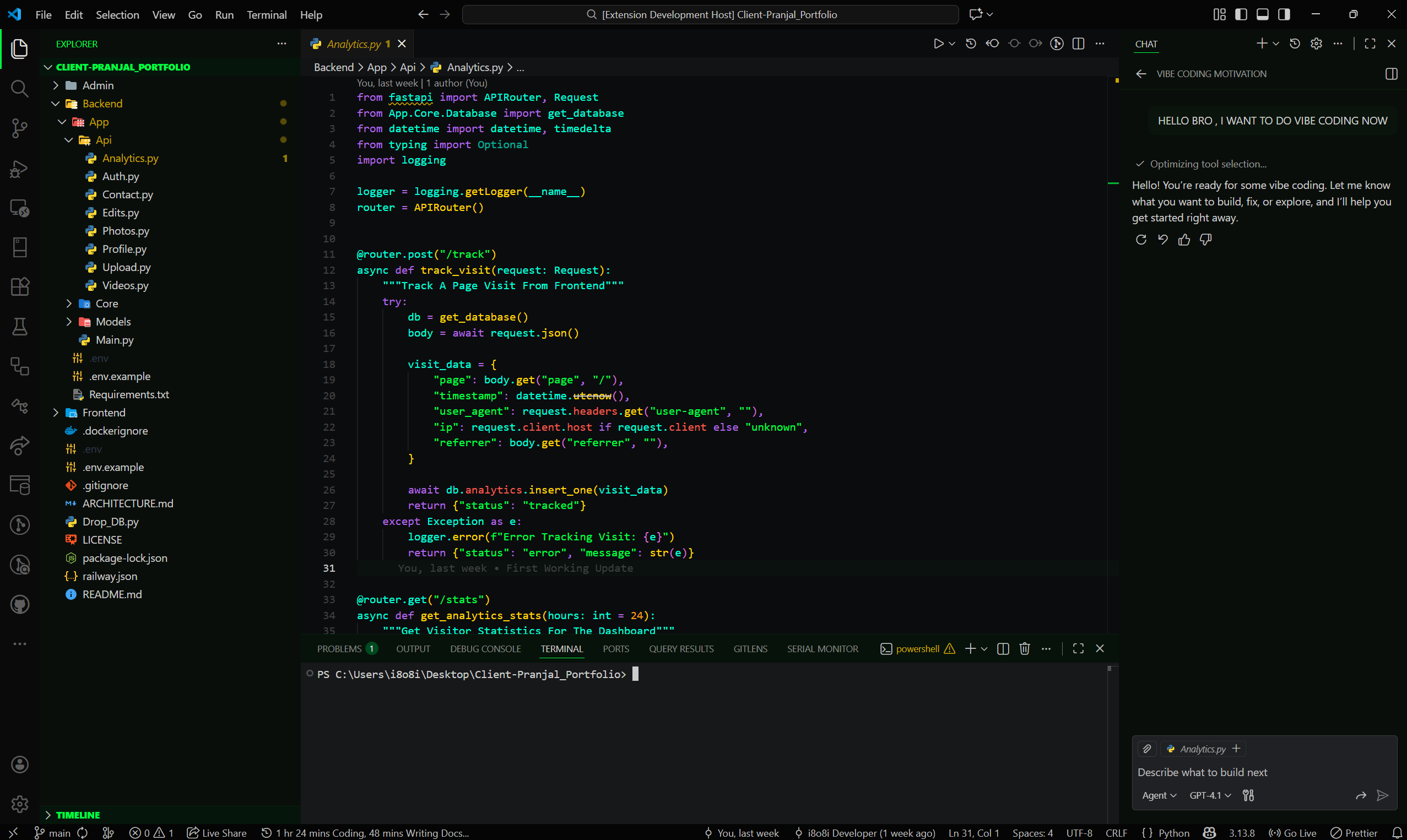
Preview
About The Project
Durgonix Dark Theme Is A Carefully Crafted Visual Experience Designed For Developers Who Demand Both Uncompromising Aesthetics And Maximum Readability. Inspired By Classic Terminal Palettes And Cyberpunk Matrix Aesthetics, This Theme Delivers:
Ultra-High Contrast Canvas : Deep Obsidian Black (#0B0C0E) Minimizes Eye Strain During Long Coding Sessions.Neon Hacker-Green Accents : Electric #00FF41 Accents Illuminate Active Tabs, Cursors, Selection Highlights, And Focus Borders.Vibrant Multi-Language Palette : Rich, Saturated Colors For Keywords, Functions, Types, Classes, And Template Interpolations.Full Semantic Highlighting Engine : Native Language Server Protocol (LSP) Token Differentiation For Modern IDEs.Bracket Pair Rainbow Colorization : Six-Tier Neon Gradient Guiding Complex Nested Logic.
Highlights
Feature
Visual Benefit
Supported Ecosystems
Deep Obsidian Background Reduces Glare & Eye Fatigue
Full Workbench, Editor & Panels (#0B0C0E)
Neon Green Accent System Highlights Active State & Cursors
#00FF41 Neon Green & #007A2E Badges
Semantic Highlighting Granular Language Server Intelligence
Classes, Parameters, Properties, Decorators & Lifetimes
Bracket Pair Rainbow Instant Visual Hierarchy In Nested Blocks
6-Tier Neon Spectrum (#FED604, #F859B1, #00FFD9, #2493FA, #B267E6, #00FF41)
Multi-Language Grammar Tailored Highlighting Across 25+ Languages
Python, TS, JS, Dart, Go, Rust, Java, PHP, C++, C#
DevOps & Config Suite Distinct Token Rules For Infrastructure
Docker, Docker Compose, Nginx, .env, YAML, TOML, JSON
16-Color Terminal Matrix Immersive Command-Line Experience
Fully Calibrated Cyberpunk ANSI Palette
Supported Languages & Technologies
Category
Supported Languages & Technologies
Web & Frontend TypeScript, JavaScript, HTML5, CSS3, SCSS, Less, Tailwind CSS, Vue, Svelte, Astro, JSX, TSX
Backend & Systems Python, Rust, Golang, Java, C, C++, C#, PHP, Ruby, Kotlin, Swift
Mobile & Cross-Platform Flutter, Dart, React Native
DevOps & Cloud Dockerfile, Docker Compose, Nginx Configuration, Kubernetes YAML
Configuration & Data .env, JSON, YAML, TOML, INI, XML, GraphQL, Prisma Schema
Database & Scripting SQL, PostgreSQL, MySQL, Shell / Bash, Zsh, PowerShell
Documentation Markdown, JSDoc, Docstrings
Showcase Views
Editor — Code View
Editor — Terminal & Panel Integration
Color Palette
#0B0C0E (Obsidian)
#00FF41 (Matrix Green)
#FED604 (Electric Gold)
#F859B1 (Cyber Pink)
#00FFD9 (Neon Cyan)
#B267E6 (Neon Purple)
#2493FA (Electric Blue)
#F15A4C (Neon Coral)
Quick Install
Method 1: Install From VS Code Marketplace
code --install-extension i8o8i.durgonix-dark-theme
Method 2: Install From Local Package (VSIX)
code --install-extension ./durgonix-dark-theme-1.1.1.vsix
Recommended Settings
For The Ultimate Cyberpunk Development Experience, Add The Following Configuration To Your VS Code settings.json:
{
  "workbench.colorTheme": "Durgonix Dark",
  "editor.semanticHighlighting.enabled": true,
  "editor.bracketPairColorization.enabled": true,
  "editor.guides.bracketPairs": "active",
  "editor.cursorBlinking": "smooth",
  "editor.cursorSmoothCaretAnimation": "on",
  "workbench.iconTheme": "vscode-icons"
}
Customization
You Can Fine-Tune Specific UI Surfaces Using workbench.colorCustomizations In Your User Settings:
"workbench.colorCustomizations": {
  "[Durgonix Dark]": {
    "tab.activeBorderTop": "#00FF41",
    "badge.background": "#007A2E",
    "badge.foreground": "#FFFFFF",
    "statusBar.background": "#050505"
  }
}
Join Our Community Of Developers And Contributors! Whether You Have Feedback, Suggestions, Or Bug Reports, You Are Always Welcome.
Contributing
Contributions To Durgonix Dark Theme Are Warmly Welcomed!
Fork The Repository And Create Your Feature Branch (git checkout -b feature/AmazingThemeFeature)
Commit Your Changes With Clear Messages (git commit -m 'Add Enhanced Rust Macro Highlighting')
Push To The Branch (git push origin feature/AmazingThemeFeature)
Open A Pull Request With Visual Screenshots
License & Ownership
This Project Is Licensed Under The MIT License — See The LICENSE File For Details.
Copyright © 2026 i8o8i-Developer And Respective Contributors.
Crafted With Passion & Precision ❤️ — Durgonix Dark Theme