i18n Chinese Search
通过中文一步定位 i18n key 在代码中的引用位置。适用于 vue-i18n 等代码里只有 $t('user.name') 这类 key、
Ctrl+Shift+F 搜不到中文的场景。
为什么需要它
i18n Ally 等插件用编辑器 decoration 在 key 旁边「画」中文,但 decoration 是渲染层虚拟文本,
不进入文档模型,VS Code 搜索架构上索引不到。本插件绕开这一限制:输入中文 -> 反查语言包 key ->
全局搜索带引号的 key 引用 -> 直接跳转。
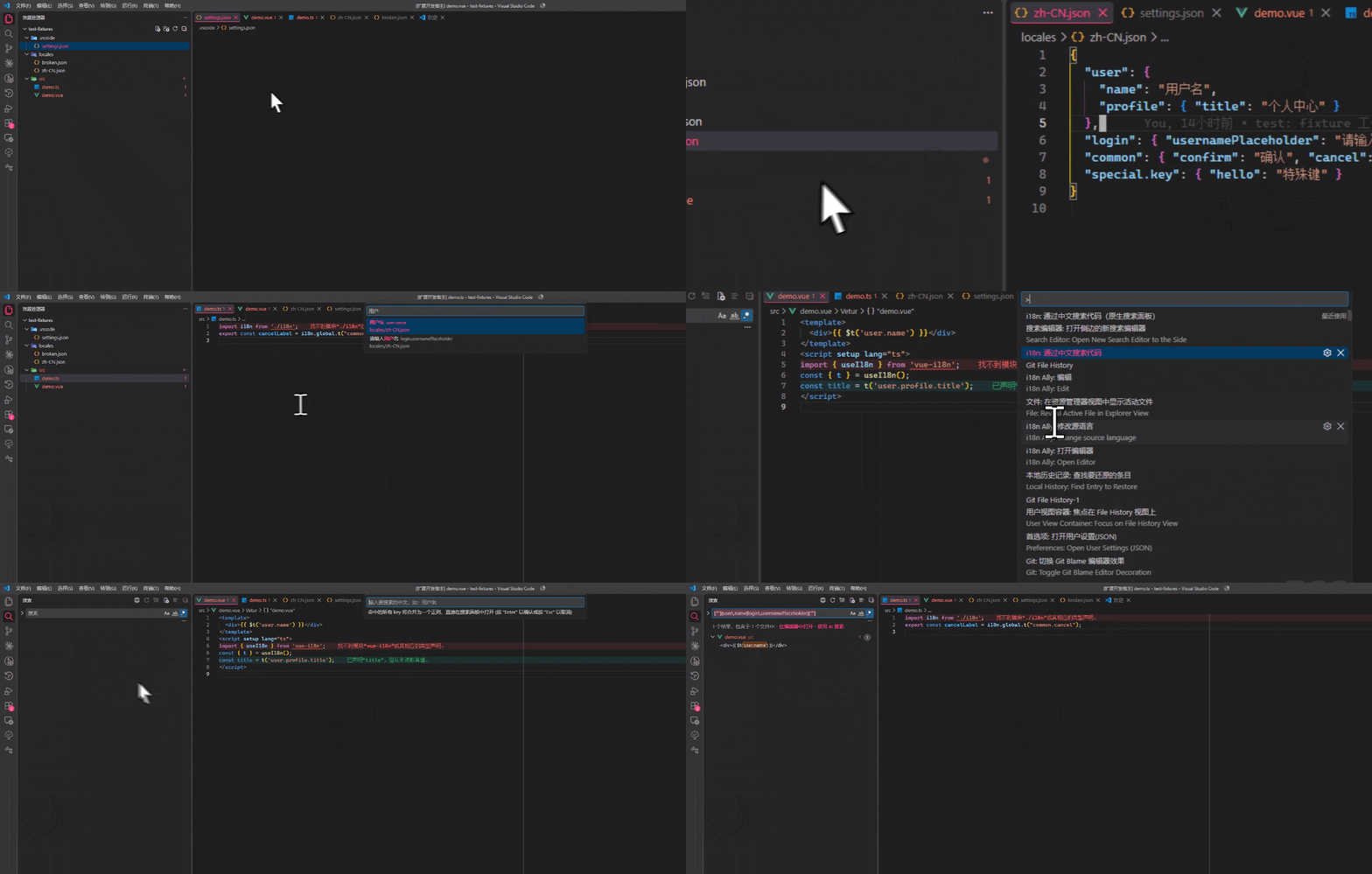
使用
配置中文语言包位置(支持多个 glob):
"i18nSearch.localeSearchPaths": ["src/locales/**/zh-CN.json"]
命令面板执行:
- i18n: 通过中文搜索代码 -- 输入中文子串 -> 选语言包条目 -> 选引用位置回车跳转;
- i18n: 通过中文搜索代码(原生搜索面板) -- 同流程,最后打开 VS Code 原生搜索面板(正则已填好)。
Search 面板直搜按钮:原生搜索面板(Ctrl+Shift+F)标题栏有一个 🌐 按钮,
点击后输入中文,命中的所有 key 自动合并为一个正则,直接打开原生搜索结果(无二次选择)。
建议快捷键(keybindings.json):
{ "key": "ctrl+alt+t", "command": "i18nSearch.searchByChinese" }
配置项
| 配置 |
类型 |
默认值 |
说明 |
i18nSearch.localeSearchPaths |
string[] |
[] |
中文语言包 glob 数组 |
i18nSearch.keyStyle |
string |
"auto" |
nested / flat / auto |
i18nSearch.include |
string[] |
["**/*.{vue,ts,js,tsx,jsx}"] |
代码引用搜索范围 |
i18nSearch.maxReferences |
number |
200 |
引用结果上限 |
已知限制
vscode.workspace.findTextInFiles 目前是 proposed API:在稳定版 VS Code 上该 API 不可用(或调用失败)时,
插件会退化为逐文件扫描。退化扫描会排除 node_modules,但不读取 search.exclude 等自定义排除项,
因此大仓库首次查询可能略慢。- 动态拼接的 key(如
$t(`user.${type}`))无法命中:引用搜索只匹配带引号的完整字面量 key。
| |

