HyperIDE
Visual editor for React components inside VS Code.
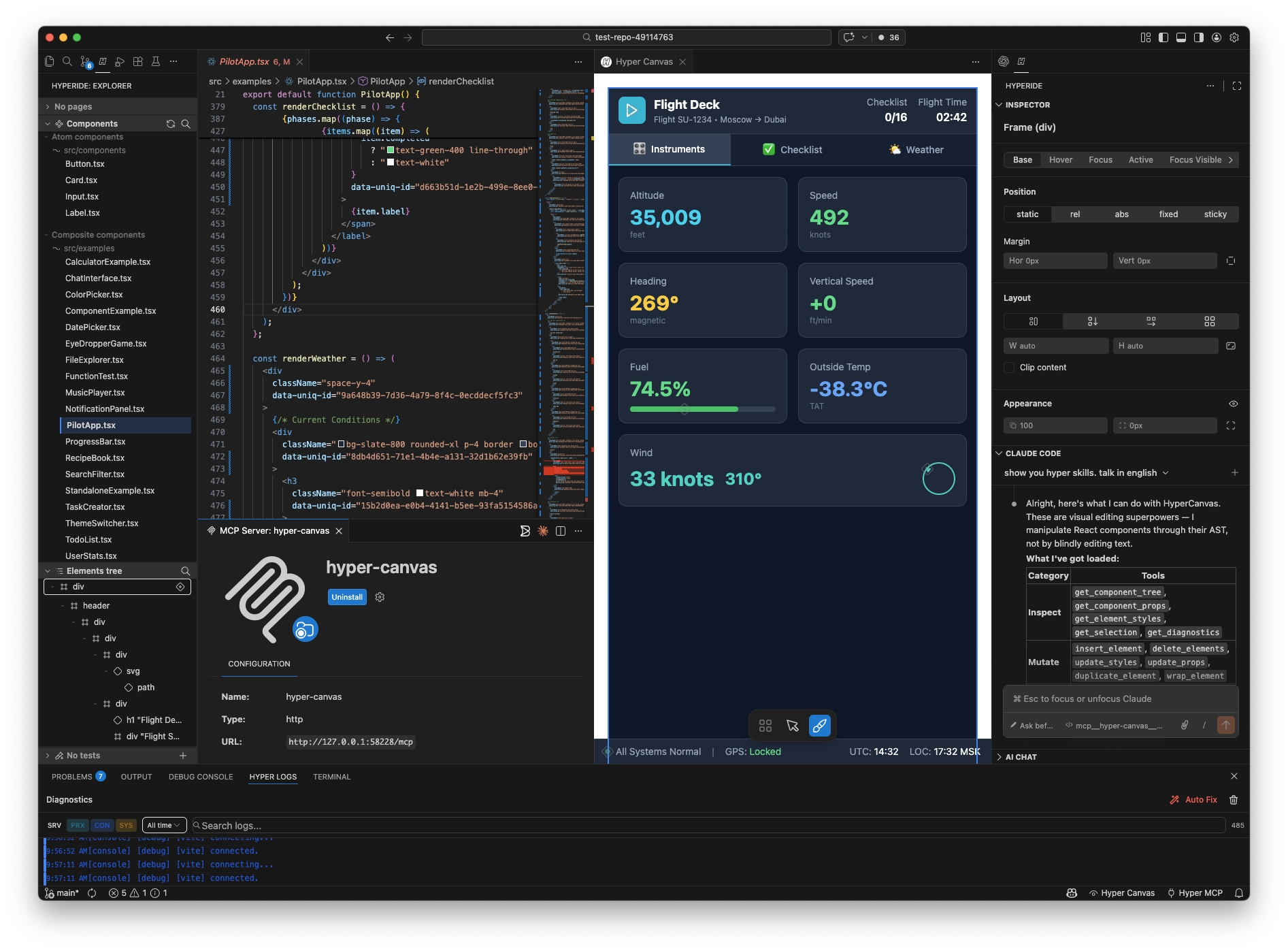
Edit styles, inspect props, and preview changes — all without leaving your editor.
Why HyperIDE
Most visual tools rely on AI to rewrite your code for every change — even a simple
color tweak burns through tokens and takes seconds to apply. HyperIDE takes a
fundamentally different approach:
- Zero-token editing. Style and layout changes go directly through AST
manipulation — no LLM round-trip, no token cost, instant feedback.
- Works with your existing codebase. Open any React project and start editing
visually. No migration, no vendor lock-in, no opinionated stack.
- Deterministic and reliable. AST operations produce precise, predictable code
changes. No hallucinations, no regressions, no "fix one thing, break two others."
- Stays inside VS Code. No separate app, no cloud IDE, no context switching.
Your files, your git, your workflow.
- AI when you want it. The visual editor works independently. AI Chat is an
optional power-up for generation and refactoring — not a requirement.
- MCP server for AI agents. 20 tools that let any AI assistant (Copilot, Claude
Code, Cursor) control the visual editor programmatically. HyperIDE becomes the
visual layer for your existing AI workflow.
Features
- Live Preview — see your React components rendered in real time
- Component Explorer — browse and navigate your project's component tree
- Style Inspector — view and edit Tailwind classes and CSS properties visually
- AI Chat — ask AI to modify components, generate code, and explain patterns
- Dev Server — start and manage your project's dev server from VS Code
- Code ↔ Canvas — click an element in preview to jump to source, and vice versa
- MCP Server — expose AST tools to external AI agents for automated editing
Quick Start
- Install the extension from the VS Code Marketplace
- Open a React project in VS Code
- Run
Cmd+Shift+P → Hyper: Open Preview
- (Optional) Start the dev server:
Cmd+Shift+P → Hyper: Start Dev Server
AI Configuration
The extension includes an AI assistant for component editing and code generation.
- Run
Cmd+Shift+P → Hyper: Configure AI API Key
- Select your preferred provider in settings (see table below)
Recommended: GLM via Z.ai — flat-rate starting from $10/mo.
Settings
| Setting |
Default |
Description |
hypercanvas.ai.provider |
glm |
AI provider: claude, openai, glm, firepass, commandcode, proxy, opencode |
hypercanvas.ai.backend |
— |
Backend for proxy/opencode providers (e.g. gemini, deepseek) |
hypercanvas.ai.model |
— |
Model identifier (e.g. claude-sonnet-4-20250514, gpt-4o) |
hypercanvas.ai.baseURL |
— |
Custom base URL for AI provider API |
hypercanvas.devServer.autoStart |
false |
Auto-start dev server when opening preview |
hypercanvas.preview.defaultPort |
3000 |
Default port for dev server |
hypercanvas.preview.syncPositions |
true |
Sync cursor position with canvas selection |
Commands
| Command |
Keybinding |
Description |
| Hyper: Open Preview |
— |
Open the visual preview panel |
| Hyper: Refresh Preview |
— |
Refresh the preview iframe |
| Hyper: Go to Visual |
Cmd+Shift+V |
Jump from code to canvas element |
| Hyper: Start Dev Server |
— |
Start the project dev server |
| Hyper: Stop Dev Server |
— |
Stop the running dev server |
| Hyper: Configure AI API Key |
— |
Set API key for the selected AI provider |
| Hyper: Open Explorer |
— |
Open the component explorer sidebar |
| Hyper: Open Inspector |
— |
Open the style inspector sidebar |
| Hyper: Open AI Chat |
— |
Open the AI chat panel |
| Hyper: Start Diagnostic Capture |
— |
Start capturing extension-host errors to a structured NDJSON log |
| Hyper: Stop Diagnostic Capture |
— |
Stop capture, open the log, and show rejection/exception counts |
Privacy & Telemetry
HyperIDE collects anonymous usage and error telemetry to improve the product.
- Respects your VS Code setting. Telemetry is always AND-ed with the global
telemetry.telemetryLevel. If VS Code telemetry is off, HyperIDE sends nothing.
- No personal data, ever. We send only enums, counts, durations, booleans, and
one-way hashes — never your source code, file paths, prompts, URLs, or content.
- Opt out any time via the
hypercanvas.telemetry.enabled setting (or the
"Disable" button on the first-run notice).
- Backends: PostHog (EU) for product analytics, Sentry (EU) for error reports.
Run code --telemetry to see the full list of events, or read
telemetry.json in this extension.
Requirements
- VS Code 1.74 or later
- A React project (JSX/TSX)
Development
See DEVELOPMENT.md for architecture details, build instructions, and contribution guide.
License
Elastic License 2.0
You can: use, copy, modify, and redistribute the code for internal or commercial projects.
You cannot: provide this software (or a modified version) as a hosted/managed service
competing with HyperIDE, or publish editor extensions (VS Code, JetBrains, etc.)
derived from this code.
| |

