Cursor IME Indicator
A lightweight VS Code extension that displays the current input language directly above your cursor. Never accidentally type in the wrong language again.
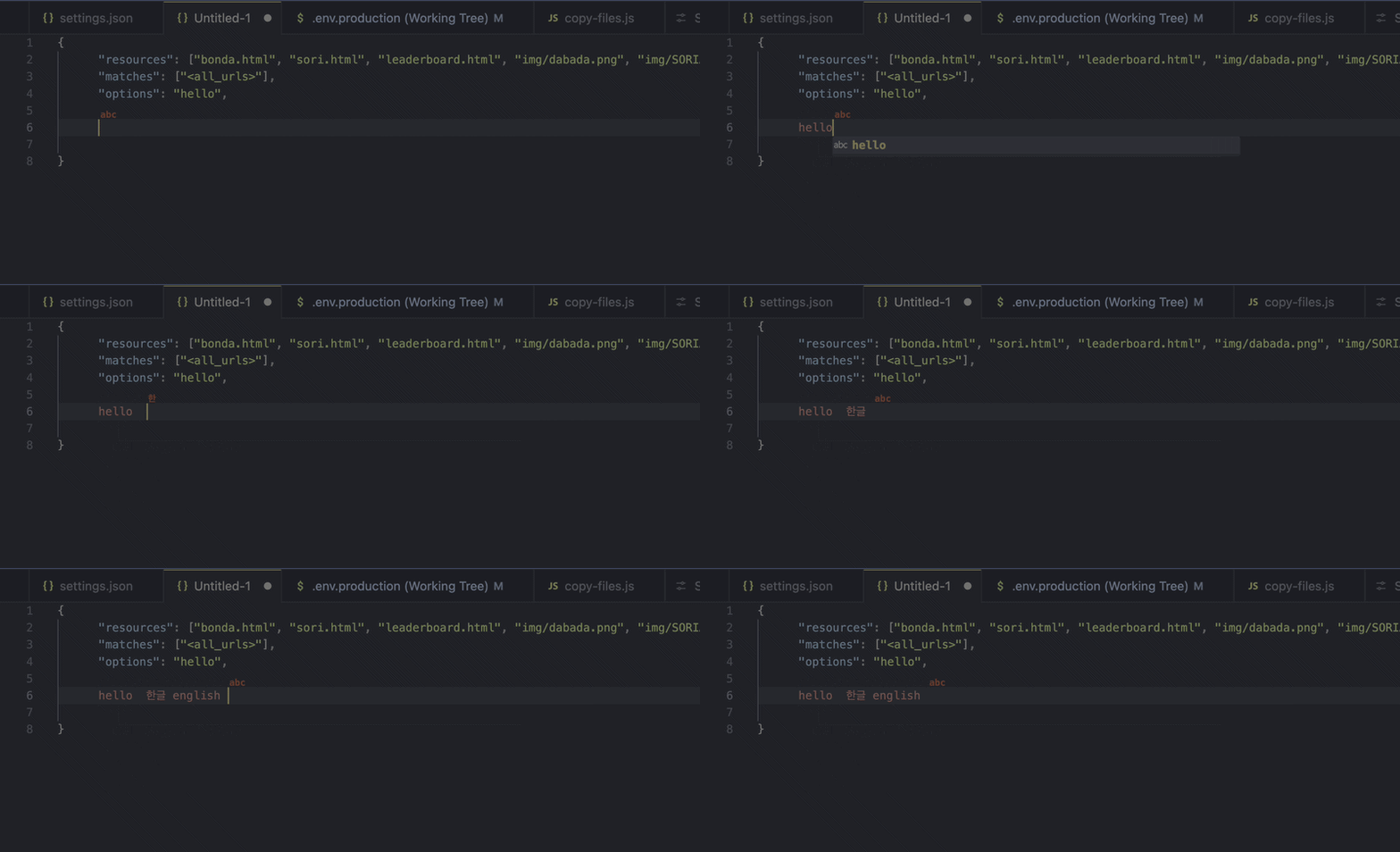

Features
- Inline language indicator — Shows a small label above your cursor so you always know which input language is active.
- Cross-platform — Works on both macOS and Windows with native-level detection.
- Instant detection — Uses native event-driven watchers for real-time input source changes with minimal overhead.
- IME mode aware — Detects 한/영 toggle and CJK IME mode switches, not just keyboard layout changes.
- 25+ languages supported — Korean, English, Chinese, Japanese, and many more out of the box.
- Fully customizable — Adjust font size, opacity, color, and bold style to match your theme.
| Platform |
Primary Detection |
Fallback |
| macOS |
Swift native watcher (event-driven, zero polling) |
defaults read periodic polling |
| Windows |
C# native helper (IMM API, 200ms polling) |
PowerShell periodic polling |
Supported Languages
| Language |
Indicator |
Language |
Indicator |
| Korean |
한 |
English |
abc |
| Chinese |
中 |
Japanese |
あ |
| Russian |
Ру |
Arabic |
عر |
| Thai |
ไท |
Hindi |
हि |
| Greek |
Ελ |
Hebrew |
עב |
| German |
DE |
French |
FR |
| Spanish |
ES |
Italian |
IT |
| Portuguese |
PT |
Turkish |
TR |
| Polish |
PL |
Dutch |
NL |
| Swedish |
SV |
Norwegian |
NO |
| Danish |
DA |
Finnish |
FI |
| Czech |
CZ |
Hungarian |
HU |
| Vietnamese |
VI |
+ more... |
|
CJK and non-Latin scripts display a representative character from their native writing system.
Latin-alphabet languages display the ISO country code.
Unknown input sources fall back to a 2-letter abbreviation automatically.
Requirements
- VS Code 1.85.0 or later
- macOS: Xcode Command Line Tools (for first-run native helper compilation; falls back to polling if unavailable)
- Windows: .NET Framework 4.x (pre-installed on Windows 10/11; falls back to PowerShell if unavailable)
Linux support is planned for a future release.
Installation
From VS Code Marketplace
- Open VS Code
- Go to Extensions (
Cmd+Shift+X / Ctrl+Shift+X)
- Search for Cursor IME Indicator
- Click Install
From VSIX
code --install-extension cursor-ime-indicator-0.0.7.vsix
Extension Settings
| Setting |
Default |
Description |
cursorImeIndicator.enabled |
true |
Enable/disable the indicator |
cursorImeIndicator.fontSize |
0.8 |
Font size relative to editor font (0.3 ~ 3.0) |
cursorImeIndicator.opacity |
0.7 |
Indicator opacity (0.1 ~ 1.0) |
cursorImeIndicator.bold |
true |
Display indicator in bold font |
cursorImeIndicator.color |
"" |
Custom text color (empty = cursor color) |
cursorImeIndicator.pollingInterval |
300 |
Polling interval in ms (fallback mode only) |
Example: Minimal
{
  "cursorImeIndicator.fontSize": 0.5,
  "cursorImeIndicator.opacity": 0.8,
  "cursorImeIndicator.bold": true,
  "cursorImeIndicator.color": "#888888"
}
Commands
| Command |
Description |
Cursor IME Indicator: Toggle |
Toggle the indicator on/off |
Access via Command Palette (Cmd+Shift+P / Ctrl+Shift+P).
How It Works
macOS
- Primary: A native Swift helper listens for
AppleSelectedInputSourcesChangedNotification via DistributedNotificationCenter. This is fully event-driven — no polling, no CPU overhead.
- Fallback: If the native helper cannot be compiled (no Xcode CLI tools), the extension falls back to periodic polling via
defaults read.
The native helper is automatically compiled on first activation and cached for subsequent sessions.
Windows
- Primary: A native C# helper uses Win32 APIs (
GetKeyboardLayout + IMM ImmGetDefaultIMEWnd) to detect both keyboard layout changes and IME mode switches (e.g., 한/영 toggle). Polls at 200ms intervals and outputs only on change.
- Fallback: If the C# helper cannot be compiled (no
csc.exe), the extension falls back to a PowerShell-based detector with the same IMM API, or a simple periodic polling via InputLanguage API.
The native helper is automatically compiled using csc.exe (.NET Framework) on first activation and cached for subsequent sessions.
Known Issues
- On the first line of a file, the indicator may be partially clipped at the top edge.
- The indicator position may vary slightly depending on editor font and line height settings.
Release Notes
0.1.0
- Windows: Significantly improved IME detection accuracy in Electron-based apps like VS Code using
GetGUIThreadInfo API.
- Windows: Added multi-tier fallback logic for IME window handle retrieval to ensure reliable state detection.
- Windows: Enhanced alphanumeric mode detection appearing incorrectly when in English mode.
- Windows: Improved native helper compilation stability by removing external GDI+ dependencies.
- Windows: Applied consistent IME mode check logic across all detection tiers (Native, PowerShell persistent, and simple polling).
0.0.7
- Windows support with native C# IME detection
- IME mode awareness (한/영 toggle, CJK conversion mode detection)
- 3-tier fallback on Windows (native → PowerShell persistent → PowerShell simple polling)
- Platform-specific detector architecture for easier future platform additions
0.0.1
- Initial release
- macOS input source detection (native watcher + polling fallback)
- 25+ language support with native script indicators
- Customizable appearance (font size, opacity, bold, color)
Contributing
Contributions are welcome! Please feel free to submit issues and pull requests.
License
MIT

