Skip to content
| Marketplace
Sign in
Visual Studio Code>Visualization>Markdown CommentsNew to Visual Studio Code? Get it now.
Markdown Comments

Markdown Comments

huyansheng

|
2 installs
| (0) | Free
Markdown preview with outline navigation and collaborative comments for human-AI workflows
Installation
Launch VS Code Quick Open (Ctrl+P), paste the following command, and press enter.
Copied to clipboard
More Info

Markdown Comments - VSCode Extension

A Notion-style Markdown preview with floating outline navigation and collaborative inline comments for human-AI workflows.

Preview

✨ Features

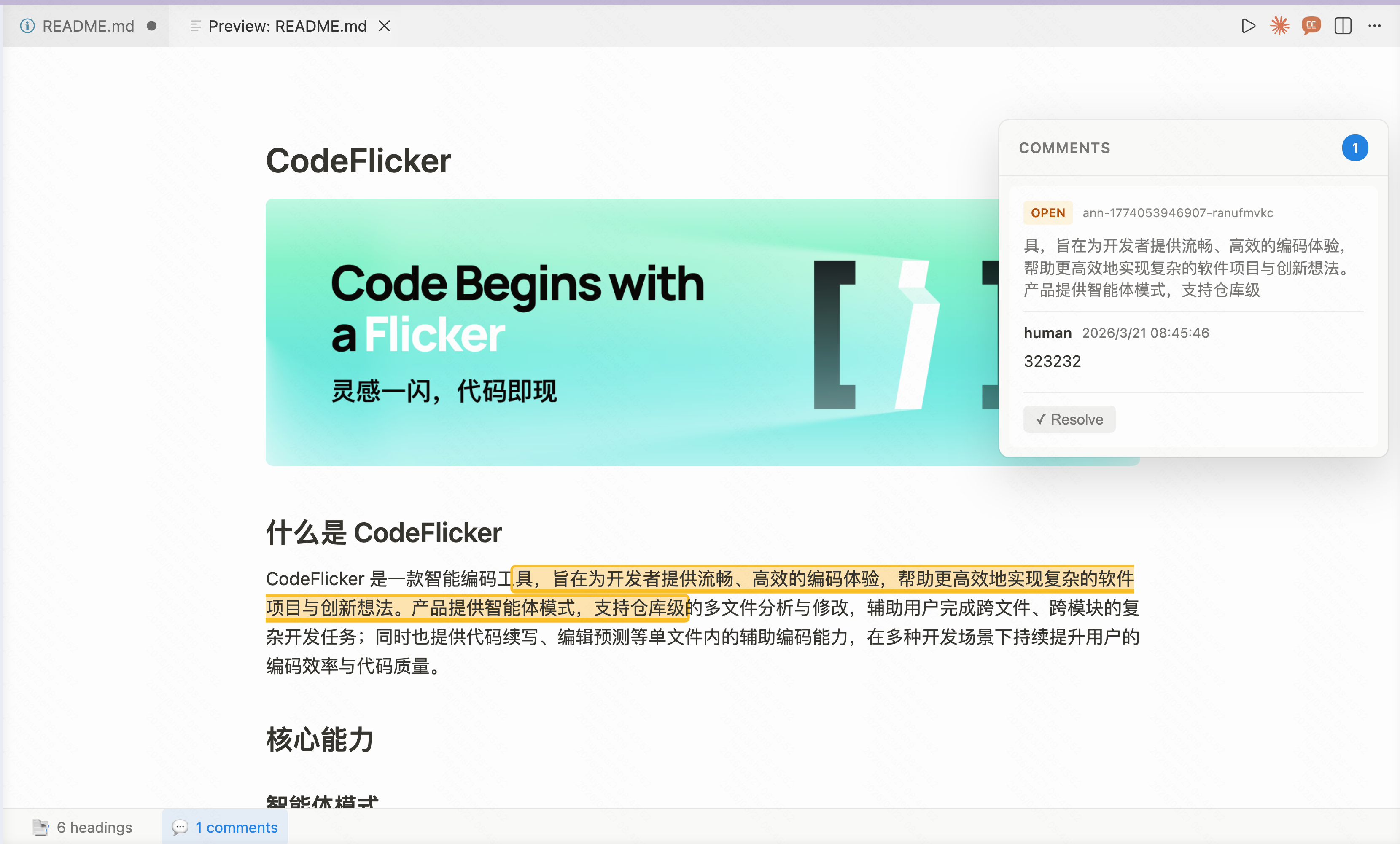
📄 Notion-style Markdown Preview

  • Clean, minimal design - Notion-inspired UI with floating panels and bottom status bar
  • Full Markdown rendering - Headings, code blocks, tables, images, links, and more
  • Frontmatter support - YAML frontmatter displayed as a beautiful metadata card
  • Auto-open on file open - Preview automatically opens when you open a .md file
  • Keyboard shortcut - Cmd+Shift+V (Mac) / Ctrl+Shift+V (Windows)

📋 Floating Outline Panel

  • Hierarchical outline - See all headings (H1-H6) in a tree structure
  • Click to jump - Smooth scrolling to any heading
  • Scroll spy - Active heading automatically highlighted as you scroll
  • Hover to show - Panel appears when hovering the left edge
  • Toggle via status bar - Pin/unpin from the bottom status bar

💬 Inline Comments & Annotations

  • Select & comment - Select text → floating toolbar → add comment
  • In-place input - Comment input appears right where you selected
  • Visual highlighting - Commented text highlighted with amber underline
  • Annotation status - Open (amber) / Resolved (green) markers
  • Writes to file - Comments stored as <annotation> tags in the Markdown source
  • AI-readable - Comment syntax designed for AI tools to parse and respond

🎨 Design Highlights

  • Notion-like color system (light & dark mode)
  • Floating panels with popup shadows (no borders)
  • Bottom status bar showing heading & comment counts
  • Smooth animations and transitions
  • Responsive layout adapts to window size

📥 Install

From VSIX (Manual Install)

Download the latest .vsix from GitHub Releases, then:

code --install-extension markdown-comments-0.2.0.vsix

Or in VSCode: Cmd+Shift+P → "Extensions: Install from VSIX..."

From Source

git clone https://github.com/huyansheng3/markdown-comment.git
cd markdown-comment/packages/packages/vscode-extension
npm install
npm run package
code --install-extension markdown-comments-0.2.0.vsix

📖 Usage

Adding Comments

  1. Open any .md file — preview opens automatically
  2. Select text in the preview area
  3. Click the 💬 button in the floating toolbar
  4. Type your comment and press Cmd+Enter to submit

Viewing Comments

  • Click 💬 in the bottom status bar to toggle the comments panel
  • Click highlighted text to see associated comments
  • Comments panel shows all threads with open/resolved status

Outline Navigation

  • Hover the left edge of the preview to reveal the outline
  • Click 📑 in the bottom status bar to pin the outline panel
  • Click any heading to smooth-scroll to it

Resolving Comments

  • Open the comments panel
  • Click "✓ Resolve" on any open comment thread

⚙️ Configuration

Setting Default Description
markdownComments.preview.openPreviewOnOpen true Auto-open preview when opening a .md file
markdownComments.preview.showComments false Show comments panel by default
markdownComments.preview.showOutline false Show outline panel by default
markdownComments.comments.highlightColor rgba(255, 212, 0, 0.2) Highlight color for open annotations
markdownComments.comments.resolvedHighlightColor rgba(0, 200, 0, 0.1) Highlight color for resolved annotations

⌨️ Keyboard Shortcuts

Shortcut Command
Cmd+Shift+V / Ctrl+Shift+V Open Preview to Side
Cmd+Enter Submit comment (in comment input)
Escape Cancel comment input

🗨️ Comment Syntax

Comments are stored inline in the Markdown source using <annotation> tags:

<annotation id="c1" status="open">

This text has comments attached.

<comment by="human" time="2026-03-21T08:00:00Z">
Consider rephrasing this section.
</comment>

<comment by="ai" time="2026-03-21T08:01:00Z">
Good suggestion! Updated.
</comment>

</annotation>

This format is designed to be:

  • Human-readable in raw Markdown
  • AI-parseable for automated review workflows
  • Git-friendly for version control

📋 Requirements

  • VSCode 1.85.0 or higher

🔗 Related

  • comment-md - Core library and React components
  • Live Demo - Try the React-based demo

📄 License

MIT © huyansheng

  • Contact us
  • Jobs
  • Privacy
  • Manage cookies
  • Terms of use
  • Trademarks
© 2026 Microsoft