Hunter's Task Explorer
A VS Code extension that adds a Task Explorer view to the activity bar. It lists the
tasks discovered via the VS Code Tasks API, grouped by source:
- Workspace — tasks defined in
.vscode/tasks.json
- npm, typescript, etc. — auto-detected task sources
Features
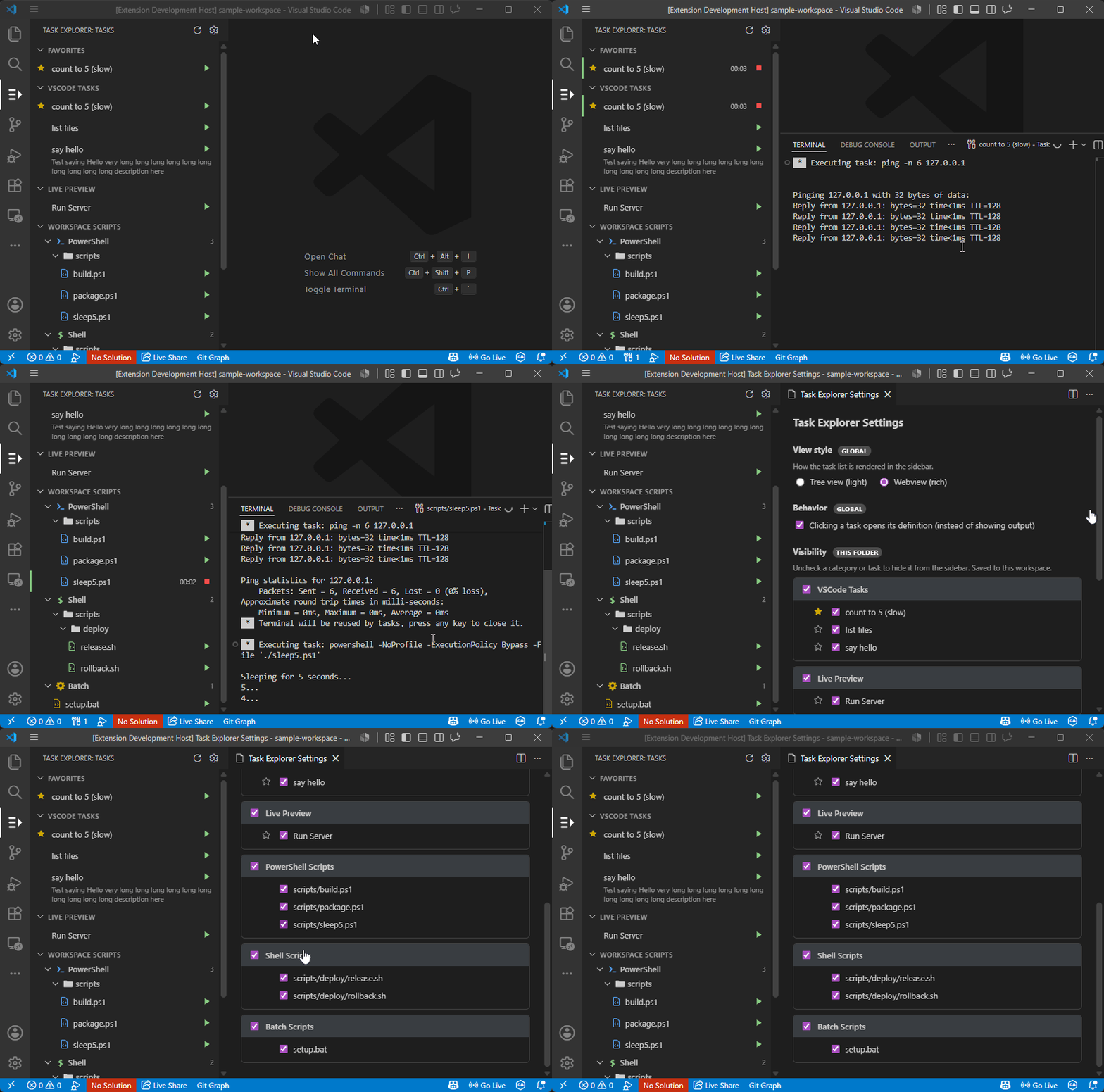
Run & monitor
- Inline Run icon on every task.
- While a task runs: the row shows ticking elapsed time, the Run icon becomes a
Stop icon, and (in the tree view) a Show Output icon appears.
- Show Output reveals the task's integrated terminal; Stop terminates it.
- Rows auto-revert when a task finishes.
- Click a task to jump to its definition in
tasks.json / package.json
(on by default — toggle in settings).
Two view styles
Switch in the settings page or via taskExplorer.viewStyle:
- Tree (default) — native, lightweight, single-line items.
- Webview — richer: two-line items (title + wrapping detail), right-aligned elapsed
runtime, colored run/stop buttons, and collapsible/indented groups.
Favorites
- A Favorites section pinned to the top of both views.
- Add/remove via tree right-click, the star in the settings page, or the
hover star on each webview row.
Workspace Scripts
A Workspace Scripts category (sibling to the task sources) scans the workspace
for script files and groups them by type, each with a distinct colored icon:
PowerShell (.ps1, .psm1, .psd1)
Shell (.sh, .bash, .zsh, .ksh)
Batch (.bat, .cmd)
Scripts appear as a nested folder tree matching their location on disk.
Run / Stop any script inline — it runs with the right interpreter in an
integrated terminal, with ticking elapsed time in both views.
Click a script to open it in the editor.
The list auto-refreshes as scripts are added or removed.
In the settings page, show/hide a whole script type (e.g. hide Shell scripts
on Windows where they can't run natively) or individual scripts.
Disable entirely with taskExplorer.showWorkspaceScripts.
Settings page
Open from the gear icon in the view title bar:
- Switch view style (global).
- Toggle click-to-open-definition (global).
- Show/hide each category and each task (saved per workspace folder).
- Star tasks as favorites.
Settings reference
| Setting |
Scope |
Default |
Description |
taskExplorer.viewStyle |
global |
tree |
tree or webview rendering. |
taskExplorer.openDefinitionOnClick |
global |
true |
Click a task to open its definition instead of its output. |
taskExplorer.showWorkspaceScripts |
folder |
true |
Scan the workspace for script files and list them under Workspace Scripts. |
taskExplorer.hiddenCategories |
folder |
[] |
Categories (and script types) hidden from the sidebar. |
taskExplorer.hiddenTasks |
folder |
[] |
Tasks hidden from the sidebar. |
taskExplorer.favorites |
folder |
[] |
Favorited tasks. |
Visibility and favorites are managed through the settings page rather than edited by hand.
Develop
npm install
npm run compile        # builds SCSS then TypeScript
npm run watch          # tsc watch
npm run watch:css      # sass watch (run alongside watch)
Press F5 to launch the Extension Development Host.
Webview assets live in media/ as *.html, *.scss (compiled to *.css), and *.js;
TypeScript injects them via a shared template loader (src/webviewHtml.ts).
Test
npm test
Runs @vscode/test-cli integration tests in a real VS Code instance against this
folder's .vscode/tasks.json. Tests live in src/test/.
Project layout
src/extension.ts — activation, command registration, task lifecycle, jump-to-definition.src/taskProvider.ts — tree TreeDataProvider, nodes, running-state tracking.src/scriptScanner.ts — workspace script discovery, categorization, and run tasks.src/webviewProvider.ts — webview sidebar view.src/settingsPanel.ts — settings webview panel.src/config.ts — settings accessors (view style, visibility, favorites).src/webviewHtml.ts — webview HTML template loader.media/ — webview HTML / SCSS / JS assets.
Package
npm run package        # produces a .vsix via @vscode/vsce
npm run publish        # publishes to the Marketplace

