OpenCode Web Integration


Languages: English | 简体中文
A VSCode extension that integrates OpenCode Web functionality into the sidebar.
Features
- 🌐 Multi-language Support: Supports English, Simplified Chinese, Japanese, and Korean, automatically following VSCode interface language
- 🖥️ Sidebar Integration: Display OpenCode Web interface in VSCode sidebar
- 🚀 Quick Launch: Launch OpenCode directly from VSCode with a single command
- 📝 Code Integration: Send selected code snippets along with context to OpenCode TUI
- ⚙️ Configurable: Customize port and language settings
- 🔄 Process Management: Support restarting and stopping OpenCode processes
Installation
Prerequisites
Globally install OpenCode:
npm install -g opencode-ai
Install this extension from VSCode Marketplace (search "OpenCode Web Integration")
Usage
Launch OpenCode
Use OpenCode Web in the left sidebar

Use OpenCode Web in the editor area
Besides the left sidebar, you can also display it in the editor area

Send Code to OpenCode TUI
- Select code in the editor
- Right-click and select
Append to OpenCode Terminal
- Selected code will be sent to OpenCode along with file context

Process Management
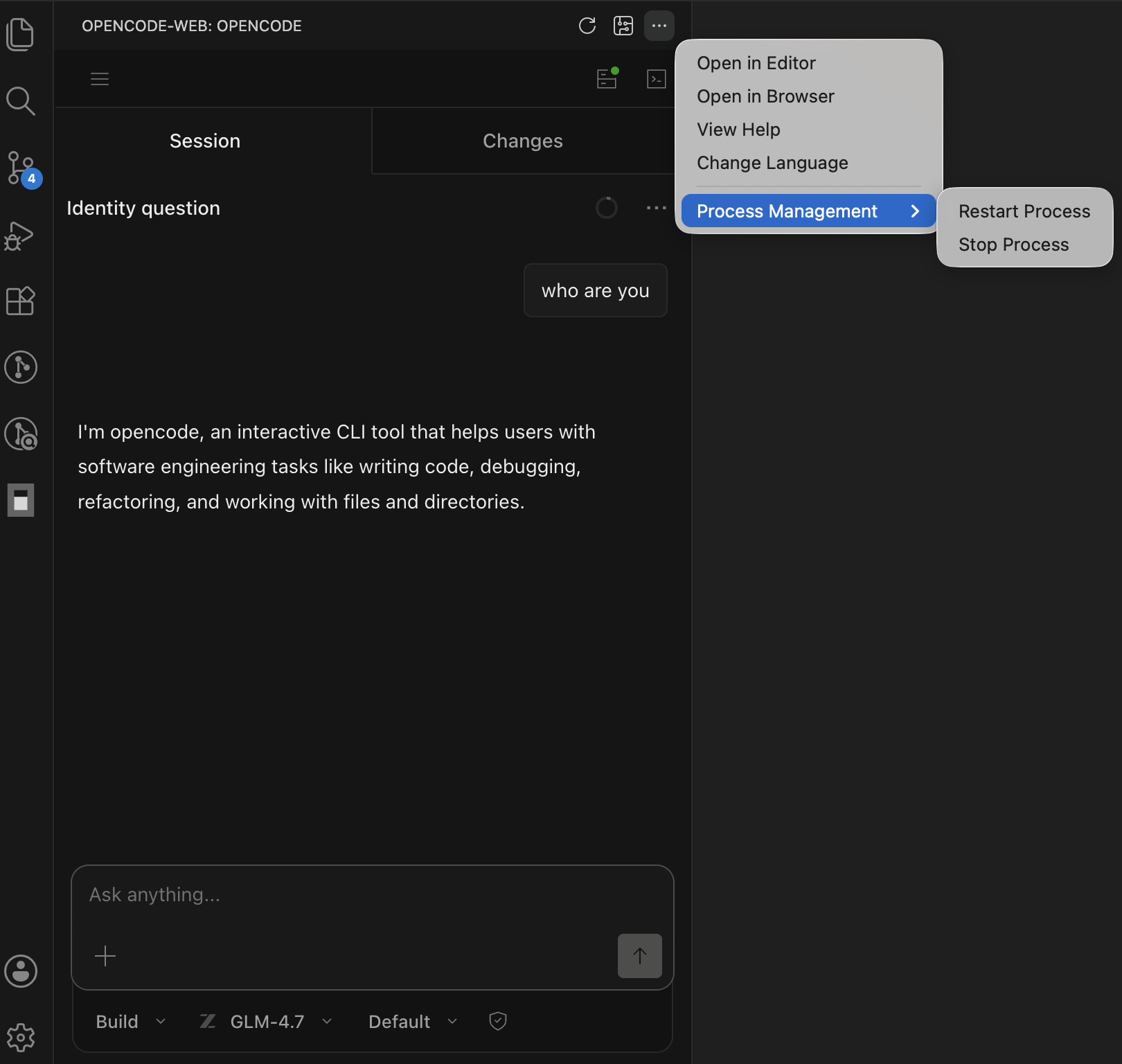
In the sidebar toolbar:
- Refresh Connection: Refresh the OpenCode Web page
- Open TUI Terminal: Open terminal in the right editor area
- More Actions:
- Open in Editor
- Open in Browser
- View Help
- Process Management:
- Restart Process
- Stop Process
Configuration
You can configure this extension in VSCode Settings:
| Setting |
Type |
Default |
Description |
opencode.port |
number |
4099 |
OpenCode server port |
opencode.timeout |
number |
5000 |
Connection timeout (milliseconds) |
opencode.language |
string |
auto |
Interface language (auto/en/zh-cn/ja/ko) |
Language Switching
The extension supports the following languages:
- Auto: Follow VSCode interface language
- English (en)
- Simplified Chinese (zh-cn)
- Japanese (ja)
- Korean (ko)
You can switch languages through:
- Modify the
opencode.language configuration in settings
- Click the language switch button in the top-right corner of the Webview (when OpenCode is running)
- Via the sidebar "More Actions" menu → "Change Language"
License
MIT
Support
For issues and feature requests, please visit the GitHub repository.
| |


