PICO-8 IDE
A VS Code extension for browsing and playing PICO-8 games.
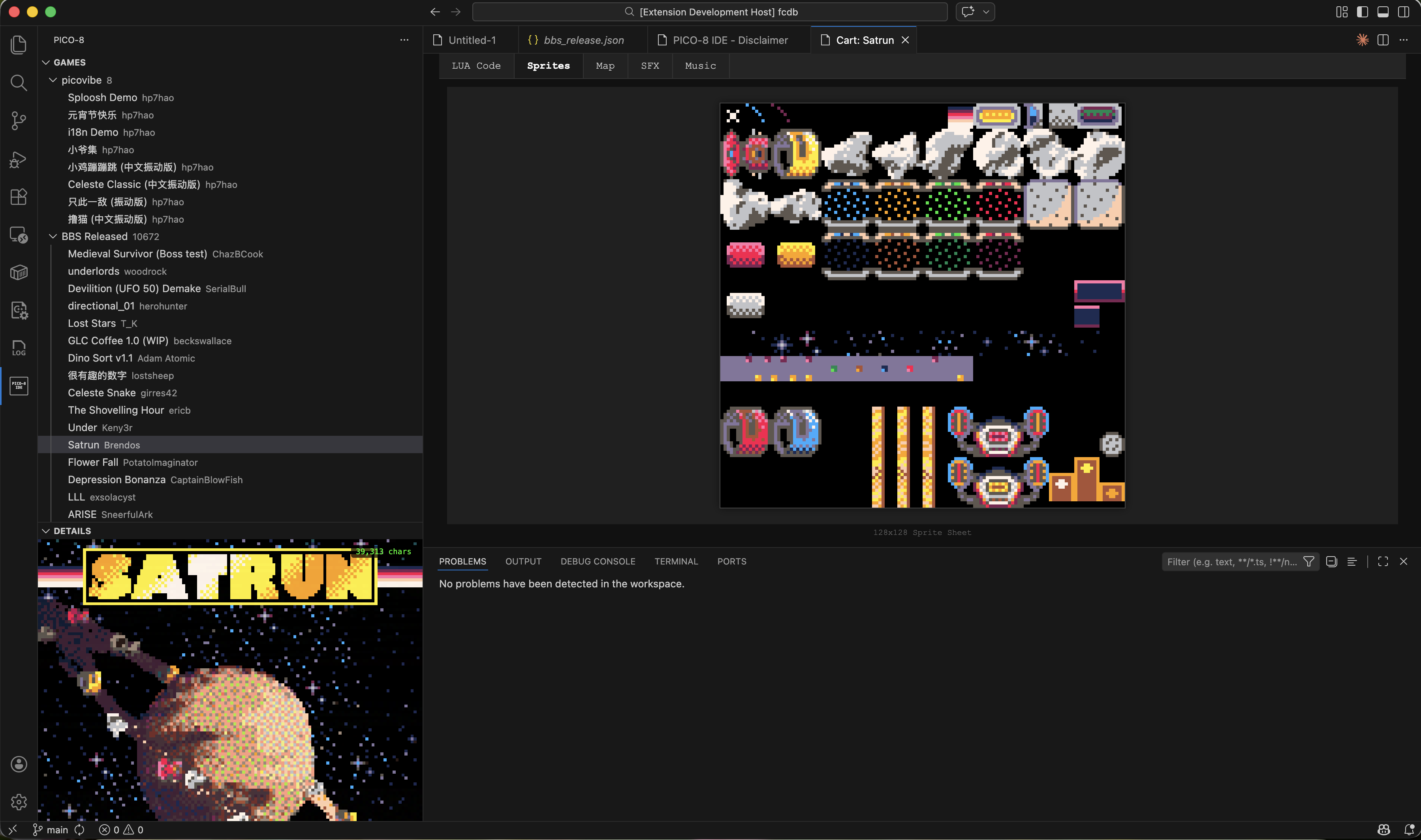
Note: The extension currently supports viewing cartridge data only (code, sprites, maps, SFX, music). Editing and running games is coming soon.
Features
- Browse PICO-8 games from the Lexaloffle BBS
- Search games by name, author, or game ID
- View game details, thumbnails, and metadata
- Open and read PICO-8 cartridge source code
- View sprites, maps, SFX, and music data
- Curated game lists
Usage
After installing, click the PICO-8 icon in the Activity Bar to open the game browser. Games are loaded from a regularly updated database.
Create Your Own Game List
The extension supports curated game lists powered by the fcdb project. You can create your own list and contribute it to the database.
Add a JSON file to fcdb/curated/pico8/lists/ with any name (e.g. mylist.json). Four formats are supported:
A plain array of game ID strings and/or inline game objects:
[
  "131736",
  {
    "id": "my_custom_game",
    "name": "My Game",
    "source": "custom",
    "author": { "name": "yourname" },
    "description": "A cool PICO-8 game.",
    "created": "2025-01-01 00:00:00",
    "updated": "2025-01-01 00:00:00",
    "extension": {
      "cart_url": "https://example.com/mygame.p8.png",
      "tags": ["platformer"]
    }
  }
]
A named list with metadata and an array of game IDs or inline objects:
{
  "meta": { "name": "My List", "description": "A hand-picked collection.", "order": 1 },
  "games": ["131736", "54321"]
}
Automatically matches games by name or tags:
{
  "meta": { "name": "Puzzle Games", "description": "Games tagged or named with puzzle." },
  "filter": { "keyword": "puzzle" }
}
Sorts games by a numeric field and takes the top N:
{
  "meta": { "name": "BBS Fan Favorites", "description": "Top 100 most liked games on the BBS.", "order": 5 },
  "rank": { "field": "likes", "order": "desc", "limit": 100 }
}
Required fields for inline games
| Field |
Description |
id |
Unique identifier for the game |
name |
Display name |
author.name |
Author name |
created |
Creation date (YYYY-MM-DD HH:MM:SS) |
updated |
Last update date (YYYY-MM-DD HH:MM:SS) |
Optional fields: source (defaults to "custom"), description, license, ref_id, and extension (for cart_url, tags, etc.)
Translations
Add a companion file named {listname}.{lang}.json (e.g. mylist.zh_CN.json) to provide translated metadata:
{
  "meta": { "name": "My List in Chinese", "description": "..." }
}
Build the database
cd fcdbtool
npm run build && npm run db:pico8
The build pipeline will:
- Add inline games to the master database
- Download cartridges from
cart_url if provided
- Generate thumbnails automatically
- Output the list view to
fcdb/dist/pico8/lists/yourlist.json
Disclaimer
This is a hobby project for learning purposes only. Not for sale and not affiliated with Lexaloffle Games.
If you're interested in PICO-8, please visit the official website: https://www.lexaloffle.com/pico-8.php
PICO-8 IDE (中文)
一个用于浏览和体验 PICO-8 游戏的 VS Code 扩展。
注意: 目前仅支持查看卡带数据(代码、精灵图、地图、音效、音乐),编辑和运行游戏功能即将推出。
功能
- 浏览 Lexaloffle BBS 上的 PICO-8 游戏
- 按名称、作者或游戏 ID 搜索游戏
- 查看游戏详情、缩略图和元数据
- 打开并阅读 PICO-8 卡带源代码
- 查看精灵图、地图、音效和音乐数据
- 精选游戏列表
使用方法
安装后,点击活动栏中的 PICO-8 图标即可打开游戏浏览器。游戏数据来自定期更新的数据库。
创建你自己的游戏列表
本扩展支持由 fcdb 项目驱动的精选游戏列表。你可以创建自己的列表并贡献到数据库中。
在 fcdb/curated/pico8/lists/ 目录下添加一个 JSON 文件,文件名任意(例如 mylist.json)。支持四种格式:
格式 1 — 简单数组
游戏 ID 字符串和/或内联游戏对象的数组:
[
  "131736",
  {
    "id": "my_custom_game",
    "name": "My Game",
    "source": "custom",
    "author": { "name": "yourname" },
    "description": "一个很酷的 PICO-8 游戏。",
    "created": "2025-01-01 00:00:00",
    "updated": "2025-01-01 00:00:00",
    "extension": {
      "cart_url": "https://example.com/mygame.p8.png",
      "tags": ["platformer"]
    }
  }
]
格式 2 — 结构化游戏列表
带有元数据的命名列表,包含游戏 ID 或内联对象的数组:
{
  "meta": { "name": "我的列表", "description": "精心挑选的合集。", "order": 1 },
  "games": ["131736", "54321"]
}
格式 3 — 关键词过滤
按名称或标签自动匹配游戏:
{
  "meta": { "name": "益智游戏", "description": "名称或标签中包含 puzzle 的游戏。" },
  "filter": { "keyword": "puzzle" }
}
格式 4 — 排行榜
按数值字段排序,取前 N 名:
{
  "meta": { "name": "BBS 玩家最爱", "description": "BBS 上最受欢迎的 100 款游戏。", "order": 5 },
  "rank": { "field": "likes", "order": "desc", "limit": 100 }
}
内联游戏的必填字段
| 字段 |
说明 |
id |
游戏的唯一标识符 |
name |
显示名称 |
author.name |
作者名称 |
created |
创建日期(YYYY-MM-DD HH:MM:SS) |
updated |
最后更新日期(YYYY-MM-DD HH:MM:SS) |
可选字段:source(默认为 "custom")、description、license、ref_id、extension(用于 cart_url、tags 等)
翻译
添加一个名为 {listname}.{lang}.json 的伴随文件(例如 mylist.zh_CN.json)提供翻译元数据:
{
  "meta": { "name": "我的列表", "description": "..." }
}
构建数据库
cd fcdbtool
npm run build && npm run db:pico8
构建流程会:
- 将内联游戏添加到主数据库
- 如果提供了
cart_url,自动下载卡带
- 自动生成缩略图
- 将列表视图输出到
fcdb/dist/pico8/lists/yourlist.json
免责声明
本项目仅为业余学习项目,不用于销售,与 Lexaloffle Games 无关。
如果你对 PICO-8 感兴趣,请访问官方网站:https://www.lexaloffle.com/pico-8.php
许可证 / License
MIT

