vscode-favorites




An extension that lets the developer mark resources (files or folders) as favorites, so they can be easily accessed.
Install
Launch VS Code Quick Open (cmd/ctrl + p), paste the following command, and press Enter.
ext install howardzuo.vscode-favorites
Usage
Add to Favorites
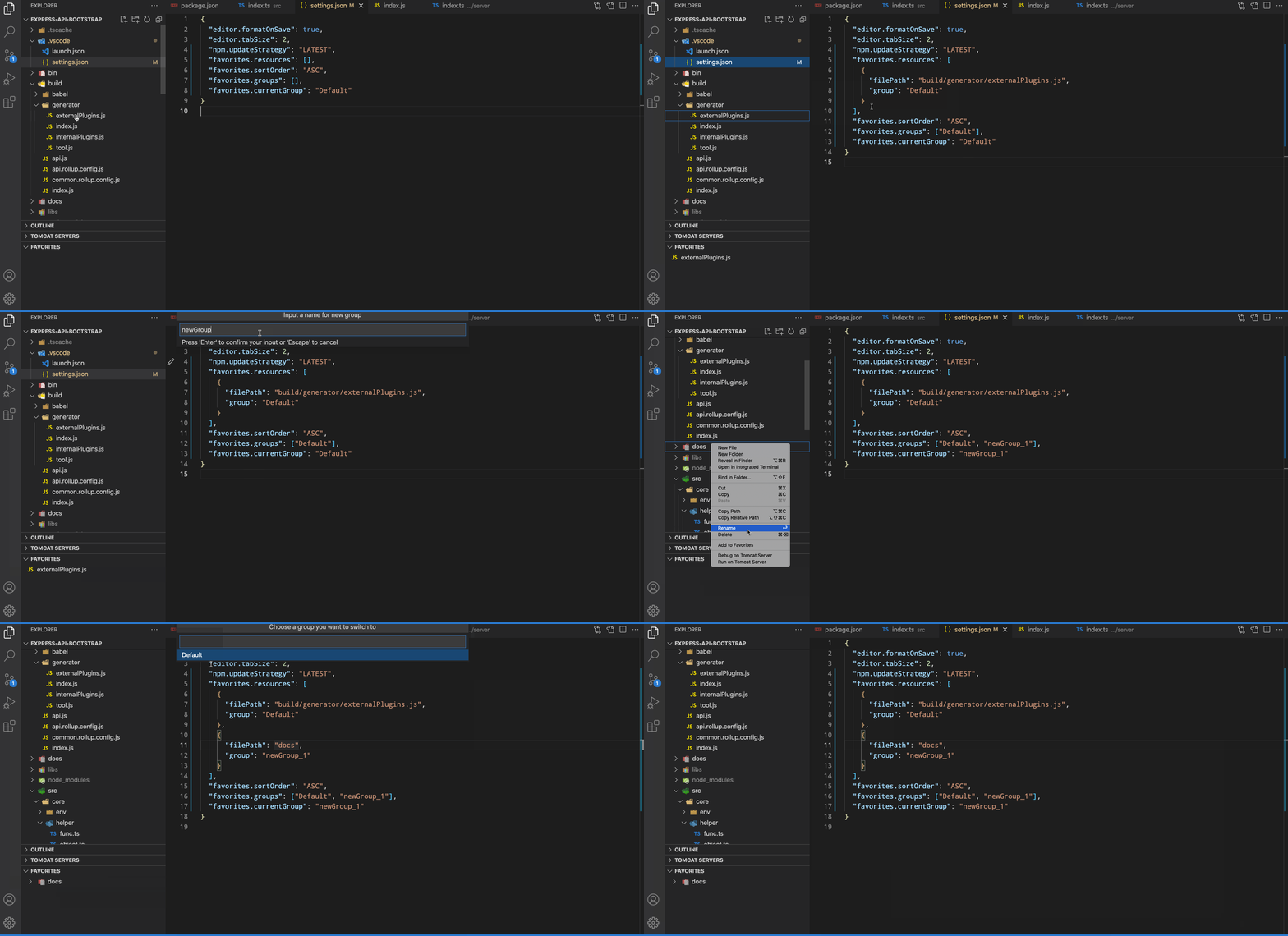
An Add to Favorites command in Explorer's context menu saves links to your favorite files or folders into your XYZ.code-workspace file if you are using one, else into the .vscode/settings.json file of your root folder.
Toggle Favorite for Active File
Use the Toggle Favorite command from the Command Palette (cmd/ctrl + shift + p) to quickly add or remove the currently active file from your favorites.
Toggle Folder Favorite for Active File
Use the Toggle Folder of Active File command from the Command Palette (cmd/ctrl + shift + p) to quickly add or remove the folder containing the currently active file from your favorites.
Drag and Drop Support
Reordering Favorites
You can reorder favorites within the favorites panel by dragging and dropping them to your desired position. The sort order will automatically switch to "MANUAL" when you start dragging.
Adding Files via Drag and Drop
You can also add files to your favorites by dragging them from:
- Editor tabs: Drag the tab of an open file directly into the favorites panel
- Explorer: Drag files or folders from the Explorer view into the favorites panel
Your favorites are listed in a separate view and can be quickly accessed from there.
Configuration
{
    "favorites.resources": [], // resources path you prefer to mark
    "favorites.sortOrder": "ASC", // DESC, MANUAL
    "favorites.saveSeparated": false // whether to use an extra config file
    "favorites.groups": ["Default"], // the groups you have created
    "favorites.currentGroup": "Default" // determine the current using group
}
You normally don't need to modify this config manually. Use context menus instead.
Changelog
Changelog on Marketplace
LICENSE
GPL v3 License
Development
Environment Setup
Clone the repository:
git clone https://github.com/leftstick/vscode-favorites.git
cd vscode-favorites
Install dependencies:
pnpm install
Run development server:
pnpm run watch
Launch extension:
- Press
F5 in VS Code
- This will open a new VS Code window with the extension loaded
Build and Test
Build the extension:
pnpm run build
Run tests:
pnpm run test
Package the extension:
pnpm run package
Contribution Guidelines
- Fork the repository
- Create a feature branch:
git checkout -b feature/your-feature-name
- Make your changes
- Run tests to ensure your changes don't break existing functionality
- Commit your changes with a descriptive commit message
- Push to your fork
- Create a pull request
Code Style
- Follow TypeScript best practices
- Use
async/await for asynchronous operations
- Add appropriate error handling
- Write clear and concise comments
- Maintain consistent code formatting
- TypeScript: For type-safe code
- esbuild: For fast builds
- Mocha: For unit tests
- VS Code Test: For extension integration tests


