Forge for VS Code
The full Forge agentic coding workflow, brought into your editor. Run tasks from any selection, watch them stream live, browse history, and keep an eye on token spend without leaving VS Code.



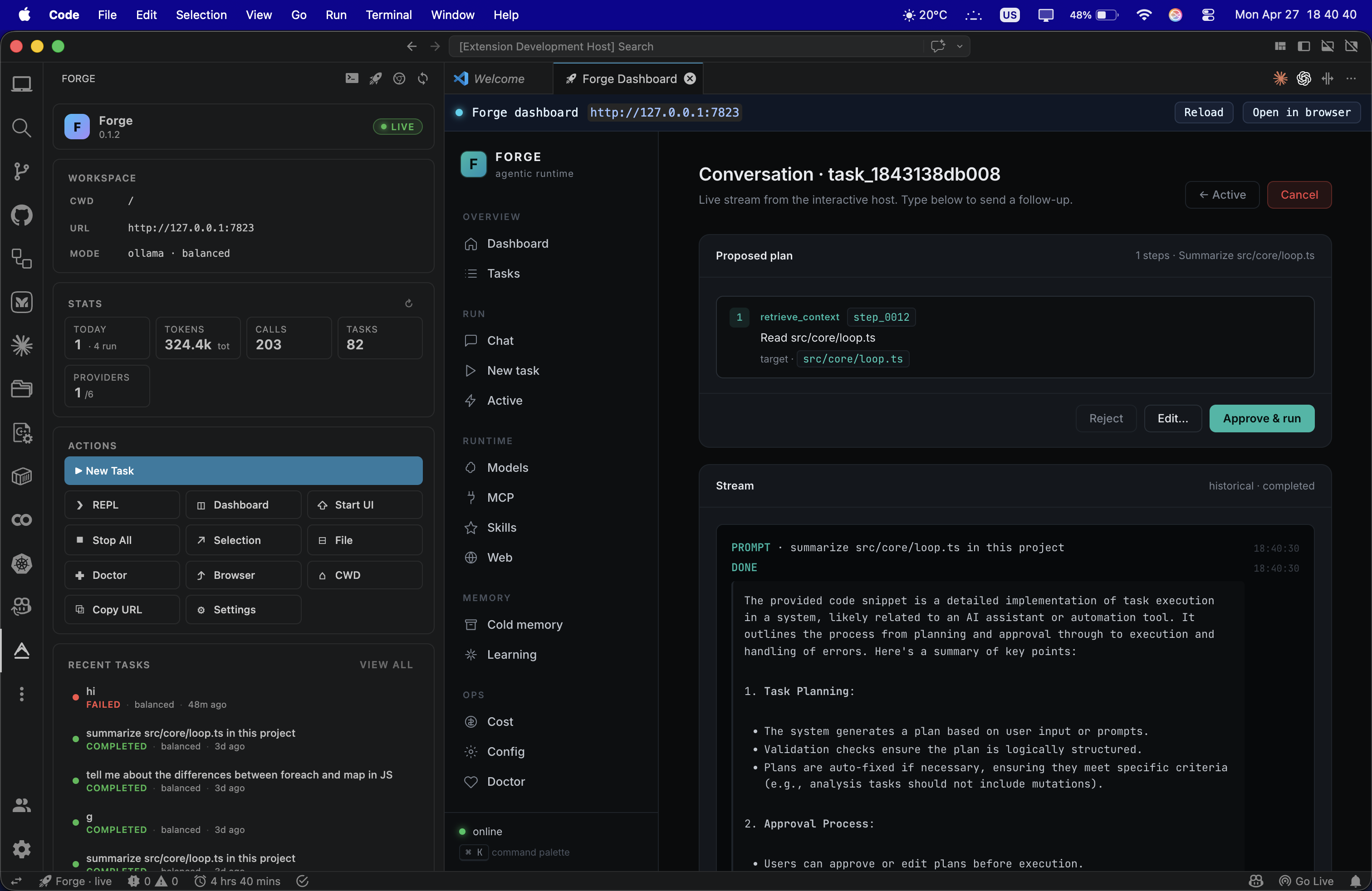
Highlights
- Live activity-bar sidebar with status pill, workspace meta, real-time stats, quick actions, recent tasks, and providers. Reads straight from
~/.forge/global/index.db, so numbers are accurate even when no server is running.
- Run anything as a task: command palette, editor context menu (selection or whole file), or the sidebar. Each run opens its own integrated terminal and streams in real time.
- One-click dashboard: launches the local UI server in the background, waits until it is reachable, and embeds it in a webview alongside your code. Deep links go straight to a task's conversation view.
- Status-bar awareness: a single rocket pill flips between live and idle and tells you exactly which port is being polled.
- Click-through to task detail: every recent task in the sidebar opens directly into its conversation, plan, and result, not just the dashboard home.
- Workspace-aware: respects your VS Code workspace folder by default and lets you override the working directory per project, or pick a fresh one with a folder picker.
Quick start
# 1. Install the Forge runtime
npm install -g @hoangsonw/forge

# 2. Sanity check
forge doctor
Then install the extension and reload. From the activity bar, click the Forge rocket icon to open the sidebar. The big primary button kicks off a new task, the others wire up the rest of the surface.
If forge --version prints a version in your terminal, you are ready.
The Forge view is a single styled webview, not a tree, so layout adapts to whatever width you give it.
- Header — gradient logo, Forge wordmark, binary version, and a status pill (
live, idle, or no binary).
- Workspace card — current
cwd, dashboard url, active provider and mode. Hover any row to copy the value.
- Stats card — Today's tasks (with a running counter when something is in flight), Tokens (lifetime in + out), Calls (model invocations), Tasks (lifetime count), Providers (live/total). Refresh button on the title.
- Actions card — Run Task (primary), REPL, Dashboard, Start UI, Stop All, Run Selection, Run File, Doctor, Open in Browser, Change CWD, Copy URL, Settings. The grid reflows to one column on narrow widths.
- Recent tasks card — the last eight tasks across every project, with a colored state dot, mode chip, time-ago, and attempts. Click a row to open its conversation directly. Pulse animation on
running and verifying.
- Providers card — every model provider Forge knows about, with live/down dots and model counts.
- Footer — last refresh time and a status shortcut.
The sidebar polls every 4 seconds while it is visible and pauses when collapsed, so it does not burn CPU when you are not looking at it.
Commands
All commands live under the Forge: prefix in the command palette (Cmd+Shift+P).
| Command |
What it does |
Forge: Run Task… |
Prompts for a task description, runs forge run "<task>" in a fresh terminal. |
Forge: Run Selection as Task |
Editor context menu. Sends the highlighted text. |
Forge: Use Active File as Task |
Sends the whole buffer as a task. Useful for spec files and TODO lists. |
Forge: Open REPL |
Opens (or focuses) the persistent Forge REPL terminal. |
Forge: Start UI Server |
Spawns forge ui start --port … --bind …, polls /api/status until it answers. |
Forge: Open Dashboard |
Opens the dashboard inside a webview, auto-starting the server if needed. |
Forge: Open Dashboard in Browser |
Same URL, your default browser. |
Forge: Stop UI Server |
Disposes the spawned server terminal and the embedded webview. |
Forge: Open Task in Dashboard |
Used by the sidebar; can also be bound to a key for any task id. |
Forge: Run Doctor |
Runs forge doctor in a terminal. |
Forge: Show Status |
Compact one-line health check (binary, cwd, dashboard reachability). |
Forge: Copy Dashboard URL |
Puts the dashboard URL on your clipboard. |
Forge: Stop All Forge Terminals |
Disposes every Forge-owned terminal in one shot. |
Forge: Change Working Directory |
Folder picker that updates forge.cwd for the workspace. |
Forge: Open Settings |
Jumps to the Forge section of VS Code settings. |
Forge: Refresh Sidebar |
Forces an immediate re-fetch. |
A status-bar item (Forge · live or Forge · idle) is always visible. Clicking it opens the dashboard, auto-starting the server if needed.
Settings
| Key |
Default |
Purpose |
forge.binaryPath |
forge |
Path to the Forge binary. Useful for nvm setups or local checkouts. |
forge.cwd |
(first workspace folder) |
Working directory for every Forge process the extension spawns. |
forge.uiHost |
127.0.0.1 |
Bind address for forge ui start. |
forge.uiPort |
7823 |
Port for the dashboard server. |
forge.autoStartUi |
false |
Start the dashboard automatically when VS Code loads the extension. |
forge.replArgs |
[] |
Extra args appended to the REPL command. |
forge.runArgs |
[] |
Extra args forwarded to forge run, e.g. ["--mode","plan"] or ["--allow-write"]. |
All settings respect VS Code's standard scope rules, so workspace overrides win over user defaults.
Workflows
Run something quickly. Highlight a comment like // TODO: add cache headers to /healthz, right-click → Forge: Run Selection as Task. A new terminal opens and Forge starts planning. Switch back to your code; the dashboard sidebar updates as the run progresses.
Spec-driven runs. Write a plain-text spec in feature.md, open it, run Forge: Use Active File as Task. Forge gets the full buffer as the prompt. Pair with forge.runArgs: ["--mode","plan"] if you only want a plan, not an implementation.
Watch a long task. Click the live status-bar pill or Forge: Open Dashboard. The webview embeds the same dashboard that runs in your browser, with a Reload and Open-in-Browser shortcut at the top.
Jump back into history. Click any row in the sidebar's Recent tasks. The dashboard opens directly to that task's conversation, plan, and result, even if the task lived in a different project.
Hop between projects. Use Forge: Change Working Directory to point Forge at a different folder without leaving your VS Code window. Workspace-scoped, so each window remembers its own.
The sidebar pulls from two places, whichever is fresher:
- The dashboard API (
/api/status, /api/tasks?limit=8, /api/models) when the UI server is running. Best for in-flight task state and provider liveness.
- The local SQLite index at
$FORGE_HOME/global/index.db (default ~/.forge/global/index.db) read in read-only mode via the sqlite3 CLI. Best for stats, recent tasks, and anything that does not need a live process.
Tokens, calls, and lifetime task counts always come from the DB, so they are correct even with the dashboard stopped. Providers and the live running count come from the API when available.
Requirements
- VS Code 1.84 or later.
- Node.js 20+ (only because
@hoangsonw/forge requires it).
- The
sqlite3 CLI for the offline stats path. Preinstalled on macOS and most Linux distros. On Windows the extension still works, you just lose the offline stats and fall back to the API path.
Troubleshooting
- Sidebar shows
no binary. forge.binaryPath is wrong. Run which forge in a terminal and paste that into settings, or npm install -g @hoangsonw/forge.
- Status pill is stuck on
idle. forge ui start is not running. Click Start UI in the sidebar, or check that nothing else is bound to your forge.uiPort.
- Stats stuck at zero. The
sqlite3 CLI is not on PATH. brew install sqlite on macOS, apt install sqlite3 on Debian, or just start the dashboard and let the API path take over.
- Recent task click does nothing visible. Make sure the dashboard server is running 0.1.2 or later. Older versions did not deep-link from
?task=<id>.
Local development
cd vscode-extension
npm install
npm run build
# F5 in VS Code launches an Extension Development Host with this version loaded.
npm run watch keeps the TypeScript compiler in the background. npx @vscode/vsce package --no-dependencies produces a .vsix for sideloading.
License
MIT, same license as the Forge runtime.

