Skip to content
| Marketplace
Sign in
Visual Studio Code>Programming Languages>Claude Code Agent MonitorNew to Visual Studio Code? Get it now.
Claude Code Agent Monitor

Claude Code Agent Monitor

Son Nguyen

|
3 installs
| (1) | Free
Professional integrated dashboard for monitoring Claude Code AI agent activity, token usage, and costs directly in VS Code.
Installation
Launch VS Code Quick Open (Ctrl+P), paste the following command, and press enter.
Copied to clipboard
More Info

Claude Code Agent Monitor for VS Code

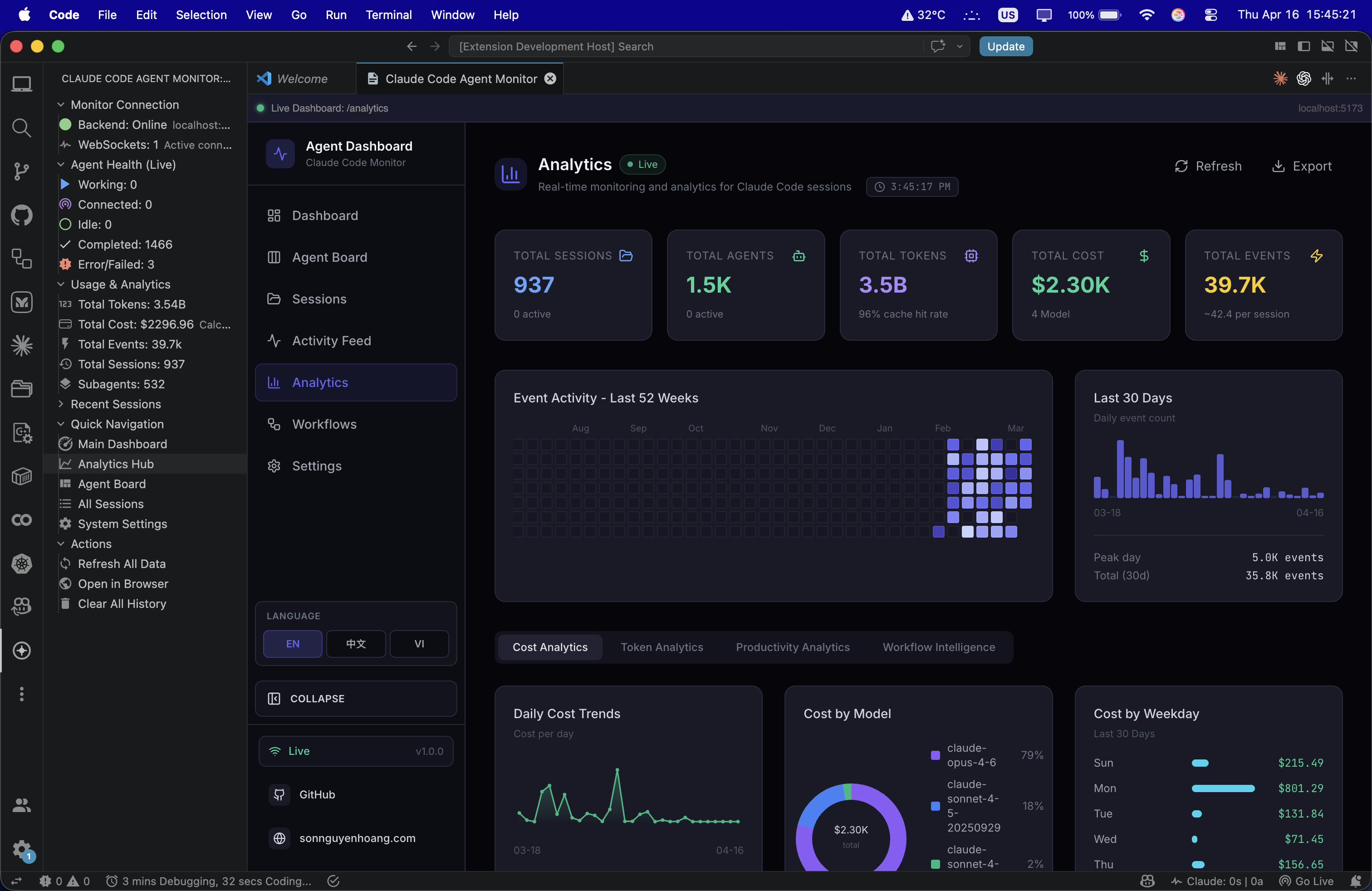
Claude Code Agent Monitor brings a high-fidelity, real-time dashboard for your Claude Code AI sessions directly into your VS Code workspace. Monitor token usage, track agent health, and view deep analytics without switching windows.

Extension Screenshot


🚀 Key Features

📊 Integrated Dashboard

Open the full agent monitoring dashboard in a dedicated VS Code tab. Supports real-time updates via WebSockets and local-first data storage.

🩺 Live Agent Health

Track all 5 agent states in your sidebar with color-coded status indicators:

  • Working: Active subagents currently processing tasks.
  • Connected: Agents initialized and ready.
  • Idle: Standby agents.
  • Completed: Successfully finished tasks.
  • Error/Failed: Instantly spot where things went wrong.

📈 Usage & Analytics

  • Token Tracking: Real-time display of Billions (B) or Millions (M) of tokens consumed.
  • Cost Calculation: Live estimate of total USD cost based on current model pricing.
  • Event Frequency: High-signal stats on events per session and subagent spawning.

🧭 Deep Navigation

Jump directly to specific views from the sidebar:

  • Main Dashboard: Global overview.
  • Analytics Hub: Deep dives into model performance.
  • Agent Board: Kanban-style view of subagent progress.
  • Recent Sessions: One-click access to your last 10 Claude sessions.

🛠️ Getting Started

1. Requirements

Ensure you have the Claude Code Agent Monitor server running locally:

npm install
npm run dev

2. Installation

  • Search for "Claude Code Agent Monitor" in the VS Code Marketplace.
  • Click Install.

3. Usage

  • Click the Radar/Dashboard icon in the Activity Bar.
  • The extension automatically detects your local server on ports 5173 (dev) or 4820 (prod).
  • Use the Refresh button in the sidebar to manually force an update.

📦 Publishing & Development

To generate a .vsix file for manual installation or marketplace upload:

  1. Install vsce globally:
    npm install -g @vscode/vsce
    
  2. Navigate to the extension folder:
    cd vscode-extension
    
  3. Run the package command:
    vsce package
    
    This will generate claude-code-agent-monitor-1.0.0.vsix.

📜 License

This extension is licensed under the MIT License.

Developed with ❤️ for the AI Engineer community.

  • Contact us
  • Jobs
  • Privacy
  • Manage cookies
  • Terms of use
  • Trademarks
© 2026 Microsoft