Hivey Code
A coding assistant for VS Code that does not send your code away.
Local models (Ollama, LM Studio, vLLM, llama.cpp), a gateway (OpenRouter, Azure, LiteLLM) or your own
account with OpenAI, Anthropic, Gemini, DeepSeek, Qwen, Mistral, xAI, Groq or Perplexity — your
choice, per role, and pseudonymized when it does leave.
Open source (Apache-2.0), zero runtime dependencies, zero telemetry.
The course · Le cours, en français · Architecture · Privacy ·
Threat model
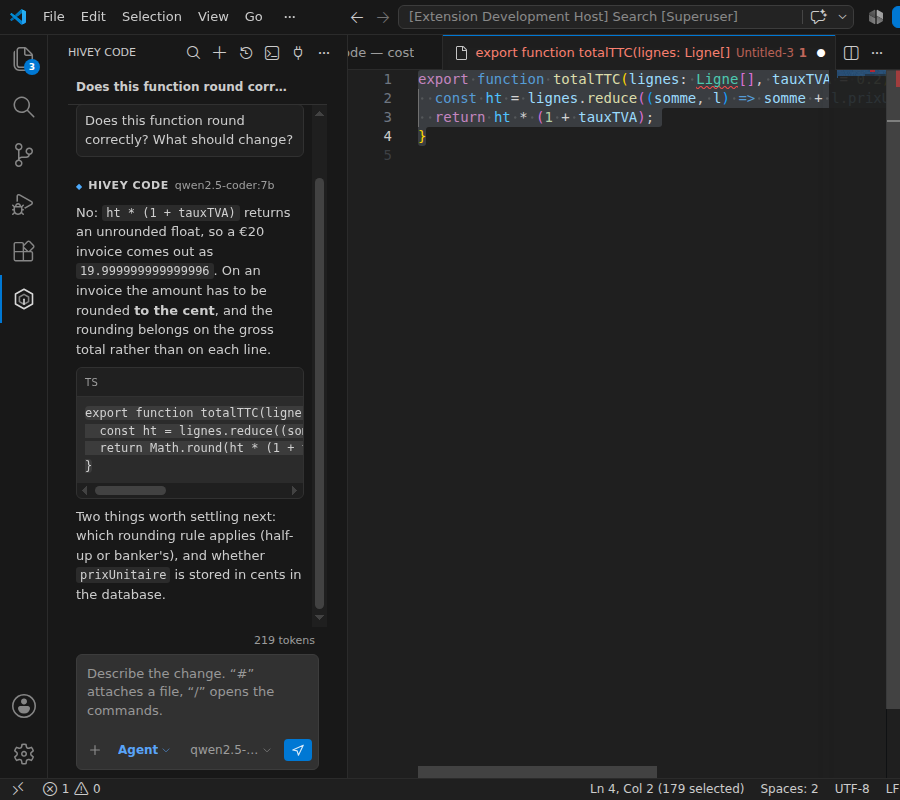
Real screenshots, taken from a VS Code launched by the integration suite — node scripts/screenshots.mjs
takes them, so they cannot quietly stop being true. The panel sits in the right-hand bar with the
editor's own furniture cropped away, because the subject is the panel. Only the model answering is a
stub server; everything else is the product.
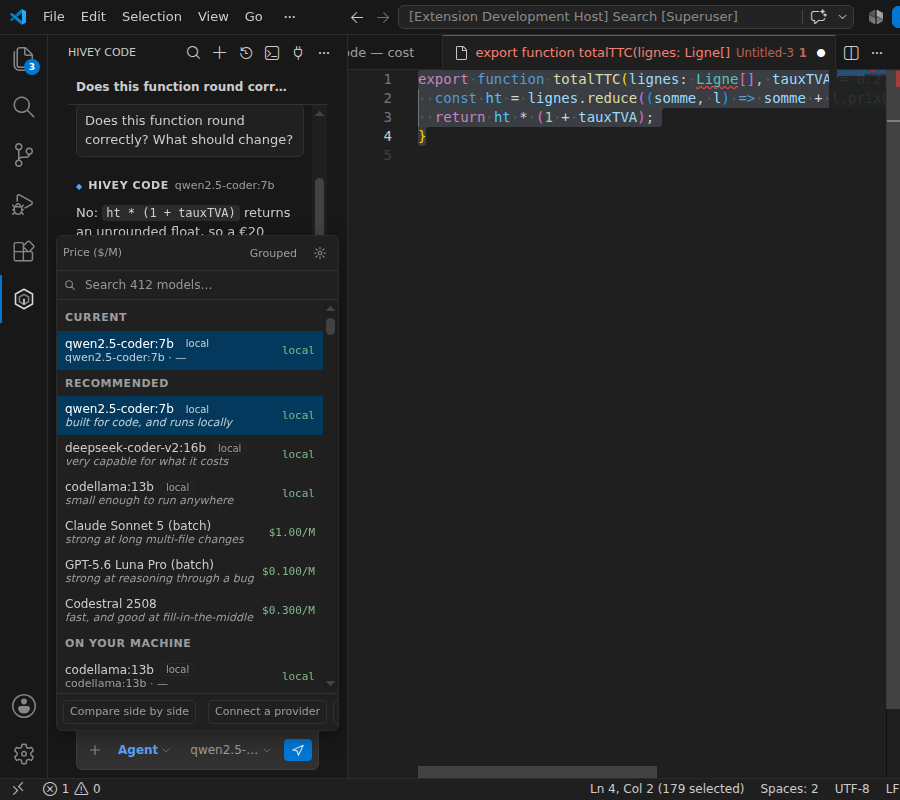
| Choosing a model |
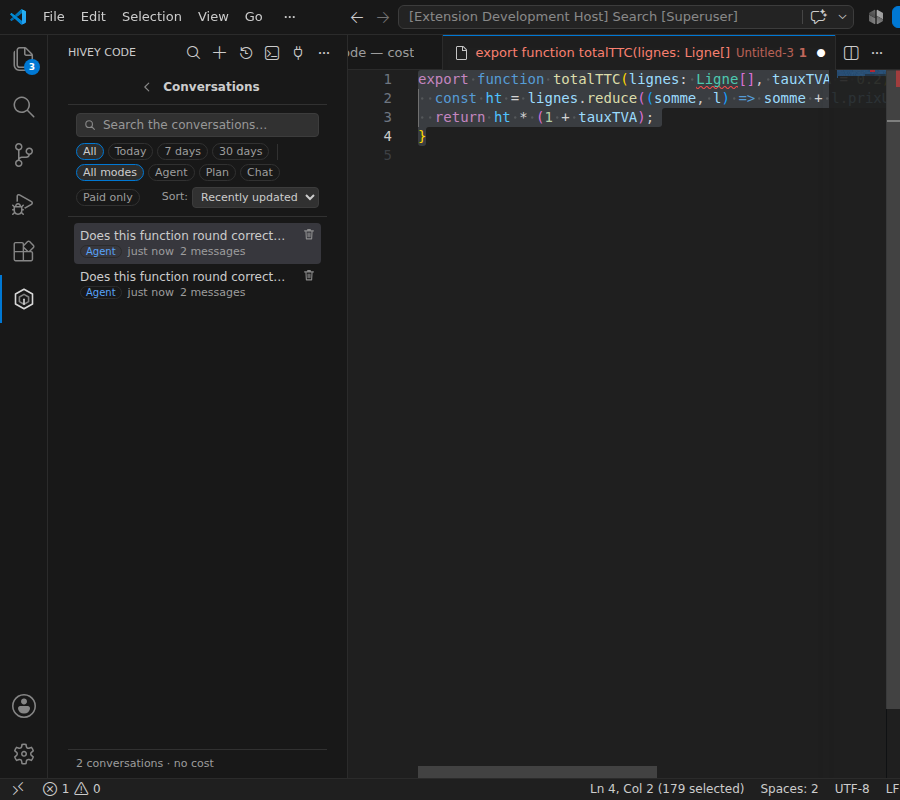
Conversations |
 |
 |
Why
GitHub Copilot is excellent, and it presents a company with two problems:
- The code leaves. Every keystroke, every open file, every question goes to a third party. For
a lot of teams — health, defence, banking, subcontractors under NDA — that alone closes the file.
- The cost is structural. The product sends everything to one large remote model, because that
is the product. You pay per developer, every month, for completions that are 90 % trivial.
Hivey Code inverts both: the default is the model already running on your machine, the remote one is
an escalation that has to be justified, consented to, and paid for out of a budget; and anything
that does leave is reversibly pseudonymized first.
What it does
|
|
| Inline completion |
Fill-in-the-middle with your local code model. Debounced, cancellable, with a typed-through cache that serves the rest of a suggestion with no request at all. |
| Sidebar chat |
Streaming, attachments (active file, selection, chosen files), per-workspace history, model picker, context and cost meters. |
| Three modes |
Chat (no tools), Plan (reads the repository, changes nothing — what a plan looks like), Agent (reads, edits, proposes commands). The mode decides the tool set in code: in plan mode no writing tool exists — it is not an instruction in a prompt. Switchable from the composer, the palette (Hivey Code: Switch mode) or a keybinding. |
| Agent mode |
Reads the repository, searches it, consults the editor's diagnostics, edits files and proposes commands — one approval per action, a diff before every write, everything in the undo stack. |
| Permissions |
Per action and per shape of action: “allow once”, “for this conversation”, “always”. Allowing npm test does not allow npm publish. A dedicated screen separates what is permanent from what expires. |
| Reasoning |
An adjustable thinking budget (direct / brief / standard / deep), translated per provider — reasoning.effort on OpenRouter, a token budget on Anthropic. The thinking is shown as it is written — which is most of the reason for turning it on — and folds itself away the moment the answer starts, because by then it is reference material sitting between you and the answer. It is never sent back to the model. |
| It reads what it runs |
run_command returns the output and the exit code, through VS Code's shell integration — so "run the tests and fix what fails" is one turn instead of a round trip through you. On a shell with no integration the result says the output could not be read, and never invents an exit code. |
| The next edit |
After you change something, the edit that follows from it elsewhere in the file — a call site still on the old name, a branch that no longer matches — offered as a hint with a quick fix. It runs on the completion model, so on your machine it costs nothing; on a paid endpoint it stays off until you ask. |
| It falls back instead of failing |
A rate limit or a dead network moves the request down a chain — the cheaper model of the same preset, then your own machine — never up into something more expensive, never after a word has reached the screen, and never silently. |
| Terminal |
The hivey-code command (short alias hivey): the same core in a REPL, with command output actually captured and a diff printed before every write. Launched from a shell, not from the editor. |
| In the editor |
Ctrl+I rewrites the selection in place · right-click → Hivey Code (rewrite, ask, add to the conversation, or the full list of what to do with a selection: explain, find problems, cover with a test, document, show the callers, simplify, handle the failures, add the types) · the lightbulb carries the same offers · commit message written from the staged diff · “explain the terminal output”. |
| Quick fixes |
On an error reported by your language server: “Fix with Hivey Code” and “Explain this problem”. The compiler says what and where; the model only has to fix it — which is what makes a small local model enough for most everyday cases. |
| The open file |
Offered as context and sent by default, the way the editor's own chat does it — the selection's lines when there is one, the whole file otherwise, following whichever tab is in front. One click puts it aside; opening another file brings the offer back. The privacy block list applies: a file it excludes never attaches itself. |
| Paste or drop it in |
A screenshot, a stack trace, a log, a file from the explorer — pasted or dropped onto the composer and attached to the question. A short paste still goes into the box, as it does everywhere else; a wall of text becomes an attachment instead of burying the thing you are writing. Images are reduced before they travel and go only to models the catalogue says can read them — you are told when the one you have chosen cannot, instead of it answering about a picture nobody looked at. What a .docx or a .pdf cannot honestly be turned into is refused rather than attached as noise. |
| Context notation |
#file:, #selection, #changes, #problems, #codebase, #terminal, #sym: — Copilot's notation, because you should not have to learn a second one. Resolved on your machine before anything is sent, which is what lets #changes attach unreleased code to a conversation with a local model. |
| Participants |
@workspace, @editor, @terminal, @git, @ibmi, @arcad — a hint about where to look first, not a different personality. |
| House rules |
.github/copilot-instructions.md is read as written: a team that has one should not write it twice. .hiveycode/instructions.md wins if both exist. |
| Git |
Status, diff, log, blame, show, branches, stage, commit — through the editor's own Git extension, not through a shell. It never pushes. |
| IBM i |
Db2 for i, CL commands, source members, object lists and the library list, over the connection Code for IBM i has already negotiated. And the part that decides whether the code compiles: the dialect is detected from the member, and its column rules go into the prompt — RPG III, fixed and free ILE RPG, SQLRPGLE, CL, DDS (PF/LF/DSPF/PRTF), Db2 for i, COBOL. |
| ARCAD Elias |
Check-out, check-in, compile, cross-references and the Transformer RPG conversion, through the arcad.* commands Elias itself registers — plus calls to the REST server you have already configured. |
| MCP |
Connect any Model Context Protocol server, stdio or HTTP. Its tools join the set, under the same permissions. A local server never starts until you have said so in a dialog that names the command. |
| Compacting |
When a conversation fills its budget, one command — /compact, This conversation → Summarize it now under the context ring, or the offer that appears at two thirds (which can be set to Always, and then it happens by itself) — replaces it in the prompt with a summary the model writes, and deletes nothing: every exchange stays on screen, muted, one click from coming back. The gain is measured and shown (8 200 → 900 tokens), not asserted. |
| Knowledge base |
Optional, off by default. What has been established about this system, this business and these tools, kept as Markdown files in .hiveycode/knowledge/ (versioned with the code) or ~/.hiveycode/knowledge/ (yours, across projects) — or on a server you plug in, or in any folder you point it at with hiveyCode.knowledge.folders: a share of internal documentation, a checked-out wiki. Several folders may be listed, and Markdown, plain text, Word and PDF are all read — the .docx and .pdf extractors are written here, by hand, like the markdown renderer and the diff, so the promise of zero runtime dependencies holds. Those folders are read exactly as they are, with no header required, and they are read-only — /remember never writes into somebody's documentation and retiring a note never moves one out of it. A PDF that is a scan, or whose fonts cannot honestly be read as text, is left out rather than attached as noise: a model answers about mojibake with complete confidence. The agent searches it before answering, and records what it learns with /remember. Only the list of titles travels with each question, a dozen tokens a note; a note is read when it is needed. Writing a note whose subject already exists is refused, with the notes that cover it, so the base is corrected rather than piled up; retiring moves a note to the archive with a reason rather than deleting it. |
| Conversations as context |
Any earlier conversation can be attached to the current one from the history rather than opened. “What did we settle about the invoices last week” is a question about today's work. |
| Rendered as it streams |
Headings, tables, checklists, quotes and syntax-colored code appear formatted while the answer is being written, not after — including RPG, DDS, CL and Db2 for i. Every color is one of the editor's own variables. |
| Search |
Inside the open conversation (Ctrl+F, matches highlighted) and across the whole history — the search looks inside the messages and shows the fragment that matched. |
| History filters |
Period, mode, “paid only”, and four sort orders (recently updated, created, longest, most expensive). |
| Context control |
Every exchange can be muted (stays on screen, stops being sent), pinned (survives trimming), edited or deleted. It is the most direct lever there is on both quality and cost. |
| Context sized by the model |
The budget follows the window of the model actually selected rather than a number chosen once — a fixed 8 000 tokens is most of a small local model and a rounding error on a modern one, and against it a conversation was summarized away after three exchanges and answered from the digest. One attachment is capped separately (hiveyCode.context.attachmentTokens, 0 for whole files), and past that cap a file arrives as its outline — every symbol it declares with the line it is on — followed by its head, rather than its first N lines and nothing about the rest. A file attached in five turns is sent once, in the message nearest the question. |
| Privacy |
Reversible pseudonymization, blocked files, consent before the first destination, an egress log and a cost report. An image is the one thing none of that can touch — so when one is about to leave, the consent card says exactly that, and the log records it. |
| A log you can check |
Every entry in the egress log carries the hash of the one before it, so altering a line means rewriting the whole tail and deleting one leaves a gap the check finds. Exportable as JSONL or RFC 5424 syslog, for the collector that is not on this machine. |
| MCP that stays what you approved |
The approval covers the tool descriptions and schemas, not just the command that starts the server. A server that rewrites what its tools claim to do asks again, naming what changed — that is what tool poisoning is, and a dialog that only says "something changed" teaches people to click yes. |
| Languages |
English and French, following the editor's display language — or pinned with hiveyCode.language, for a machine whose editor is in one language and whose user reads another. |
| A background task, isolated |
“Run this in the background” gives a request its own git worktree and, when a container engine is present, its own container with no network. It works while you keep typing, and it reports with a branch you can read a diff of. It cannot reach your checkout, and the git commands it is allowed do not include push — a background agent that could publish is a background agent that can publish a mistake. |
| Hooks |
.hiveycode/hooks.json: your own command before or after a tool call. A non-zero exit before stops the call; the team's formatter after runs on what was written. The exit code of a hook counts as a verification, because it is the team's own check saying the change is or is not acceptable. The file is read from the repository, so it is reviewed like code — and a changed hook file asks again before it runs. |
| Review this branch |
Finds the point your branch left its base, reads the whole diff, and puts what it finds in the Problems panel as diagnostics on the lines they concern — not as a wall of prose. An empty list is a readable answer, and it is reported as one. |
| A second model reads the diff |
Before an edit that touches a guarded setting, a file that configures everything else, or a diff too large to have been read, a second model answers one question: does this do something the request did not ask for? Its objections appear on the approval card, named. Local only, taken at its word — if the second reader would be a billed model it is not called, and the card says so. Advisory unless your organisation's policy requires otherwise. |
| What the compiler already knows |
Three read-only tools over your language server: who calls this, the call hierarchy, and the symbol by name across the workspace. The answer comes from the same index that powers Go to references — so it is right for the language you are in, and it costs no tokens to be right. |
| Routing that learns, per repository |
Optional. The success rate verifyTurn() actually observed, per repository, per kind of task, per model — and then the cheapest model whose observed rate clears a threshold. The panel says why: “Chose qwen2.5-coder:7b: 9 out of 10 in this repository”. Never outside the models you authorised, never on too little evidence, and a measurement exists only where something was verified. Two commands: what was learned here, and forget it. |
| What this machine learned stays here |
Optional, off by default. When a local model fails and a remote one succeeds with a check at green, the episode is kept locally: the request, the files as they were, both diffs, and the command that decided. It exports as eval/tasks fixtures or as a JSONL conversation set for fine-tuning a local model. Nothing leaves — there is no network call in that code, and a test reads the source to refuse one. |
| Finance |
Eight skills for code where the arithmetic is the requirement: half-away-from-zero against half-to-even, money without floats, packed and zoned decimal, T+1/T+2 settlement with holidays as a parameter, market hours in the exchange's own timezone, ISIN/LEI/BIC check digits, FIX BodyLength and CheckSum, amortisation schedules whose parts sum to the whole. Each one is backed by an evaluation task that fails before it is applied. |
| Your theme |
Every color in the panel is one of the editor's own variables. Not one hex value — the same picker under a light theme, captured by the same script. It follows a theme change immediately, high contrast included. |
How the cost tends to zero
Not a slogan — an architecture. Six levers, in order of effect:
Completion never escalates. It is the high-frequency traffic — one request per pause in
typing. It runs on a local code model (7B is enough) and costs electricity. The router forbids
escalating it whatever the configured policy.
Send a map, not the territory. The ambient context is a repository map (paths + top-level
symbols, extracted without a native parser), not file contents. A few thousand tokens describe a
repository a hundred times their size, and the model asks for the two files it needs instead of
being handed forty.
The prompt cache, kept rather than merely marked. A coding conversation resends almost the
same context every turn, so this is where most of the bill is decided. Every cache hits up to the
first byte that differs, so one line in the system prompt that follows the open editor around
costs the whole prefix, every turn: the repository map is frozen for the life of a
conversation and everything per-turn sits after it. The hit rate is on the ring's tooltip, so
none of it has to be taken on trust.
Anthropic's cache goes further — it only applies to prefixes a request explicitly marks, and
marking them can cut a long conversation's bill several-fold. That is chat.promptCache, and it
is off by default, which is a scar rather than a preference: turning it on changes the shape
of the request (a message's content stops being a string and becomes an array of parts, the only
place the marker can go), and somewhere behind OpenRouter that shape produced an empty
completion, billed for the prompt, with no error at all. Turn it on, and check that answers
still arrive.
Escalate on failure, not on a guess. The old rule read the question and bet: a regular
expression decided "refactor the architecture" was hard and bought a remote call, while "make
this test pass" stayed local and came back wrong. Now the local model tries, the tests or the
diagnostics say whether it worked, and only a proven failure buys a remote call — carrying the
diff of what the failed attempt left on disk and the error it produced, so the second model
finishes rather than starts over. Nobody who never hits a failure ever pays for one.
Do not ask when it is pointless. No request mid-word, none in front of existing code, none
for a context the model already had nothing to say about; and the rest of a suggestion you are
typing through is served from the cache.
A budget that asks, on a number it has checked. A per-request cap (one runaway prompt
cannot cost a dinner) and a daily cap, checked before the call on an estimate and recorded
after on the real cost when the provider reports it (OpenRouter does). There is no BPE
tokenizer here, by choice, so that estimate would be a pessimistic guess from character classes —
refusing requests that were affordable — except that every answer comes back carrying the
provider's own count of the text we just estimated. Pairing the two is free, and about ten of
them put a given model's factor within a few per cent.
Going over a cap opens a card in the conversation — Send anyway / Raise the cap / Do not send —
and the day's spend appears next to the context ring as it approaches the cap. It used to refuse
outright, and silently, which is the worst of both: a guard that ends the turn without a readable
reason protects nobody. The caps are a brake, not a wall.
Default result: $0. The first cent spent is an explicit choice.
The Hivey presets
When you do decide to spend, you can choose a budget instead of a model. Three rows sit at the top
of the model picker — Hivey Free, Hivey Smart, Hivey Pro — and each is a routing rather
than a model: an ordinary question, an agent turn, an inline completion and a chore (a commit
message, a summary) each go to a different model, so the one you pay for the hard work is not the
one writing your commit messages. It is the same idea as in the Hivey sidebar and the web HiveyCode,
with one difference: nothing here asks a model to classify your request first. The extension already
knows whether it is completing a line or running an agent, so the routing costs no extra call and
adds no latency.
Which model each preset uses is generated, never written by hand: a daily job picks it from
OpenRouter's own catalogue by budget, capability, vendor family and recency, and commits the diff.
No model version is named anywhere in this repository — a hard-coded id is correct the day it is
written and returns 404 a few weeks later, silently.
How any of this is checked
The test suite proves the extension works. It says nothing about whether an answer is any good,
and "more reliable than the alternatives" is a sentence that needs a number behind it or it is
marketing. So there is a set of small broken repositories in eval/ — a paginator off by
one, a credit note rounded the wrong way, a fixed-format RPG program to convert, a query written for
PostgreSQL that has to run on Db2 for i — and each one carries a shell command that decides whether
the result works. A command rather than a diff: two models that solve a task differently both pass,
and what is scored is the only thing you care about, which is whether the code works now.
npm run eval:verify                                    # no model needed
npm run eval -- --model qwen2.5-coder:7b --url http://127.0.0.1:11434/v1
The first line is the one that makes the numbers mean anything, and it runs on every commit: every
task's check must fail on its untouched fixture. A task that already passes scores every model
100 %, it is invisible in the results, and it is the easiest mistake there is — a fixture gets
written by breaking working code and sometimes the break does not take. It caught one of mine on the
first run.
The honest limit: the harness has been proven end to end here with a stub model, not with a real
one. This machine has no GPU. See docs/ROADMAP.md.
What it actually scores
eval/QUALITY.md is the comparison table: each configuration somebody can choose —
the local model alone, the local model with escalation, each preset — with quality and cost per task,
over the repository's own evaluation set.
One configuration has now been measured, and the result is bad. local only —
qwen2.5-coder:7b on Ollama, the setup this README tells you to install — scored 0 out of 56.
The number that explains it is next to it: in 51 of those 56 tasks the model never took a single
tool step. It wrote the change as a code block and asked whether it should proceed. In the five
where it did act, it never once called an editing tool. So this is not a measurement of the model's
reasoning; it is a measurement of a 7B model's willingness to act, on this runtime, through this
client.
That figure is published rather than buried because it is the honest state of the thing, and because
it says what to fix next. It also happens to be the argument for the escalation design: a local model
that cannot be relied on to act is exactly the case escalation exists for — though local + escalation has not been measured here, and reads not measured rather than being guessed at.
What is proven, on every commit, is the half that makes any score mean anything: each task's check
fails on its untouched fixture and passes on its reference solution.
It carries no column for Copilot and none for IBM Bob, for the same reason: nobody here has run
them on these tasks, and a column filled in from a published figure compares two different
measurements. What it would take to add one honestly is written in the file.
Your own account, if you already pay for one
OpenRouter is one key for four hundred models, which is the right default and the wrong answer for
anyone who already has an account somewhere. So the providers are listed in full, and each is a card
on the setup screen with its own key: OpenAI, Google Gemini, Anthropic, DeepSeek,
Qwen, Mistral, xAI, Groq, Perplexity, plus any OpenAI-compatible gateway of your
own (Azure, LiteLLM, a company proxy). The key goes to the OS keychain, the address is a setting you
can change — a region, a proxy, Azure — and the models the picker shows for a provider are the ones
that provider answers /models with, never a list written here by hand.
These are API keys, billed per token by the vendor. A ChatGPT, Claude or X subscription is not one
of them: the key is bought separately in each vendor's console, and the cards say so.
One thing had to be built for this rather than declared: "OpenAI-compatible" is a family, not a
specification. OpenAI's own API refuses max_tokens on its reasoning models and wants
max_completion_tokens; some gateways reject a field they do not know instead of ignoring it. Rather
than a table of which vendor refuses what — wrong the week a model is renamed — the request goes out
as written, and if the server names a parameter it will not take, that parameter is dropped or
renamed and the question is asked again. At most twice, and only ever by removing something.
How privacy is kept
Four steps, in this order, on everything bound for a remote provider:
- Blocked. A file matching
privacy.blockedGlobs (.env, keys, secrets/**…) is never
attached, neither in chat nor in completion.
- Reversible pseudonymization. Credentials (known shapes + an entropy safety net), e-mail
addresses, phone numbers, IP addresses, internal hosts, account names in paths, and the
organization-specific terms you list.
alice@corp.fr becomes ⟨EMAIL_1⟩ — always the same
marker, so the model can still reason — and becomes alice@corp.fr again on your machine,
including in the code it sends back.
- Refused. A detected credential raises a modal warning; it has already been replaced anyway.
The “off” level never applies to credentials: privacy is a preference, a password is not.
- Consent. Before the first request to a given destination: what leaves (volume, destination,
model) and what was masked.
Then, the proof: Hivey Code: Show outgoing data lists every remote request — timestamp, host,
model, tokens, share served from cache, cost, redaction categories. Never the content: a log of
what you were trying to keep private is not a privacy feature.
The places where others get this wrong, and which are handled here:
- The endpoint decides, not the setting name. Pointing the “local” provider at a public URL
triggers pseudonymization and consent like any other.
- Every agent step goes through the gate again. A file the agent just read is new text: it is
pseudonymized again before the next call.
- Attached content is fenced. Files, logs and pages arrive inside a block closed by a
per-turn nonce; an injection hidden in a file cannot close a block whose delimiter it cannot
guess.
- Keys live in the OS keychain (
SecretStorage), never in settings.json — which syncs, and
gets committed by accident.
For IBM i teams
Every other language this extension handles shares an assumption: whitespace is decoration. On IBM i
that assumption is false, and being wrong about it is expensive. An RPG III calculation means one
thing in column 26 and another in column 36; a DDS record name lives in columns 19-28 and nowhere
else; a line that runs past column 80 is not rejected, it is truncated and compiled. A model
trained mostly on free-form code writes if x = 1; into a fixed-format member and the failure
surfaces later, in a spool file, as a message id.
So Hivey Code decides the dialect from the member itself rather than from its name — **FREE in
column 1, or a specification letter in column 6 — and puts that dialect's rules and its column ruler
into the prompt. .rpgle says nothing about the format, and telling the model the wrong one is the
single most reliable way to get code that cannot compile.
|
|
| Understood |
RPG III (RPG/400), ILE RPG fixed and fully free, SQLRPGLE, CL/CLLE, DDS for physical, logical, display and printer files, Db2 for i SQL, ILE COBOL, command definitions. |
| Mapped |
Symbols are read by column, so a repository of source members produces a real map. Before this it produced an empty one — and long members with six-character names are exactly where a map earns its keep. |
| Production is not reachable |
hiveyCode.ibmi.writableLibraries names the libraries the agent may change — ["TSTCFC", "DEVCFC"], say. It is enforced in code, like the tool set in plan mode, and not asked of the model in a prompt. When the list is set, anything that alters something must name its library and every library it names must be on the list: a command that does not say which library it means resolves against the job's library list, which may start with production, and what cannot be checked is not let through. Reading is never restricted, and a CL verb this extension does not recognize as a reader counts as a writer — being wrong that way costs a refusal you can lift. A command that carries what it will do inside a string — a shell line through QSH, or CL handed to QCMDEXC — is refused outright, because what it touches is built at run time and cannot be read here. Empty by default, because a default would be one company's library names shipped to everybody else's. |
| Connected |
Through Code for IBM i, on the connection it has already negotiated: the right library list, the right CCSID, a warm SQL job. Hivey Code opens no session of its own, because a second one would run under a different library list and get EBCDIC subtly wrong. |
| Under change management |
Through ARCAD Elias: check-out, check-in, compile, cross-references, and the Transformer RPG conversion — by calling the arcad.* commands Elias registers, so a change stays inside the process the shop already has. |
| Commands |
/tofree converts a fixed-format member, /sql writes Db2 for i rather than generic SQL, /dds explains a display file. #member:LIB/SRCFILE(MBR) and #db2:select … attach the real thing. |
| Compiled, read, fixed |
ibmi_compile runs CRTBNDRPG/CRTSQLRPGI/CRTBNDCL and the rest through the connection, then reads the spool file and the job log and returns the messages with their member, line and message id. A failed compile is a verdict, not an error to retry: the loop “compile, read what it said, fix it, compile again” happens in one turn. An object name it cannot validate is refused rather than escaped. |
| The house's RPG tests, run |
ibmi_test calls the unit-test framework the shop already uses — RPGUnit, or whatever hiveyCode.ibmi.testCommand names — and its result counts as a verification, which is what lets the agent know it is finished rather than claim it. |
| Who uses this? |
ibmi_impact answers the question asked before every change to a file or a program: the programs that reference it, from DSPPGMREF into an output file in QTEMP, plus what the SQL catalogue knows about views and dependencies. |
| Why this query is slow |
The explain the database can already give, read back as what it means — the index it did not have, the scan it chose — from Db2 for i's own tooling rather than from a model's impression of it. |
| What an identifier means here |
Six-character names are not documentation. The naming conventions of this shop — read from a file the team writes, not guessed — go into the prompt, so CFC1234 is read as what it is on this partition. |
| Forty skills |
One per thing an IBM i team actually asks, each declaring the evaluation task that proves it: free-form conversion, display files, embedded SQL, overflow, MONITOR, CCSID, journalling, triggers, multi-member modules, and the rest. Where a task could not honestly be written here — because it needs a partition — the skill says so rather than claiming coverage. |
| Handed back to ARCAD |
Check-out, check-in, compile and cross-references through the arcad.* commands Elias registers. And the one thing the agent will never do: promote. Promotion is the step where somebody takes responsibility, and a tool that can do it is a tool that can do it by accident. |
| Attached without opening anything |
The + menu offers Source member — library, then source file, then member, each a list drawn from the partition — and Stream file (IFS) by path. Nothing is downloaded into the workspace, nothing is checked out, and no tab is opened: a member comes through Code for IBM i's connection and a stream file through the file system it registers. The source of truth stays on the partition, which is the only place it can be. |
Reading is free; running a CL command is always asked; an SQL statement is asked only if it
writes, because the check is on the statement rather than on the tool. In plan mode the same tool
exists in a form that refuses a write instead of offering you a dialog — "plan mode changes nothing"
should not have an "unless you click yes" attached to it.
Hivey Code does not invent ARCAD's REST endpoints. Its catalogue is not published, and guessing paths for
a model to call produces an integration that fails at a customer site in a way nobody can debug. It
carries requests to paths you supply, with credentials from the OS keychain. For anything deeper
than that, the right shape is MCP.
Plugging in your own systems
Hivey Code speaks the Model Context Protocol, so an internal service — a ticketing system, a
catalogue, a change-management server — can expose its own tools without either side knowing about
the other. Declare a server in hiveyCode.mcp.servers, or in a .vscode/mcp.json the team already has:
{
  "servers": {
    "tickets":  { "type": "http", "url": "https://tools.corp.example/mcp" },
    "internal": { "command": "node", "args": ["./tools/mcp-server.js"] }
  }
}
Its tools join the set under the same rules as every other: named for their server, governed by the
same permissions, filtered by the mode. A server's claim that a tool "only reads" is enough to skip
a dialog on a local one and never enough on one that reaches out of the machine.
A stdio server is arbitrary code execution, configured in a file that may have arrived with a
cloned repository. Hivey Code does not start one until you have said so in a dialog that names the
command, and the consent is tied to the command rather than to the name — the part an attacker
controls most cheaply.
The client is written by hand. The wire format is JSON-RPC over a stream and the handshake is three
messages; an SDK would bring a dependency tree into an extension whose whole premise is that you can
audit what it sends.
Your own skills and sub-agents
The tool is meant to be yours, so the parts that decide what it does are files in your repository
rather than settings on your machine:
.hiveycode/skills/review-rpg.md      instructions you invoke, or the model reaches for
.hiveycode/agents/db-explorer.md     a sub-agent with its own prompt, tools and model
A skill is prose with a header:
---
name: review-rpg
description: Review a member against this shop's conventions
---

Check the indicators before anything else. This shop does not use %BIF forms in fixed-format
members. A file specification that opens CUSTMAST must document why.
The model is told the name and the description of every skill — never their contents — and fetches
the instructions when one applies. That is why the description matters: it is what the decision is
made on. Type /review-rpg to invoke it yourself.
A sub-agent is the same file with a few more keys:
---
name: db-explorer
description: Explores Db2 for i schemas and reports what it found
tools: ibmi_sql, ibmi_objects, read_file
model: qwen2.5-coder:7b
max-steps: 8
---

You explore schemas. Answer with the tables, their keys and their relationships, and nothing about
how you found them.
It runs on a clean context with only the task it was handed, so a long conversation does not have to
be re-read to answer a small question — and it can run on a cheaper model than the one you are
talking to.
tools: is a request, not a grant. A sub-agent's tools are intersected with what the current
mode already allows, never added to it. A definition file arrives with a cloned repository; if its
tools: line could grant run_command in plan mode, the mode would be a suggestion rather than a
guarantee. In plan mode the sub-agent above gets read_file and nothing else, quietly. And whatever
it does goes through the same approval dialogs and the same egress gate as anything else — being
called by a sub-agent is not a way around a question.
Areas switch themselves on from the files you have open. A workspace of RPG members brings the RPG
and Db2 for i areas in without being asked, which is the difference between forty skills existing and
forty skills being reachable; before this, somebody editing RPG on default settings got the general
area and nothing else. It only ever ADDS — an area you chose stays on whatever you are editing today,
and one that was on only because of an open file is simply gone from your next conversation. Decided
once per conversation rather than per turn, because that list is part of the cacheable prefix and a
prefix that followed your cursor would be re-paid for on every message. hiveyCode.skills.auto turns
it off.
Skills and sub-agents under the composer opens the same menu that lists them: areas, skills,
sub-agents, and — under a rule, because making one is the same thought as choosing one — New
skill…, New sub-agent… and Share with the team. Either writes a working example and opens
it. (Hivey Code: Create a skill and Hivey Code: Create a sub-agent do the same from the command
palette.) A file with a broken header is reported, not skipped: a skill that silently vanishes makes
the assistant ignore instructions it never received, and leaves nobody able to find out why.
Install
Not on the VS Code Marketplace or on Open VSX yet. Everything a submission is checked for is in
place and verified on every build (docs/PUBLISHING.md, npm run check:publish);
what is missing is a publisher account and a token, which only the maintainer can create. Saying
"search the Marketplace" until then would waste your time, so:
Download hivey-code.vsix from the build release
— it is rebuilt from main and the link does not change — and install it either way:
code --install-extension hivey-code.vsix # or: codium, cursor, code-insiders
Or without a terminal: Extensions → the … menu at the top of the panel → Install from
VSIX… → pick the file. Nothing else to do; the extension activates on the next window.
Every published .vsix is built by CI and carries proof of it. To check that the file you have is
the file that workflow produced, from the commit it says it did:
gh attestation verify hivey-code.vsix --repo FlorianMartins/hivey-vscode
sha256sum hivey-code.vsix          # compare with SHA256SUMS in the same release
Byte-for-byte reproducibility is deliberately not claimed: a .vsix is a zip, a zip records the
modification time of every file in it, and two builds of the same commit therefore differ. What is
offered instead is stronger where it counts — a signature, issued by GitHub's own OIDC identity for
that workflow run, tying that exact file to that exact commit.
From source:
git clone https://github.com/FlorianMartins/hivey-vscode
cd hivey-vscode
npm ci
npm run build
npm run package        # produces hivey-code.vsix (needs Node >= 20)
code --install-extension hivey-code.vsix
For the model, the simplest setup:
ollama pull qwen2.5-coder:7b   # completion + chat, ~5 GB
ollama serve
Nothing else to configure: the defaults point at http://127.0.0.1:11434/v1.
To add a remote escalation: Hivey Code: Store a provider key, then set hiveyCode.escalation.model (for
example anthropic/claude-sonnet-4.5). The same command stores the key for any of the providers
above; the panel's first screen does it card by card, with a link to where each key is bought.
The terminal client
npm link                       # puts `hivey-code` and its short alias `hivey` on the PATH
hivey                          # REPL in the current directory
hivey "why is this test flaky?"   # one-shot question
Configuration comes from .hiveycode.json (working directory, then ~), so a project can commit its
team configuration without committing a key (apiKeyEnv names the environment variable).
It is configured through HIVEY_CODE_PROVIDER, HIVEY_CODE_MODEL, HIVEY_CODE_URL and
HIVEY_CODE_KEY, or through .hiveycode.json. There is no longer a command that launches it from
the editor: it did not work reliably enough to keep, and a button that fails is worse than no button.
REPL commands: /context lists the exchanges, /mute 3 takes one out of the context without
deleting it, /forget 3 deletes it, /mode switches between chat, plan and agent, /cost shows
the day's spend.
Enterprise deployment
- Serve one model for everyone: vLLM or Ollama behind an internal URL, declared in
hiveyCode.endpoints.servers (or pushed through VS Code's settings policy). Its models appear in
the picker under “On your network”, beside whatever is running on the laptop. An address on
your own network counts as local: nothing is billed and nothing is pseudonymized, because nothing
leaves it.
- Lock down what needs it:
privacy.blockedGlobs, privacy.customTerms (client and project
names), privacy.egressPolicy: "ask-always", budget.dailyUsd.
hiveyCode.* settings are workspace-scoped: a sensitive repository can force chat.provider: "local"
in its own .vscode/settings.json.- A signed policy the user cannot loosen. A file on the machine, signed with your key, that
restricts — a provider, a list of endpoints, a maximum budget, whether a second opinion is
advisory or blocking. Verified before anything reads a setting, through the one choke point every
setting is read from. It can only narrow what is allowed: a policy that could grant something
would be a way to turn a guarantee off, and it was built so that is not expressible. An unsigned or
tampered policy is refused, not ignored.
- The egress ledger goes to your collector. The same ledger you can read in the panel, shipped as
RFC 5424 syslog over TLS or OTLP/HTTP, through an allow-list of fields — so what reaches the
SIEM is the metadata and provably never the content. The queue is bounded, it counts what it
dropped, and a row is acknowledged only when the collector actually took it.
- A proof of sovereignty. One report, signed, that answers the question an auditor asks: over this
period, what left this machine, to whom, and is the record intact? It carries the ledger's hash
chain verdict, and optionally an RFC 3161 timestamp from your authority, so the report cannot
have been written after the fact. It states what it does not prove as plainly as what it does.
- The extension ships no runtime dependency: what you audit is the bundle and nothing else. An
SBOM is published on every CI run.
Architecture
src/core/         no `vscode` import — testable without an editor
  redaction/      detectors, pseudonym vault, policy
  providers/      OpenAI-compatible (Ollama, vLLM, LiteLLM, OpenRouter…) + native Anthropic
  router/         local first, consented escalation, prices, budget
  completion/     FIM per model family, cache, answer cleanup
  context/        repository map, symbols, imports
  session/        the transcript, the prompt derived from it, the modes, the history, `#`/`@`,
                  and the digest that both compacting and “use as context” are made of
  agent/          the tool loop, and the permission book
  ibmi/           dialects, column rules, symbols read by column, Db2 for i decisions
  mcp/            the Model Context Protocol client, written by hand
  markdown/       the syntax highlighter: families, not grammars; never a guess
  models/         the curated quality index the picker ranks by
src/shared/       the panel↔extension protocol, and the translation catalogue
src/extension/    the VS Code layer (sidebar, completion, commands, egress gate)
  integrations/   Git, Code for IBM i, ARCAD Elias, MCP servers
src/cli/          the terminal client, and the environment contract it shares with the extension
src/webview/      the panel: chat / history / models / permissions screens, the model picker,
                  hand-drawn SVG icons, and never `innerHTML` on model output
More: docs/ARCHITECTURE.md · docs/PRIVACY.md ·
docs/THREAT-MODEL.md · docs/ROADMAP.md ·
eval/README.md.
The decisions, with what was rejected and why: docs/adr/ — including
escalating on an observed failure rather than on a question that looks hard,
why the prompt prefix is an asset,
hashing the log and never the data,
measuring answer quality with a command instead of a diff, and
reading the terminal — and saying so when it cannot.
Those documents are currently written in French; translations are welcome.
Development
npm test                   # builds the bundles, then 1413 tests (node:test)
npm run test:integration   # loads the extension into a real VS Code (45 tests, headless)
npm run eval:verify        # every evaluation task must fail before a model touches it
node scripts/screenshots.mjs  # retakes the README's images from that same editor
npm run typecheck
npm run scan:secrets       # scans this repository with the extension's own detectors
npm run models             # regenerates the price catalogue from OpenRouter
npm audit --audit-level=high   # 0 vulnerabilities: 5 dev tools, no runtime dependency
CI runs types, tests, integration tests in a real VS Code, the secret self-scan, npm audit,
CodeQL, the .vsix packaging and an SBOM. The price catalogue is regenerated daily by a scheduled
job: no version and no price is ever written by hand.
Translating
The interface is English in the source and translated through one table:
src/shared/i18n.fr.ts for the panel, the extension and the CLI, and
package.nls.<lang>.json for the manifest. To add a language, copy those two files, translate the
values, and register the table in src/shared/i18n.ts. A test fails if a string in the source has
no entry, so a translation cannot silently rot.
Status
1.14.2 — used every day by its author. docs/ROADMAP.md is the honest version:
what is tested, what was only checked by hand, and what is written but has never run in the
conditions it was written for. That last list is not empty and it is named.
Not on the Marketplace yet — see Install.
License
Apache-2.0.
| |

