YAML :heart: JSON



Convert YAML to or from JSON directly in VS Code — single files, entire folders, text selections, or via live preview. Preserves comments when converting to JSONC.
Any good ideas or feature requests? Please, do not hesitate to open a new issue!
Features and usage
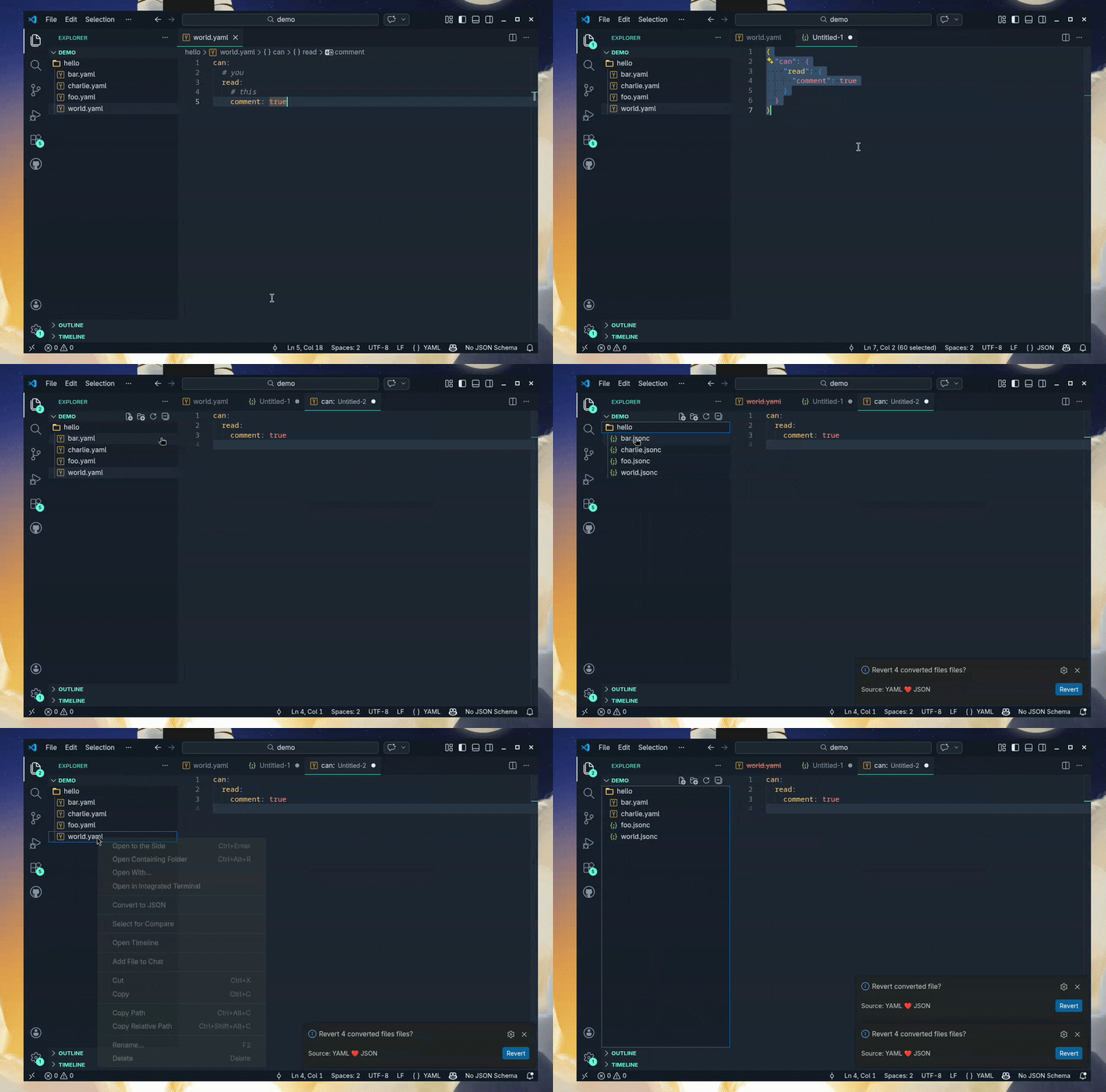
See more usage examples in the docs directory.
- Convert a single file:
- Convert a YAML file to JSON or JSONC by right clicking it and selecting
Convert to JSON.
- Convert a YAML file to JSON or JSONC by changing file extension to
.json or .jsonc.
- Convert a JSON or JSONC file to YAML by right clicking it and selecting
Convert to YAML.
- Convert a JSON or JSONC file to YAML by changing file extension to
.yaml or .yml.
- Convert selection as preview:
- Convert YAML selection as preview by using command
YAML+JSON: Preview as JSON (from YAML. Opens in new file)
- Convert JSON selection as preview by using command
YAML+JSON: Preview as YAML (from JSON. Opens in new file)
- Convert text selection:
- Convert YAML selection by using command
Convert selection to JSON - does not change file extension.
- Convert JSON selection by using command
Convert selection to YAML - does not change file extension.
- Converting multiple files:
- Convert a selection of JSON files to YAML by right clicking one of the selected files and selecting
Convert selected files to YAML.
- Convert a selection of YAML files to JSON by right clicking one of the selected files and selecting
Convert selected files to JSON.
- Convert YAML files in a directory to JSON by right clicking the directory and selecting
Convert YAML files to JSON.
- Convert JSON files in a directory to YAML by right clicking the directory and selecting
Convert JSON files to YAML.
- Comment preservation (YAML to or from JSONC):
- When converting between YAML and JSONC, comments are preserved by default (
preserveComments: true).
- YAML
# comments map to JSONC // comments and vice versa.
- To use this feature, set
fileExtensions.json to ".jsonc".
- Plain
.json files cannot hold comments, so comment preservation only applies to .jsonc.
- Note: Multi-document YAML files fall back to plain JSON array output (no comment preservation).
- Convert on save: When
convertOnSave is enabled, saving a YAML or JSON file will automatically create (or update) its counterpart file. The original file is always kept. The overwriteExistentFiles setting controls what happens when the counterpart already exists.
- Reverting converted files: When a file has been reverted, a "revert" prompt will be shown to revert it. Using this will return the entirety of the original file, including YAML comments.
- Overwriting existent files: When trying to convert a file into a destination that already exist, you can use the
overwriteExistentFiles configuration to overwrite such. Notice if you use the revert feature after overwriting a file, the extension cannot (currently) revert the overwritten file. Also, due to limitation in vscode of active user prompts, if you set it to "ask" you will only be prompted to overwrite N number of files, while others will be skipped.
Config
All configurations should be defined in the yaml-plus-json object of your vscode settings (e.g. in a workspace file .vscode/settings.json). Example:
{
  "yaml-plus-json": {
    "convertOnRename": true,
    "convertOnSave": false,
    "yamlIndent": 2,
    "yamlLineWidth": 0,
    "yamlMerge": false,
    "fileExtensions": {
      "yaml": ".yaml",
      "json": ".jsonc", // use ".jsonc" for comment preservation
    },
    "preserveComments": true,
    // for more advanced parser configurations
    // see the YAML module documentation for details:
    // https://github.com/eemeli/yaml/blob/main/docs/03_options.md#options
    // note specific extension configs set takes precedence ("yamlIndent" for example)
    "yamlOptions": {
      "indent": 2,
      "lineWidth": 0,
    },
  },
}
|
description |
type |
default |
example |
convertOnRename |
Convert YAML/JSON files on rename |
boolean |
true |
false |
convertOnSave |
Automatically convert YAML/JSON files to their counterpart on save. The original file is always kept. |
boolean |
false |
true |
yamlIndent |
The number of spaces to use when indenting code (yaml) |
number |
2 |
4 |
yamlSchema |
See yaml module documentation for details |
string |
"core" |
"json" |
yamlMerge |
Enable support for << merge keys. Default value depends on YAML version. |
boolean |
true |
false |
yamlLineWidth |
Set to 0 to disable line wrapping. See line width options for details |
number |
|
100 |
fileExtensions |
define what filename extension(s) to use when converting file(s) |
object |
|
|
fileExtensions.yaml |
yaml filename extension |
string |
".yaml" |
".yml" |
fileExtensions.json |
json filename extension. Use ".jsonc" to enable comment preservation. |
string |
".json" |
".jsonc" |
keepOriginalFiles |
Keep original files when converting. Use "ask" to be asked every time or "always" to always keep original files |
string |
|
"always" |
overwriteExistentFiles |
Overwrite existent files when converting. Use "ask" to be asked every time or "always" to always overwrite |
string |
|
"always" |
yamlOptions |
For more advanced configs using the YAML parser. See the module docs for details. Note that specific extension configs set takes precedence. |
object |
|
|
preserveComments |
Preserve comments when converting between YAML and JSONC. Requires fileExtensions.json set to ".jsonc". |
boolean |
true |
false |
directoryConversion |
Enable the right-click commands that convert all JSON/YAML files in a directory (applies to folders only). Set to false to hide these commands from the explorer context menu. |
boolean |
true |
false |



