resx-designer
Multi-language .NET resource (.resx) editor for VS Code. Edit locale files in a unified grid view or YAML-like editor.
Features
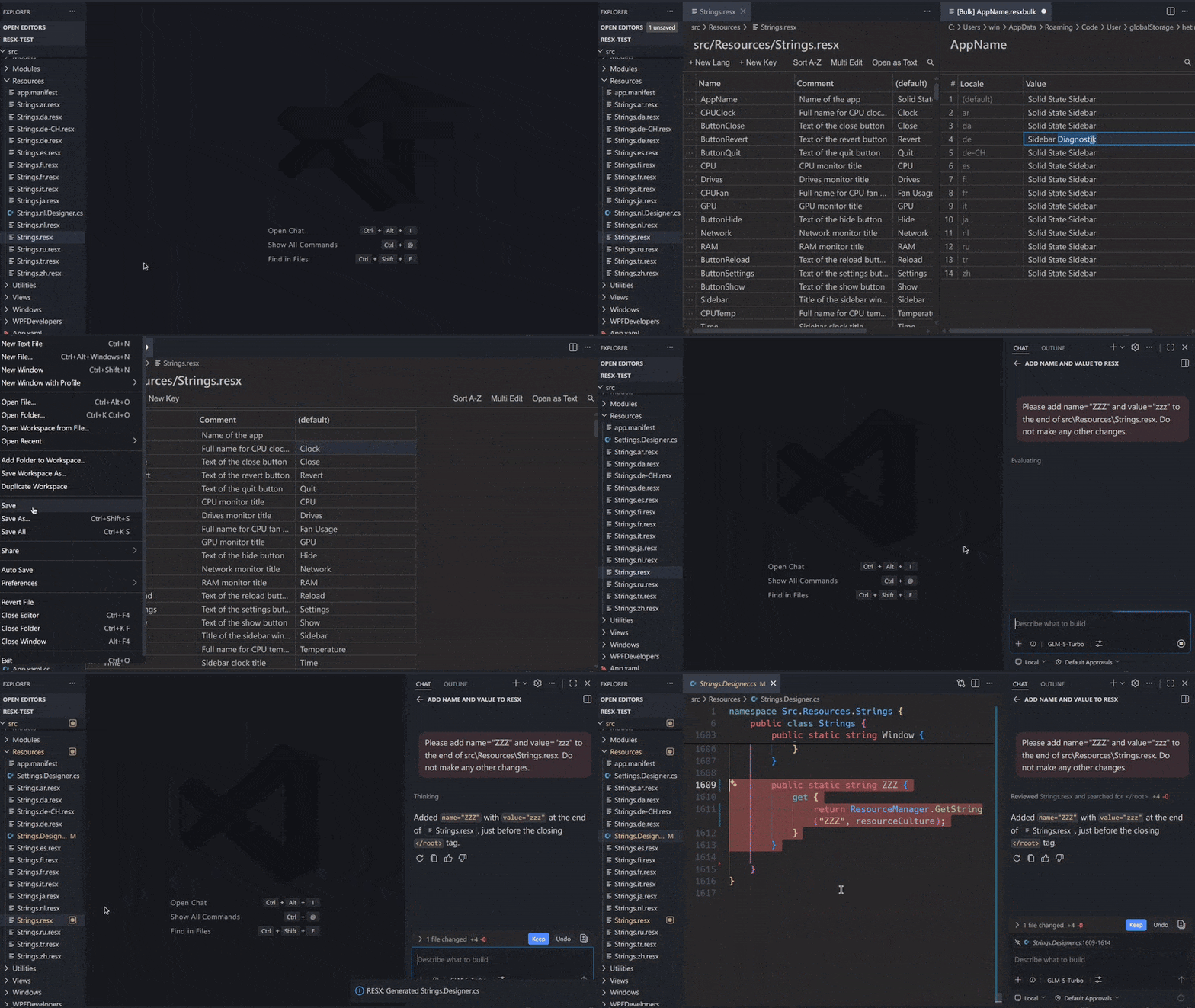
Automatically sync Designer.cs
Designer.cs is synchronized automatically whenever you add or remove keys in Strings.resx. It also updates when saved by AI! You no longer need to run ResXFileCodeGenerator manually.
Regarding the namespace for newly created files: If a Designer.cs file already exists, its current configuration will be reused. However, for a newly created file, the namespace is automatically generated from the workspace name and folder structure. In this case, please open the file and verify if it matches your project. You will need to check two places: the very top of the file and around line 20. Once you modify and save the file, the extension will read and preserve those custom values for subsequent updates.
YAML-like Editor
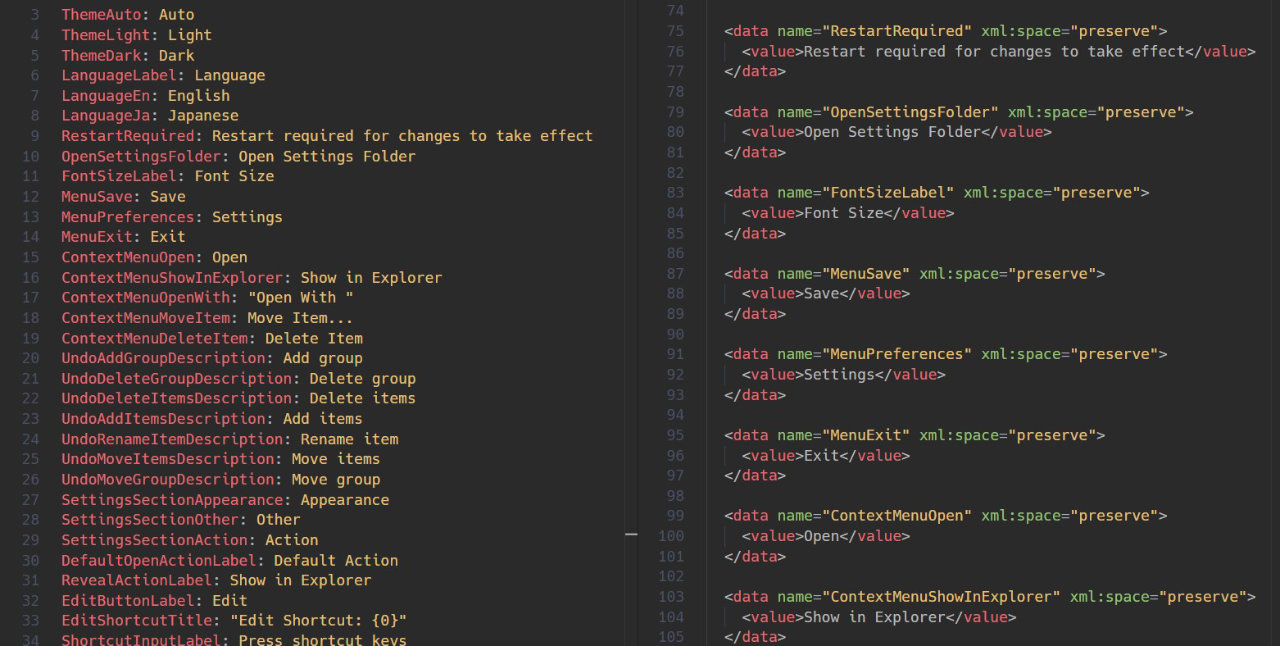
Convert clunky XML-based .resx files into a clean, human-readable YAML-like format for effortless editing. Edits in a YAML-like format and automatically converts back to XML upon saving.
Spreadsheet-style Editor
You can view and edit data in a graphical table format. However, it is not fully polished yet, using the YAML-Like Editor is recommended.
The editor type can be changed through the extension settings or RESX: Set Editor Type command.
Batch Edit Identical Names
Provides a custom window to extract and edit a single name across all languages. No need to deal with a massive cell matrix. Click the ellipsis at the far left of the row and select "Bulk Edit".
Instant Key Generation
Create new keys directly from selected text in .cs or .xaml files, and immediately open the Bulk Edit interface for fast editing.
Other Features
- Automatic locale detection — Finds related
.resx files in the same folder by naming convention (Resources.resx, Resources.ja.resx, Resources.fr.resx, …)
- Add/remove name keys — Automatically applies to all language files
- Missing translation highlighting — Untranslated entries (empty or identical to the default value) are visually flagged
- Switch to Normal Editor — Please press "Open as Text"
Getting Started
1. Install the Extension
- Open Visual Studio Code.
- Go to the Extensions view (
Ctrl+Shift+X or Cmd+Shift+X on macOS).
- Search for resx-designer and click Install.
2. Setup Required
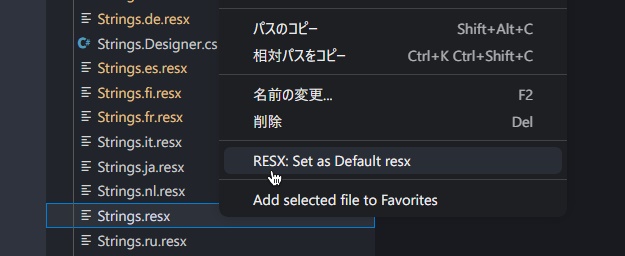
Open your workspace and set the default Strings.resx first. Right-click Strings.resx in the Explorer panel and run RESX: Set as Default resx. (Saved in .vscode/settings.json)
Note: Functions such as Designer.cs syncing depend on this default file. If left unconfigured, any file named Strings.resx in the workspace is automatically treated as the default fallback.
If there are multiple default .resx files (not necessarily named Strings.resx), you can specify them as an array in .vscode/settings.json in workspace:
"resx.defaultResx": ["Resources/Strings.resx", "Other/Labels.resx"]
Commands
Open the Command Palette (Ctrl+Shift+P / Cmd+Shift+P) and search for:
| Command |
Description |
RESX: Set Editor Type |
Switch editor mode (table / yaml-like / plain-text) |
RESX: Set as Default resx |
Set the default Strings.resx |
RESX: Open as YAML (single file) |
Open current .resx as YAML in text editor |
RESX: Open as YAML (bulk – all locales, current key) |
Open all locale values for the selected key as YAML |
RESX: Open as YAML (multi – all keys) |
Open all keys across all locales as YAML |
Settings
All settings are scoped to the resx.* prefix.
| Setting |
Type |
Default |
Description |
resx.editorType |
string |
"table" |
Editor mode: "table" (visual grid), "plain-text", or "yaml-like" |
resx.showSerialIndex |
boolean |
false |
Show index number column |
resx.highlightMissingTranslations |
boolean |
true |
Highlight untranslated cells |
resx.fontFamily |
string |
(inherit) |
Override font family |
resx.fontSize |
number |
0 |
Override font size in px (0 = inherit) |
resx.cellPadding |
number |
4 |
Cell vertical padding in px |
resx.maxFileSizeMB |
number |
10 |
Soft file-size limit (0 = unlimited) |
Roadmap
- Editor improvements
- Integration with .cs and .xaml
Release Notes
See full history in CHANGELOG.md.
Development
pnpm install
pnpm run compile
pnpm run package
# install to local
pnpm deploy # mac, linux
pnpm deploy:win # windows
Support This Project
If you find this tool helpful, please consider supporting me on ko-fi.com
Interested in the GLM Coding Plan? Sign up through this referral link to get 10% off
License
This extension is licensed under the MIT License.
This program is based on jonaraphael/csv

