Skip to content
| Marketplace
Sign in
Visual Studio Code>Themes>Sepia for VS CodeNew to Visual Studio Code? Get it now.
Sepia for VS Code

Sepia for VS Code

Weevil_Breeder

| (0) | Free
Warm beige, eye-friendly light theme with vivid gruvbox-based syntax colors. A VS Code port of Adam Wojszczyk's Sepia theme for JetBrains IDEs.
Installation
Launch VS Code Quick Open (Ctrl+P), paste the following command, and press enter.
Copied to clipboard
More Info

Sepia for VS Code

A warm, paper-like light theme with vivid, clearly distinguishable syntax colors.

Low blue light, cream background, and a gruvbox-rooted palette — gentle on the eyes during long sessions, without sacrificing syntax readability.

A faithful VS Code port of Adam Wojszczyk's Sepia theme for JetBrains IDEs (MIT). If you loved it in PyCharm, this is the same feeling in VS Code.

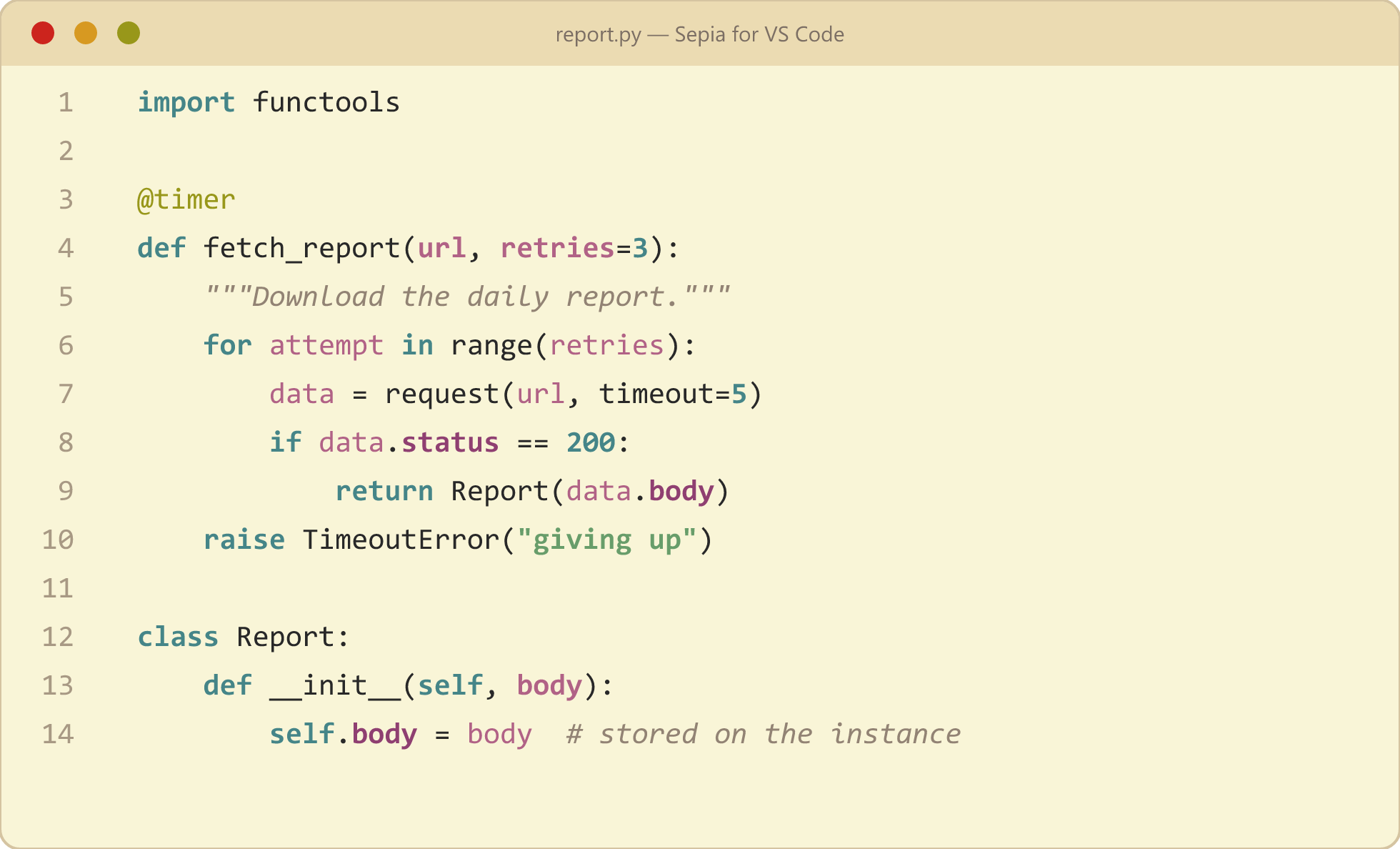
Sepia for VS Code — Python preview

Why sepia?

Sepia is literally the ink of the cuttlefish — hence the little fella in the icon, drawn by the original theme author. The palette keeps blue light low and contrast calm, while syntax roles stay vividly separated: you can tell a parameter from a field from a keyword at a glance.

Palette

Swatch Hex Role
#f9f5d7 Editor background — warm cream
#282828 Text, function & class names
#458588 Keywords, numbers, self — bold teal
#689d6a Strings — bold green
#b16286 Variables & parameters — magenta
#8f3f71 Object fields, dunders — deep purple
#98971a Decorators — olive
#928374 Comments & docstrings — gray italic

Highlights

  • 🎨 Full workbench theming — sidebar, tabs, status bar, menus, quick pick
  • 🐍 Python-aware token colors — decorators, self/cls, keyword arguments, dunder methods
  • 📓 Notebook-friendly — cell backgrounds and outputs styled to match
  • 🖥️ Terminal — complete gruvbox-light ANSI palette
  • 🔍 Diff, search, and error colors tuned to the same palette

Install

  1. Search "Sepia for VS Code" in the Extensions view, or:

    code --install-extension hedinhong007.sepia-for-vscode
    
  2. Press Ctrl+K Ctrl+T and pick Sepia (PyCharm).

Credits & License

  • Original theme & cuttlefish logo: Adam Wojszczyk — Sepia Theme (MIT)
  • Palette roots: gruvbox light
  • MIT licensed — see LICENSE for full attribution
  • Contact us
  • Jobs
  • Privacy
  • Manage cookies
  • Terms of use
  • Trademarks
© 2026 Microsoft