Azure API ReviewPreviewAdds some capabilities from APIView.dev for Azure API reviews to support the new API Review Hub. Installation Launch VS Code Quick Open ( Ctrl+P), paste the following command, and press enter.Copied to clipboard |

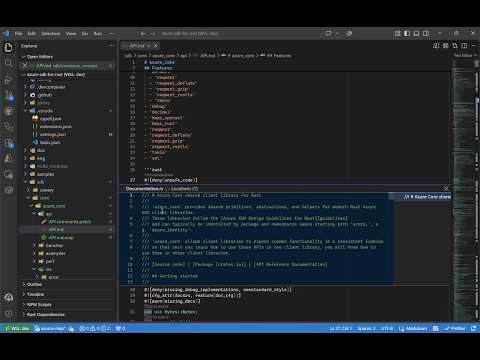
Azure API ReviewAzure API Review is a VS Code extension for Azure SDK API reviewers. It adds review actions to generated API Markdown files while keeping the standard Markdown text editor unchanged. The extension runs in VS Code for the Web, local desktop windows, and remote workspaces using VS Code's virtual workspace file system. Review APIsOpen a configured API Markdown file. For declarations with review metadata, CodeLens actions appear above the declaration:
Actions are omitted when the corresponding comment patch or source mapping is missing or does not map unambiguously to the declaration.
Custom Markdown PreviewUse Reopen Editor With > Azure API Review to render an API Markdown file with its configured comments patch applied in memory. Comments are hidden by default; use the expand-all and collapse-all actions in the editor title to show or hide all comments. The preview can also show a diff against a Git tag, commit, pull request base, or another selected Markdown file, and while a diff is active the title bar adds next/previous hunk navigation plus a close action. When the file belongs to an open pull request and the base revision still contains the configured API Markdown file, the preview automatically opens the diff against that pull request base. The diff picker keeps the pull request base as the first choice and shows the matching tag name when that base also matches an eligible version tag. The source Markdown file is never modified. In Node.js extension hosts, tags, commits, and baseline content come from the built-in Git extension so local and unpublished history remains available. In web hosts, GitHub-backed documents use GitHub APIs for published tags, commits, pull request bases, and baseline content, so published tag and commit history remains available even outside pull request context. Other documents can still be compared against another selected Markdown file. The custom preview applies CSS contributed by installed extensions through
Syntax highlighting in the extension is intentionally limited to C#, C++, Go, Java, JavaScript, Python, Rust, and TypeScript, as well as Bash/Shell and JSON. Other fenced-code languages render as plain code without language-specific highlighting. The standard Markdown editor remains available and continues to provide the Documentation and Go to source CodeLens actions described above. Configure RepositoriesThe defaults support repositories that generate Configure these settings at workspace or workspace-folder scope:
For example, repositories that want to try Related-file patterns support file-context variables such as To open configured API files in the custom preview by default, add a matching
editor association to the repository's Repositories can replace both occurrences with their own API Markdown pattern. Additional ConfigurationEdits to API review files like ContributingSee CONTRIBUTING.md for development setup, testing, and debugging instructions. |