Skip to content
| Marketplace
Sign in
Visual Studio Code>AI>Session GroupsNew to Visual Studio Code? Get it now.
Session Groups

Session Groups

Hicham Boulal

|
4 installs
| (0) | Free
A side panel of your own groups of coding-agent sessions: each session runs in a terminal and resumes after VS Code restarts.
Installation
Launch VS Code Quick Open (Ctrl+P), paste the following command, and press enter.
Copied to clipboard
More Info

Session Groups

Keep your coding-agent sessions in your own groups, and resume any of them with a click.

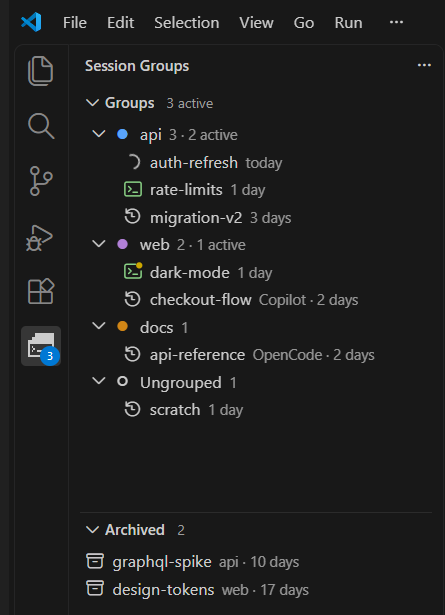
Session Groups panel

  • Groups you define, each with its own folder, colour and agent.
  • Real terminals. Sessions survive restarts, and a click resumes one.
  • See what is running, and for Claude Code and OpenCode, whose turn it is.
  • Archive and search your sessions.
  • Built-in agents: Claude Code, OpenCode, GitHub Copilot CLI, Gemini CLI, Qwen Code and Goose; add your own in the settings.

The agent's command-line tool must be installed.

Full documentation, settings and source: github.com/hboulal/session-groups

  • Contact us
  • Jobs
  • Privacy
  • Manage cookies
  • Terms of use
  • Trademarks
  • Your Privacy Choices
  • Consumer Health Privacy
© 2026 Microsoft