RouteLens for VS Code
The API client that reads your code.
Preview: an early version. Bug reports and ideas are welcome in GitHub issues.
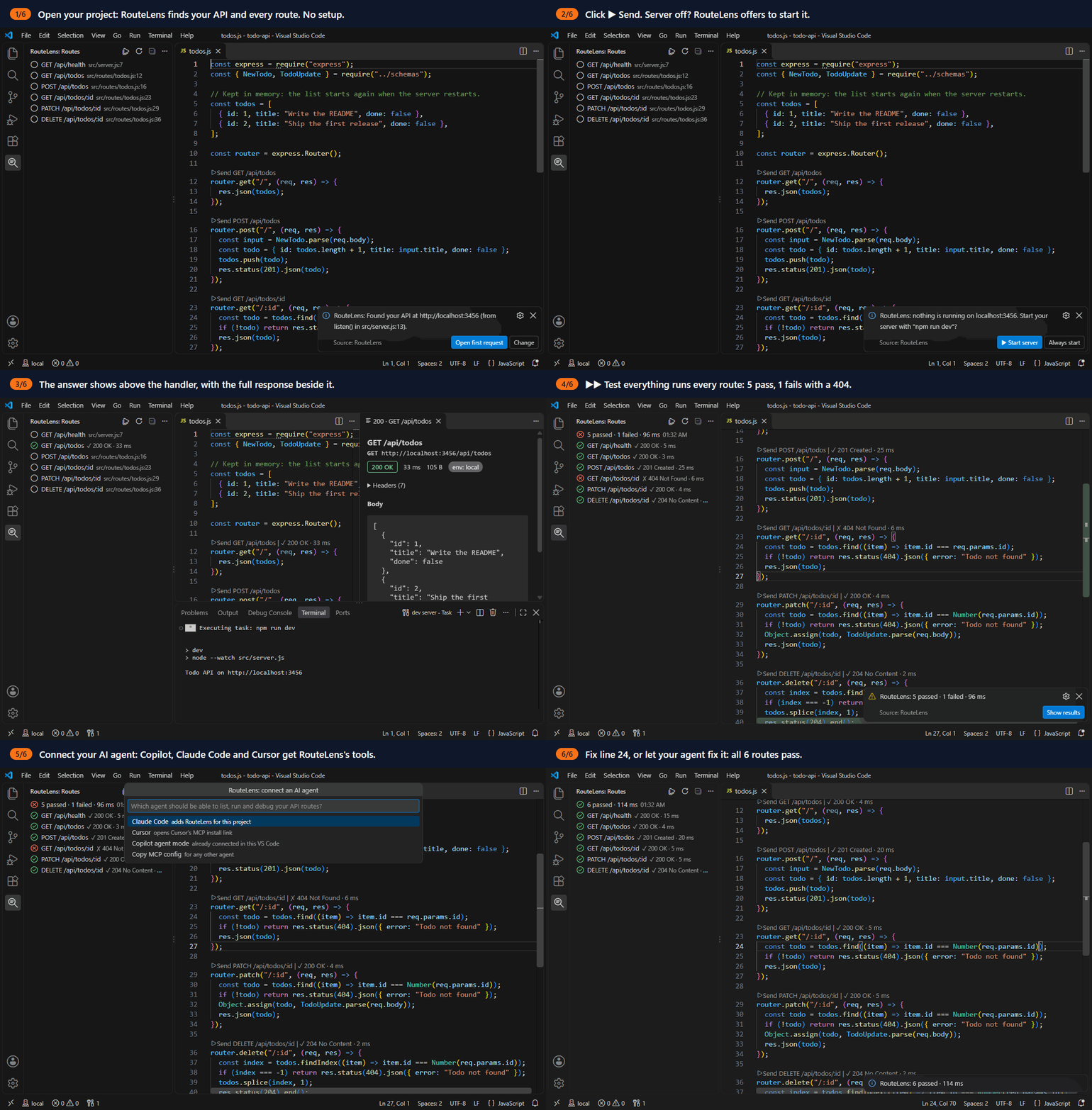
Quick start
- Open your API project (Next.js or Express). RouteLens finds your server's address and every route, and creates
.routelens/ with a request for each route.
- Click ▶ Send above a route handler. If your server is off, click ▶ Start server.
- Click ▶▶ Test everything at the top of the RouteLens sidebar to run every route at once.
- Optional: run RouteLens: Connect an AI Agent and ask your agent "Test my API and fix what's broken".
Features (today)
- Zero setup. Open a JavaScript project and RouteLens finds your API's address (from your
dev script, .env or server code), creates .routelens/ with a first request, and tells you which clue it used, with a Change button.
- Starts your server. Click ▶ Send request while your server is off and RouteLens offers ▶ Start server. It runs your
dev (or start) script in a visible terminal, waits up to 60 seconds, and sends the request again. Crashes are reported, with the terminal one click away.
- Reads your code. A Routes sidebar lists every API route in your Next.js (App Router and
pages/api) or Express project, and a ▶ Send button sits above each route handler. Each route gets a request file with a sample body from its zod schema. When the route changes, the request follows, and your edits are kept. RouteLens reads your code; it never runs it.
- Test everything. ▶▶ at the top of the Routes view runs every request and flow (reads first, deletes last) and shows a health board:
12 passed · 2 failed, with ✓/✗ on each route.
- Re-runs on save. Saving a route file runs its requests again and updates the ✓/✗ above the handler. Only requests that already ran are sent again.
- Checks and flows. Add an
expect block to a request ("status": 400, "body": { … }, "values": { "body.id": { "type": "number" } }), or write a .flow.json that runs requests in order and passes values on. ▶ Run flow sits at the top of each flow file. Plain code replays them; no AI.
- Logs in by itself. When a route answers 401, RouteLens logs in with your login route, asks for your username and password once, and reuses the token.
- Works with your AI agent. Copilot agent mode gets RouteLens's tools automatically (VS Code 1.101+): it can list routes, run them, read what failed with the route's code, and save flows. RouteLens: Connect an AI Agent sets up Claude Code or Cursor in one click.
- Inline results.
✓ 201 Created · 14 ms next to the button. Hover for a body preview; click for the full response (status, time, size, headers, pretty body).
- Environments in the status bar, with
{{variables}} from .routelens/environments/<name>.env.json.
- Requests are
.routelens/requests/*.req.json files in your repo, with autocomplete. RouteLens: New Request creates one.
- A Get Started walkthrough.
Commands
| Command |
What it does |
| RouteLens: Send Request |
Send the open .req.json file |
| RouteLens: New Request |
Create a request file |
| RouteLens: Set Up Project |
Find your API and create .routelens/ |
| RouteLens: Change Server Address |
Pick or type the address saved in local.env.json |
| RouteLens: Start Server / Stop Server |
Run or stop your dev / start script in a terminal |
| RouteLens: Select Environment |
Switch environments (also in the status bar) |
| RouteLens: Scan Routes |
Read the code again and update the Routes view |
| RouteLens: Test Everything |
Run every request and flow, and show the health board |
| RouteLens: Run Flow |
Run the open .flow.json file |
| RouteLens: Log Out |
Forget the stored login and token |
| RouteLens: Connect an AI Agent |
Let Claude Code, Cursor or another agent use RouteLens |
Settings
| Setting |
Default |
What it does |
routelens.environment |
local |
Default environment; the status bar picker overrides it for this workspace |
routelens.timeoutMs |
30000 |
Request timeout in milliseconds |
routelens.autoStartServer |
ask |
When your local server is off: ask to start it, start it always, or never |
routelens.runOnSave |
true |
Run a route's requests again when you save the file with its handler |
Safety
- Sending requests and starting servers only work in trusted workspaces.
- RouteLens only runs the
dev (or start) script from your package.json, never a command from a .routelens file, and always in a terminal you can see.
- The first server start in each workspace always needs your click, even with
autoStartServer set to always.
.routelens/ files are committed to Git: never put secrets in them.- Your login is kept in VS Code's SecretStorage (your system keychain), the token only in memory, and the token is only sent to the server you logged in to. RouteLens: Log Out forgets both.
- Test everything asks before it sends
POST, PUT, PATCH or DELETE requests to a server that is not this machine.
- AI agents: requests only go to this machine or hosts in your environment files; writes to other hosts need your OK in the agent's app; RouteLens never starts your server for an agent, and your login is never shown to it.
- Route scanning only reads files inside the workspace and never runs your code, so the Routes view also works in untrusted workspaces. Making request files and sending need trust.
Coming next
The v0.1 launch (M6): Marketplace and Open VSX, npm packages for the CLI and the MCP server, and a demo. See the roadmap.
| |

