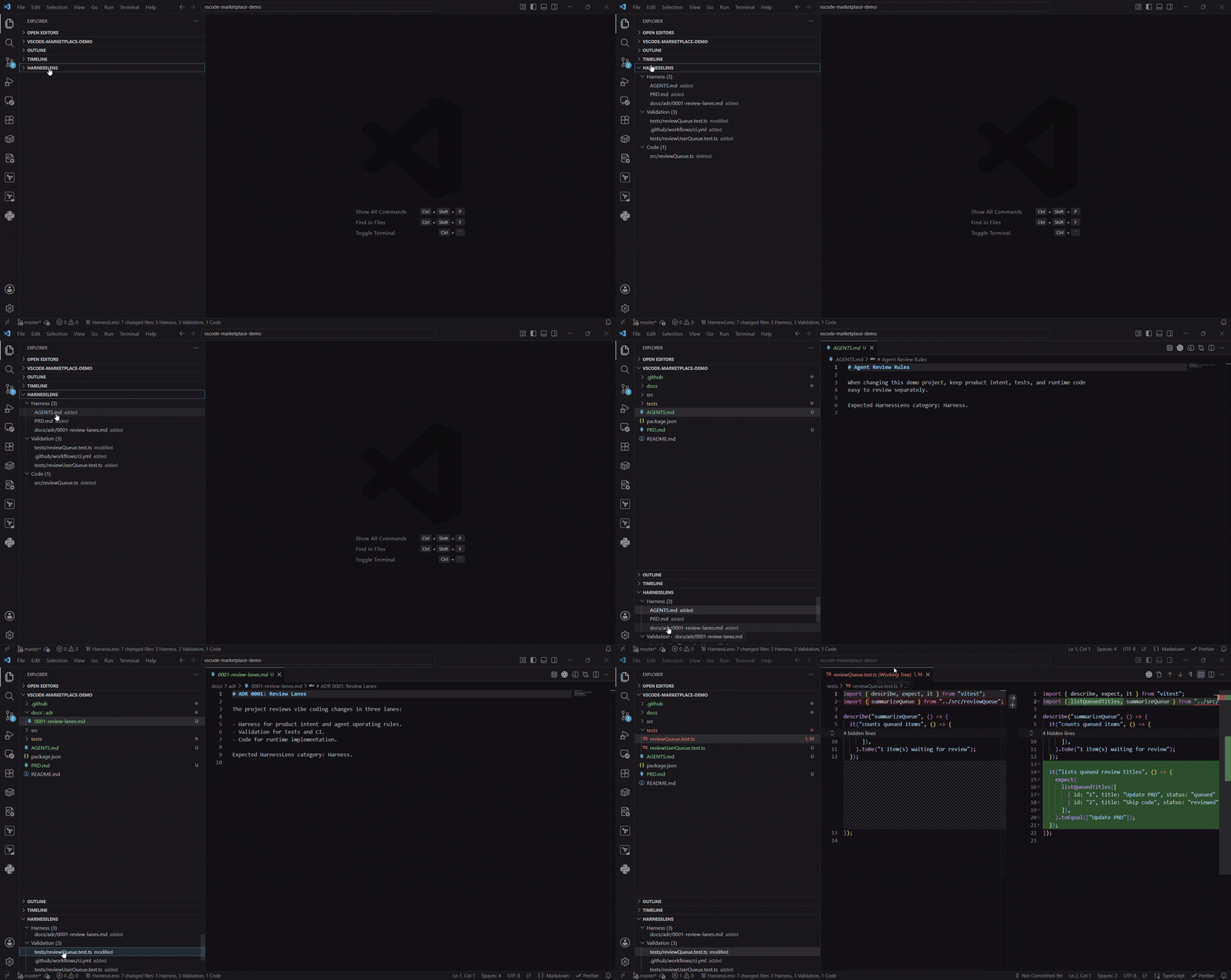
HarnessLensReview local Git changes as Harness, Validation, and Code. Installation Launch VS Code Quick Open ( Ctrl+P), paste the following command, and press enter.Copied to clipboard |

HarnessLensHarnessLens is a small review tool for the vibe coding era. Vibe coding changes often mix the harness that guides AI-assisted work with the tests that validate it and the code that ships it. Prompts, specs, agent instructions, PRDs, ADRs, CI, tests, and runtime source can all change before you even open a pull request. HarnessLens adds a local VS Code review view so you can inspect changed files by review intent before committing or publishing your work.
What It ShowsHarnessLens classifies local Git changes into three review lanes:
How It Helps
UsageOpen a Git repository in VS Code. The HarnessLens view appears in Explorer and updates as files are added, modified, deleted, staged, or unstaged. Select a file to open the native Git diff. Right-click a file to open either the source file or diff. Use PrivacyHarnessLens reads changed-file paths from the built-in VS Code Git extension API. It does not send repository contents, paths, or workspace metadata to a remote service. Current LimitationsClassification uses built-in defaults in the current release. Project-level configurable classification is planned for a later release. |