FileGrix
By HaorGrix, developed by Musfiqur Tuhin.
FileGrix opens PDF, Word, Excel, PowerPoint, CSV, Markdown, EPUB, archives, SQLite, Parquet, notebooks, images, audio, video and many more file types in an editor tab, inside VS Code and editors built on it. You can search a document, edit some of them, export or print them, and hand a selection to the AI agent you already use. It runs on your computer. FileGrix's own code makes no network calls and has no telemetry.
FileGrix was called Ultimate Viewer until version 0.3.0. The extension id inside the editor is still ultimate-viewer, and its settings and commands still start with ultimateViewer., so your existing settings keep working.
Open
Double-click a file in the Explorer and it opens in a FileGrix tab. The viewer is chosen from what is inside the file, not only its name. If a file cannot be shown, you get a preview with buttons to open it as text, as bytes (hex view), in another application or in its folder, not an error page.
- 323 file patterns open by default and 204 more text and code types open in FileGrix too, with a button to switch to the normal editor (see "File formats" below). A second editor, "any file", is offered under Open With... for every other file and is never picked automatically.
- Password-protected PDF, Word, Excel, PowerPoint, OpenDocument and zip files ask for the password and open read-only, so saving can never remove the protection. The password stays in memory. 7-Zip and RAR passwords are not supported.
- Open a file at a place from a link such as
report.pdf#page=12, sales.xlsx#Sheet1!B7 or guide.md:40, or with Open File at a Place.... Copy Link to This Place makes one.
- Not every extension should be taken over. Choose File Types lets you opt a family out, after showing the exact change to
workbench.editorAssociations.
- Files opened by a chat panel or an AI agent as plain text are handed to the viewer in the same tab.
Work with it: edit, export, print
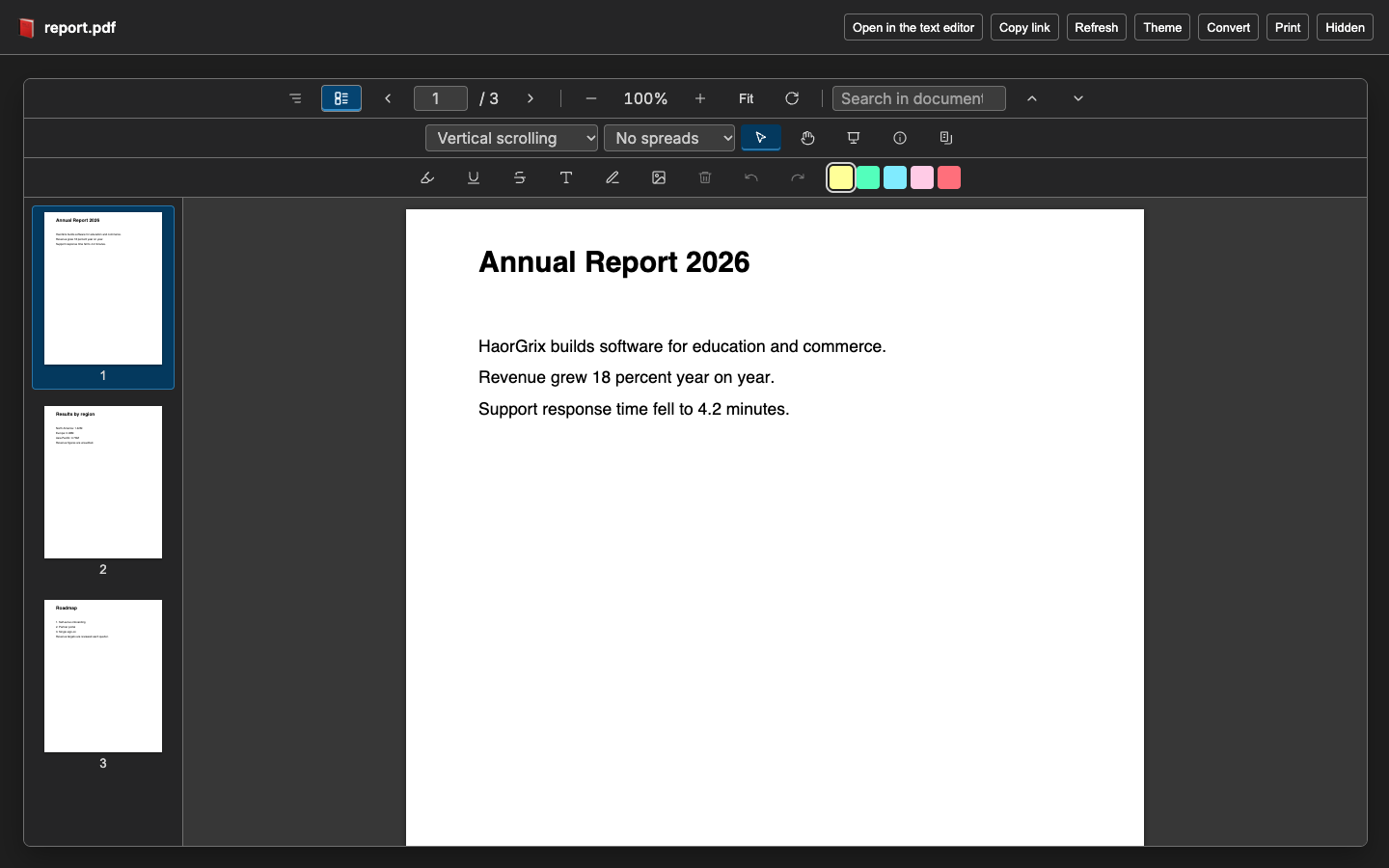
- PDF: continuous scrolling, selectable text, search, outline, thumbnails, zoom, rotate, scroll and spread modes, presentation mode, document properties. Add highlight, underline, strikethrough, text, drawing, images and form fields; they are saved as an incremental update, so the original bytes stay at the start of the file. Page tools (delete, rotate, extract, merge, reorder) write a new PDF through the Save dialog and never change the open file.
- Spreadsheets (
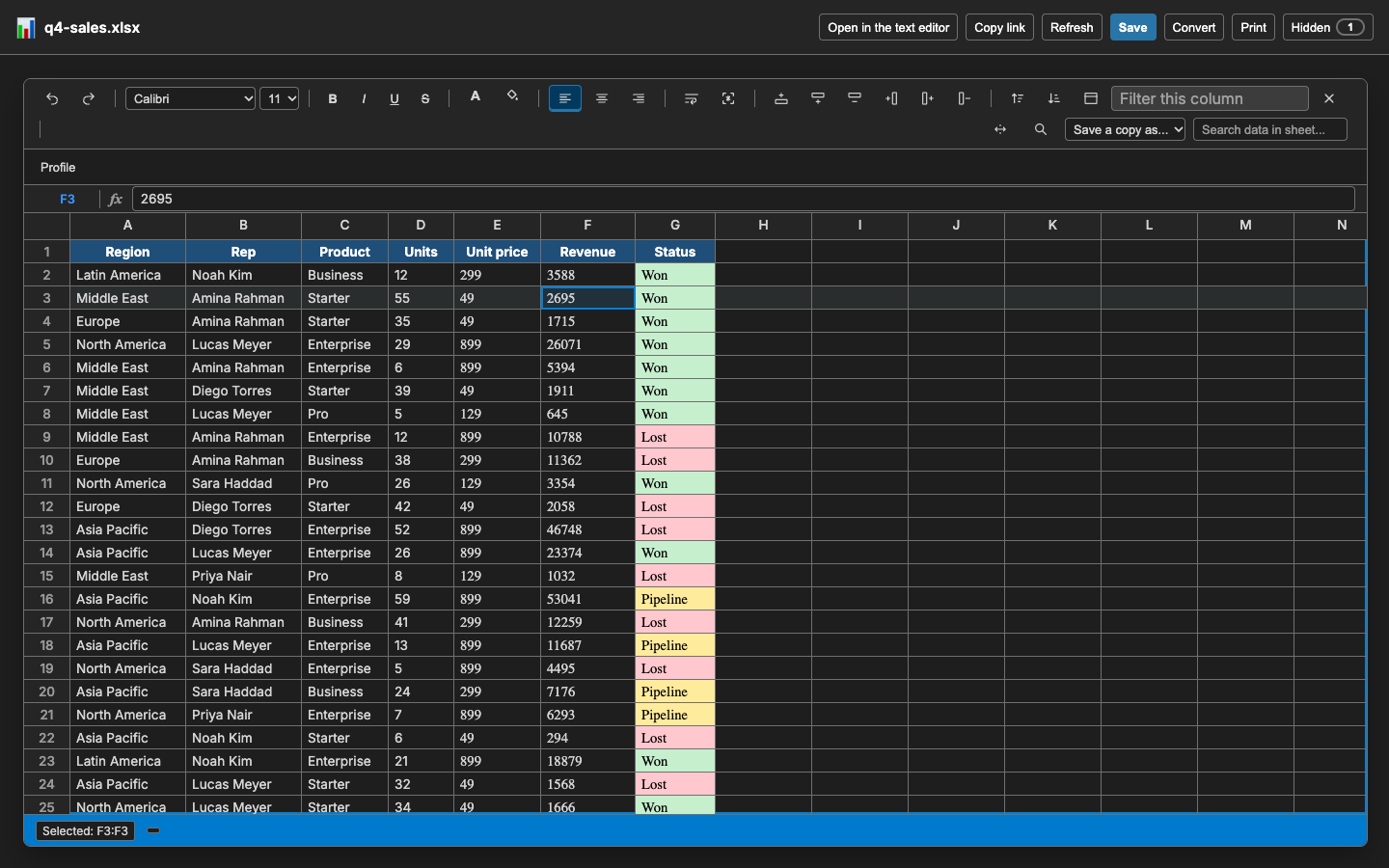
.xlsx, .xls, .ods, .csv, .tsv and relatives): formula bar, sheet tabs, sort, filter, freeze header row, find and replace, auto-fit columns, insert and delete rows and columns, selection summary, a data profile, and Save a copy as CSV, TSV, XLSX or JSON with a warning about what the new format loses. .xlsx is edited and saved; .xls is read-only. Saving an Excel file rebuilds it from what the viewer shows, so charts, pivot tables and macros can be lost; FileGrix asks first.
- Word: reading with an outline, search, zoom, and switches for comments and tracked changes. Editing is off by default (
ultimateViewer.editWordDocuments); when on, text and basic formatting are written into the original file.
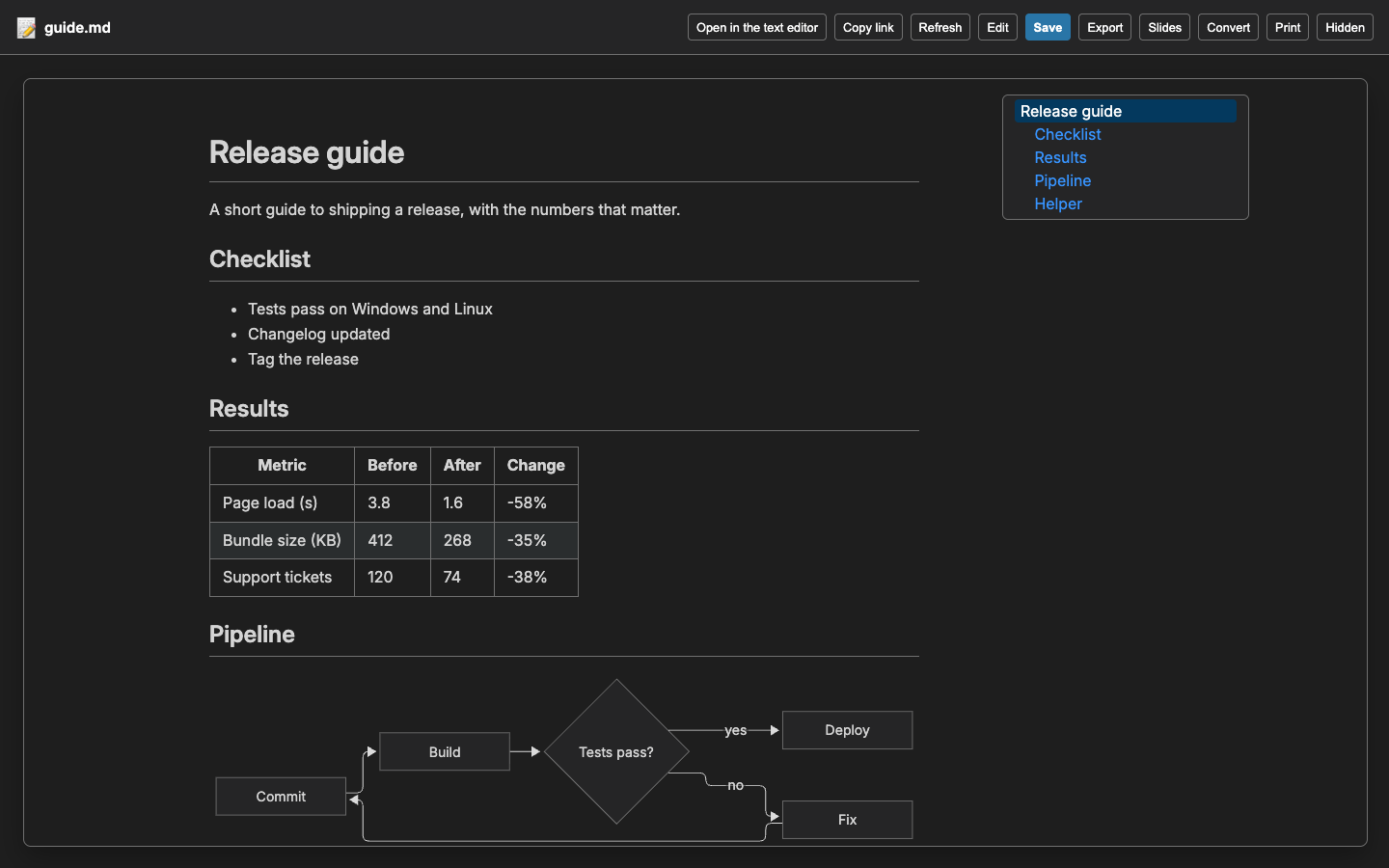
- Markdown: code highlighting, maths, Mermaid and Graphviz diagrams, contents sidebar, edit mode, slide mode, and export to HTML, PDF and Word (
.docx).
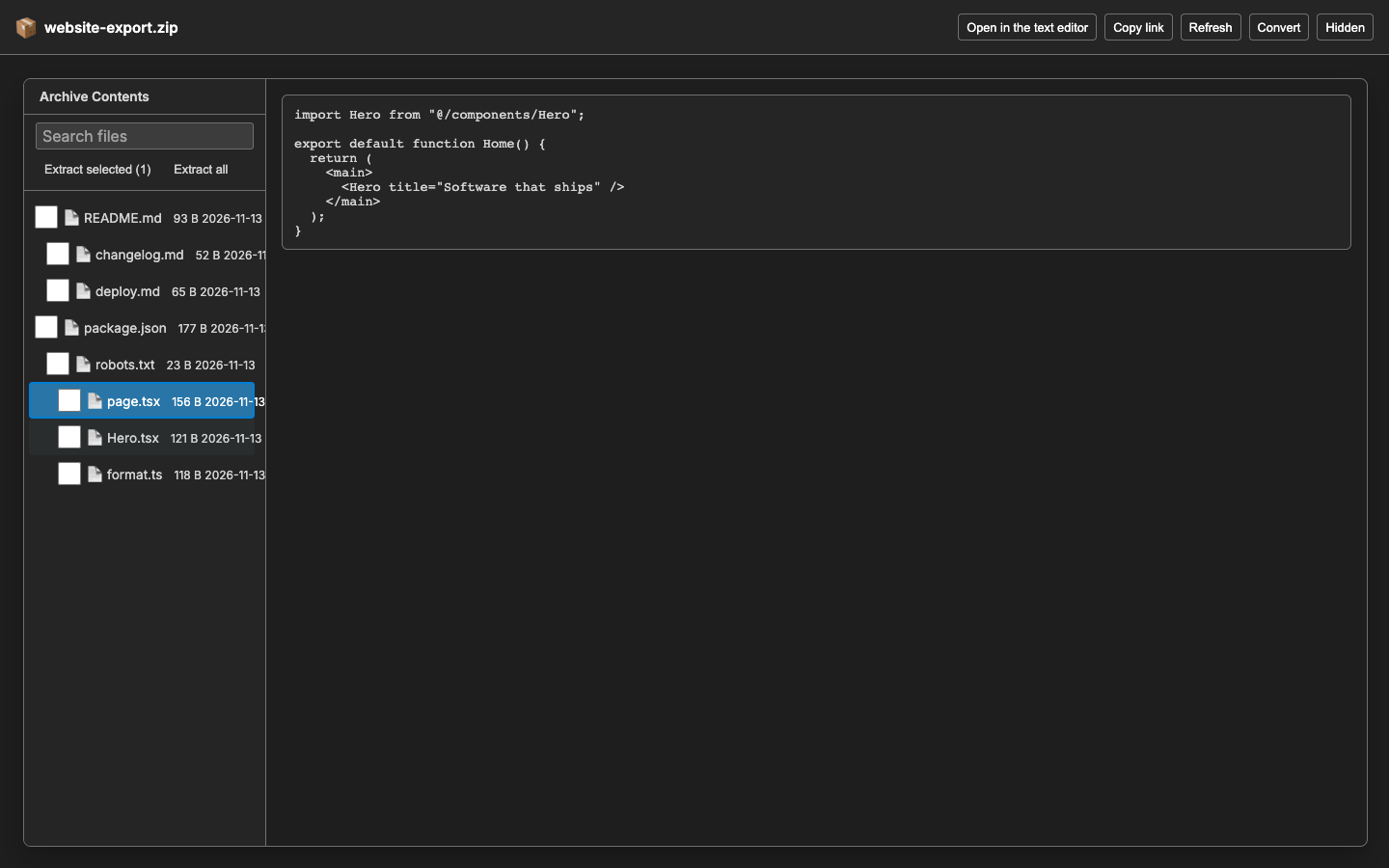
- Other viewers: PowerPoint with a slide bar, EPUB, email, SQLite (read-only), Parquet and Arrow (read-only, export to CSV or JSON), archives (browse, search, extract selected entries), fonts, draw.io (export a page as SVG), images with zoom and pan, streamed audio and video, and a hex view.
- Print from the Print button,
Ctrl+P / Cmd+P or FileGrix: Print. The editor blocks the system print dialog inside a webview, so FileGrix makes a PDF and opens it in your PDF application (in the browser build it asks where to save it).
- Review changes: when an open file is rewritten on disk (for example by an AI agent), a Changes button compares it with the previous version, the Git version or the last saved version, for lines, JSON keys, cells, paragraphs, slides, PDF pages, archive entries, database schema, bytes or pictures. You can accept it or revert after a confirmation. Earlier versions are kept in memory only.
Ask AI
FileGrix contains no AI model. It does two things around the agents you already use.
- Send a selection. Select text in any viewer and a small bar offers Explain, Improve, Summarize, Translate and Ask. FileGrix builds a prompt that includes the file and the place (PDF page, sheet and cell range, Markdown line, byte range) and hands it to the target you choose, or puts it on the clipboard. Nothing is sent until you click, and FileGrix makes no network call. Targets are listed by Show AI Targets; you can add your own in
ultimateViewer.ai.customTargets. The routes are built from each agent's published commands; the clipboard route works with any agent.
- Give agents reading tools. Editor language model tools (describe, read, read part) and a stdio MCP server (
dist/mcp/server.js) let an agent read PDF, Office and other files as text and structure, in pieces. They are read-only, limited to folders you allow, and every result is marked as untrusted data. Desktop editors only. Use Copy MCP Server Configuration and Show Agent Tools Status.
Trust
- Offline, no telemetry. FileGrix's own code makes no network requests and sends no usage data.
- Every file is treated as hostile. Size, time and nesting limits apply; no code from a file is run (notebooks are drawn and never run, macros never run); Markdown is sanitised; archive entry names are shown as text; unsafe archive entries and symbolic links are never written. Each viewer page has its own strict content security policy.
- Hidden-content check. A Hidden button in the viewers finds what a reader cannot see but an AI agent would read: hidden or white text, comments, tracked changes, speaker notes, hidden sheets and slides, invisible and look-alike characters, and wording aimed at AI agents. It says what it could not check and exports a Markdown report. It runs on your computer.
- Review of changes. See "Review changes" above. Nothing is changed without a click and a confirmation.
- Your files stay yours. Lossy saves ask first; password-protected files open read-only.
No software can promise that every file is safe. See SECURITY.md for how to report a problem.
Supported editors
FileGrix runs in VS Code and in editors built on it:
- VS Code (stable and Insiders)
- VSCodium
- Antigravity IDE
- Cursor
- Windsurf
- Kiro
- Trae
- Positron
- code-server
- vscode.dev and github.dev (in the browser)
- Remote SSH, WSL, Dev Containers and Codespaces
Not supported: Zed, JetBrains IDEs and Visual Studio.
The extension asks for VS Code 1.90 or newer (engines.vscode ^1.90.0). Details: documentation/Editor-Compatibility.md.
FileGrix views 527 file extensions, has an editor for 515 (.webloc is editable but is not a registered viewer pattern, so it is not in the table) and converts to other formats through 15 converter groups (5186 source-to-target pairs). View means it opens in a tab. Edit means it can change the file or save an edited copy. Convert to lists the formats on the Convert menu.
| Family |
View |
Edit |
Convert to |
| PDF (1) |
.pdf |
all |
none |
| Word and OpenDocument text (6) |
.docm .docx .dotm .dotx .odt .rtf |
all |
html md txt |
| Spreadsheets and CSV (8) |
.csv .ods .tsv .xls .xlsm .xlsx .xltm .xltx |
all |
csv csv-bom csv-semicolon csv-semicolon-bom csv-zip html html-table json jsonl md md-table ods schema sql toml tsv xlsx xml yaml |
| Presentations (5) |
.odp .potx .ppsx .pptm .pptx |
all |
csv html json md txt |
| Markdown and Mermaid (4) |
.markdown .md .mermaid .mmd |
all |
docx html png png:2 png:3 rtf svg txt |
| E-books and email (2) |
.eml .epub |
all |
csv html json md txt |
| Images (16) |
.apng .avif .bmp .cur .gif .icns .ico .jfif .jpeg .jpg .png .psd .svg .tif .tiff .webp |
all |
bmp-24 bmp-32 gif ico ico-small jpg pdf png tiff webp |
| Audio and video (12) |
.aac .aiff .amr .flac .m4a .mov .mp3 .mp4 .ogg .pcm .wav .webm |
all |
aiff report-json report-txt wav wav:mono=1 wav:rate=16000,mono=1 wav:rate=22050 wav:rate=44100 wav:rate=48000 wav:rate=8000,mono=1 |
| Archives (34) |
.7z .aab .aar .apk .appx .bz2 .cab .cbz .crx .deflate .ear .egg .gz .gzip .ipa .jar .kmz .lzma .msix .nupkg .rar .tar .tbz .tbz2 .tgz .txz .tzst .vsix .war .whl .xpi .xz .zip .zst |
all |
none |
| SQLite databases (8) |
.db .db3 .gpkg .s3db .sdb .sl3 .sqlite .sqlite3 |
all |
none |
| Columnar and line data (Parquet, Arrow, Avro, JSONL) (9) |
.arrow .arrows .avro .feather .jsonl .ndjson .parq .parquet .pq |
all |
csv csv-bom html json jsonl md ods schema sql toml tsv xlsx xml yaml |
| Packages and disk images (13) |
.asar .dmg .gem .img .iso .msi .nib .pak .pkg .rdb .rpm .scpt .snap |
all |
report-json report-text |
| Statistics and database files (Stata, SPSS, SAS, R, ORC, DuckDB, Access) (11) |
.accdb .dta .duckdb .mdb .orc .rda .rdata .rds .sas7bdat .sav .xpt |
all |
csv report-json report-text |
| Fonts (5) |
.otf .ttc .ttf .woff .woff2 |
all |
sfnt woff |
| Legacy Office, e-books, Visio, iWork, mail, calendars and contacts (17) |
.azw3 .doc .fb2 .ics .key .mbox .mobi .msg .numbers .ott .pages .pps .ppt .vcf .vsdx .wps .xlsb |
all |
csv csv-zip eml html json md txt |
| Executables, libraries and other binary files (36) |
.a .ap_ .bin .cff .class .core .crdownload .crf .dat .del .dex .dic .dll .dump .dylib .elf .exe .hex .keystream .len .lib .nbc .nbi .o .pdb .priors .pyc .rsc .so .stat .swiftdeps .swiftdoc .swiftmodule .tab_i .wasm .zi |
all |
report-json report-text |
| Scientific arrays (HDF5, NetCDF, MATLAB, FITS) (7) |
.fits .h5 .hdf .hdf5 .mat .nc .netcdf |
all |
fits-json tree-json tree-text variables-csv |
| Certificates and keys (15) |
.age .asc .cer .crt .csr .der .gpg .jks .jwt .p12 .pem .pfx .pgp .pub .sops |
.der .gpg .jks .p12 .pfx .pgp |
der details-json details-text pem report-json report-text |
| Machine-learning files (NumPy, ONNX, GGUF, safetensors, pickle, PyTorch) (13) |
.ckpt .gguf .joblib .mlmodel .npy .npz .onnx .pickle .pkl .pt .pth .safetensors .tflite |
all |
csv json report-json report-text |
| Animation, build log, game and snapshot files (7) |
.binlog .nex .riv .s7dcl .sna .udt .ytd |
all |
none |
| Small formats (fonts, profiles, logs, shortcuts, feeds) (17) |
.afm .ani .atom .bcmap .db-shm .db-wal .dia .eot .gcode .icc .lnk .pfb .rss .sst .tiktoken .torrent .url |
.afm .ani .atom .bcmap .db-shm .db-wal .dia .eot .gcode .icc .lnk .pfb .rss .sst .torrent .url |
csv html json md-code md-list text-cp1252-crlf text-cp1252-lf text-latin1-crlf text-latin1-lf text-utf16be-crlf text-utf16be-lf text-utf16le-crlf text-utf16le-lf text-utf8-crlf text-utf8-lf text-utf8bom-crlf text-utf8bom-lf |
| 3D models, point clouds and CAD (20) |
.3mf .blend .dae .dwg .dxf .fbx .glb .gltf .iges .igs .las .obj .pcd .ply .step .stl .stp .usd .usda .usdz |
all |
glb gltf obj ply report-json report-text stl stl-ascii stl-binary svg |
| Maps and GIS (KML, GPX, Shapefile, MBTiles) (5) |
.dbf .gpx .kml .mbtiles .shp |
all |
geojson gpx kml tiles-zip |
| More image formats (TGA, DDS, HDR, EXR, HEIC, camera RAW) (18) |
.arw .cr2 .dds .dng .exr .hdr .heic .heif .jp2 .jxl .nef .pgm .pnm .ppm .raw .svgz .tga .xcf |
all |
jpg png webp |
| Design files (Sketch, Figma, XD, Illustrator, EPS) (6) |
.ai .eps .fig .ps .sketch .xd |
all |
report-json report-text |
| More audio and video containers (12) |
.3gp .avi .flv .m4v .mid .midi .mkv .mpeg .mpg .opus .wma .wmv |
all |
midi-csv midi-json report-json report-txt wav wav:mono=1 wav:rate=16000,mono=1 wav:rate=22050 wav:rate=44100 wav:rate=48000 wav:rate=8000,mono=1 |
| Medical images and 3D scenes (DICOM, NIfTI, tractography, Gaussian splats, Babylon.js, Blockbench) (8) |
.babylon .bbmodel .dcm .gsplat .nii .nii.gz .splat .tck |
all |
none |
| Diagrams and notebooks (4) |
.dio .drawio .drawio.xml .ipynb |
.ipynb |
html md png png:2 png:3 py svg |
| Serialized data and network captures (MessagePack, protobuf, pcap) (4) |
.msgpack .pb .pcap .pcapng |
all |
json |
| Text and code (204) |
.adoc .applescript .arff .asciidoc .ass .asy .avsc .axaml .b64 .bak .bat .bazel .bib .bnf .bpmn .bsd .bzl .c .cc .cfg .cjs .cmake .coffee .conf .cpp .cpuprofile .crontab .csh .csproj .css .cts .cu .cuh .def .diff .dockerfile .doctest .dot .dtsx .edgelist .ejs .entitlements .env .erb .err .excalidraw .f90 .fish .fsproj .g4 .gdb .gemspec .geojson .gitignore .go .gql .graphql .gv .gyp .h .har .hbs .heapprofile .heapsnapshot .hpp .htm .html .http .hurl .iml .ini .interp .java .jinja .js .jsdoc .json .json5 .jsonc .jst .jsx .kerml .kt .kts .lark .ld .lgpl .license .lock .log .lottie .lrc .lua .mako .map .mdc .mdown .mdx .mf .mjs .mobileconfig .mod .modulemap .mplstyle .mts .n3 .njs .notice .nu .openapi .opml .org .orig .out .owl .patch .pbxproj .pdl .php .pid .pl .plantuml .plist .po .pot .prisma .properties .props .proto .ps1 .ps1xml .psd1 .psm1 .ptx .puml .pxd .pxi .py .pyf .pyi .pyx .qmd .rb .rdf .rels .renv .rest .resx .rmd .rockspec .rs .rst .scad .scss .sdf .sh .sha256 .sln .smali .sql .srt .strings .sub .svelte .swagger .swift .sysml .targets .tex .textile .thrift .tmlanguage .tmpl .tmx .toml .topojson .tpl .trace .ts .tsbuildinfo .tsx .ttl .ttx .txt .vbproj .vcxproj .vtt .vue .webmanifest .wsdl .xaml .xcconfig .xcscheme .xib .xliff .xml .xrc .xsd .xsh .xsl .xslt .yaml .yml .zsh |
all |
ass csv csv-bom gpx html html-table json json-min json-pretty jsonl kml lrc md md-code md-list md-table ods png png:2 png:3 report-json report-text schema sql srt sub-23.976 sub-24 sub-25 sub-29.97 sub-30 svg text-cp1252-crlf text-cp1252-lf text-latin1-crlf text-latin1-lf text-utf16be-crlf text-utf16be-lf text-utf16le-crlf text-utf16le-lf text-utf8-crlf text-utf8-lf text-utf8bom-crlf text-utf8bom-lf toml tsv txt vtt xlsx xml yaml |
518 of the 527 types also offer some of these compress, encode and text-encoding conversions, depending on the type: base64 base64-wrapped decompress from-base64 gz har-csv har-json hex-binary hexdump jwt-json log-csv pcap-csv pem-to-ssh split-certs ssh-to-pem tar text-cp1252-crlf text-cp1252-lf text-latin1-crlf text-latin1-lf text-utf16be-crlf text-utf16be-lf text-utf16le-crlf text-utf16le-lf text-utf8-crlf text-utf8-lf text-utf8bom-crlf text-utf8bom-lf tgz to-ihex zip. The complete per-extension list is File-Formats-Matrix.md, generated from the same code.
A second entry, "FileGrix Text and Code", opens the text, code and configuration types by default; the switch button goes to the normal editor. Everything is generated from the extension's own code by pnpm run readme:formats.
Settings
| Setting |
Default |
What it does |
ultimateViewer.maxFileSizeMB |
100 |
Largest document to load. Media and images are streamed. |
ultimateViewer.allowEditing |
true |
Turn off for a read-only viewer. |
ultimateViewer.confirmLossySave |
true |
Ask before overwriting Excel files. |
ultimateViewer.editWordDocuments |
false |
Allow editing Word documents. |
ultimateViewer.openFromChatsAndAgents |
true |
Open files from chat panels and agents in the viewer. |
ultimateViewer.pageAppearance |
original |
match-theme recolours PDF and Word pages for dark themes. |
ultimateViewer.pdf.defaultZoom |
actual |
Starting PDF zoom. |
ultimateViewer.pdf.defaultSidebar |
none |
Starting PDF sidebar. |
ultimateViewer.pdf.scrollMode |
vertical |
PDF scroll mode. |
ultimateViewer.pdf.spreadMode |
none |
PDF spread mode. |
ultimateViewer.contentFont |
notoSerif |
Font for document text in any script: notoSerif (bundled, covers Bengali) or editor. |
ultimateViewer.autoRefresh |
unlessEdited |
What an open viewer does when its file changes on disk: always, unlessEdited or off. |
ultimateViewer.extract.maxCharacters |
400000 |
Most characters one headless extraction returns. |
ultimateViewer.extract.timeoutSeconds |
30 |
Seconds one extraction may run. |
ultimateViewer.extract.includeComments |
true |
Include comments and tracked changes in extracted text, marked as such. |
ultimateViewer.agentTools.enabled |
true |
Let AI agents read documents through editor language model tools. |
ultimateViewer.agentTools.mcpAutoRegister |
false |
Offer the MCP document reader to the editor's agent. |
ultimateViewer.hiddenContent.autoScan |
badge |
After a file opens: badge, banner or off. |
ultimateViewer.review.enabled |
true |
The Changes button and in-memory earlier versions. |
ultimateViewer.review.maxBaselineMB |
50 |
Memory for earlier versions of open files. |
ultimateViewer.review.autoShowChip |
true |
Count chip after a live reload. |
ultimateViewer.ai.enabled |
true |
The Ask AI toolbar on a selection. |
ultimateViewer.ai.defaultTarget |
empty |
The AI target used last. |
ultimateViewer.ai.confirmBeforeSend |
true |
Show what will be sent before the first send of a session. |
ultimateViewer.ai.maxChars |
20000 |
Most characters of a selection that are sent. |
ultimateViewer.ai.allowAutoRun |
false |
Allow routes that start the agent working at once. |
ultimateViewer.ai.customTargets |
empty |
Your own AI targets (a command and arguments). |
ultimateViewer.links.enabled |
true |
Act on links to a place in a file. |
ultimateViewer.links.copyFormat |
path |
What Copy Link to This Place copies: path, uri or both. |
Commands
Open With FileGrix (also in the Explorer menu), Open as Text, Open as Hex, Print (Ctrl+P / Cmd+P in a viewer), Refresh (Ctrl+Alt+R / Cmd+Alt+R), Ask AI About Selection (Alt+Shift+A), Show AI Targets, Open File at a Place..., Copy Link to This Place (Ctrl+Alt+L / Cmd+Alt+L), Choose File Types, Copy MCP Server Configuration, Show Agent Tools Status, Show Log.
Themes and accessibility
The viewer follows whatever theme your editor uses, light, dark or high contrast, and changes at once when you switch. It has been tested against the 26 themes below. 4,654 pages were audited across them with no contrast violations. If a theme you use leaves a colour pair too hard to read, the viewer corrects it toward WCAG AA contrast.
| Theme |
Kind |
| Dark+ |
Dark |
| Light+ |
Light |
| Monokai |
Dark |
| Solarized Light |
Light |
| Solarized Dark |
Dark |
| Dracula |
Dark |
| Nord |
Dark |
| GitHub Light |
Light |
| Tokyo Night |
Dark |
| High Contrast |
High contrast (dark) |
| High Contrast Light |
High contrast (light) |
| Pathological (unreadable) |
Dark |
| Dark Modern |
Dark |
| Light Modern |
Light |
| Quiet Light |
Light |
| Abyss |
Dark |
| Red |
Dark |
| Gruvbox Dark |
Dark |
| Gruvbox Light |
Light |
| Catppuccin Mocha |
Dark |
| Catppuccin Latte |
Light |
| One Dark Pro |
Dark |
| Ayu Light |
Light |
| Material Ocean |
Dark |
| Tomorrow Night Blue |
Dark |
| Kimbie Dark |
Dark |
The list above is generated from the test files. "Pathological (unreadable)" is a deliberately unreadable test theme that proves the contrast guard works; it is not a theme to install. Controls have names, focus is visible and motion respects "reduce motion". A human review with a screen reader has not been done yet; please report problems in the issue tracker.
Development and licence
See CONTRIBUTING.md and Architecture. Third-party libraries and their licences are listed in THIRD-PARTY-NOTICES.md.
MIT licence. Copyright 2026 HaorGrix.
| |

