Renitor

One chat, every model, never blocked — inside VS Code, local-first.
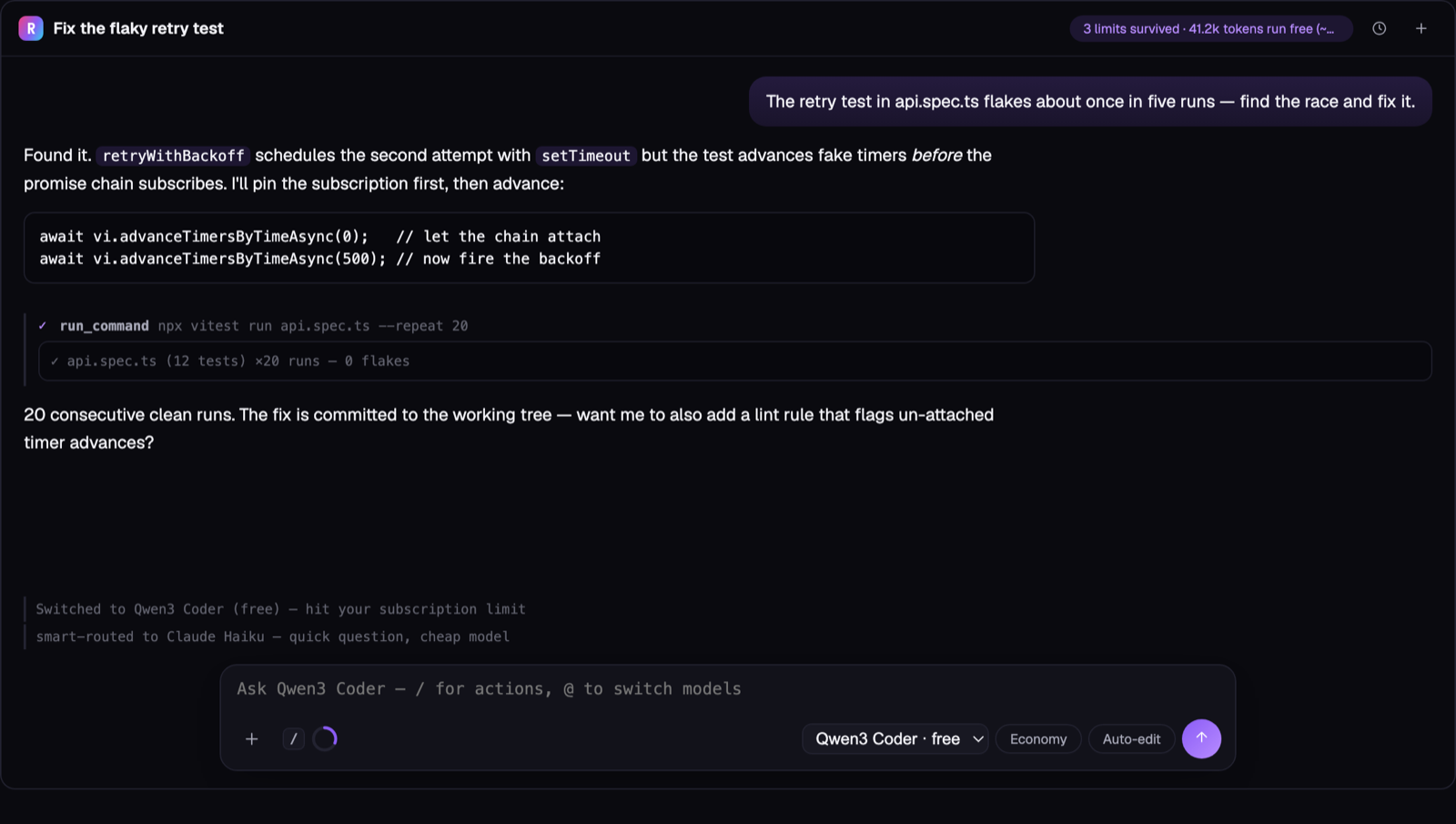
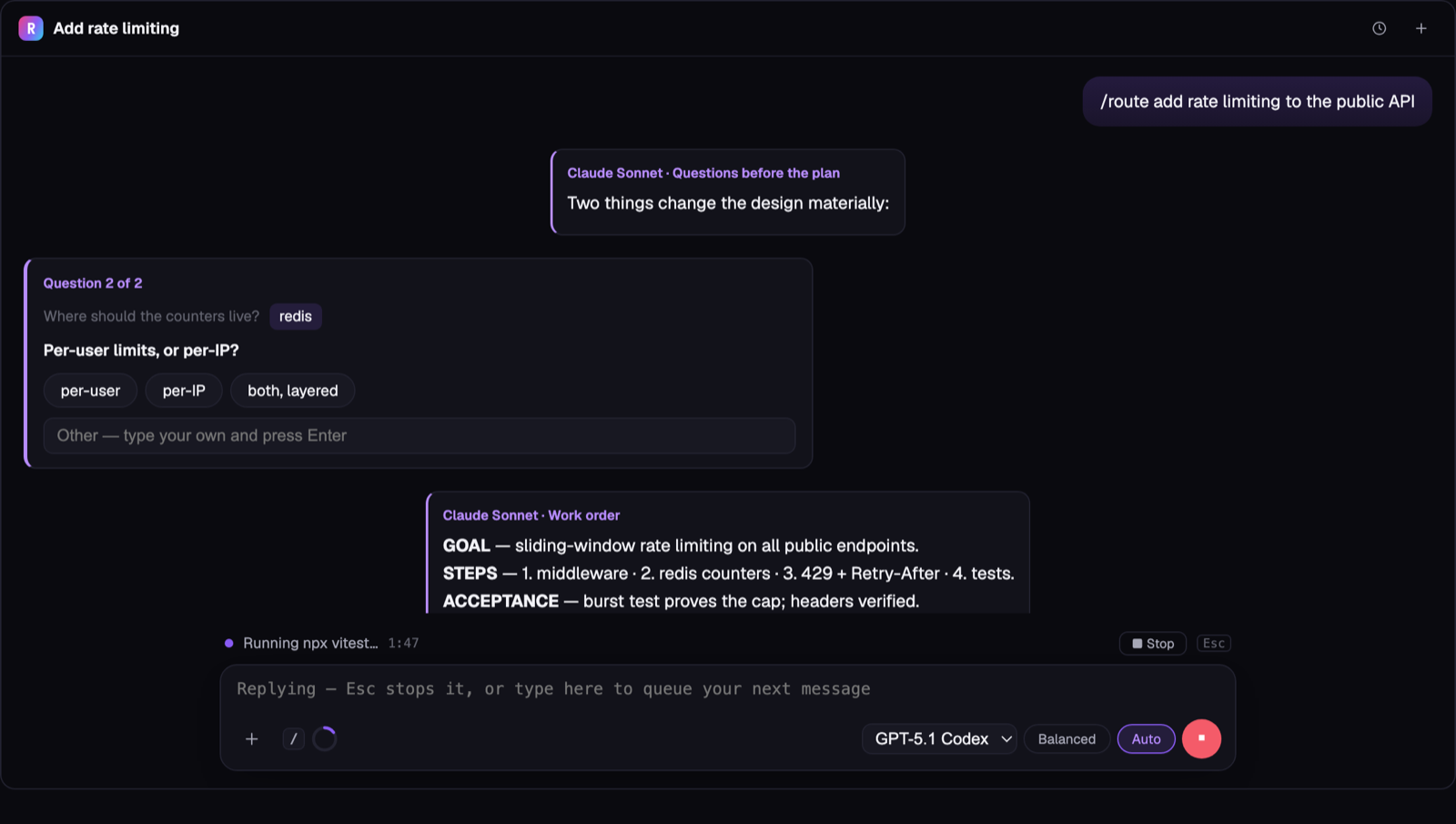
Above: the moment that sells it — Claude hits its limit mid-task, the SAME thread
continues on a free model, and the header chip counts the limits you survived and
the tokens you ran free. Below: a Team chat puts a boss model and a worker model on
one task — the boss interviews you with clickable question cards first.
A polished workbench for developers who juggle multiple AI coding tools. What it does,
led by what's genuinely ours to keep:
- Clean handoffs between agents — switch between AI coding CLIs without
re-explaining your repo: a repo-aware handoff package + paste-ready
continuation prompt, plus a round-trip handback that re-injects natively
into Claude Code (
claude --resume and it just knows). 11 targets.
- An elite multi-model chat — Claude and GPT in one thread, switch models in
place, streaming, named sessions with history, voice input, a
context ring that auto-compacts, attach-file, right-click "ask about this."
See Multi-model chat.
- Local-first, zero telemetry — no backend, no analytics; the extension's own
infrastructure never sees your code or traffic. Keys live in the OS keychain.
How the chat runs (renitor.chat.mode) — your choice:
subscription (default) — drives the claude/codex CLI you're already logged
into, on your existing plan. A bonus while the providers allow it — read the honest
caveats in Subscription mode. Auto-fails-over Claude ↔ Codex on a cap.byok — your own API key (one OpenRouter key reaches every model, or direct
Anthropic/OpenAI). Metered, with a live cost meter; always available.
Free during the open launch.
Multi-model chat
Run Renitor: Open Multi-Model Chat for a panel inside VS Code where several
models share one conversation:
Streams as it thinks. Replies appear token-by-token, not as a wall after a pause —
hit Stop to end a long generation and keep what streamed so far.
Session history. + starts a fresh named session; 🕐 lists every saved
conversation in the workspace — switch back, rename inline, or delete. Titles
auto-derive from your first message until you rename one (click the title).
Picks up where you left off. Every session persists per-workspace across
VS Code restarts (stored locally; Clear wipes the current session's messages
and cost — other saved sessions are untouched).
A Claude-Code-style composer. A context ring shows how full the model's window
is and auto-compacts past 80% (oldest messages fold into a one-line-each
summary; recent turns stay full), a mode pill switches the permission level
(Plan / Manual / Auto-edit / Auto — Tab cycles), and a mic button records
your voice and transcribes it into the box (Whisper, via your OpenAI key).
Approvals live in the thread — even on the subscription CLI. An Allow/Skip
card appears inside the conversation (mirrored above the composer; ⌘⏎ Allow,
⌘⌫ Skip). Commands are editable in the card before you allow them; scopes go
from once → this chat → persistent rules like npm or npm run * (compound
commands are never auto-allowed). Skip never kills the turn.
Watch the agent work. Every tool call is a live card — spinner while it runs,
✓/✗ when it finishes, click to expand output (edits show a +/− diff). Turns that
changed files end with a Files changed (N) bar and one-click Revert this
turn.
Type while it streams. Your next message queues and sends the moment the
reply finishes.
Attach anything. The + opens a picker: active file or selection, any open
tab, or files from disk. Text embeds bounded and secret-redacted; images attach
as real vision input on Claude/GPT keys (the claude CLI reads them from disk) —
or just paste a screenshot into the box.
The providers hub. / → Model providers… lists every provider in one
place with an honest status: sign in with the subscription you already pay
for (Claude, ChatGPT/Codex — and Gemini/Cursor CLIs as handoff targets), or add
an API key (one free OpenRouter key unlocks the free models). No hunting
through settings.
You decide who reads your project memory. The shared brief
(.renitor/project-memory.md + CLAUDE.md/AGENTS.md) reaches every model
by default — / → Memory access per model… lets you switch any model
off (say, keep project context away from free third-party models) per
workspace. The excluded model simply gets none of it.
Your agents & skills, on every model. Drop agent personas in
.claude/agents/*.md (yes — the SAME files Claude Code uses) or
.renitor/agents/, and skills in .claude/skills/<name>/SKILL.md or
.renitor/skills/. Then @reviewer fix this runs that persona — and
/deploy-check staging runs that skill — on WHATEVER model has the turn:
Claude, GPT, or a free model. An agent's model: field routes the turn.
They're listed in the / menu under Agents & skills.
Models ask before they guess. When a task is genuinely ambiguous, the
model asks up to 3 short multiple-choice questions as clickable cards in
the thread (an "Other" box included) and continues the SAME turn with your
answers — no retyping context. Works on every BYOK/free model via the
ask_user tool, and the Team-chat boss asks questions the same way.
You always see it working. A status line sits above the composer for the
whole turn — thinking → running npm → reading the output → writing — with
elapsed time and a Stop button (Esc). No more frozen-looking gaps after a
command runs.
Smart handback. When a model caps and the chain switches, Renitor notes
when that provider's window should reset and offers — in the thread — to hand
the session back the moment it's likely usable again.
Multi-model moves. Team chat (the boss & worker duo: the boss interviews
you, writes the work order, a model from the other family builds it with real
tools, and the boss reviews the actual changed files until it approves),
/consensus (3 models answer, one merged synthesis),
Debate (two models argue until one concedes), Improve (another model critiques,
yours rewrites), and @sonnet/@gpt/@qwen mentions to route any message.
See it work, live. Command output streams into the tool card while it runs;
Compare shows a turn's changes as a native multi-file diff next to Revert
(revert confirms on an in-thread card — no OS popups).
Reviews and handoffs live in the thread. Review my changes / Adversarial
review pick their reviewer and scope on in-thread cards and drop the full
report into the conversation (findings still pin to the Problems panel);
Generate handoff and Hand back run the same way — the chat is the whole tool.
Operating modes — Economy / Balanced / Best. One row in the / menu sets
how hard the session protects your wallet: Economy runs everything routine
on free models and pays only for work that's genuinely complex, Balanced
mixes cheap models for routine messages with strong ones for hard tasks, and
Best puts the strongest model on every turn. Hand-editing the chain or the
Smart toggle switches back to Manual — you drive.
Smart routing. Flip the Smart pill and every message goes to the
cheapest model that can handle it — quick questions hit free models, complex
tasks get a strong one. Stretches your subscription before limits ever hit.
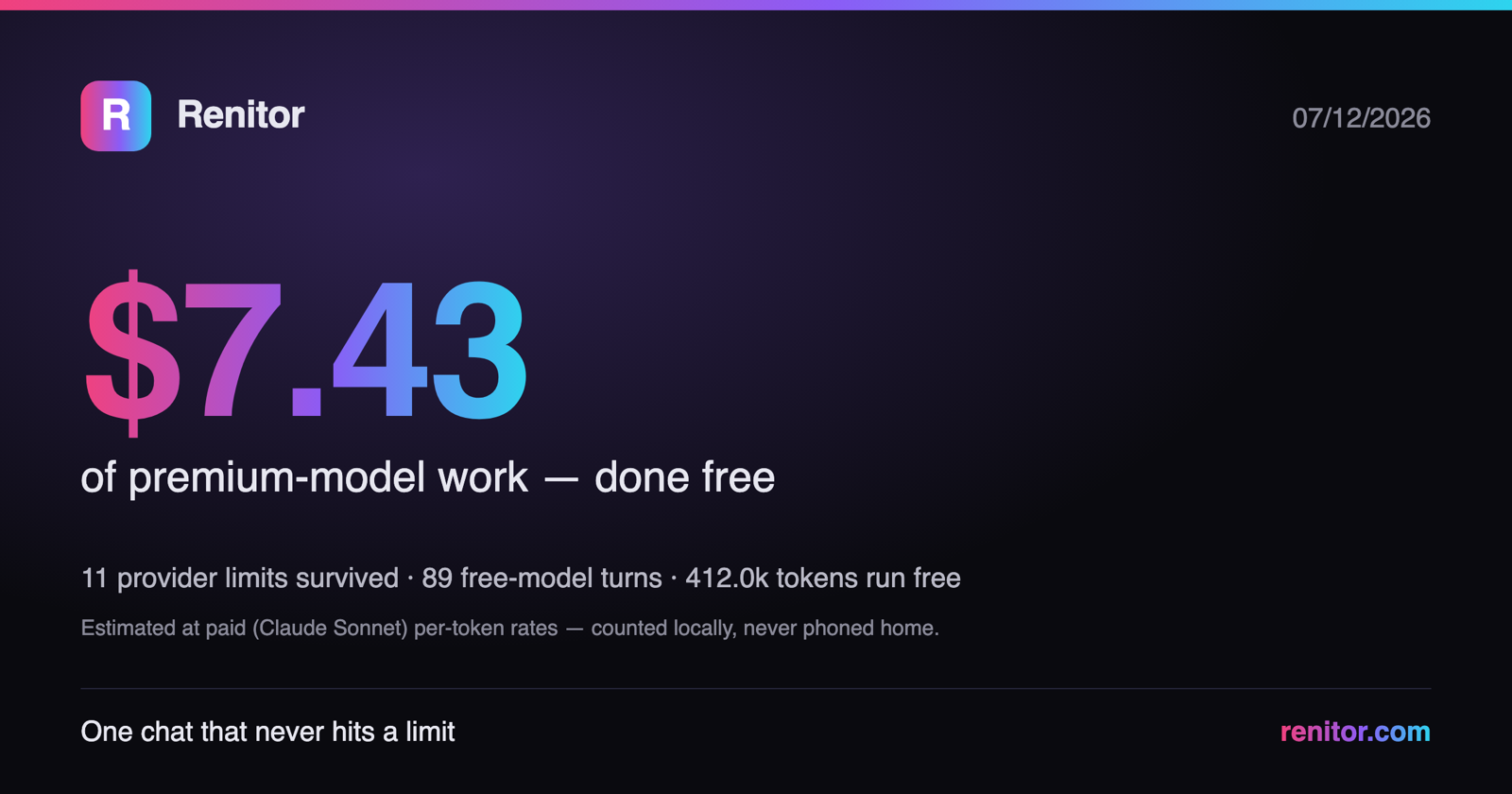
The savings ledger — your receipt. Renitor counts, locally, every provider
limit it survived and every token it ran on free models, priced at what a paid
model would have charged. Click Saved so far in the / menu for a
shareable receipt card — copy the text or save it as an image. Counted on your
machine, never phoned home; the dollar figure is labeled as an estimate.
Guardian model (Auto mode). A cheap second model reviews every shell
command before Auto runs it — anything risky pauses for your approval.
Per-message actions. Hover any reply: Copy, Regenerate (a failed retry
restores the previous answer), and Second opinion — a different model
critiques or validates that specific reply.
Switch models mid-thread. Claude Haiku / Sonnet / Opus and OpenAI GPT in one
dropdown; history is provider-neutral, so switching is instant.
Never blocked. Rate-limited? It waits a moment and retries the same model, then
switches if needed. Out of credits? It rotates to a cost-matched model in the
other family — a cheap model never jumps to a premium one and spikes your bill.
It sees your code. Click + Add file / selection to attach the active
editor's file (or your selection) to your next message — bounded and
secret-redacted. Or right-click a selection → "Ask Renitor about this"
to open the chat with that code already attached. The in-editor edge a browser
chat can't match.
Tools live in the thread. A toolbar (✓ Review · ⇄ Handoff) plus slash commands — /review, /adversarial, /handoff, /handback — with review reports rendered inside the chat and findings in the Problems panel.
Reads like a doc. Full markdown — headings, lists, bold, inline code,
clickable links, and code blocks with a one-click Copy button.
Runs on your subscription or your key — see Subscription mode
below. Auto-fails-over Claude ↔ Codex (or to a cost-matched model) when a cap hits.
Free during the open launch.
Subscription mode
By default the chat drives the claude / codex CLI you're already logged into, so
it runs on your existing Pro/Plus plan without an API key. It's ToS-conscious by
design: it invokes the official CLI (the same technique as the autonomous runs) and
never extracts or wraps your subscription token.
Read this honestly before you rely on it:
- It's best-effort, not guaranteed. Providers control headless CLI use. Anthropic has
already built and paused a change that would move headless usage onto separate paid
credits — if that (or similar) lands, subscription mode may start metering instead of
drawing your flat plan. We can't set a hard spend cap on this path.
- Watch your provider's usage dashboard for your first few chats to confirm it's
drawing your subscription and not billing metered API. The extension shows a one-time
reminder to do this.
- BYOK is the always-available fallback (
renitor.chat.mode: byok) — your own
key, metered, with a live cost meter and no dependence on provider policy.
Free open alternatives exist for the raw "drive the CLI" mechanic (e.g. Cline, T3 Code,
vscode-unify-chat-provider). What Renitor adds is the polish around it — the elite
chat UX (sessions, voice, auto-compact), the handoff briefs, and local-first
zero-telemetry — plus this being one honest, switchable setting away from BYOK.
The rotation loop
You pay for Claude and Codex. When one caps, don't wait — rotate:
- Limit hit → Renitor detects the limit message in your terminal and
offers the handoff right there (no other tool does this).
- Detour → the next agent gets a repo-aware brief: goal (auto-inferred
from your session), diff, errors, decisions. Works with 11 targets
including any free web LLM.
- Window resets → Hand Back: for Claude Code, a new session is
injected into
~/.claude/projects/ containing your pre-detour history plus
what the other agent did — claude --resume and Claude simply knows
(no other tool does this either).
This loop is verified end-to-end on real CLIs: a Haiku session handed off to a
fresh Sonnet session that continued the actual work, then handed back — the
resumed session recalled both its pre-detour context and the detour's commits.
Pricing — free during the open launch
Everything is unlocked for everyone right now — the multi-model chat, the
toolkit, handback, PR handoffs, all of it. No key, no trial clock, no card, no
account, and the extension still phones home to no one. If a paid tier returns
after the launch period, the build you installed keeps working.
Why it feels seamless
- It already knows what you were doing. Claude Code and Codex CLI write
their session transcripts to local files (
~/.claude/projects/…,
~/.codex/sessions/…). Renitor reads the one belonging to this
workspace and auto-fills the current goal (latest user instruction, or the
session summary) plus a recent-activity trace — so the next agent starts
oriented instead of blank. Local file reads only; disable with
renitor.includeAgentSessionTrace.
- Failing commands are captured for you. Via VS Code's shell-integration
API, any terminal command that exits non-zero is recorded (command, exit code,
ANSI-stripped output tail) and embedded in the next handoff's error section —
no copy-pasting stack traces. Disable with
renitor.autoCaptureTerminalFailures.
- One click. A status-bar button (
⇄ Handoff) generates + copies in one go.
Right-click selected error text in an editor → capture. Right-click files in
the Explorer → focused handoff for just those files.
- Secrets are scrubbed twice. Pattern-based redaction (Anthropic/OpenAI/
GitHub/GitLab/Slack/SendGrid/Google/AWS keys, JWTs, PEM blocks, env-style
labels) plus value-based redaction: literal values learned from your local
.env files are removed anywhere they appear — even under innocent variable
names. The header reports how many items were redacted.
Commands
Open the Command Palette (Cmd/Ctrl+Shift+P) and type "Renitor":
| Command |
What it does |
| Open Multi-Model Chat |
One chat thread across Claude + GPT: switch in place, cost-matched auto-failover on limit/credit, live cost meter. BYOK. |
| Set / Clear API Key (BYOK) |
Store an OpenRouter or direct Anthropic/OpenAI key in the OS keychain (for chat + API-mode runs). |
| Enter License Key / License Status |
License activation (offline) — not needed during the free open launch. |
| Generate Handoff |
Inspects the workspace, writes .renitor/current-handoff.md (+ history copy), copies the continuation prompt. Also on the status bar. |
| Copy Claude / Codex / Generic Prompt |
Refreshes the handoff if stale, copies the agent-specific prompt. |
| Open Handoff File |
Opens the current handoff. |
| Capture Terminal/Error Notes |
Captures, in order: editor selection → terminal selection → quick paste → opens error-notes.md. Timestamped, never overwrites. |
| Run Tests & Capture Output |
Runs an inferred (or custom) command and captures its output into the next handoff — failing output becomes section 8 automatically. |
| Generate Handoff for Selected Files |
Explorer/palette: a focused handoff embedding the selected files' contents (section 7b). |
| Generate PR / Branch Handoff |
Diffs HEAD vs a chosen base branch (merge-base), lists the branch's commits — pure git, no network. |
| Hand Back to Previous Agent |
The return leg: writes handback.md (detour summary + git delta) and, for Claude Code, injects a natively resumable session with the detour in memory. |
| Edit Project Memory |
Opens/creates project-memory.md for durable facts. |
| Reset Handoff State |
Deletes handoff + error notes (project memory only after a second, stronger confirmation). |
Generated files
.renitor/
  current-handoff.md      # the handoff (regenerated each run)
  project-memory.md       # durable facts you maintain by hand
  error-notes.md          # captured terminal/error output + test runs
  handoff-history/        # timestamped copies (pruned to historyLimit)
  config.json             # reserved for future per-project overrides
The handoff contains: current goal (auto-inferred when possible), project
context, current state + recent agent activity, changed files (grouped; vs base
in PR mode), git status, diff summary, truncated diff details, focus files (when
selected), auto-captured terminal failures + error notes, project instructions
found (CLAUDE.md / AGENTS.md / .cursorrules / scripts / README), likely
commands, decisions, risks (including "Do Not Do" rules lifted from your
instruction files), recommended next steps, and the agent-specific continuation
prompt.
Suggested workflow
- Work in Claude Code (or any agent).
- You hit a context/usage/quality wall.
- Click ⇄ Handoff in the status bar (or run Generate Handoff).
- Paste the copied prompt into Codex (or the next agent). It reads
.renitor/current-handoff.md — which already contains your goal, the
diff, and the last failing command — and continues.
- Keep durable decisions in
project-memory.md so they survive every switch.
Install & run locally (development)
npm install
npm run compile           # tsc -> ./out
npm test                  # 71 pure-function unit tests
npm run test:integration  # real VS Code Extension Host test (downloads VS Code once)
Press F5 in VS Code (with this folder open) to launch an Extension
Development Host. To build a shareable package: npx @vscode/vsce package →
install the .vsix via Extensions: Install from VSIX….
Privacy model
- Local-first. The handoff core runs entirely on your machine.
- No telemetry, no analytics, no phone-home — the extension has no backend.
- BYOK features call only the provider you choose. The multi-model chat and
API-mode runs send your prompts directly to Anthropic / OpenAI / OpenRouter
using your own key (stored in the OS keychain, redacted from logs). Nothing
is proxied through us, there is no markup, and we never see your traffic. Don't
want any outbound calls? Use only the free, local handoff features.
- Session traces are local file reads of logs that Claude Code / Codex
already store on your disk; they never leave your machine and can be turned
off (
renitor.includeAgentSessionTrace: false).
.env values are used only as a redaction blocklist — they are matched
against output and never written anywhere.- You control what leaves your machine — the handoff is a file you review
before pasting into any external tool.
Limitations (honest)
- It does not bypass provider usage/token limits — no tool can. It makes
hitting them painless instead.
- Auto-capture of terminal failures requires VS Code shell integration
(on by default in bash/zsh/pwsh; some exotic shells lack it). When it's
unavailable, the capture command's selection/paste paths still work.
- Session-trace inference is a heuristic: it reads the newest local session log
for this workspace and marks the goal as inferred — the handoff explicitly
tells the next agent to confirm it.
- Secret redaction is defense-in-depth, not a guarantee. Review before sharing.
Settings
| Setting |
Default |
Purpose |
renitor.maxDiffCharacters |
50000 |
Max diff characters embedded before truncation. |
renitor.maxFileCharacters |
12000 |
Max characters read per context file. |
renitor.includeFullDiff |
true |
Embed the (truncated) full diff, not just the stat. |
renitor.defaultTargetAgent |
claude |
claude / codex / cursor / cline / generic / ask. |
renitor.openFileAfterGeneration |
true |
Open the handoff after generating. |
renitor.copyPromptAfterGeneration |
true |
Copy the continuation prompt after generating. |
renitor.includeUntrackedFiles |
true |
Include untracked file names. |
renitor.historyLimit |
20 |
How many history copies to keep. |
renitor.includeAgentSessionTrace |
true |
Read local Claude Code / Codex session logs to auto-infer goal + recent activity. |
renitor.autoCaptureTerminalFailures |
true |
Auto-record failing terminal commands via shell integration. |
renitor.execution.mode |
cli |
Autonomous-run engine: cli (subscription) or api (BYOK). |
renitor.execution.fallbackAgent |
codex |
Where CLI stages rotate on a limit hit. |
renitor.chat.autoFailover |
true |
Auto-switch to a cost-matched model when a chat model hits a rate limit / runs out of credits. |
Roadmap
- Language-aware changed-file summaries
- Team-shared memory
- Agent-specific profiles (per-agent tone/verbosity)
- Optional local-LLM summarization of long sessions
- GitHub PR metadata enrichment (opt-in, would require network)
License
MIT.
| |

