
Aura Terran — Local Knowledge Base, RAG & MCPOne local knowledge base for your AI assistant, built from files, websites, and connected services. Review sources that disagree and check which claims the evidence supports. Served over MCP. Installation Launch VS Code Quick Open ( Ctrl+P), paste the following command, and press enter.Copied to clipboard |



| Tool | What the assistant gets back |
|---|---|
rag_search |
Matching passages, each with its file and score, its authority tier when one is set, and a note if another passage supersedes it |
list_conflicts |
The disagreements Terran found, the value each side states, and which side is current and why |
rag_ground |
A verdict for each claim in an answer: grounded, weak, or unsupported |
Tools for listing and reading documents are included as well. The assistant decides when to call a tool, and the editor may ask you to allow the call. Terran's instructions ask the model to call rag_search before it answers questions about facts held in your sources. The assistant writes the answer with its own model. Terran does not generate answers.
One knowledge base
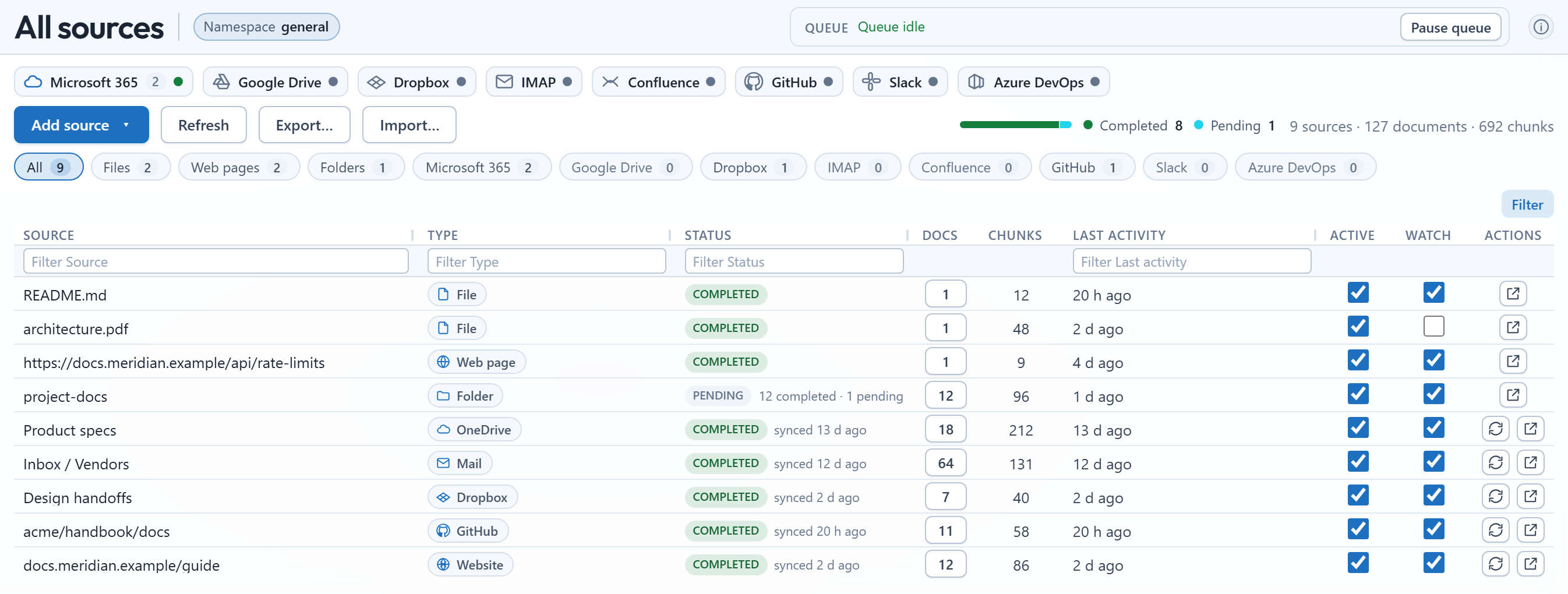
All sources, shown with demonstration data. Every row is included.
- Files, folders, network shares, single web pages, and whole-site crawls. PDF, Word, PowerPoint, Excel, Markdown, HTML, and code go into the same index. Watched folders pick up later edits.
- Microsoft 365 (OneDrive, SharePoint, mail, calendar), Google Drive, Dropbox, IMAP mail, Confluence, Slack, GitHub, and Azure DevOps. You sign in with your own account and choose what to include. Terran downloads that content to this computer and indexes it here.
The index is stored per user, under ~/.aura-terran. Every workspace, and both editors, use the same one. On Windows the Aura Terran desktop app uses it too.
When sources disagree
Two copies of the same document that state different values score almost the same for a question. Retrieval returns whichever lands first.
A walkthrough
The index held two files and nothing else. They were identical except for one number:
docs/gateway-runbook.md               The gateway request timeout is 30 seconds. ...
wiki-export/gateway-runbook-wiki.md   The gateway request timeout is 60 seconds. ...
1. The pair shows up on the board. About half a minute after indexing, a background sweep listed the two files under Conflicts as different values for timeout. No model was called. Automatic resolution was off, so the pair waited for a decision.
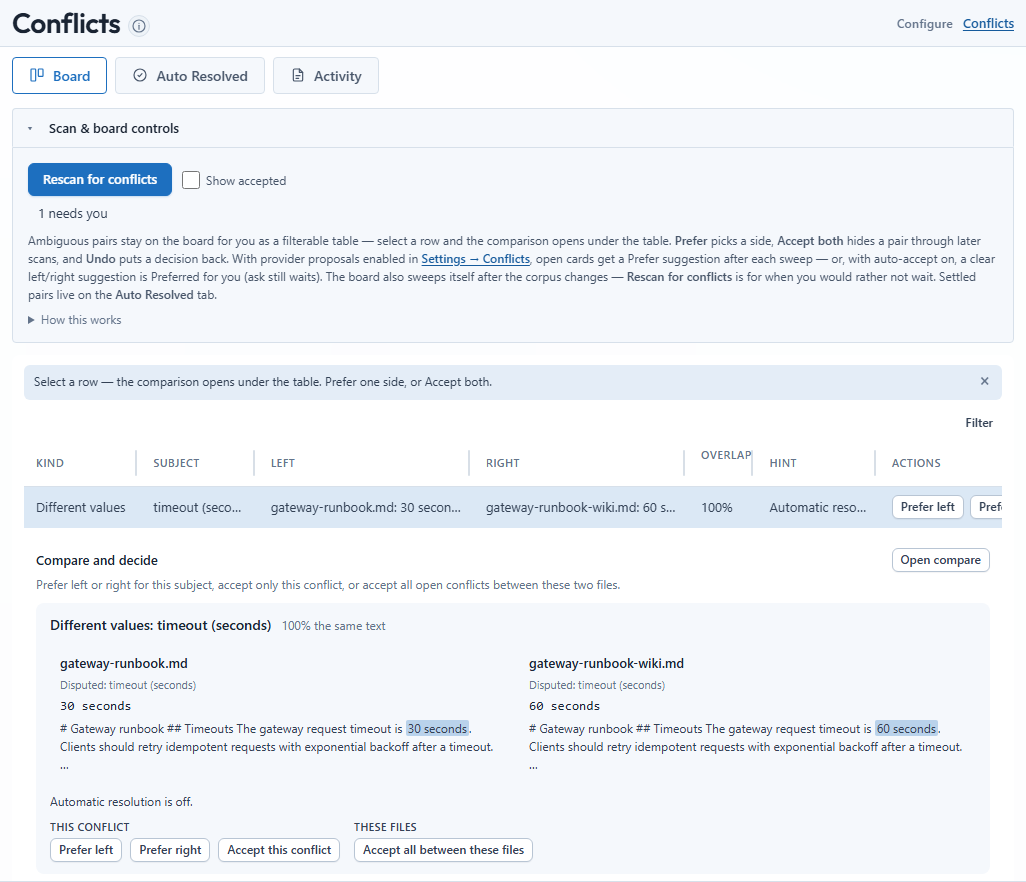
2. Before a decision, either copy can come first. A search for "What is the gateway request timeout?" returned the 60-second copy first. The two scores were 99.65% and 99.06%.
3. After Prefer left, the chosen copy comes first. The same search returned the 30-second copy first, at the score it had before. The other copy dropped to 59.79%.
| Before a decision | After Prefer left |
|---|---|
 |
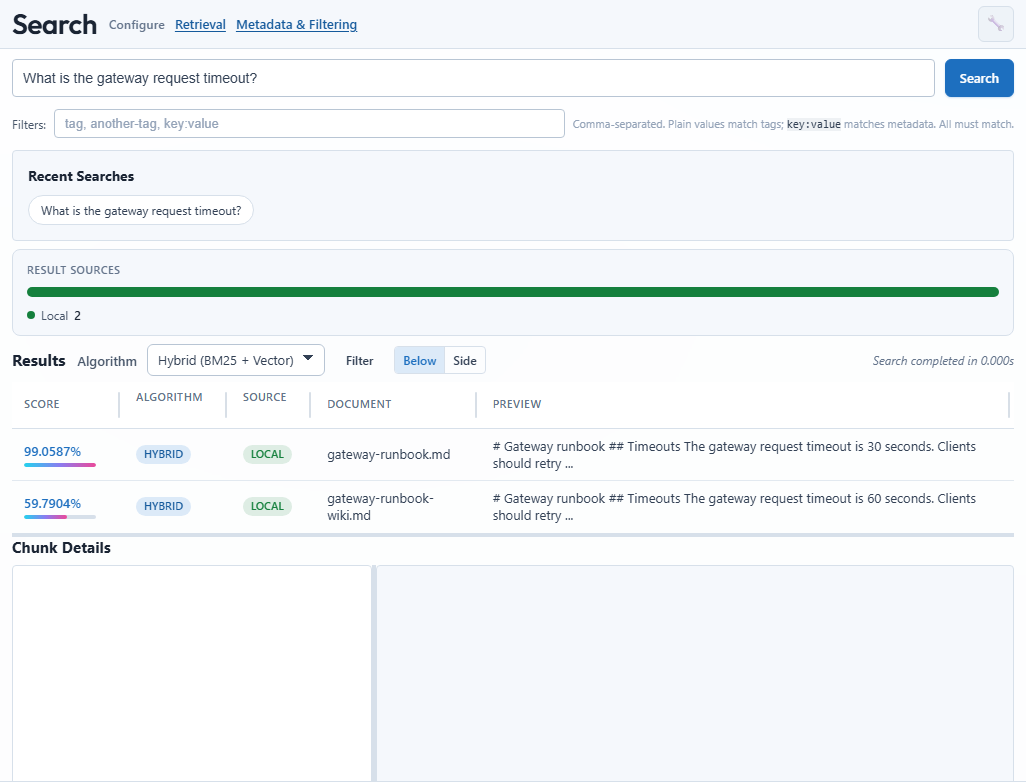 |
These three images are the extension's own pages showing the results the server returned in this run. The run was recorded and replayed for the capture, and only the folder path was changed.
The assistant's rag_search tool returned the same order and the same scores as the Search page, before and after.
What the decision did, and did not do:
- The superseded passage was still returned. Its score was multiplied by 0.6, and it carried a note naming the passage that replaced it and the reason: "You chose gateway-runbook.md."
- The lower score applied only to questions about the timeout. For a question about the rate limit, where both copies agree, both kept their scores and their order.
- The decision was still in place after a restart, and after the superseded file was edited and indexed again.
list_conflictsreported the pair, both values, and which one is current.
What Terran looks for. Passages that are largely the same text and state a different value, bound, setting, date, version, URL, contact, port, address, or status, or give opposite instructions. Near-copy sentences that differ by one substantive word are listed for you and are never settled by rules.
What it misses. Detection is text comparison on this computer and leans toward silence:
- A disagreement written in different words is usually missed.
- Documents that Terran reads as describing different products, environments, or objects are not compared with each other. File names and titles count toward that reading.
- Two passages inside one document are never compared.
- A decision changes ranking. It does not delete anything, and it does not make the preferred passage correct.
Your decisions. Prefer left or Prefer right picks a side. Accept this conflict hides one pair. Accept all between these files tells Terran the two documents cover different scopes and clears every open conflict between them. Undo reverses a decision. Rescan for conflicts runs a sweep without waiting.
Automatic settlement is included. It settles pairs the sources can decide by themselves, such as spec-v2 over spec-v1, a document that says it replaces another, or a canonical source over an archived one. It never settles security instructions or wording differences. Those wait for you.
Source authority. Each document has a tier: canonical, normal, draft, or archived. A tier comes from rules you write under Settings → Retrieval → Source authority, from front matter, or from the path. Folders such as archive/, deprecated/, and draft/ mark a file down, and a path alone never marks one up. The tier appears in Search and Vector Store and is sent with every rag_search result. Tiers change ranking only if you turn on Let a source's tier affect where it ranks, which is off by default.
Is the answer supported?
rag_ground takes an answer and the passages behind it, or a question to retrieve them with. It splits the answer into claims and grades each one against those passages. The check runs on this computer.
From the same run, after the decision, with a three-sentence answer:
| Claim | Verdict |
|---|---|
| The gateway request timeout is 30 seconds. | Grounded, with gateway-runbook.md as its source |
| Requests over the rate limit receive a 429 response. | Grounded |
| The gateway also supports HTTP/3. | Unsupported. Neither file says this |
Grounded means a passage says it. In that run the answer "The gateway request timeout is 60 seconds" was also graded grounded, because gateway-runbook-wiki.md says so. The report added a caveat that the passage had been superseded. Unsupported means your sources did not say it, which is different from the claim being false.
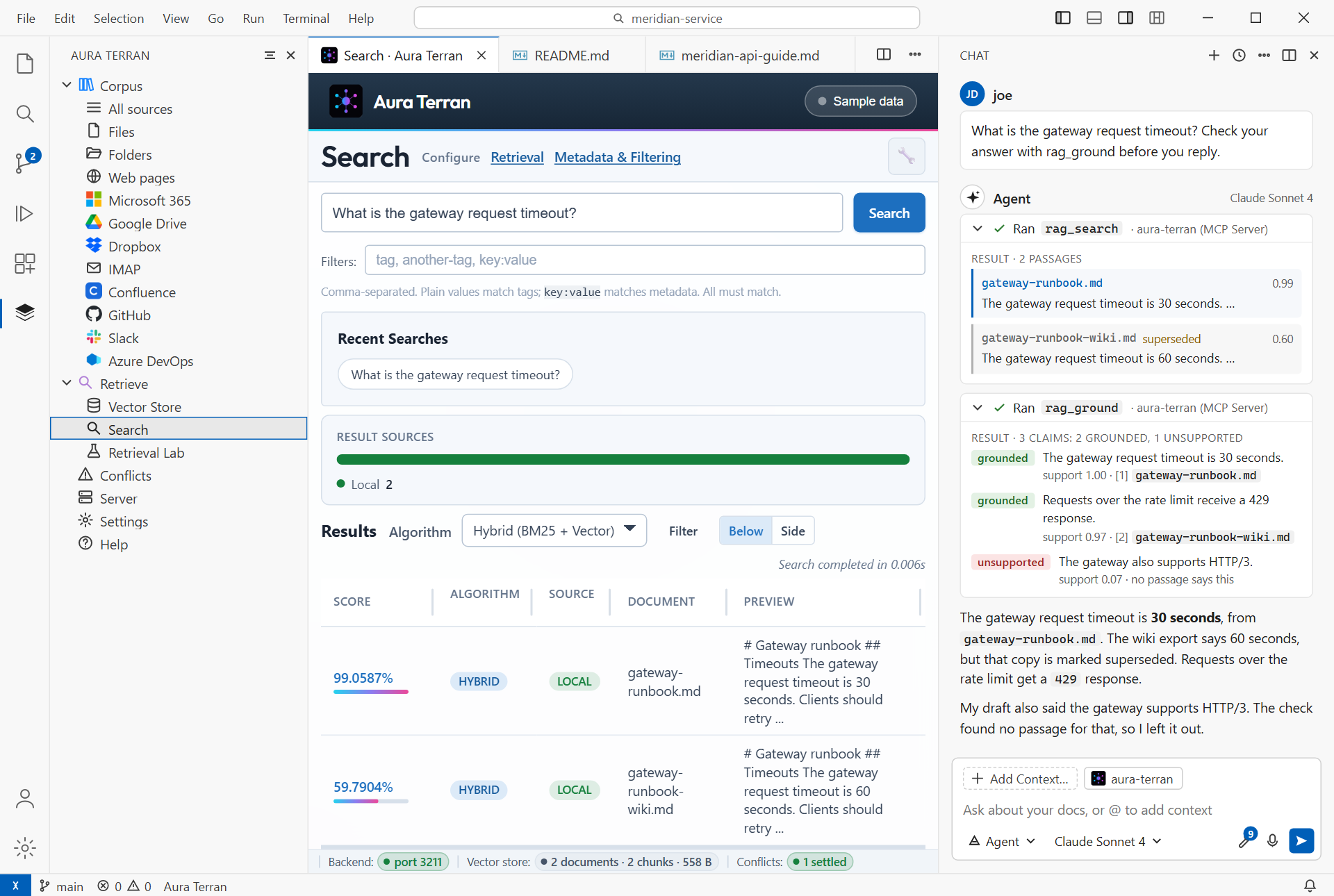
An illustration, not a recording. The editor window and the chat wording are drawn. The page in the middle is the extension's Search page, and the tool results in the chat are the ones Terran returned in this run. How your assistant words its reply, and whether it runs the check unprompted, depends on the assistant.
What the extension gives you
rag_groundis available to the assistant over MCP.- It runs when the assistant calls it. Terran's instructions to the model cover search only, so ask for the check when you want one, for example: check that answer with rag_ground.
- Results that carry an authority tier or a supersession note give the assistant grounds to qualify an answer without a separate check.
What the extension does not do
- It does not check every reply automatically.
- It has no Grounding page.
Both of those belong to the Aura Terran desktop app for Windows, where the app relays chat requests to a model and checks each reply. Chat passthrough is included.
Try it
- Install the extension. Click Aura Terran in the activity bar, or run Open Aura Terran from the Command Palette.
- The first run downloads the Terran server for this computer (about 100 to 130 MB) and starts it. Later runs start in a few seconds. The first index also downloads an embedding model (about 23 MB). Both are stored under
~/.aura-terran. The server is a native download, with no Docker image and no Python environment to set up. - Add your own sources under Corpus → Files, Folders, or Web pages. Wait until Vector Store shows them as Indexed.
- Open Search and ask a question your sources answer. Open a result to see which passage matched.
- Ask the chat in your editor the same question, and allow
rag_searchif the editor prompts you. Then ask it to check its answer withrag_ground.
Ops → Servers shows Editor connection: stdio once the local server is ready. If the connection drops, open Ops → MCP Server, click Re-apply, and reload the window.
To see a conflict, copy a short document of your own into a second folder, change one number in a sentence of the copy, index both, and open Conflicts. If the pair does not appear, What it misses lists the usual reasons.
Retrieval Lab compares two retrieval setups on questions you choose before you keep a settings change.
Free
Aura Terran is free, including for work. No license, no countdown, and no card. A donation is welcome and does not unlock anything. Earlier paid keys still activate under Settings → License.
Included: files, folders, network shares, web pages, and site crawl; search and Retrieval Lab; conflict detection, your own decisions, source authority tiers, and automatic conflict settlement; MCP tools in VS Code and Cursor, including list_conflicts and rag_ground; Microsoft 365, Google Drive, Dropbox, IMAP mail, Confluence, Slack, GitHub, and Azure DevOps; optional removal of common personal data while indexing; advanced retrieval and date-filter settings; and, in the Windows desktop app, chat passthrough with automatic answer checking and a local HTTP API for scripts.
On macOS and Linux the extension is the whole product. The Windows desktop app is a separate install of the same product.
The Windows desktop app can also connect Claude Desktop and other MCP clients to the same index. This extension registers only the editor it is running in.
What stays on this computer
By default, on this computer: reading and splitting your sources, embedding, the index, search, conflict detection, and grounding checks.
Sent to your assistant: the passages a tool call returns. They go wherever that assistant's model runs. If it is a cloud model, those excerpts leave this computer under that provider's terms. Terran sends the results of a call, not the index.
Fetched from outside: web pages you add, and content from services you connect. It is downloaded to this computer and indexed here.
Optional, off by default. Each of these sends text to an endpoint you configure:
- Chunking LLM sends document text to a chat model while indexing.
- Ask my provider to propose, under Settings → Conflicts, sends excerpts from open conflict cards to a chat model.
- Ollama embeddings send passage text to the Ollama address you set. The default address is on this computer.
Terran's own requests: the server and model downloads, one install record (a random device ID and the version), and license activation if you enter a key bought earlier. None of them include document content.
Where it runs
| Platform | Status |
|---|---|
| Windows 10 and 11 | Supported |
| macOS, Apple silicon and Intel | Preview |
| Linux, x64 and arm64 | Preview. Needs OpenSSL (libssl), which most distributions include |
VS Code 1.85 and newer, and Cursor. Reading scanned PDFs and images with OCR is Windows only for now. If something fails on a preview platform, tell us and include the Aura Terran output channel.
Frequently asked questions
My assistant already reads my project. What does Terran add? It keeps doing that. Terran adds a collection that is not tied to the open workspace, that you add to and remove from yourself, and whose results arrive with authority tiers, known conflicts, and an optional support check.
Do my files get uploaded? The index stays on this computer. Passages returned to your assistant go to that assistant's model. See What stays on this computer.
Do I need an API key? Not for indexing or search. A written answer uses the model your editor's assistant already has.
Does every chat search Terran, and is every answer checked?
No. The assistant calls rag_search when it decides to, and rag_ground when it or you ask for it.
Does grounded mean correct? No. It means a retrieved passage supports the claim. If the passage is wrong or out of date, the claim is too.
Do I need to buy a license? No. The product stays on with no key. A donation is welcome and does not unlock anything. Keys bought earlier still activate.
Aura Terran is made by Bitfield Creek Labs, the public name of Halo Softworks LLC. Product page · Support