Minecraft Material Icons
A VS Code icon theme for Minecraft mod development that combines:
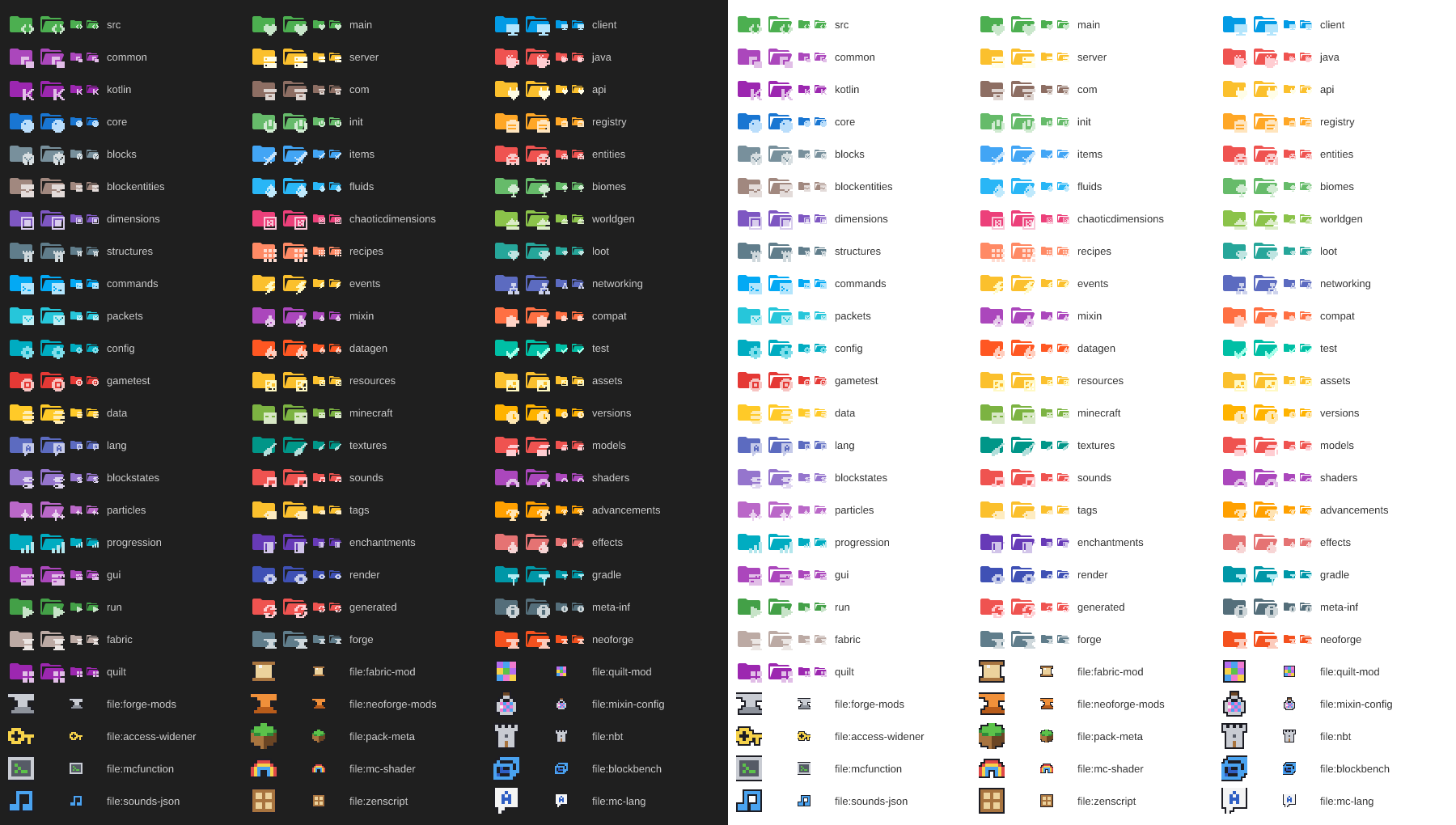
- Custom Minecraft icons in the minimalist Material style (a single-color folder with a pixel-art symbol in a lighter tint of the same color) for the folders and files you find in Fabric, Forge, NeoForge and Quilt mods, written in Java or Kotlin;
- General icons derived from the Material Icon Theme (MIT license) for everything else: JavaScript, TypeScript, Java, Python, JSON, YAML, XML, Markdown, images, fonts, Docker, Git, Gradle, npm, databases, common folders and more.
Every Minecraft folder has a closed and an open icon. Like the Material Icon Theme, each icon uses a single color: the folder uses Material's folder shape, and the symbol is a solid, monochrome shape in a light tint of that color. Folders that Material already had (src, config, test, java, gradle...) keep Material's colors; new ones use the same Material Design palette. Mod files (fabric.mod.json, *.mixins.json, pack.mcmeta...) get colorful pixel-art icons with a dark outline so they stand out. The same icons work in dark, light and high-contrast themes.
Unofficial project. Not affiliated with Mojang Studios or Microsoft. No Minecraft textures or assets were copied: the icons are conceptual (portal, block, gear, world, database, sword, network, code...).
Installation
From the Marketplace: search for Minecraft Material Icons in the VS Code Extensions view, or run ext install hadrykkxd.minecraft-material-icons from Quick Open (Ctrl+P).
From a .vsix file: open the Extensions view (Ctrl+Shift+X), click ... (top right), choose Install from VSIX... and select minecraft-material-icons-1.1.2.vsix.
From the terminal:
code --install-extension "minecraft-material-icons-1.1.2.vsix"
Enable the theme: Ctrl+Shift+P → Preferences: File Icon Theme → Minecraft Material Icons.
There are two options in the picker:
- Minecraft Material Icons: with the expand/collapse arrows (›/⌄) next to folders.
- Minecraft Material Icons (No Arrows): hides the Explorer arrows. The open/closed folder icon shows the state.
Hiding the vertical tree lines: they are a VS Code setting, not part of the theme. Open Ctrl+Shift+P → Preferences: Open User Settings (JSON) and add:
"workbench.tree.renderIndentGuides": "none"
The extension is standalone: it does not modify your Material Icon Theme installation. Both can be installed side by side; whichever you pick in File Icon Theme is used.
Priority rules
When a name has more than one association, this order applies:
- Specific Minecraft folder association (
folderNames, folderNamesExpanded, rootFolderNames, rootFolderNamesExpanded)
- Specific Minecraft file association (mod
fileNames and fileExtensions)
- General Material Icon Theme association
- Generic icon (Material's default file/folder)
General extensions keep the Material icon: .java, .json, .js, .ts, .py, .md, .yml, .yaml, .xml, .toml, .gradle, .properties, .png, .jpg, .svg, .gif, .wav and .ogg.
Mod files with a Minecraft icon: fabric.mod.json, quilt.mod.json, mods.toml, neoforge.mods.toml, *.mixins.json, *.accesswidener, accesstransformer.cfg, pack.mcmeta, pack.png, *.mcmeta, *.nbt, *.snbt, *.schem, *.litematic, *.mcfunction, *.fsh, *.vsh, *.bbmodel, sounds.json, *.zs, *.lang and language files (en_us.json, pt_br.json...).
VS Code matches names case-insensitively: META-INF and meta-inf use the same icon.
Folders: found and predicted
Last scan: project chaoticdimensions (2026-11-11): Minecraft 1.20.1, Fabric, 134 Java / 0 Kotlin files.
Project-specific names: registry, chaoticdimensions, worldgen, mixin, compat, versions, progression.
| Category |
Folder names |
Origin |
Status |
| src |
src |
conventional |
✅ found |
| main |
main |
conventional |
✅ found |
| client |
client |
conventional |
✅ found |
| common |
common |
conventional |
🔮 predicted |
| server |
server dedicatedserver |
conventional |
🔮 predicted |
| java |
java |
conventional |
✅ found |
| kotlin |
kotlin |
conventional |
🔮 predicted |
| com |
com net org blue |
conventional |
✅ found |
| api |
api |
conventional |
🔮 predicted |
| core |
core gameplay |
conventional |
✅ found |
| init |
init |
conventional |
🔮 predicted |
| registry |
registry registries |
project |
✅ found |
| blocks |
blocks block |
conventional |
✅ found |
| items |
items item armor ingots |
conventional |
✅ found |
| entities |
entities entity mobs mob entity_types |
conventional |
✅ found |
| blockentities |
blockentities blockentity block_entity block_entities tileentities tileentity |
conventional |
🔮 predicted |
| fluids |
fluids fluid water |
conventional |
✅ found |
| biomes |
biomes biome tree trees |
conventional |
✅ found |
| dimensions |
dimensions dimension dimension_type dimension_types aurora shadow |
conventional |
✅ found |
| chaoticdimensions |
chaoticdimensions chaotic_dimensions chaotic-dimensions chaoticd |
project |
✅ found |
| worldgen |
worldgen configured_feature placed_feature noise_settings density_function carver carvers noise |
project |
✅ found |
| structures |
structures structure template_pool processor_list structure_set dream_fluid_cavern dream_fluid_island dream_fluid_sky_lake |
conventional |
✅ found |
| recipes |
recipes recipe crafting |
conventional |
✅ found |
| loot |
loot loot_tables loot_table loottables loot_modifiers trade trades |
conventional |
✅ found |
| commands |
commands command |
conventional |
✅ found |
| events |
events event |
conventional |
🔮 predicted |
| networking |
networking network netcode |
conventional |
✅ found |
| packets |
packets packet |
conventional |
🔮 predicted |
| mixin |
mixin mixins accessor accessors injection |
project |
✅ found |
| compat |
compat compatibility jei rei emi |
project |
🔮 predicted |
| config |
config configs |
conventional |
🔮 predicted |
| datagen |
datagen data_gen |
conventional |
🔮 predicted |
| test |
test tests |
conventional |
✅ found |
| gametest |
gametest gametests game_test |
conventional |
🔮 predicted |
| resources |
resources resource orespawn ores |
conventional |
✅ found |
| assets |
assets |
conventional |
✅ found |
| data |
data |
conventional |
✅ found |
| minecraft |
minecraft |
conventional |
✅ found |
| versions |
versions version mc-versions 1.7.10 1.8.9 1.12.2 … (+20, see docs/FOLDERS.md) |
project |
✅ found |
| lang |
lang langs |
conventional |
✅ found |
| textures |
textures texture |
conventional |
✅ found |
| models |
models geo |
conventional |
✅ found |
| blockstates |
blockstates blockstate |
conventional |
✅ found |
| sounds |
sounds sound |
conventional |
🔮 predicted |
| shaders |
shaders shader post_effect |
conventional |
🔮 predicted |
| particles |
particles particle |
conventional |
🔮 predicted |
| tags |
tags tag mineable c |
conventional |
✅ found |
| advancements |
advancements advancement achievements |
conventional |
✅ found |
| progression |
progression |
project |
✅ found |
| enchantments |
enchantments enchantment enchant |
conventional |
✅ found |
| effects |
effects effect potions potion mob_effect mob_effects |
conventional |
✅ found |
| gui |
gui screen screens menu |
conventional |
✅ found |
| render |
render renderer renderers rendering visual |
conventional |
✅ found |
| gradle |
gradle buildsrc buildlogic build-logic wrapper |
conventional |
✅ found |
| run |
run runs run-client run-server rundata |
conventional |
🔮 predicted |
| generated |
generated |
conventional |
🔮 predicted |
| meta-inf |
meta-inf |
conventional |
🔮 predicted |
| fabric |
fabric fabric-1.7.10 fabric-1.8.9 fabric-1.12.2 fabric-1.16.5 fabric-1.18.2 … (+18, see docs/FOLDERS.md) |
conventional |
✅ found |
| forge |
forge forge-1.7.10 forge-1.8.9 forge-1.12.2 forge-1.16.5 forge-1.18.2 … (+18, see docs/FOLDERS.md) |
conventional |
✅ found |
| neoforge |
neoforge neoforged neoforge-1.7.10 neoforge-1.8.9 neoforge-1.12.2 neoforge-1.16.5 … (+19, see docs/FOLDERS.md) |
conventional |
✅ found |
| quilt |
quilt quilt-1.7.10 quilt-1.8.9 quilt-1.12.2 quilt-1.16.5 quilt-1.18.2 … (+18, see docs/FOLDERS.md) |
conventional |
✅ found |
Development
Requirements: Node.js 18 or later.
npm install        # installs vsce, the official Material Icon Theme (npm, MIT) and helpers
npm run package    # generates icons, merges the theme, validates and creates dist/minecraft-material-icons-<version>.vsix
| Script |
What it does |
npm run icons |
Generates the Minecraft SVGs in icons/minecraft/ and the images/icon.png extension icon |
npm run theme |
Merges the Material Icon Theme with the Minecraft icons into themes/ (with and without arrows) and copies only the Material SVGs that are used |
npm run validate |
Validates package.json, every JSON file, every SVG, broken references, absolute paths and the priority rules |
npm run build |
icons + theme + validate |
npm run package |
build + vsce package + check of the .vsix contents |
npm run scan -- "<mod folder>" |
Analyzes a mod project (read-only) |
npm run add-folder -- ... |
Adds folders and files to the theme |
npm run preview |
Generates images/preview.png with every Minecraft icon |
Structure
package.json                     extension manifest
themes/                          generated themes (do not edit by hand)
icons/minecraft/                 generated Minecraft SVGs (custom)
icons/material/                  SVGs copied from Material Icon Theme (MIT)
images/icon.png                  extension icon
src/minecraft-icons.json         ← config: categories, colors, folder and file names
src/glyphs.mjs                   ← folder symbols (solid, single-color pixel art)
src/file-glyphs.mjs              ← mod file icons (colorful pixel art + PALETTE)
scripts/                         build, validation, scan, add-folder, .vsix check
licenses/, THIRD_PARTY_NOTICES.md   Material Icon Theme license and credits
Adding new folders later
npm run add-folder -- --list                              # available categories and glyphs
npm run add-folder -- dims dimensions                     # "dims" uses the portal icon
npm run add-folder -- mymod chaoticdimensions --root      # also when it is the workspace root
npm run add-folder -- quests --new --glyph trophy --color "#8a6a1a"   # new category
npm run add-folder -- --file mymod.mixins.json mixin-config
npm run add-folder -- --ext mcpack pack-meta
npm run package
You can also edit src/minecraft-icons.json directly. For a new drawing, add a glyph to src/glyphs.mjs (folders) or src/file-glyphs.mjs (files): a grid of up to 8×8 using # (pixel) and . (empty) for folders, or PALETTE color letters for files. The folder color comes from color in src/minecraft-icons.json, and the symbol automatically uses a light tint of it (or glyphColor, if you set one).
Scanning your mod project
npm run scan -- "C:\path\to\your\mod"
npm run package
The scan detects the Minecraft version, the loader (Fabric, Forge, NeoForge, Quilt or Architectury), Java and/or Kotlin, the Gradle files, the wrapper, subprojects and source sets, including repositories with several loaders/versions in subfolders. It also lists the folders it found (with a Minecraft icon, with a Material icon or without an icon) and the predicted-only categories. It never creates or changes folders in your project. After npm run package, the folder table in this README marks the folders that were found.
Updating the extension
- Make your changes (
add-folder, src/minecraft-icons.json, src/glyphs.mjs or src/file-glyphs.mjs).
- Bump the version:
npm version patch --no-git-tag-version (or minor/major).
- Record the change in
CHANGELOG.md.
- Run
npm run package to build the new dist/minecraft-material-icons-<version>.vsix.
- Publish: on marketplace.visualstudio.com/manage, open the extension's ⋮ menu → Update → upload the new
.vsix. Or install the new .vsix the same way as above. The ID stays the same (hadrykkxd.minecraft-material-icons), so it replaces the previous version. Reload the window if asked.
Updating the general Material icons:
npm install material-icon-theme@latest --save-dev --save-exact
npm run package
The build copies only the required SVGs again, reapplies the Minecraft priority and validates everything.
Credits and license
- Minecraft icons, scripts and configuration: © hadryphern, MIT. See
LICENSE. Source code: https://github.com/hadryphern/minecraft-material-icons
- Folder shapes (closed/open) and general icons: Material Icon Theme © Material Extensions, MIT license. A copy of the original license is in
licenses/material-icon-theme-LICENSE, with details in THIRD_PARTY_NOTICES.md. The SVGs come unmodified from the official material-icon-theme npm package.
- Minecraft is a trademark of Mojang Studios/Microsoft. This extension is not official.

