Continuity
AI coding tools forget your architecture every session.
Continuity captures your architectural decisions locally and injects them at the start of every session — so your AI stops re-explaining the same choices and stops suggesting patterns you already rejected.
Persistent memory. Automatic. Local-first. Works across Claude Code, Cursor, Copilot, and any MCP-compatible client.
Every session your AI starts knowing:
- Why you chose this stack
- What patterns have been rejected
- Where the codebase is headed
No cloud. No account. Decisions live in .continuity/ in your repo.
Choose your install path
Continuity is one memory layer (.continuity/ in your repo) with two ways in. They are not interchangeable for habit — pick deliberately.
| Path |
Best for |
What “works as advertised” means |
| Gallery (recommended) |
Solo devs in VS Code or Cursor who reload sessions often |
Install extension → run setup wizard → MCP connects → handoff strip on day 1 and day 2 |
| npm / Homebrew CLI |
Terminal-first setup, CI, or headless repos |
continuity init → log decisions day 0 → must mount MCP or install the extension for cross-session handoff; the post-init NEXT STEP screen walks you through it |
Recommended: If you want “every AI session starts knowing your architecture” without thinking about it, start with the VS Code Marketplace extension. Use npm when you already live in the terminal — then add the extension or MCP before day 2.
See FAQ — Gallery vs npm for the full comparison.
Who This Is For
- Developers using Cursor, GitHub Copilot, Claude Code, or Gemini
- Teams tired of re-explaining the same context every session
- Anyone building real systems with AI — not just prompts
Without Continuity vs With Continuity
| Without Continuity |
With Continuity |
| Re-explain decisions every session |
Decisions offered to each new session |
| AI forgets architecture |
Architecture stays consistent |
| Conflicting implementations |
Possible conflicts flagged (keyword match) |
| Context resets constantly |
Context persists across sessions (gallery + MCP path; see install paths above) |
AI goes from a forgetful intern to a staff engineer with memory.
⭐ Finding this useful?
Three reviews would help more developers find Continuity. Leave a review →
See It In Action
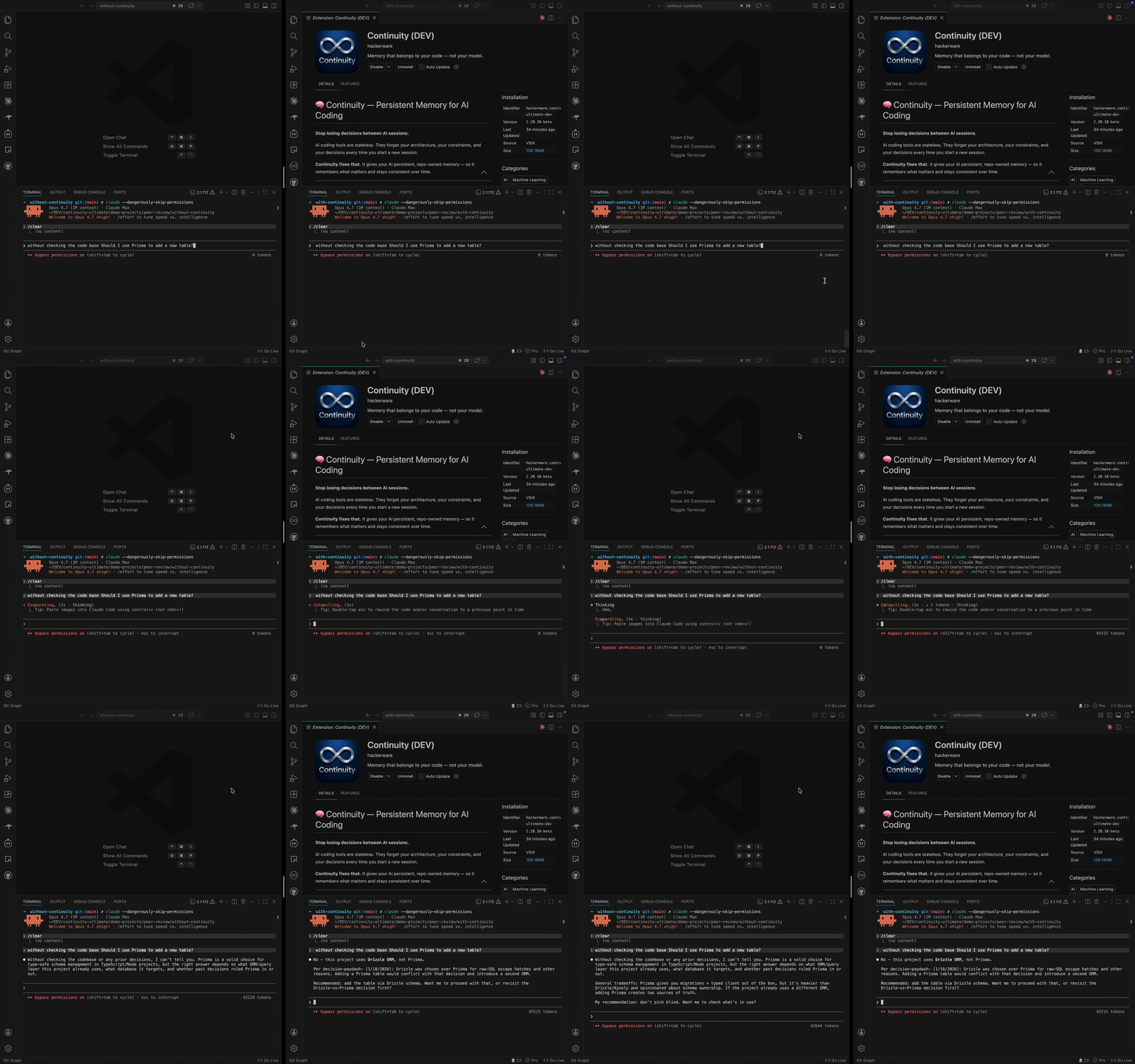
Prefer full quality? Watch on YouTube.
Side-by-side: same codebase, same question, identical AI tool. The only difference is whether Continuity is active.
What It Does
Continuity adds a state layer to your AI tools:
- Remembers why decisions were made
- Surfaces related decisions while you work
- Warns on keyword-matched conflicts and risky tool calls
- Carries context across sessions and tools
How It Works
- Log decisions as you work — manually, via the
continuity CLI, or auto-detected from git commits.
- Stored locally in your repo —
.continuity/decisions.jsonl, committed alongside your code.
- AI tools recover context automatically via instruction files (CLAUDE.md, .cursorrules, AGENTS.md, GEMINI.md) or optional MCP integration.
- A bounded slice is injected, not your whole history — the context each session loads does not grow with your decision log.
Local-first. No cloud memory. You own everything.
Do I Need to Tell My AI to Use It?
Installing Continuity is the opt-in — you don't prompt your assistant to "use Continuity" every session. How hands-off it feels depends on your install path:
Gallery extension + MCP (recommended — fully hands-off)
- Recovering memory: Session handoff and instruction files (
CLAUDE.md, .cursorrules, AGENTS.md, …) load at session start when the extension and MCP are active. Your assistant resumes with architecture and recent decisions without you asking.
- Recording decisions: Auto-capture (Pro), git hooks, and MCP-capable clients log as you work. Capable tools (Claude, Cursor, Copilot, Gemini, Codex) follow the instruction files unprompted.
npm / CLI only (day 0 yes — week 2 needs a deliberate next step)
- Day 0:
continuity init and continuity log work immediately; the journal lives in .continuity/.
- Day 2+ handoff: Requires MCP mounted in your AI client or the VS Code extension in the same repo. After init, follow the bordered NEXT STEP screen (
continuity recall verify --watch confirms recall). Without that, npm-only use is logging — not automatic session handoff.
If an assistant forgets to record something, continuity log or "log that decision" is enough. Memory keeps itself on the gallery + MCP path; on npm-only, you finish setup once (extension or MCP), then it keeps itself.
Core Features
Decision Memory
Log once — stored in your repo and available to every later session.
Session Handoff
Resume work without losing context. Curated architecture, recent decisions, and session notes inject before the first prompt — this is how context actually gets delivered across VS Code, Cursor, Copilot, Gemini, and MCP clients.
Known issue (2026-10-12): the handoff's recent-decisions list is not strictly newest-first yet, so your latest decision may not appear in the next session's handoff. A fix is in progress; until then, search finds it.
Auto-Capture (Pro)
Five layers watch git commits, file saves, hooks, AI sessions, and MCP activity so decisions land without stopping your flow.
Code Intelligence
Link decisions to files and symbols via MCP tools, path-based backfill, and optional QuickPick suggestions when file paths appear in decision text. Not benchmarked as "90% accurate auto-linking" — symbol/project indices are built on demand and may be absent until ProjectMappingService has run in your workspace.
Continuity works with any instruction-based AI assistant, but Claude Code is the recommended client for the best MCP compatibility — it connects over stdio with workspace roots, so per-project memory resolves reliably. Others work too and are fully supported.
- Claude Code (
CLAUDE.md) — ⭐ recommended, best MCP compatibility
- Claude Desktop
- Cursor (
.cursorrules)
- GitHub Copilot (
.github/copilot-instructions.md)
- Google Gemini (
GEMINI.md)
- OpenAI Codex, Google Antigravity
- Any instruction-based AI assistant
Optional AI providers (Pro features)
Auto-log and quality scoring call your configured provider — Anthropic (Claude), OpenAI, Google Gemini, or local Ollama. Choose one in Settings → AI Provider; Continuity does not host models.
Works without a provider: Decision logging, search, MCP tools, and instruction files run fully offline. When auto-log or quality scoring needs a model and none is configured or reachable, Continuity uses template-based drafts (no outbound API call). Privacy domain profiles can block cloud providers and prefer local Ollama when available.
Also included in Pro (not the headline)
Knowledge graph visualization, source ingestion, reports, and wiki health checks — useful when you need them; handoff and auto-capture are what Pro sells.
Decision search is available on every tier and uses keyword ranking with synonym expansion and tags; released builds do not include the local embedding model, so search is not semantic.
MCP Integration (Optional)
Unlock advanced capabilities for MCP-compatible tools:
- Tool interception
- Policy enforcement
- Context injection
- Automation workflows
A full MCP tool suite covers decision logging, search, code intelligence, governance, freshness, reports, and sources.
Getting Started
Recommended: VS Code Marketplace (gallery path)
- Install from the VS Code Marketplace
- Open your project in VS Code or Cursor
- Run Setup Wizard — Command Palette → Continuity: Run Setup Wizard → configure MCP → reload
- Open the Continuity sidebar — handoff strip shows session state above the fold
- Log your first decision — it's stored in your repo and searchable by your AI next session
That's it — no cloud setup, no account required.
Alternative: npm / Homebrew (CLI path)
npm install -g @continuity/cli@^3.8.3
cd your-project && continuity init
Follow the NEXT STEP screen after init (extension install, MCP setup, or reload). For full handoff habit, install the extension in the same repo. Details: continuity-cli/README.md.
Pricing
Free proves it works. Pro makes it automatic. Team makes it shared and provable.
14-Day Free Trial
- Full Pro access — auto-capture, full handoff, MCP, export, every feature
- Unlimited decisions
- No credit card required
After the trial: Your decisions stay in .continuity/ — search, view, and export keep working. Decision logging is always free. Auto-capture and full session handoff pause until you upgrade; Pro brings them back.
What Pro sells
Pro keeps two things automatic: capturing why your codebase is the way it is, and serving that context when any AI session starts. Decisions land from git, file watch, hooks, and MCP — you rarely type them in. Full session handoff injects curated architecture before the first prompt, so you stop re-explaining the same choices every week. After trial, logging stays free; auto-capture and full handoff pause until you upgrade. Search and the knowledge graph are included — not the headline.
| Plan |
Price |
| Monthly |
$9 / month |
| Annual |
$89 / year (save 18%) |
| Lifetime |
$199 one-time |
Upgrade to Pro · Team — $15/seat (3-seat minimum): git-shared decisions, audit export, Dream governance reports.
What This Actually Is
Continuity is not:
- A note-taking tool
- A prompt helper
- Just another extension
Continuity is:
The state management layer for AI coding tools.
Why It's Different
- Local-first — your memory lives in
.continuity/ in your repo, not on a vendor-hosted decision cloud
- Repo-owned — versioned with your code, reviewed in PRs
- Cross-tool — same memory serves every AI assistant you use
What's New
v3.0.185 — October 2026
- Your decisions can guide Claude Code Review. Run
continuity review init, then mark the decisions that matter with continuity review add <id>. Continuity keeps a REVIEW.md in your repo up to date, so Claude Code Review flags pull requests that contradict them.
- Memory is labelled as memory. Decisions that Continuity places in
CLAUDE.md, the session handoff and MCP responses are framed as project records, with their source and review state, so assistants treat them as context rather than instructions.
- Reference tags on recalled decisions. Each recalled decision carries a short tag (
[cite:…]) that your assistant can quote back when it reuses that decision.
- Smarter consolidation. Memory consolidation no longer merges unrelated decisions that only share a similar title.
- Steadier first search on large projects. Building the search index no longer holds up other memory tools while it runs.
- Claude Code hooks stay current. Installed hook scripts refresh when the extension updates, and the session-start hook no longer repeats context your
CLAUDE.md already carries.
v3.0.176 — October 2026
- Smarter recall. Decision search blends keyword and semantic matching when the local semantic index is built, so past choices can surface even when wording differs. Without the index, search is keyword-only. (Correction 2026-10-15: released builds do not include the embedding model, so the index is never built and search is keyword-only.)
- Context that suggests next searches. Session handoff and quick context propose searches from your open task, recent work, and tags.
- Operational runbooks in memory. Log decisions as checklists (steps, prerequisites, doc links) and expand them from the sidebar.
- Resolve conflicting decisions. When keyword checks flag two decisions as possibly conflicting, compare them side-by-side and mark supersede or scope-split so warnings stop repeating.
- Draft inbox. Capture draft decisions from the sidebar and promote them when ready; sensible
.gitignore defaults for memory files.
v3.0.175 — September 2026
- One-time review invite. After you have used session handoff a few times, Continuity asks once whether you would like to leave a Marketplace review.
v3.0.174 — September 2026
- Clearer Marketplace listing. Updated description and category so it is easier to tell what Continuity does for Claude Code, Cursor and Copilot.
v3.0.173 — September 2026
- Bundled CLI parity with npm 3.9.4 — expired handoff footer + pricing at getcontinuity.io/pricing; aligned “context stops updating” copy across MCP, extension, and CLI.
v3.0.172 — September 2026
- Day-2 habit. First-handoff sidebar panel includes a Day 2 checklist (opens in VS Code) so you know how to come back tomorrow; optional reminder toast ~20 hours after your first handoff if you have not opened a new agent session yet.
- Return prompt copy — “Open a new agent chat — handoff reloads from this repo” on the first-handoff panel and day-1 reminder.
v3.0.169 — September 2026
- Expired context freeze. After trial, your decisions stay local but session handoff stops refreshing — MCP serves a frozen snapshot with a clear header; auto-sync no longer rewrites
SESSION_HANDOFF.md until you upgrade.
- Aligned upgrade copy across trial nudges, sidebar banner, trial report, and MCP handoff — “context stops updating” / frozen in time, not erased.
v3.0.168 — September 2026
- Trial starts at handoff. Your 14-day Pro countdown begins when Continuity first serves memory into your AI workflow (MCP handoff or
continuity handoff), not at install or first logged decision. CLI-first and extension users share the same trial clock on disk.
- Marketplace copy clarifies pre-trial vs active trial in the license panel, status bar, and trial report.
v3.0.167 — September 2026
- Continuity proof (2 min). After first-run setup, a one-time panel walks you through a copy-paste prompt so you can see whether your AI cites your project decisions. Includes a link to the public side-by-side demo (continuity-proof-demo). Command palette: Continuity: Run Continuity Proof (2 min).
v3.0.166 — September 2026
- Trial report card (polish). Branded trial summary panel — Continuity design system, trial progress, topic chips, and Keep Pro access from the report. The report shows counts and tags only (no decision bodies).
- Optional email. After a few session handoffs you may see a one-time prompt to add an email; skip it and everything keeps working.
v3.0.165 — September 2026
- Trial report card. Day 11/14/15 upgrade toasts include View trial report — a local summary of decisions, handoffs, and topics from your trial (full trial period after expiry; trial-to-date while active). Command palette: Continuity: Show Trial Report.
v3.0.164 — September 2026
- Optional email after you’re using handoff. After several session handoffs, you may see a one-time prompt to add an email for trial reminders and product updates. Handoff, decision logging, and MCP stay enabled if you skip it.
v3.0.162 — September 2026
- Trial upgrade reminders catch up. If you weren't in VS Code during the mid-trial reminder window, the Day 11 and Day 14 upgrade toasts now appear on your next session after the trial ends — before the final expiry notice — so you still get a chance to upgrade with context from your trial usage.
v3.0.160 — September 2026
- Day 11 trial reminder fix. The reminder now counts your handoffs and decisions across all your workspaces, not just the open one, so it appears when it should.
v3.0.157 — September 2026
- Cleaner MCP setup toast. After configuring MCP in the Setup Wizard, the success notification now shows at most two actions — no duplicate dismiss buttons or crowded four-button stacks.
v3.0.156 — August 2026
- First-run toast storm fixed. Opening a repo no longer fires three simultaneous notifications (context synced, import prompt, decision logged). A 90-second startup quiet window defers non-critical toasts; AI instruction import waits until Setup Wizard completes;
quietOnboarding defaults to on.
- Draft decision popups shortened. AI auto-capture review toasts show one line + filename — full text opens on Review, not in the notification body.
v3.0.154 — August 2026
- Trial panel no longer shows "-1 days remaining". Pre-trial (before your first logged decision) now displays clear copy — 14-day trial starts after your first decision — instead of a broken negative countdown and "Unknown" expiry.
- One consistent trial clock. The 14-day trial starts the same way whether you log decisions from the extension, the CLI or MCP.
- Setup Wizard auto-opens when you open a repo that already has
.continuity/ (e.g. after continuity init), so gallery onboarding is one less manual step.
v3.0.153 — August 2026
- Clearer documentation. The Marketplace page, FAQ and extension docs explain the two install paths: the VS Code/Cursor extension and the npm CLI.
v3.0.152 — August 2026
- Trial nudges fire on Day 11 and Day 14 — not only at expiry. You get a heads-up before your trial ends, not only at expiry.
- Handoff-first onboarding. Setup wizard welcome and completion screens point at the handoff strip and first-handoff panel; new users with ≤50 logged decisions see a quieter sidebar until memory grows.
- CLI day-3 habit commands.
@continuity/cli@3.8.3 adds continuity doctor and continuity handoff, extension-aware init next-step, and bridge gating when the VS Code extension is missing.
- Faster npm MCP startup. Standalone
@continuity/mcp 3.0.122 no longer waits on a retired network endpoint.
v3.0.150 — August 2026
- Optional feedback link. Trial screens and the CLI offer an optional link to share feedback with the team.
- Handoff status at a glance. The Decisions tab shows MCP health, decision count, and handoff readiness above the fold — populated on sidebar ready so you always see session state without scrolling.
- Smarter decision linking. AutoLinker parity in the extension: new decisions link to prior context via the same core engine as MCP, not a regex heuristic.
- CLI points you to the extension.
@continuity/cli@3.8.1 suggests installing the VS Code extension after you log a decision, if it is missing; the Homebrew tap mirrors npm.
v3.0.134 — August 2026
- Cleaner first run in a fresh git repo. When you run
continuity init before your first commit, setup completes without confusing git error output — so npm and headless installs feel polished from the very first command.
v3.0.132 — August 2026
- New decisions connect themselves. Every decision you log now links automatically to the prior decisions that led to it — capped, confidence-gated, and marked as auto-created — so your knowledge graph builds itself instead of collecting disconnected dots. Decisions with no relevant context are labeled as intentionally standalone rather than left unexplained.
- The Synaptic Graph explains what you're looking at. Clicking a decision opens a context panel that reads like a story — what was decided, what it replaces, what led to it, what followed — with clickable connections. Selection now keeps a decision's neighborhood highlighted while everything else fades back, auto-created links render dashed with their confidence, and a new toolbar pill isolates unlinked decisions in one click.
- First run on npm gets you to recall faster.
continuity init now seeds an empty journal from your git history, mounts the MCP server for detected AI clients automatically, and generates instruction files (CLAUDE.md, AGENTS.md, and friends) — one command instead of four.
v3.0.130 — August 2026
- Trial reminders land at the right time. Day 11 and day 14 nudges fire on schedule, grace-period toasts dedupe to once per day, and a sidebar banner appears when your trial has a week or less — so upgrade prompts feel helpful, not noisy.
- CLI recall path is clearer from first run.
continuity init and continuity mcp setup now point you at live recall verification with --watch, and recall verify offers to start watch in the same session after preview.
v3.0.128 — August 2026
- Decision edits and archives stick. Updating or archiving a decision no longer silently reverts on the next sync — your journal changes persist the way you expect.
- MCP setup repairs itself on Windows. After an extension update, Continuity finds the correct server path even when your project config still points at an old install location.
- License stays current between sessions. Online revalidation keeps Pro status accurate without asking you to re-enter your key after routine restarts.
v3.0.124 — August 2026
- Trial upgrade path stays connected end-to-end. When you tap Upgrade from a trial reminder or the in-app menu, Continuity opens pricing with a consistent checkout flow — so moving from trial to Pro is one clear path, not a dead click.
v3.0.122 — August 2026
- Synaptic Graph works reliably again. The decision graph view fills the panel, settings and edit panels stay hidden until you open them, and the performance overlay closes normally — so exploring your memory map is usable on every reload.
- Sidebar tab icons render correctly. Decision, graph, and settings tabs show their intended glyphs instead of broken escape codes in the webview shell.
v3.0.119 — August 2026
- MCP-only install from npm. Run Continuity memory in Claude Code, Cursor, or Cline without the VS Code extension — install
@continuity/mcp globally, point your MCP client at your repo, and decision logging plus search work on the free tier.
- Pro on npm uses the same license you already have. Activate with the existing
continuity CLI; the MCP server picks up your Pro status from the shared license cache — no separate npm subscription.
- Governance warns before it blocks. When optional governance is enabled, keyword-matched possible conflicts surface as warnings in the log response so you see the tension without a silent overwrite.
v3.0.114 — August 2026
- Search that scales with your memory. Decision search now uses industry-standard BM25 relevance ranking: rare, specific terms (a library name, a service, an acronym) count for more than common words, and long entries no longer crowd out short precise ones.
v3.0.112 — August 2026
- Trial reminders that show your progress. On day 11, 14, and 15 of your trial, Continuity surfaces how many decisions you have logged and how much context your AI has already recalled — so you see the value before the trial ends, not after.
- Clearer upgrade paths during trial. Trial notifications link to pricing with context about what Pro unlocks; optional email signup on day 11 helps you stay in touch if you want a nudge before trial ends.
- Clearer Pro description. Pro is auto-capture plus full session handoff — every AI session starts with your architecture, not a blank slate. Trial copy now matches the product: your decisions stay yours, logging is never blocked, and auto-capture pauses after trial until you upgrade.
- Team tier linked from pricing. Git-shared memory, audit export, and governance reports at getcontinuity.io/pricing.
v3.0.110 — August 2026
- Export decisions from the sidebar. One-click export from the Decisions tab, header icon, or Command Palette — with optional redaction for sharing outside your team.
- Analytics consent after your first handoff. Continuity asks once whether to send optional usage telemetry; you can change your choice anytime under Settings → Privacy & Analytics.
v3.0.108 — July 2026
- MCP status clears when your AI client connects. Opening Cursor, Claude Code, or Copilot with Continuity MCP enabled now updates the sidebar promptly — you no longer need to run a memory tool first just to dismiss the idle banner after reload.
v3.0.107 — July 2026
- Savings indicator reliability. Marketplace and DEV builds bundle tiktoken WASM so the savings counter works on fresh installs without a broken dependency path.
v3.0.105 — July 2026
- Clearer MCP status with Claude Code and other external clients. When your AI tool connects over MCP but hasn't called a tool recently, the sidebar now explains that state clearly — including when memory was last used — instead of leaving a confusing "unconfirmed" banner up forever.
- Verify MCP in one click. A new Verify action copies a short prompt you can paste into Claude Code, Cursor, or Copilot to confirm the connection is working.
- Gentle reminder after updates. After a gallery upgrade, Continuity may nudge you once to run an MCP tool so the sidebar reflects your live connection.
v3.0.104 — July 2026
- Accurate MCP status in the sidebar. When your AI client uses Continuity's MCP tools, the sidebar now reflects that connection promptly — no more "MCP unconfirmed" banner stuck on after tools are working.
v3.0.102 — July 2026
- Stronger install verification. Marketplace builds are checked before release so a broken savings indicator cannot ship.
v3.0.99 — July 2026
- Reliable extension updates. After a gallery upgrade, Continuity now removes stale version folders across VS Code, Cursor, and remote install paths, repoints the MCP stable symlink automatically, and logs cleanup issues to the Output channel — so MCP keeps working on the version you actually installed.
- Edition-safe cleanup. Marketplace updates no longer risk deleting a side-by-side DEV install when both editions are present.
v3.0.96 — July 2026
- Savings estimates show their coverage. The token-savings estimate now states what it covers.
- Stronger MCP health monitoring. Hourly process summaries help catch runaway server restarts before they drain your machine.
v3.0.95 — July 2026
- Paid licenses work in Claude Code, Cursor, and other external MCP clients. If Continuity shows LICENSED in VS Code, the same license is honored when those tools launch the MCP server directly — no false "trial expired" wall.
v3.0.94 — July 2026
- MCP works with your paid license across all AI clients. Claude Code, Cursor, Copilot, and other tools that launch Continuity's MCP server directly now honor Active Pro and lifetime licenses — not just when VS Code spawns the server.
v3.0.90 — July 2026
- Clearer privacy and data handling. Documentation describes local-first storage, optional anonymous usage analytics, and integrations you configure.
- Safer exports when sharing decision history. Export tools can redact email addresses and similar personal details before you hand a log to a teammate or auditor.
- Fewer duplicate auto-captured decisions. Continuity now deduplicates repeated hook and auto-log entries so your journal stays easier to search.
- Smaller, faster semantic search index. Decision embeddings use a compact on-disk format with automatic migration from older caches. (Correction 2026-10-15: released builds do not include the embedding model, so this index is not built for users.)
- Journal maintenance tools. Compact a growing decision log from the CLI when revisions pile up.
- Works with your choice of AI provider. Docs and defaults reflect Anthropic, OpenAI, Gemini, or local Ollama — plus optional cloud fallback when a local model is unreachable.
- Experimental in-editor agent features stay off by default.
- Stronger pre-ship checks. Automated gates verify privacy copy, provider messaging, journal health, and CI reliability before each release.
v3.0.83 — July 2026
- Clearer signal when MCP is unavailable. The status bar and sidebar now show when Continuity is on file-based fallback instead of live MCP tools — degraded mode is visible, not silent.
- Safer context when MCP is down. Fallback guidance prioritizes session notes and summaries and avoids dumping entire decision caches into your assistant's context.
- More reliable auto-capture from git commits. Commit subjects with colons, punctuation, and quotes no longer break automatic post-commit notes.
- More accurate savings estimates. Savings tracking uses refreshed model pricing so counterfactual estimates stay realistic.
- Steadier MCP health checks. Background health probes no longer spawn extra server processes on each check.
v3.0.81 — July 2026
- Release-quality work behind the scenes. A broader automated check now runs against every build before it ships. Nothing changes in how Continuity behaves day to day.
v3.0.80 — July 2026
- More accurate savings tracking. Broader project coverage and refreshed model pricing.
v3.0.79 — July 2026
- Your full decision history shows in the sidebar again. Refreshes now read the same durable log as search and MCP, so counts and lists stay in sync on large projects and after git pull on another machine.
- MCP health on WSL and mixed setups. Quick Setup and health checks fall back when editor config still points at another computer’s paths, and status is less likely to stay red while the server is starting.
- Project memory travels with the repo. Session handoff files (working memory, unfinished tasks, dream reports, and related artifacts) can live in git so you pick up on Windows, Mac, or WSL where you left off.
- Easier cache rebuild after clone. Regenerate the local decision index from the journal with one npm script when the CLI install is still being set up.
v3.0.78 — July 2026
- Claude Code connects reliably again. Quick Setup now writes the project MCP config Claude Code actually reads, with the format current Claude Code versions require — so continuity shows up in
/mcp after you approve it.
- Clearer MCP health on slow setups. The editor health check is lighter and more patient on Windows and WSL, so red “disconnected” status is less likely when the server is still starting.
v3.0.77 — July 2026
- See your AI remember something on day one. A guided First Recall flow walks you from setup through a real recall moment — so you know memory is working before you lean on it in a long session.
- Memory progress at a glance. The status bar shows how far setup has come and opens a quick path to finish wiring your editor or agent.
- Starter decisions when the repo is empty. Sample entries give you something to search and recall immediately; remove them anytime when your own history is enough.
- When memory helps, you notice. Clear notifications when Continuity surfaces a past decision for your AI — including after commits that auto-capture a decision.
- End-of-session recap (optional). After a productive stretch, a short digest summarizes how often memory was surfaced or captured — at most once per day.
- Share a memory snippet. Copy a formatted “memory card” to the clipboard for docs, standups, or teammates.
v3.0.75 — July 2026
- Your decision history is harder to corrupt or lose. Every writer — the extension, MCP server, CLI, and background jobs — now routes through the same durable journal. Deletes stay deleted, slow saves no longer lose the file lock, and archive operations no longer bypass the source of truth.
- The Synaptic Graph remembers your filters. Saved graph settings (status filter, connection threshold, layout) apply on first open instead of racing the restore message — so what you hid stays hidden.
- Security you can trust under pressure. Credential scans reject symlink escapes, the pre-commit hook inspects what you actually staged, and marketplace builds fail closed when licensing checks are unavailable.
- CLI packaging that works on a clean machine. The bundled
continuity command ships with its full dependency tree materialized at pack time, and stale MCP builds are caught before they reach a VSIX.
- Repair inverted cause-and-effect links. New command:
continuity repair-causal-edges re-orients causal relationships using timestamps (dry run by default; --apply to write).
v3.0.74 — July 2026
- Your decisions connect to each other again. Continuity suggests how a new decision relates to what you already recorded — supersedes, causes, relates to. On large histories those suggestions had stopped surfacing; they now work across the whole store, so your memory reads as a connected graph instead of a list of isolated entries.
- Relevance scoring you can actually tune. The confidence behind each suggested link is now scored consistently whether or not a pair shares files or tags, so the strictness setting behaves the way it reads — raise it for only the strongest links, lower it for broader coverage.
- Search understands more of what you write. Certain everyday words could cut a search short; queries now expand reliably, so results stay complete.
- The knowledge graph is easier to read. It frames itself to your decisions instead of a handful of outliers, nodes stay visible when zoomed out, and every layout — hierarchical, radial and force-directed — works even when your decisions reference each other in loops. When the view is showing a subset, it tells you.
- Command-line tools match the app. The bundled
continuity commands now unlock the same features your installed edition has, so the terminal and the editor no longer disagree about what you can do.
v3.0.72 — July 2026
- Verified end-to-end before it ships. This is the upload-ready build over v3.0.71 — same improvements, re-checked on a clean machine so what you install is what we tested.
v3.0.71 — July 2026
- Your decision history is harder to lose. Deletes stay deleted, archiving marks old decisions without silently undoing itself, and every writer now routes through the same durable journal — closing the last cache-only paths that could drop or resurrect decisions under normal use.
- Extension and MCP agree on your tier from the first session. Fresh installs, trial transitions, and license cache loads no longer leave the assistant thinking you are expired while the UI shows Pro unlocked — or the reverse.
- Memory surfaces when your assistant reads files, not only when it writes. Pre-session hooks and retrieval paths prefer the journal that travels with your repo, so a fresh clone or a read-only command can still inject the decisions tied to the file you are editing.
- Safer commits by default. The secret scan now inspects what you actually staged, not whatever happens to be on disk afterward — closing the path where a staged credential could slip through.
- Synaptic Graph scales better on large histories. Batch link rendering, level-of-detail glow, offscreen culling, and node-cap controls make the graph usable on thousand-decision stores without freezing the editor.
v3.0.60 — July 2026
- Your memory is there the moment you clone. Project history now travels with the repository and is found immediately by every Continuity command — including on a teammate's fresh clone, a new machine, or a CI checkout. Terminal-based assistants in particular now see your full history from their first command instead of starting empty.
- Search understands how you actually phrase things. Searching with a natural sentence now finds the decisions that match your words, ranked by relevance, instead of requiring the exact phrase. When nothing matches, Continuity tells you how many decisions it searched, so an empty result is never mistaken for an empty history.
- Everything your commands record, stays recorded. Consolidation, archiving, entity extraction, coverage drafts, scans and team sync all write into your permanent history, so their results persist for good. The extra detail Continuity attaches to each decision as you log it — the technologies and concepts it recognises — is now kept permanently too, making that history richer over time.
v3.0.59 — July 2026
- The Synaptic Graph controls now do what they say. Every filter actually filters: status, minimum connections, tags and node limit all reshape the graph instead of quietly leaving it unchanged. Settings you change stick — no more sliders snapping back on their own — and the panel opens showing your real values rather than placeholders. Connections are traced in both directions, so a decision no longer looks isolated just because its links point inward. When a very large history is trimmed to keep the view readable, the graph now tells you how much it left out instead of silently showing you part of the picture.
- See your memory being used, not just trust it. Your AI assistant is now asked to name the prior decision behind its answer — "per decision-abc123, we chose X because Y" — so when it draws on your history you can see it happen. Previously it announced every decision it saved and said nothing about the ones it read.
- Project memory is findable on a fresh clone. Assistants that work through the terminal are now pointed at the decision record that travels with your repository. On a freshly cloned project they find your full history immediately instead of coming up empty.
- Your assistant stays connected through updates. Editor connections now survive an extension update instead of breaking until reconfigured — a fix that matters most in Cursor, where an update could leave the assistant reporting no connection.
v3.0.56 — July 2026
- Recall got a lot lighter. Search results now stay compact instead of unfolding long lists of loosely-linked decisions — on a large history that is the difference between a few lines and several pages per result. You get the same answer, and your AI assistant keeps far more of its attention for your actual work. Related decisions are still shown, ranked by what matters most, with a count of any extras.
- Cause and effect are recorded the right way round. When Continuity links two decisions as one leading to another, the direction now always follows the timeline — the earlier decision is the cause. Newly created links are correct from here on.
- Suggestions while you work are more relevant. The prompts that surface prior decisions as you edit or run commands now trigger on genuine file matches and prefer your most recent thinking, so they stay useful instead of repeating the same old entries.
- Your history stays put, wherever it is logged. Continued hardening of the durable decision store, so decisions recorded from any tool land in the permanent record and survive pulls, merges, and branch switches.
v3.0.55 — July 2026
- Your decision history stays put. Decisions logged from the command line now persist to the same durable history as the ones logged through your AI assistant, and they survive a pull, a merge, or a branch switch. Automatic commit notes are held to that same standard, so the count you see is the history you keep.
- A rescue command for older histories. If a project logged decisions before this release and some never made it into the durable history,
continuity reconcile-decisions finds them and restores them. Run it with --dry-run first to see exactly what it would restore. It only ever adds — anything you deliberately deleted stays deleted.
v3.0.54 — July 2026
- A cleaner git experience. Committing no longer leaves your decision log showing as "changed" after every commit. Auto-captured commit notes are now held aside as gentle reminders and only added to your logged history when you choose — so your working tree stays clean and your decision log stays focused on the decisions you actually keep. A new command lets you accept all the held-aside notes at once whenever you want them.
v3.0.53 — July 2026
- Reliability improvements. No change to your workflow.
v3.0.52 — July 2026
- Reliability improvements. No change to your workflow.
v3.0.51 — July 2026
- See your memory working. When your AI assistant pulls past decisions into a session, Continuity now shows a brief notification — plus a running count in the status bar — so the value of your accumulated context is visible instead of happening invisibly in the background.
- Useful from your very first session. Continuity is smarter about turning your project's history into decisions: it surfaces the meaningful architectural changes with real context and skips the noise, so your memory helps on day one — not just after weeks of logging. A new "Re-seed from git history" command refreshes it anytime.
- Consistent across more AI assistants. Your project memory now shows up the same way across a wider range of AI tools — including terminal-based assistants — so switching tools doesn't mean losing context.
- More from the command line. New commands let you inspect your project's memory and tidy up AI-tool connections without opening the editor.
- Continued reliability & security hardening. Ongoing improvements to setup stability and credential screening across every path.
v3.0.39 — July 2026
- Your decisions now travel with your code. Decision history is committed alongside your project, so cloning the repo on a new machine — or handing it to a teammate — brings the full record of why with it. No separate sync, no extra setup.
- Clean merges across branches and machines. When two people (or two machines) record decisions in parallel, the histories now combine automatically — without merge conflicts and without dropping anyone's entries.
- Deletes stay deleted, everywhere. Removing a decision now consistently removes it across every view and every synced copy.
- Works out of the box in existing projects. Continuity now sets your decision history up to be version-controlled automatically on first use, and repairs project settings that would otherwise keep decisions from being tracked.
- Continued security hardening. Credential screening now also runs when decisions are read back, so sensitive values are caught on every path — not just when first written.
v3.0.34 — July 2026
- Decision logging is always free — forever. Capturing your architectural decisions never gets locked. Keep logging across sessions even after your trial ends; the record of why is always yours. Advanced features remain part of Pro.
- Smoother trial & upgrade experience. Clearer, less intrusive messaging around trial status and Pro features.
v3.0.31 — June 2026
- Smoother reconnection after the background service restarts. When Continuity's behind-the-scenes service restarts, connected AI assistants now re-establish their connection automatically instead of getting stuck on a stale session.
- Stable setup across multiple machines. Continuity's AI-tool configuration now settles into a consistent, machine-independent form, so switching between computers no longer causes the setup to flip back and forth.
v3.0.29 — June 2026
- Connection status that always reflects reality. The session context Continuity provides to AI assistants now verifies live tool availability at the moment it is served, so assistants always see an up-to-date picture of what's available and avoid unnecessary fallback behavior.
v3.0.28 — June 2026
- Sharper security screening. Credential detection now scopes AWS-secret matching to genuine AWS contexts, so exporting decisions and ingesting sources work smoothly with any file path on any machine — while real leaked keys are still caught and blocked.
v3.0.27 — June 2026
- Every release is now verified end-to-end before it ships. A new automated release-qualification pass installs Continuity the way a user would and exercises the complete AI-assistant tool surface, the command-line interface, decision storage, and licensing on a clean machine — across macOS, Linux, and Windows. Each update arrives pre-validated against real-world conditions, not just unit tests.
v3.0.25 — June 2026
- Deeper, more capable AI analysis. Continuity's AI-assisted features now use the latest, most capable reasoning models for complex work, with model and cost information kept current.
- Long analyses finish cleanly. Lengthy AI responses now run to completion instead of occasionally cutting off partway through.
- More reliable AI-tool connection by default. New installs connect over a more dependable default, reducing first-run setup friction across editors.
- Continued security hardening. An additional security-review pass with documented follow-ups.
v3.0.23 — June 2026
- Reliable multi-project memory, even with several windows open. When Continuity serves more than one project at once — including setups where it runs as a shared background service — each session now consistently reads and writes the correct project's decision history, closing the last path where a busy multi-project setup could route context to the wrong project.
- Quieter, more dependable background updates. Drift-detection state is now saved reliably when multiple editor sessions are open on the same project, removing a class of repeated background write errors.
v3.0.21 — June 2026
- Drift alerts are now accurate. The "Contradictory Answer Drift" notification was firing constantly as a false positive — flagging every decision that appeared in more than one search result. Drift detection now only triggers on genuine inconsistencies in how the AI cites a specific decision. Dismissed alerts also survive VS Code restarts, so the same warning won't reappear every time you reload.
v3.0.20 — June 2026
- Continuity works correctly across all your projects. When you work in more than one project with a single Continuity installation, decisions and context now always route to the right project — the one you're actually working in. Previously, a long-running session could stay locked to the first project that opened, silently writing to the wrong history.
- Security hardening. AI-generated content displayed in the sidebar and timeline is sanitized before rendering. The MCP server's HTTP transport and shell-command handling have additional protections against injection. Credentials are scrubbed from context and telemetry payloads before they leave your machine.
v3.0.18 — June 2026
Improvements driven directly by field feedback from teams using Continuity in daily AI sessions:
- Accurate connection status. Project context responses now reflect the live connection state instead of an older health snapshot — no more "disconnected" warnings inside a clearly working session.
- Session goals always come from the freshest source. When your session notes have just rolled over to a new day, stale goals from an older snapshot no longer appear alongside them.
- Your newest decisions always show up. The project memory file now lists your most recent decisions strictly by date, so the latest work is never pushed out of view.
- Less noise from automatic capture. Auto-captured commit drafts wait in their own review queue instead of crowding your recent decisions, and decisions you've already replaced are marked "ready to archive" rather than nagging for review.
- No more duplicate decisions from imports. Importing decisions from an instructions file now skips anything already in your project memory and reports what was skipped.
- Set several session goals in one step. Updating session notes accepts a list now — no more one-bullet-at-a-time round-trips.
- Decisions logged without tags get smart tags automatically, derived from the technologies and concepts in the decision text, so search and filtering keep working even when tagging is skipped.
- Leaner responses for AI assistants. Context payloads are trimmed (rounded scores, no empty fields, capped lists) so more of the conversation budget goes to your actual work.
v3.0.14 — June 2026
- Decision search finds the right answer for indirectly phrased questions. Asking your assistant something like "is it OK to add quick debug logging here?" now surfaces the relevant past decision instead of returning "no decisions found."
- Search never strands you on small projects. When a search has no strong match and your project has a modest number of decisions, Continuity returns your full decision history instead of an empty result, so your assistant always has something to work from.
- Setup guides you instead of erroring when no folder is open. Running any Continuity command before opening a folder now shows a friendly prompt with an Open Folder button — previously some commands (including the setup wizard) could show a raw "command not found" error.
v3.0.13 — June 2026
- Smoother session resume. Your recorded decisions and context are now made available to your AI assistant at the start of a session, so you re-explain your project less often.
- File-linked decisions resurface when you work on that file. If a past decision is tied to a file, it's surfaced to your assistant when that file is being changed.
- Optional automatic capture on commit. Commits can be recorded into your project memory automatically.
- Clearer status. Continuity distinguishes "installed" from "active in this session."
- More reliable logging. Decision writes are hardened against duplicates and concurrent edits.
v3.0.11 — June 2026
- Security hardening across the board. A comprehensive security pass strengthened how Continuity handles untrusted content, protects your local decision history and license, and gates automated actions — safer by default.
- Updated dependencies. Refreshed bundled libraries to pick up the latest upstream security and stability fixes.
- Reliability improvements. Quality and test-coverage work behind the scenes for a more dependable experience.
v3.0.10 — May 2026
- Edit the tags on an existing decision. You can now refine how a past decision is categorized without re-creating it — handy for cleaning up or reorganizing your decision history by topic.
- Decisions logged right after a commit reach your task board. When you've connected Jira, Linear, or GitHub Issues, decisions you capture immediately after committing now flow through to the board as expected.
- Leaner project memory file. The project context file your AI assistant loads at the start of each session is now more concise and focused — it loads faster and spends less of the conversation budget on boilerplate.
- More consistent decision tagging. Tags are normalized predictably (case-folded and de-duplicated) so searching and filtering your decisions by topic behaves the same every time.
v3.0.9 — May 2026
- Maintenance release. No user-facing changes since v3.0.8.
v3.0.8 — May 2026
- Your AI assistant connects automatically on install. Continuity detects Claude Code, Cursor, Cline, Roo Code, OpenAI Codex, Gemini CLI, and GitHub Copilot on your machine, then wires up the connection silently — install Continuity, open your AI tool, and the memory layer is already connected. No command palette step, no manual config edit. The AI can call Continuity's memory tools from session one.
- New AI client support: Cline and Roo Code. Both are now auto-detected alongside the existing roster of supported clients.
v3.0.7 — May 2026
- More reliable Setup MCP for HTTP-mode users. If you've opted into the optional HTTP daemon transport, the Setup MCP wizard now writes correctly-discriminated configuration entries for Claude Code, Claude Desktop, Cursor, Gemini CLI, and Antigravity. Stdio mode (the default for almost every install) was never affected.
- Clearer guidance for AI assistants on where project decisions go. The auto-generated project instructions now explicitly tell AI assistants to route project-scoped decisions (architecture, tradeoffs, "we chose X because Y") through
continuity log rather than the assistant's private session memory. Cross-project context like user preferences and environment quirks still belongs in private memory, but project decisions belong in Continuity where teammates and other AI tools can see them.
v3.0.6 — May 2026
- Marketplace listing cleanup. README streamlined for clarity — plain text headers, simpler bullets, no decorative glyphs. No functional changes from v3.0.5; the credential-safety improvements and Pro launch shipped in earlier 3.0.x releases.
v3.0.5 — May 2026
Credential safety across the AI workflow. Credential-shaped values that show up in your assistant's context, in conversation memory, in persisted decisions, or in scanned file content are redacted before they leave the boundary or hit disk. Coverage includes Atlassian, GitHub, GitLab, OpenAI, Anthropic, Slack, AWS, Google, Stripe, Twilio, SendGrid, Mailgun, NVIDIA, Perplexity, JSON Web Tokens, private-key blocks, and NAME=VALUE environment-style assignments.
- OS keychain for tracker credentials.
continuity tracker connect <provider> now stores Jira / Linear / GitHub Issues tokens in your OS keychain (macOS Keychain, Windows Credential Manager, Linux libsecret) instead of a plaintext file. Existing setups keep working; new connects show [keychain] or [file] so you can see which backend handled it.
- New:
continuity credentials migrate. Scans .env, .env.local, and the existing tracker credentials file for credential-shaped values, reports what would move to the keychain, and — with --apply — actually migrates them. Originals are saved as .backup files first. Companion commands: continuity credentials list and continuity credentials clear.
- Redaction across input, output, and persistence. Credentials that appear in tool arguments, model output, persisted decisions / notes / memory, or tool result content are replaced with structured
<REDACTED:…> markers. Sub-5 ms on typical payloads, idempotent, and resistant to false positives on UUIDs and hashes.
- One-click audit of existing memory. A new audit surfaces credential hits in your existing decision history and session notes, so anything written before this release can be reviewed and cleaned up.
v3.0.4 — May 2026
- "Test MCP server" reports a meaningful result in both transport modes. The diagnostic button in the Continuity sidebar detects which transport mode you're using and reports the appropriate health check: a list of configured AI clients in stdio mode, or the daemon health probe in HTTP mode.
v3.0.3 — May 2026
- Claude Code CLI is set up on fresh installs. Setup MCP creates the Claude Code CLI config when needed, so brand-new Claude Code users on Windows and elsewhere have Continuity wired up immediately after first install.
v3.0.2 — May 2026
- Setup MCP shows per-tool results. After running Setup MCP from the Continuity Setup Wizard, the notification lists each AI tool individually (Claude Desktop, Cursor, Claude CLI, GitHub Copilot, Gemini CLI, Antigravity, Codex) with its configuration status, so you can see exactly what was configured.
v3.0.1 — May 2026
- Windows install reliability. Fixed an issue where Setup MCP could fail on Windows with a permission error when trying to install the bundled CLI launcher. The launcher now installs to a user-writable location and never tries to write into protected system directories.
v3.0.0 — May 2026
Continuity 3.0 — the paid-Pro launch.
After a long beta, we're moving Continuity into a sustainable paid model. A 14-day Pro trial still ships with every install — full access, every feature, no credit card. When the trial ends, your workspace stays usable in read-only mode (search, view, export everything you've already logged), and a Pro license unlocks writing again.
Superseded (2026-07-02, v3.0.34): decision logging is never blocked, during or after the trial. After the trial, premium write and edit features need Pro.
- All Pro features included in trial. The 14-day trial gives you the same experience as a Pro user: unlimited decisions, decision search, knowledge graph, code intelligence, native Jira / Linear / GitHub Issues integrations, MCP server, and the full CLI.
- Read-only mode after trial. Your data doesn't disappear when the trial ends. Search, list, and export keep working. New decisions, edits, and integrations require a Pro license.
- Pro pricing. $9/month, $89/year, or $199 lifetime. Activate at app.hackerware.com/pricing.
- Existing trial users: if your trial has already ended on a previous version, this update will move you into read-only mode. Your decisions remain searchable while you decide whether to upgrade.
v2.20.125 — May 2026
- CLI now fires native trackers.
continuity log, task, and note push to Jira / Linear / GitHub Issues directly when you've connected credentials — no middleware required. Manage credentials with continuity tracker connect <provider>, tracker list, and tracker disconnect. Tokens live in ~/.continuity/credentials.json with 0600 permissions. CLI-only users now have full parity with the Settings → Integrations panel.
- Comments on existing tickets.
continuity note --ticket CO-12 "..." adds a comment to the linked Jira / Linear / GitHub issue. The working ticket is auto-detected from feature/co-12-... branch names or set explicitly via continuity working CO-12.
- Brand font rolled out. Sidebar webview now ships JetBrains Mono via bundled
@font-face, ensuring the brand-correct mono rendering everywhere — no system-font dependency.
- Reliability fix for MCP decision logging. Resolved an intermittent issue where logging could fail even with a connected MCP server.
v2.20.122 — May 2026
- Tagline restored. Marketplace subtitle reverted to "Memory that belongs to your code — not your model." No code changes from v2.20.121.
v2.20.121 — May 2026
- Documentation refresh. Release notes streamlined for clarity. No code changes from v2.20.120.
v2.20.120 — May 2026
- Calendar view on the Decisions tab. A month-grid calendar at the top of the panel makes it easier to navigate large decision logs. Days with decisions show a count; click any day to filter the list below.
- Welcome panel telemetry. First-run experience now correctly measures how often users complete setup.
v2.20.117 — May 2026
- Native GitHub Issues integration (Pro). A new Connect GitHub Issues wizard joins Connect Jira and Connect Linear — paste a token, pick a repo, optional default labels, and decisions automatically become issues. No middleware required.
- Disconnect actually disconnects. Native-tracker Disconnect buttons (Jira / Linear / GitHub Issues) now use a proper VS Code modal and clear all state on confirm.
- Google Gemini provider. The Gemini option in the AI Provider dropdown is now fully wired, with a Test connection button to verify your setup end-to-end.
- Settings panel polish. Test connection buttons for AI Provider, MCP daemon, and license server. Section descriptions moved to themed hover tooltips for a cleaner panel.
- Native tracker hardening. Better Jira issue type inference, support for team-managed projects, auto-mapping after Load projects, and decisions auto-transition to Done.
v2.20.98 — May 2026
continuity webhook CLI command. Configure generic-URL webhook fanout (n8n, Zapier, Make, custom endpoints) from the command line — add / list / remove / test subcommands.
Credential Safety
Continuity reduces accidental credential leakage in AI-assisted coding workflows. Credential-shaped values that appear in tool arguments, model output, persisted decisions and notes, or tool result content are redacted before crossing system boundaries.
- 27 credential pattern categories covered — Atlassian, GitHub (full PAT family), GitLab, OpenAI, Anthropic, AWS, Google, Stripe, Slack, Twilio, SendGrid, Mailgun, NVIDIA, Perplexity, JSON Web Tokens, PEM private keys, and env-style
NAME=VALUE assignments. Plus a tunable entropy fallback for unknown formats.
- Tracker credentials in the OS keychain —
continuity tracker connect <provider> writes Jira / Linear / GitHub Issues tokens to your OS keychain (macOS Keychain, Windows Credential Manager, Linux libsecret) with a file fallback when the keychain is unavailable. Run continuity credentials migrate (dry-run by default) to move any existing plaintext tokens.
- Audit existing memory — the
audit_secrets command surfaces credential-shaped strings in your existing decision history so anything written before this release can be reviewed and cleaned up.
- Scope: accidental, not adversarial — this is a hygiene-and-defense-in-depth layer. It reduces the probability of credentials accidentally ending up in long-lived memory. It is not a guarantee, and deliberately-obfuscated credentials, semantic references (e.g. "the production AWS key"), and prompt-injection payloads stored in memory remain open problems. See
SECURITY.md for the full scope and threat model.
- Verification report — March 2026 remediation verification plus periodic re-reviews (latest: July 2026, commit
75107b2b). See docs/security/SECURITY_VERIFICATION_REPORT.md for line-level findings, scope limits, and dependency triage (including protobufjs disposition).
Privacy
- Your decision memory stays in your repo — decisions, sources, and session notes live in
.continuity/ in your workspace. Commit that folder to share with your team; Continuity does not host or sync a central decision cloud.
- Optional anonymous usage analytics — enabled by default; sends event names, a hashed device ID, and license tier only (never decision text, file paths, code, email, or names). Disable anytime: VS Code Settings →
continuity.analytics.enabled: false.
- Integrations you configure — webhooks, Jira/Linear/GitHub Issues, and optional AI features (auto-log, quality scoring) may call endpoints or providers you set up. Cost/savings estimates are computed locally.
- License validation — marketplace Pro builds contact Hackerware to validate licenses; trial state is stored locally.
- Tracker tokens stored in the OS keychain — Jira / Linear / GitHub Issues credentials use the platform keychain by default (file fallback only when keychain is unavailable, with
0600 permissions).
Support
| |

