Boardown
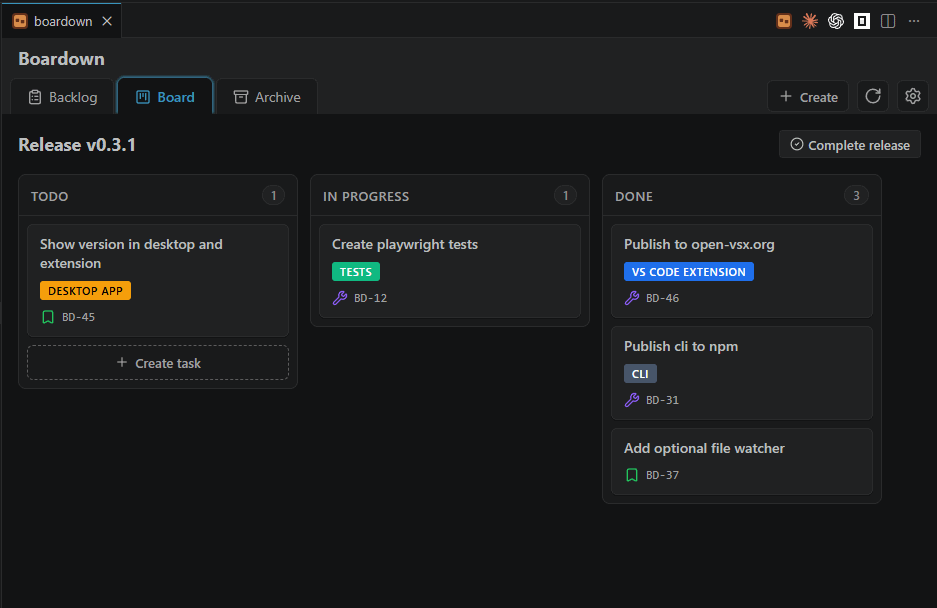
A lightweight, local-first task board that stores its data as plain markdown
files inside your project's git repo. Releases, epics and tasks live in a
.boardown/ folder next to your code, so they version, branch and diff with
the rest of the project — no cloud, no server, no account. And because the
board is just markdown in your repo, your AI coding agent can read and
drive it too — see Built for you and your AI
agent.
Getting started
Click the board icon in the top-right corner of the editor, or run
Boardown: Open Board from the Command Palette. There is nothing to point it
at: Boardown picks up the .boardown/ folder of the project you have open, and
on a project that has none it offers to create the board on the spot. From
there on, every change is saved straight back to the markdown files.
By default the board auto-refreshes when its .boardown/ files change on
disk — so edits made via git, the CLI, or another editor show up without a
manual reload. Turn it off with the boardown.autoRefresh setting to refresh
on demand via the Reload button instead. If a file you've changed in the
board was also changed on disk underneath you, a conflict modal lets you reload
instead of overwriting.
Features
- Backlog, Board and Archive views: a Jira-style backlog, a kanban for the
current release, and an archive of finished releases — read-only unless you
allow editing them in Settings.
- Releases with a
future → current → finished lifecycle, with start /
complete actions and unfinished-task relocation on completion; click a
release's name to view and edit its details. Opt in from Settings to keep
several releases active at once and switch the board between them.
- Docs: a Docs tab turns
.boardown/docs/ into a small project wiki,
and any doc page can be referenced from a task or epic and opened in a popup
without leaving the board.
- Repo file links: write
[[repo:src/server.ts]] in a description, a note
or a custom field to link any text file in the project — it renders as the
file's name and opens the file's content in a read-only popup.
- External links: an
http:// or https:// URL written in a description, a
note, a custom field, a doc page or a repo file preview is clickable and opens
in your browser.
- Epics that group tasks across releases, usable as a filter dimension,
with an editable colour.
- Labels: tag tasks with free-form labels, shown on board cards and
suggested from a board-wide list as you type.
- Task search: a search field in the top bar finds any task by id, title or
description — finished releases included — and opens it in one click.
- Task priority: four levels (Critical / High / Medium / Low) shown as a
glyph on task cards and backlog rows, and usable as a backlog filter.
- WIP limits: cap how many tasks the current release may have in each
in-flight column; once a column is full, nothing else gets in.
- Custom statuses (beta): replace
todo / in-progress / done with your
own columns (2–8 of them) in .boardown/config.yaml.
- Custom task types: add your own task types — label, icon, colour and
commit prefix — or switch off built-in ones in
.boardown/config.yaml.
- Task checklists and notes: each task can carry a lightweight todo
checklist (shown as a
done/total badge) and timestamped notes (shown as a
count badge), edited in the task dialog.
- Custom fields (beta): declare extra per-task fields in
.boardown/config.yaml and edit them in the task dialog's Details card.
- Task links: relate two tasks from the task dialog's Linked tasks
section — blocks, includes, duplicates or plain relates to, each stored on
both sides and shown from the right end in each task, finished releases
included. Any task id mentioned in
a description or a note renders as a link to that task.
- Attachments: attach files to a task from the task dialog or Create task —
they are kept in
.boardown/attachments/<task id>/, open in the same preview as
a repo file link, and download through a Save-as dialog. Images show as
thumbnails and open as pictures.
- Git integration: a Commits panel in the task dialog lists the commits
in your local repository whose subject names the task's id, and a copy button
next to the id puts a
feat(BD-123): Add next button commit message on the
clipboard. Local history only — nothing is fetched and no remote is contacted.
- Drag & drop to move tasks between statuses, releases and the backlog, and
to reorder within a section.
- Delete a task from the task dialog, with a confirmation step — git stays
the safety net.
- Auto-refresh on external file changes (toggle via
boardown.autoRefresh).
- Plain-markdown storage in
.boardown/, committed to git like the rest of
your code — no cloud, no server, no account, and git is your history and
backup. Edits are written in place, so a task you moved on a feature branch
merges back as a two-line diff.
- Agent-drivable from the companion CLI (
@grinev/boardown-cli): the same
board, scriptable with machine-readable JSON output for AI agents and CI.
Built for you and your AI agent
Because the whole board is plain markdown in your repo, an AI coding agent
— Claude Code, Codex, OpenCode, Cursor, … — already sees it right next to your
code: no integration, no plugin. The companion CLI,
@grinev/boardown-cli,
turns that into a first-class control surface: every command speaks JSON, so
an agent can read the backlog, pick up the current release, and add or move
tasks from the command line. You plan in this extension; your agent drives the
same board headlessly — and thanks to auto-refresh, its changes show up live in
the editor.
npm i -g @grinev/boardown-cli   # installs the `boardown` command
boardown release current        # what the agent is working on now
See PRODUCT.md for
the full spec.
License
MIT
| |

