Node Package Viewer
Manage npm dependencies faster with a powerful workspace package viewer built into VS Code.
Node Package Viewer provides an intuitive UI to inspect, filter, and update npm packages across all package.json files in your workspace. Compare versions across registries, track outdated dependencies, and receive update notifications—all without leaving the editor.
Perfect for monorepos, multi-package workspaces, DevOps workflows, and large projects where dependency management matters.
🖼️ Basic UI Preview
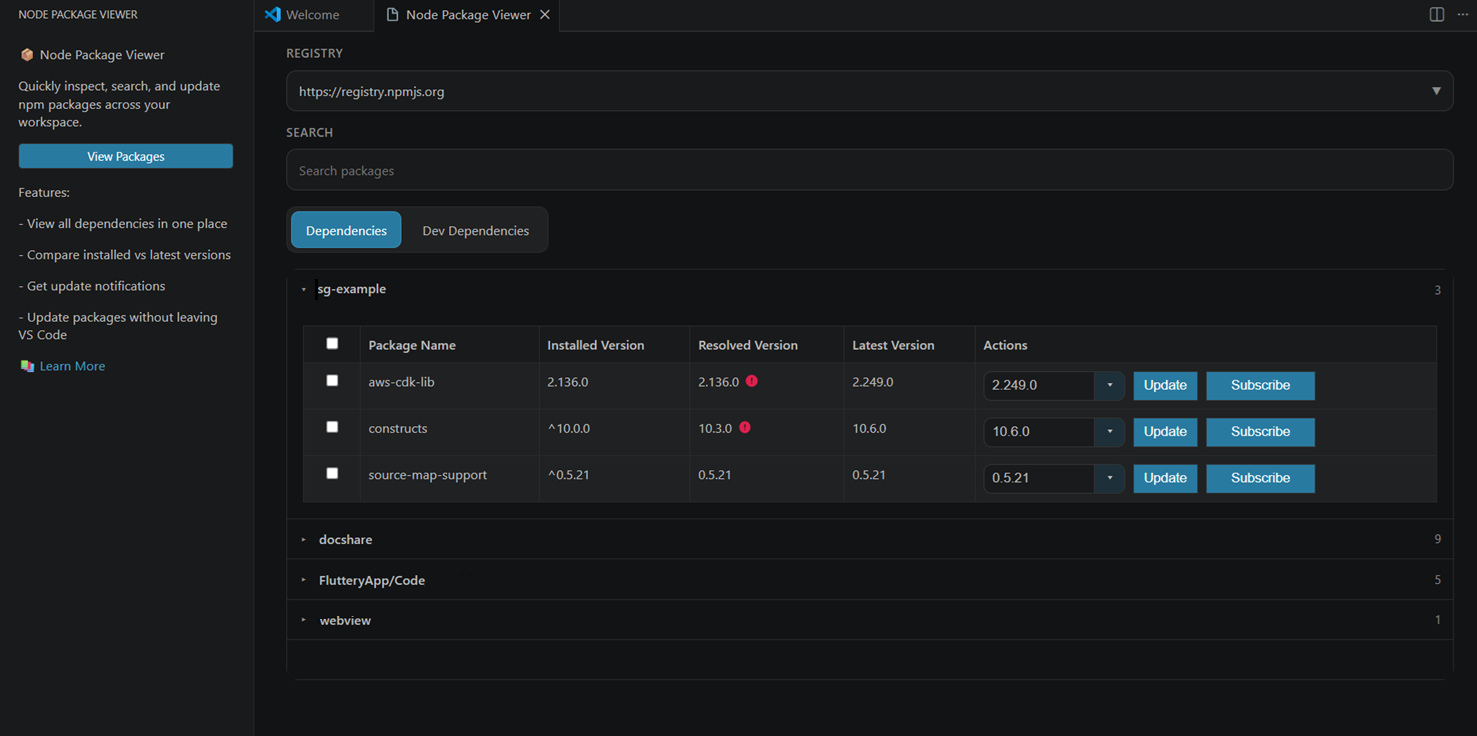
✨ Key Features
- 📦 Multi-Package Discovery: Automatically find all
package.json files in your workspace with configurable include/exclude rules
- 🗂️ Multi-Root Workspace Support: Discover and manage dependencies across every folder in a VS Code multi-root workspace
- 🔍 Advanced Filtering: Filter by registry, search by package name, and browse dependencies or devDependencies separately
- 📊 Version Intelligence: See installed, resolved, and latest versions side-by-side; instantly identify outdated packages
- 🎯 Smart Updates: Choose any stable version from a searchable selector before updating—no more guessing
- 🔔 Update Notifications: Subscribe to receive alerts when new versions are available for specific packages
- 🔄 Live Refresh: Automatically refreshes the package view when
package.json or lockfiles change
- 🏢 Multi-Registry Support: Built-in support for npm, GitHub Packages, and custom HTTP registries
- ⚙️ Workspace State Persistence: Track update subscriptions per workspace and package location
- 🛠️ Developer-Friendly: Detailed diagnostics in the Node Package Viewer output channel
🚀 Quick Start
1. Open Node Package Viewer
- Click the Node Package Viewer icon in the VS Code Activity Bar (sidebar), or
- Press
Ctrl+Shift+P (or Cmd+Shift+P on Mac) and search for Node Package Viewer: View and Update Dependencies
2. Explore Your Dependencies
- Choose between Dependencies and DevDependencies tabs
- (Optional) Filter by registry or search for specific packages
3. Update a Package
- Click on a package version selector
- Choose your target version
- Click Update to run
npm install
- Click Subscribe on any package to receive update notifications
- Notifications appear when the extension next activates
📋 Table of Contents
💡 Use Cases
Monorepo Management
Keep your entire workspace's dependencies updated without switching between multiple package.json files. Quickly identify which packages need attention across different services and libraries.
DevOps & Release Engineering
Monitor dependencies for security patches and updates across all deployment targets in one place. Subscribe to critical package updates and receive timely notifications.
Large Project Maintenance
Manage hundreds of dependencies efficiently with filtering by registry and workspace-relative discovery rules. Avoid surprise incompatibilities by comparing versions across environments.
Polyglot Workspaces
Manage npm packages alongside other tools. Works seamlessly in mixed-language projects where npm is one of several package managers.
Features Overview
- Discover packages across all package.json files in all workspace folders (single-root and multi-root; excludes node_modules, .git, .vscode-test, out, dist, build, and coverage by default; fully configurable)
- View dependencies and devDependencies in separate tabs for clarity
- Compare installed, resolved, and latest versions at a glance
- Highlight outdated packages to prioritize updates
- Search packages by name to find what you need instantly
- Filter by multiple registries (npm, GitHub Packages, custom HTTP registries)
- Choose any stable version from a searchable dropdown before updating
- Update packages by running
npm install <package>@<version> directly from the UI
- Subscribe to update notifications for critical packages across your workspace
- Keep subscription state per workspace and package location for persistent tracking
- View diagnostics in the Node Package Viewer output channel for debugging and insights
Usage Guide
- Open any workspace that contains Node.js projects (one or more package.json files)
- Click the Node Package Viewer icon in the activity bar, or run
packageviewer.start from the command palette
- Select a tab (Dependencies or DevDependencies)
- (Optional) Filter by registry from the dropdown at the top
- (Optional) Search by package name
- Click a package row to see version details
- Select a version from the version selector dropdown
- Click Update to install the selected version
- Click Subscribe to receive update notifications the next time the extension activates
Commands
packageviewer.start: Open the Node Package Viewer webview in the sidebar
Data Sources
Node Package Viewer intelligently gathers information from multiple sources:
- package.json files: Discovered recursively across all workspace folders (configurable discovery rules)
- package-lock.json: Used to determine the exact resolved version installed (when available)
- .npmrc: Parsed for default registry, scope-specific registries, and authentication tokens
- Registry APIs:
- npm-compatible registries via
<registry>/<package>/latest
- GitHub Packages via GitHub REST API (when registry host is
npm.pkg.github.com)
Resilience: If registry metadata cannot be retrieved (network issues, offline, etc.), the UI shows "Unknown" instead of failing—your workspace view stays available.
Registry Providers
Node Package Viewer uses a flexible provider system where each registry can define its own metadata retrieval strategy.
Default Providers
- npm: Default fallback for all npm-compatible registries
- github: Automatically activated for
npm.pkg.github.com
Custom Providers
You can opt-in to additional providers per registry via .npmrc:
Custom HTTP Registry
Use custom-http to integrate any HTTP-based package registry:
//my.registry.example/:packageViewerProvider=custom-http
//my.registry.example/:packageViewerConfig.metadataUrlTemplate=https://meta.my.registry/packages/{encodedPackageName}
//my.registry.example/:packageViewerConfig.versionsUrlTemplate=https://meta.my.registry/packages/{encodedPackageName}/versions
Optional custom-http fields:
//my.registry.example/:packageViewerConfig.metadataVersionField=version
//my.registry.example/:packageViewerConfig.versionsField=versions
URL template placeholders:
{packageName}: Package name as-is{encodedPackageName}: URL-encoded package name
GitHub Packages
Optional GitHub API configuration:
//npm.pkg.github.com/:packageViewerConfig.apiBaseUrl=https://api.github.com
Configuration
Extension Settings
Discovery Settings (Workspace or User scope):
packageviewer.discovery.excludeDirs (array of strings): Directories to exclude from workspace scanningpackageviewer.discovery.includeDirs (array of strings): Directories to include (overrides excludeDirs)
Refresh Settings (Workspace or User scope):
packageviewer.refresh.debounceMs (number): Delay in milliseconds before auto-refresh after package.json or lockfile changes (default 500, min 100, max 5000)
Default exclude directories: node_modules, .git, .vscode-test, out, dist, build, coverage
Path format:
- Simple directory names (e.g.,
out)
- Workspace-relative paths (e.g.,
packages/generated)
Example configuration (.vscode/settings.json):
{
  "packageviewer.refresh.debounceMs": 350,
  "packageviewer.discovery.includeDirs": ["packages", "services"],
  "packageviewer.discovery.excludeDirs": ["node_modules", ".vscode-test"]
}
Environment Variables
Fine-tune performance and behavior:
| Variable |
Default |
Purpose |
PACKAGE_VIEWER_REQUEST_TIMEOUT_MS |
10000 |
Timeout for metadata requests (ms) |
PACKAGE_VIEWER_VERSIONS_REQUEST_TIMEOUT_MS |
25000 |
Timeout for version list requests (ms) |
PACKAGE_VIEWER_MAX_FETCH_RETRIES |
2 |
Maximum retry attempts for failed requests |
PACKAGE_VIEWER_RETRY_BASE_DELAY_MS |
250 |
Base delay between retries (ms) |
PACKAGE_VIEWER_MAX_LOOKUP_CONCURRENCY |
10 |
Max concurrent registry lookups |
PACKAGE_VIEWER_INFO_CACHE_TTL_MS |
300000 |
Package metadata cache TTL (5 min) |
PACKAGE_VIEWER_VERSIONS_CACHE_TTL_MS |
600000 |
Version list cache TTL (10 min) |
PACKAGE_VIEWER_MAX_AVAILABLE_VERSIONS |
500 |
Max available versions returned per registry |
VSCODE_DEBUG_MODE |
false |
Enable webview dev server debugging |
Example (set in your shell or VS Code launch config):
export PACKAGE_VIEWER_REQUEST_TIMEOUT_MS=15000
export PACKAGE_VIEWER_MAX_LOOKUP_CONCURRENCY=5
Requirements
- VS Code: 1.109.0 or newer
- Node.js Project: At least one
package.json file in your workspace
- Internet Access: Required for registry lookups (works gracefully when offline)
FAQ
Q: Does Node Package Viewer modify my files?
A: No. Node Package Viewer only runs npm install <package>@<version> when you explicitly click the Update button. It never auto-modifies package.json or package-lock.json.
Q: How are version updates tracked?
A: Update subscriptions are stored in VS Code's workspace state, not in your repository. Each workspace has its own subscription list.
Q: Can I use Node Package Viewer with private registries?
A: Yes! Ensure your .npmrc has the correct registry URL and authentication tokens. Node Package Viewer respects your npm configuration.
Q: What about GitHub Packages authentication?
A: GitHub Packages requires authentication. Configure your .npmrc with:
//npm.pkg.github.com/:_authToken=<your-token>
Node Package Viewer will automatically use this token when looking up GitHub packages.
Q: Can I use custom HTTP registries?
A: Yes! Use the custom-http provider (see Registry Providers section). Set up the JSON response format, and Node Package Viewer will query it.
Q: How does caching work?
A: Node Package Viewer uses in-flight deduplication and TTL-based caching:
- Multiple requests for the same package within a short period share one network call
- Cached results expire after TTL (configurable via env vars)
- This reduces network load and improves performance, especially in large workspaces
A: The UI shows "Unknown" for that package's latest version, but the viewer continues to function and show installed/resolved versions.
Q: Does it support monorepos?
A: Absolutely! Node Package Viewer discovers and displays packages from all package.json files in your workspace. Use includeDirs to optimize discovery for monorepo structures.
Troubleshooting
Issue: "Unknown" versions showing for all packages
Possible causes:
- No internet connection
- Registry is unreachable or requires authentication
- Incorrect .npmrc configuration
Solutions:
- Check network connectivity
- Verify your
.npmrc has correct registry URLs and auth tokens
- Check the Node Package Viewer output channel for error details
- Increase
PACKAGE_VIEWER_REQUEST_TIMEOUT_MS if using slow networks
Issue: Node Package Viewer takes too long to load packages
Solutions:
- Increase
PACKAGE_VIEWER_INFO_CACHE_TTL_MS to cache results longer
- Reduce
PACKAGE_VIEWER_MAX_LOOKUP_CONCURRENCY if network is bandwidth-limited
- Use
packageviewer.discovery.excludeDirs to skip unnecessary directories
- Check the output channel for specific slowness patterns
Issue: Updates succeed but package.json doesn't reflect the change
Possible cause: The terminal where npm ran had an error, or npm install failed.
Solution:
- Check the Node Package Viewer output channel for npm error messages
- Run
npm install <package>@<version> manually in the terminal to verify npm works
- Check if your user has write permissions to package.json and the package directory
Issue: GitHub Packages showing "Unknown" even with auth token
Solutions:
- Verify token has
read:packages scope
- Double-check token is set in
.npmrc for npm.pkg.github.com
- Try running
npm view @scope/package in terminal to test npm's auth
- Check Node Package Viewer output channel for detailed errors
Issue: Custom registry not working with custom-http provider
Checklist:
- Verify
.npmrc has the correct provider and template URLs
- Test the URL template manually (use {packageName} or {encodedPackageName})
- Ensure custom registry returns JSON in the format you specified
- Check the output channel for exact HTTP response errors
Known Issues
- Registry requests may fail when you are offline or behind a restricted network
- Package metadata quality depends on data returned by the selected registry
- Very large workspaces (1000+ packages) may require tuning
PACKAGE_VIEWER_MAX_LOOKUP_CONCURRENCY for optimal network performance
Have questions or found an issue?
Log bugs or report issues @ gptkm.musings@gmail.com
Your feedback helps us improve Node Package Viewer! 🙏

