Codemap Extension

Read complex source code effortlessly with visual connection lines and an AI-powered infinite canvas.
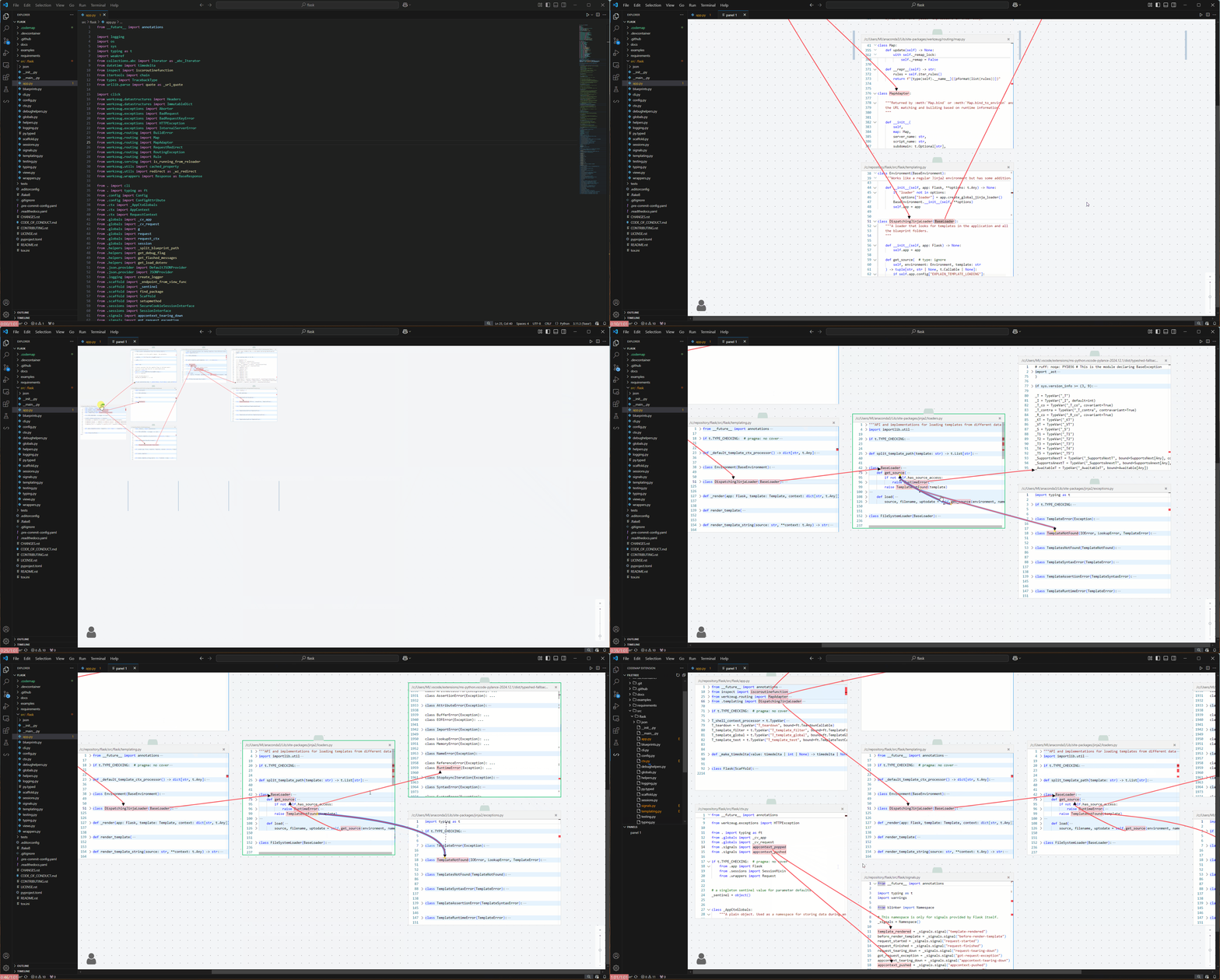
Codemap is the pioneering editor extension engineered to eliminate the cognitive overload of reading and analyzing unfamiliar codebases. Instead of constantly switching tabs and losing your mental model, Codemap tiles related files side-by-side on an infinite canvas (FloatArea), highlighting tokens and drawing interactive visual connections between function calls and their definitions.
🚀 What's New: Native MCP Support
Codemap now features a built-in Model Context Protocol (MCP) server!
It automatically registers with Cursor and VS Code upon extension activation — zero setup or manual mcp.json editing required.
How to Trigger in AI Prompts
Whenever you ask an AI assistant (such as Cursor Composer / Agent or GitHub Copilot) to explain or trace code, simply include trigger phrases like "visualize with codemap" or "通过 codemap 可视化":
visualize with codemap (or 通过 codemap 可视化)show the call hierarchy in Codemapconnect definitions and usages using Codemap
Example Prompts
"Explain how the MCP server registers in src/mcp.ts, and visualize with codemap."
"Trace the authentication flow and visualize with codemap."
"分析当前模块的调用链路,通过 codemap 可视化"
How It Works Under the Hood
- Autonomous Analysis: The AI agent reads your code and resolves accurate symbol definitions using language tools.
- Auto-Tiled Canvas: The agent invokes Codemap's MCP tools (
show_code_structure), automatically opening and tiling relevant files on the canvas and scrolling to target ranges.
- Interactive Linkage: Codemap renders smooth bezier connection lines between callers and definitions across editors, giving you an immediate spatial overview of your program flow.
Demo
Key Features
- 🌌 Infinite Canvas (
FloatArea): Break free from rigid tabs. Freely arrange, drag, and pin multiple editor panes on an infinite workspace.
- 🔗 Cross-File Visual Connections: Interactive bezier lines connect function calls directly to their declarations across split files.
- 🤖 Zero-Config MCP Integration: Out-of-the-box support for modern AI coding workflows in both Cursor and VS Code.
- 📝 In-Canvas Annotations & Highlighting: Add contextual notes and highlights right alongside the source code.
Requirements
Please ensure the corresponding Language Server (e.g. TypeScript, Python, Go, Rust) is installed and activated for your project to enable accurate definition and reference resolution.

