CertView: X.509 Certificate Inspector





Inspect certificates without leaving VS Code.
CertView helps you quickly answer who issued a certificate, when it expires, which names it covers, whether a chain is ordered as expected, and what fingerprints you need to copy for reviews or incidents.
Think of it as openssl x509 -text -noout, openssl req -text and openssl crl -text rendered inside the editor, for PEM, DER, CRT/CER, CSR, CRL, P7B, PKCS#12 (.p12 / .pfx), JWK and key files.
It works offline, does not include telemetry, and does not send certificate, key, or PKI material outside your machine. No external tools, OpenSSL install, account, or network access required.
Built and maintained by Juan Torchia as part of GMM Software Solutions. See the CertView product page for architecture, support boundaries, source, and release links.
Install
- Install from the VS Code Marketplace.
- VSCodium, Cursor, Windsurf, Gitpod and other Open VSX-based editors: install from Open VSX.
- Or search for CertView in the VS Code Extensions view.
- Open any supported certificate file to inspect it directly in the editor.
What it does
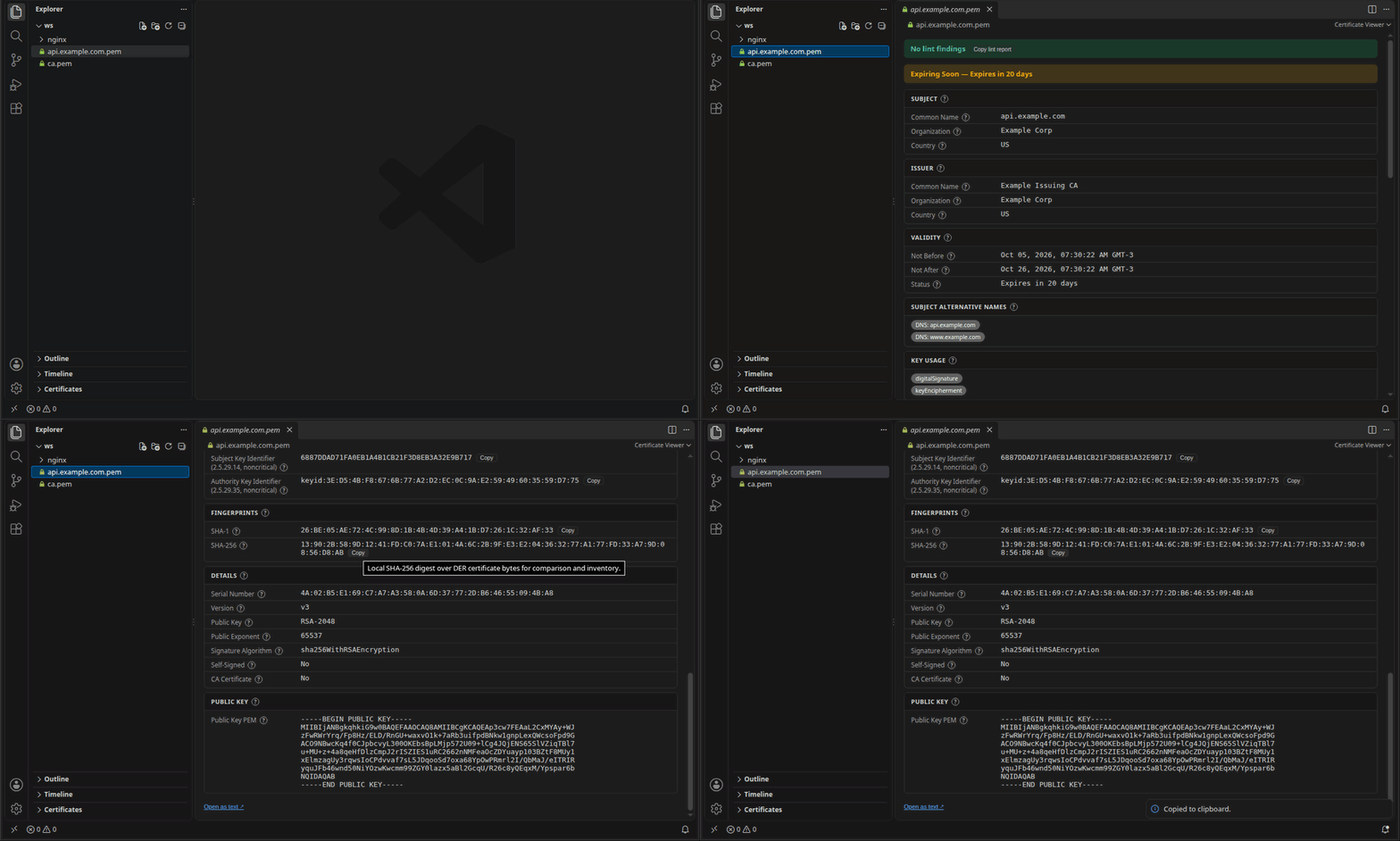
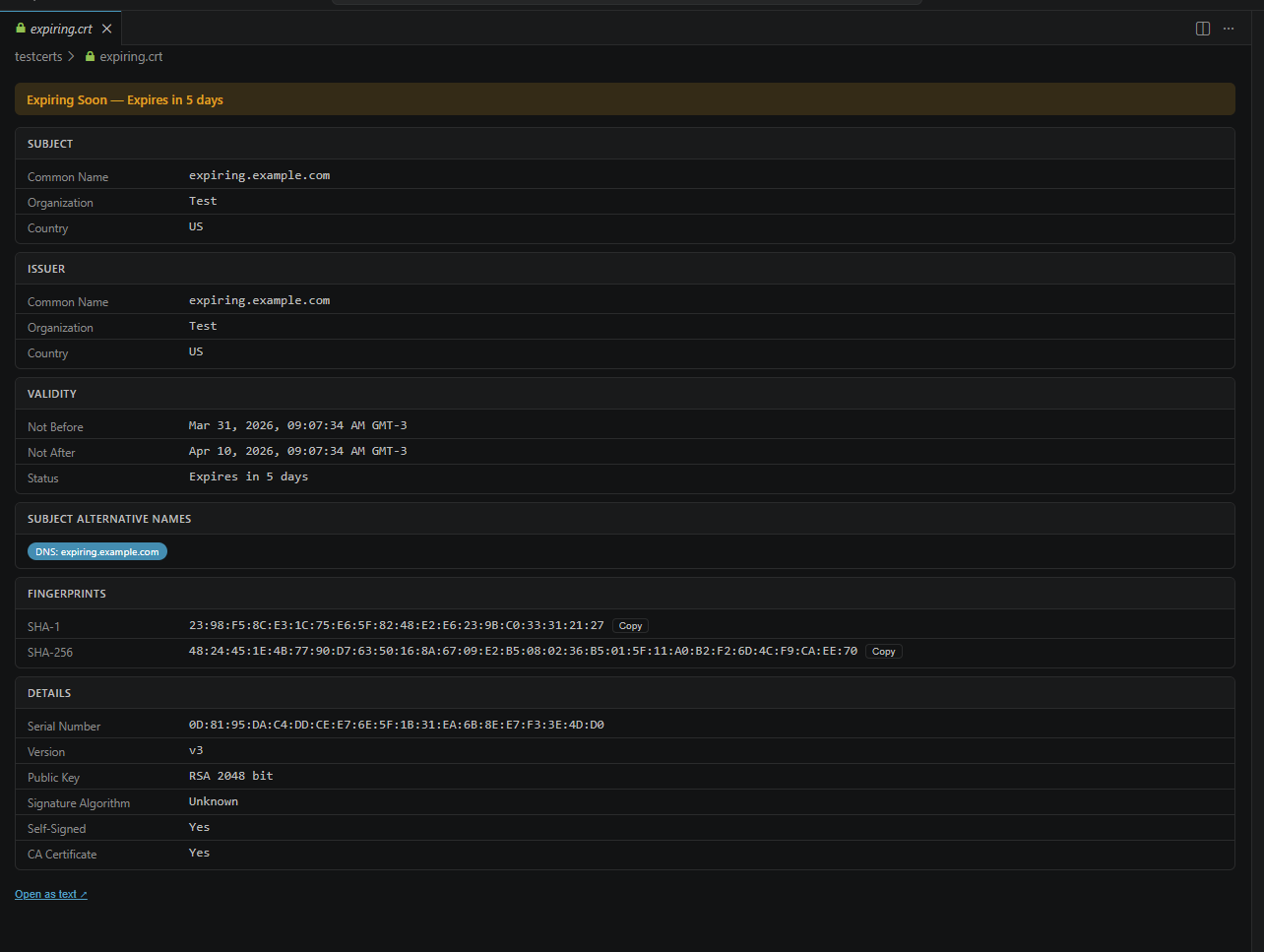
Double-click any certificate file and instantly see:
- Subject & Issuer — Common Name, Organization, Country, and more
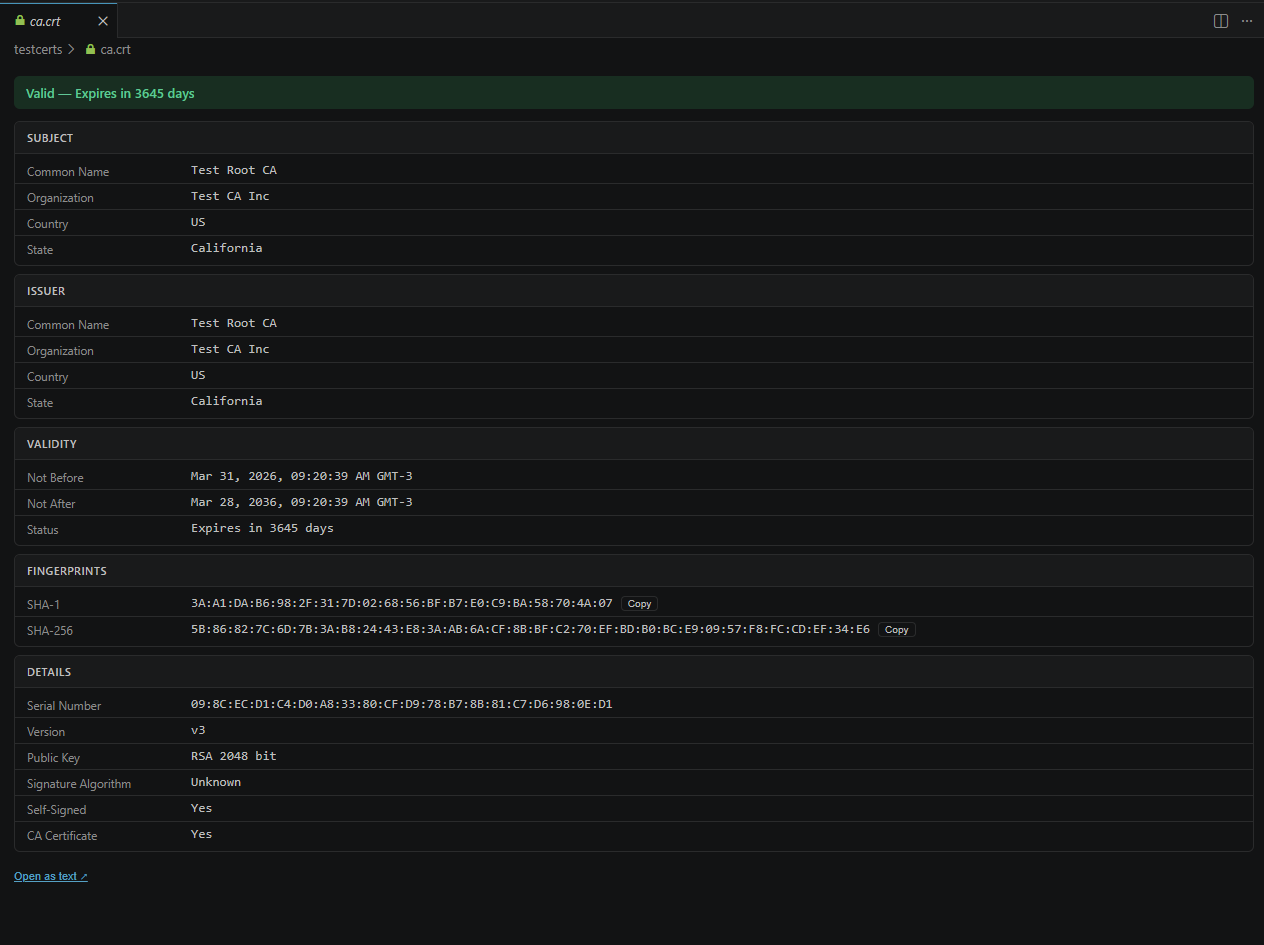
- Validity period — clear expiry date with a visual status banner (valid / expiring soon / expired)
- Fingerprints — certificate SHA-1/SHA-256 and key SPKI SHA-1/SHA-256 with one-click copy
- Public key — algorithm with key size or curve, such as
RSA-4096 or EC-P-256
- Key parameters — RSA public exponent and EC named curve aliases where the runtime exposes them
- Extensions — SANs, Key Usage, Extended Key Usage, Basic Constraints, Name Constraints, SCTs, and arbitrary critical or noncritical extensions
- CSRs and CRLs — CSR fingerprints, requested CSR SANs/extensions, CSR key fingerprints, and CRL issuer/update/signature metadata
- Lint findings — errors, warnings, and informational notices tied to RFC references
- RFC tooltips — hover over sections and fields for relevant RFC guidance
- Local format coverage — X.509 certificates, chains, CSRs, CRLs, PKCS#7 bundles, PKCS#12/PFX keystores, and public/private key files
- Certificates explorer — every certificate-related file in the workspace with a valid / expiring / expired status per certificate
- Problems panel — lint findings show up as native VS Code diagnostics, also while you edit PEM text
- PEM syntax highlighting —
BEGIN/END boundaries and base64 bodies are colored when a .pem file is opened as text
Expiry warnings at a glance
Never get caught by a surprise certificate expiration. Files expiring within 30 days (configurable with certview.warningDaysBeforeExpiry) get a yellow warning banner; expired certificates show a red one.
Certificate chains
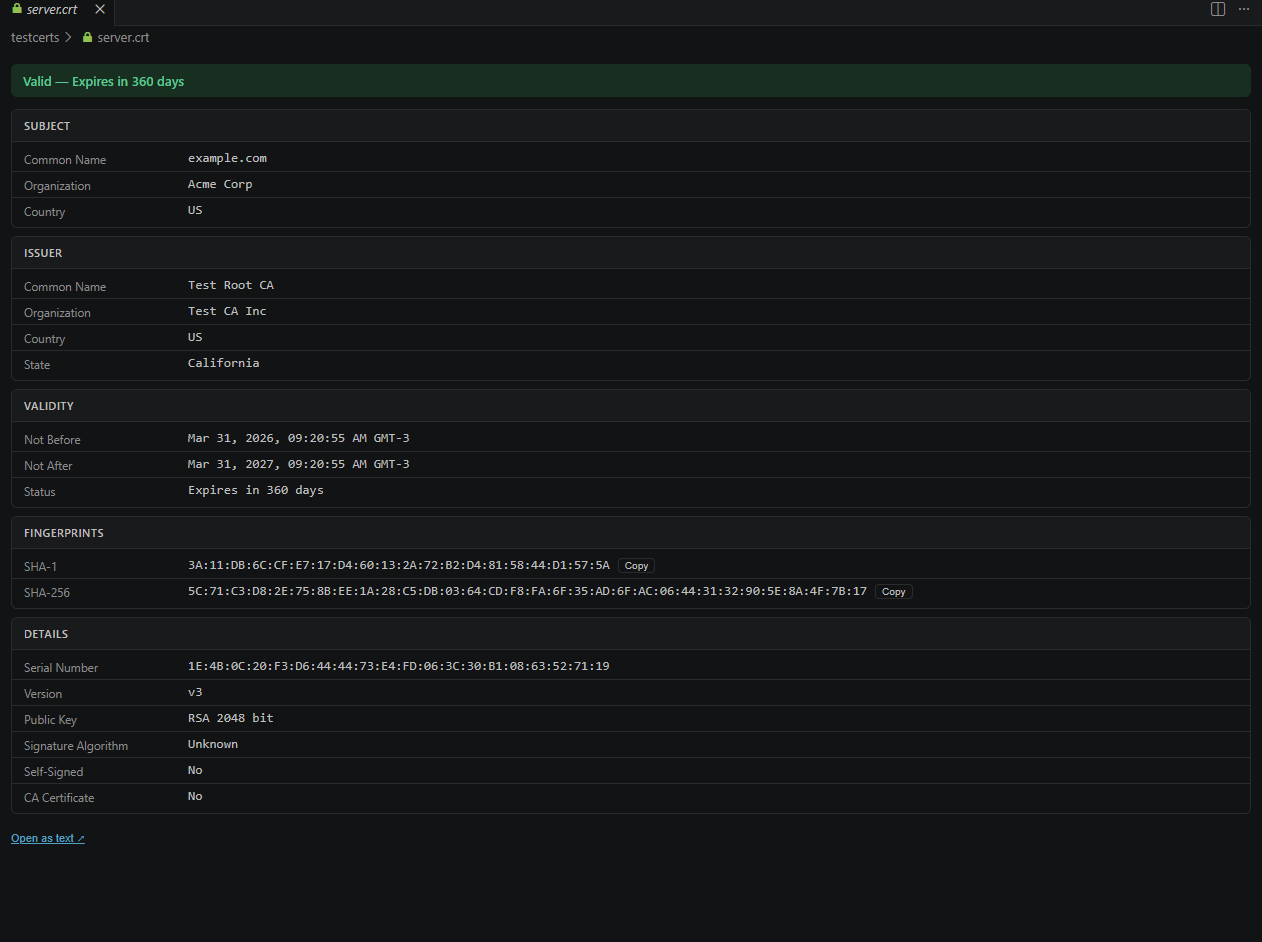
Multi-certificate files (chains, P7B bundles) are displayed as tabbed panels — one tab per certificate in the chain.
CA certificates
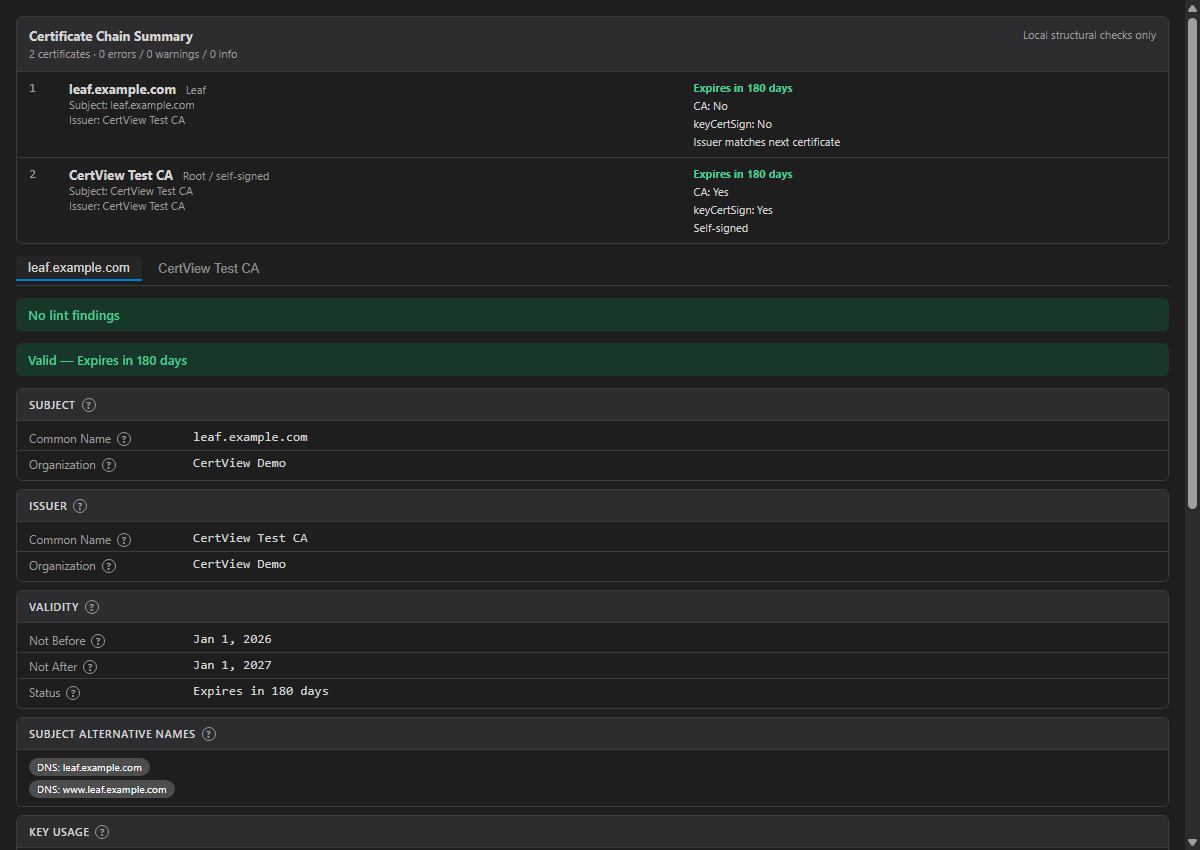
Self-signed and CA certificates are clearly identified.
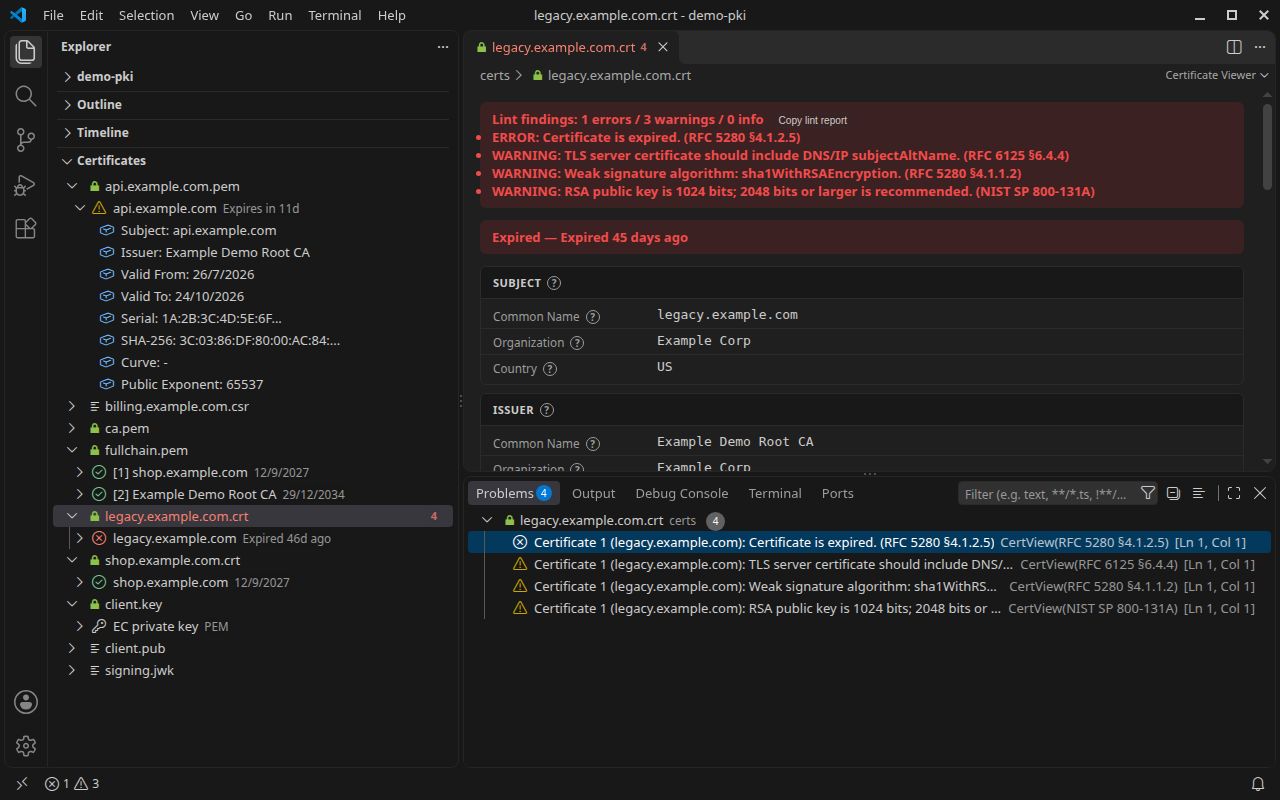
Certificates explorer and Problems panel
The Certificates view in the Explorer sidebar lists every supported file in the workspace. Expand a file to see each certificate with a status icon and a short description: the expiry date, Expires in 11d when it is within 30 days, or Expired 46d ago. Expand a certificate for subject, issuer, validity, serial, SHA-256 fingerprint, curve, and public exponent; key files show algorithm, format, size or curve, and SPKI SHA-256. PKCS#12 entries open in the editor, because they may need a password.
Lint findings (expired or not-yet-valid certificates, missing SANs on TLS server certificates, weak signature algorithms, short RSA keys, CA and key usage mismatches, chain ordering problems) are also published to the Problems panel (Ctrl+Shift+M / Cmd+Shift+M) with their RFC or NIST reference, so they sit next to the rest of your workspace diagnostics. Diagnostics refresh when you open, edit, or save a supported file as text; live diagnostics skip text files larger than 1 MiB.
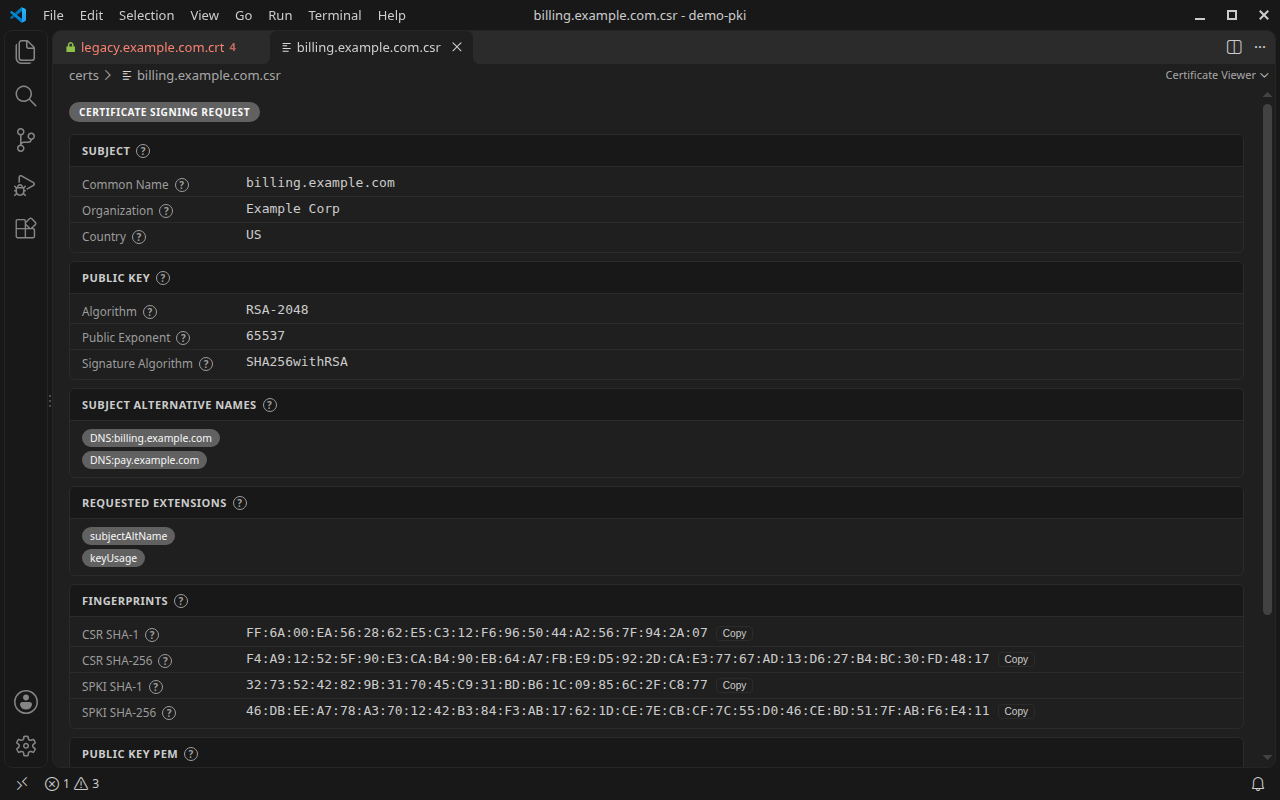
Certificate Signing Requests
Open a .csr (PKCS#10) before sending it to a CA to check what you are about to request: subject, public key algorithm and size, signature algorithm, requested SANs and extensions, CSR SHA-1/SHA-256 fingerprints, SPKI fingerprints, and the public key PEM.
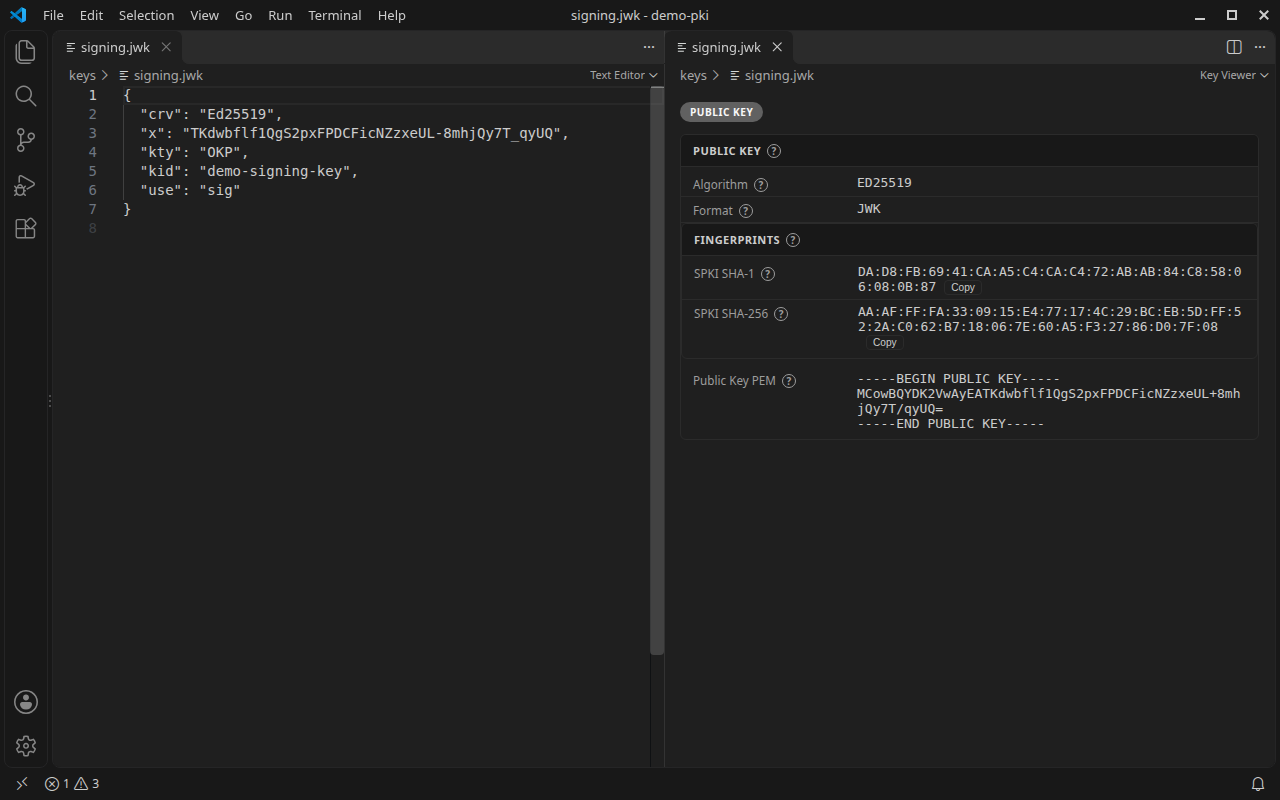
Public keys, private keys, and JWKs
.key, .pub, and .jwk files open as text by default. Run CertView: Open Certificate from the command palette or the editor context menu, or use Open With... > Key Viewer, to see the key type, algorithm (RSA, EC, Ed25519, Ed448, and runtime-supported ML-DSA), size or curve, format (PEM, DER, or JWK), SPKI SHA-1/SHA-256 fingerprints, and the public key as PEM. Matching SPKI fingerprints is a quick way to confirm that a private key, a CSR, and a certificate belong together. Encrypted private keys are detected but never decrypted.
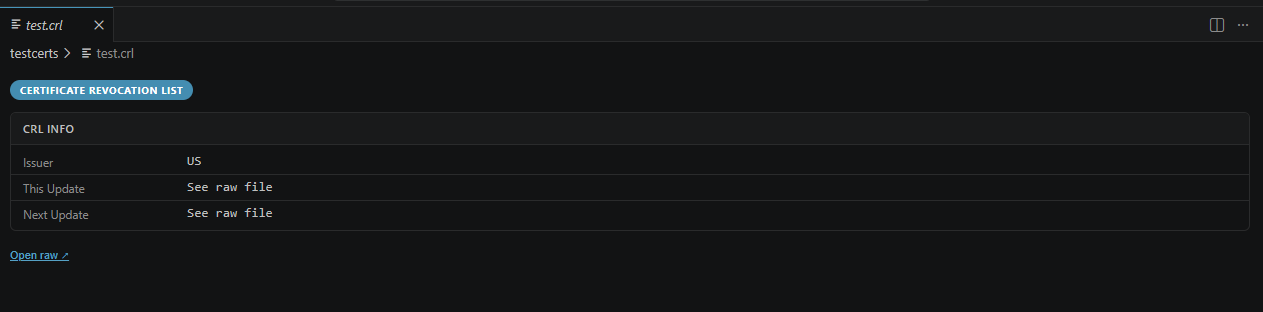
Certificate Revocation Lists
CRL files open with issuer and update timestamps — no more decoding DER by hand.
| Extension |
Format |
.pem |
PEM — single certificate, certificate chain, public key, private key, or mixed certificate/key bundle |
.cer .crt |
DER or PEM certificate |
.der |
DER binary certificate, with DER SPKI/PKCS#8 key fallback |
.p7b .p7c .p7 |
PKCS#7 certificate bundle |
.crl |
Certificate Revocation List |
.csr |
Certificate Signing Request (PKCS#10) |
.p12 .pfx |
PKCS#12 keystore — password prompt if protected |
.key .pub |
PEM or DER public keys and unencrypted private keys, plus encrypted private-key detection without decryption prompts |
.jwk |
JSON Web Key public keys |
Certificate-like files open in CertView by default. Key and JWK files stay text-first on normal open; use Open With... or CertView: Open Certificate when you want CertView to inspect them.
Workspace scanning
The Certificates panel scans supported files in the current workspace. Large repositories can tune that scan without changing project files:
certview.workspace.maxFiles limits how many certificate-related files the panel shows before adding a limit notice.certview.workspace.excludeGlobs adds VS Code glob patterns to skip generated or vendor folders, such as **/dist/**, **/build/**, or **/vendor/**.certview.workspace.autoRefresh controls whether the panel automatically refreshes when supported certificate-related files change. Disable it in very large workspaces if file watcher churn is noisy, then use the refresh button manually.
VS Code glob patterns use / as the path separator, including on Windows.
Usage
- Open a certificate-like file → the viewer opens automatically on double-click
- Open a key or JWK file → VS Code opens it as text/JSON by default; use Open With... for CertView
- Right-click any supported file → CertView: Open Certificate
- Certificates panel in the Explorer sidebar lists all cert files in the workspace
- Hover sections or fields in the certificate view to see RFC context
- Hover or focus the
? indicator beside fields and sections to see RFC context inside the webview
- Copy lint report from the validation banner for JSON output suitable for issue comments or reviews
- Open as text at the bottom of the viewer switches back to the raw file
- Problems panel (
Ctrl+Shift+M) lists CertView lint findings for open supported files
Project status and collaboration
CertView is open to focused contributions in parsing, diagnostics, webview UX, test fixtures, documentation, and Marketplace presentation.
- See ROADMAP.md for planned work and help-wanted areas.
- See CONTRIBUTING.md before opening a pull request.
- See SECURITY.md before reporting parser, rendering, denial-of-service, or secret-handling concerns.
- Please do not attach private keys, production certificates, customer certificates, tokens, passwords, or proprietary PKI material to public issues.
Contributors
Settings
| Setting |
Default |
Description |
certview.warningDaysBeforeExpiry |
30 |
Days before expiry to show the warning banner |
certview.workspace.maxFiles |
200 |
Maximum certificate-related files shown in the Certificates panel before a limit notice appears |
certview.workspace.excludeGlobs |
[] |
Extra VS Code glob patterns to skip during Certificates panel scans |
certview.workspace.autoRefresh |
true |
Automatically refresh the Certificates panel when supported files change |
certview.ratingPrompt.enabled |
true |
Occasionally ask for a Marketplace rating after regular use (at most twice) |
Requirements
- VS Code 1.85 or later
- Maintainer guidance for VS Code and Node baseline changes is documented in CONTRIBUTING.md
- Works fully offline — no network access, no telemetry
- Files larger than 5 MiB are refused before parsing to protect the VS Code extension host from unbounded certificate, PKCS#7, or PKCS#12 processing
Security and validation notes
- The viewer performs offline structural and profile lint checks for validity dates, CA/key usage consistency, SAN presence and criticality, extension criticality, and unrecognized extensions.
- Multi-certificate files are checked for issuer/subject ordering, CA marking, keyCertSign usage, validity nesting, and path length constraints. These checks are not full RFC 5280 certification path validation.
- Critical and noncritical X.509 v3 extensions are shown with OID, display name, and decoded or hexadecimal value where available. The local OID registry includes common X.520/RDN, PKCS #9, EKU, CA/B Forum policy, public-key algorithm, named-curve, Brainpool, SM2, Microsoft, and Certificate Transparency OIDs. Well-formed Certificate Transparency SCT lists are decoded into SCT entries with version, known log name, log ID, timestamp, and signature algorithm; malformed SCT values fall back to raw DER. The built-in CT log names cover current and recent Google CT log list v3 entries for major operators, including Google, Cloudflare, DigiCert, Sectigo, Let's Encrypt, TrustAsia, Geomys, and IPng Networks.
- CSR parsing extracts subject fields, CSR fingerprints, requested subjectAltName entries, requested extension names, public-key metadata, public-key PEM, and SPKI fingerprints where supported by the runtime.
- CRL parsing extracts issuer, thisUpdate, nextUpdate, revoked-entry count, signature algorithm, selected CRL extensions, and CRL fingerprints.
- Mixed PEM files that contain both certificate and key blocks are shown as a bundle instead of dropping key blocks.
- Public and private key views include SHA-1 and SHA-256 fingerprints over the DER-encoded SubjectPublicKeyInfo.
- Newer algorithms such as ML-DSA depend on the VS Code extension host's Node.js and OpenSSL support.
- Algorithm support is runtime-dependent. CertView displays algorithms that Node.js can parse from X.509 SubjectPublicKeyInfo, PKCS#8, SPKI, or JWK inputs. RSA, RSA-PSS, EC, Ed25519, Ed448, and runtime-supported ML-DSA keys are covered by tests or guarded runtime checks. ML-KEM support depends on the extension host's Node.js/OpenSSL key import support and is not guaranteed on older runtimes.
- Encrypted private keys are detected but not decrypted; CertView does not prompt for private-key passwords.
- Lint findings are advisory. They do not establish certificate trust, revocation status, WebPKI compliance, RFC 5280 path validation, FIPS compliance, Common Criteria conformance, or organizational policy compliance.
Rate / report issues — if CertView helps you, leave a review on the Marketplace; bugs and gaps go to GitHub issues.
Release Notes
0.5.2
- Documented the Certificates explorer status view, Problems panel diagnostics, the CSR viewer, the key and JWK viewer, and PEM syntax highlighting, with new screenshots.
- Added the Open VSX listing for VSCodium, Cursor, Windsurf, and Gitpod users.
0.5.1
- Fixed two denial-of-service issues where a crafted PEM or PKCS#12/PFX file could freeze the VS Code extension host.
0.5.0
- Fixed PEM files with explanatory text before or between
-----BEGIN boundaries (for example openssl x509 -text output or PKCS#12 Bag Attributes) failing to parse.
- Added an optional, non-modal Marketplace rating prompt after regular use; it never appears more than twice and can be turned off with
certview.ratingPrompt.enabled.
- Unified the listing name, added an animated demo, and moved the Marketplace category from
Other to Linters.
0.4.0
- Added compact certificate-chain summaries, parsed-document caching, bounded workspace scanning, configurable auto-refresh, and safer webview restoration.
- Expanded X.509, CSR, CRL, PKCS#7, PKCS#12/PFX, PEM, DER, JWK, and key parsing coverage with malformed-input and hostile-rendering tests.
- Kept key and JWK files text-first while preserving explicit CertView inspection through Open With... and the command palette.
- Hardened packaging and development dependencies; the audited VSIX contains only runtime assets and the extension remains offline with no telemetry.
0.3.5
- Hardened certificate, PKCS#7, PKCS#12, PEM, DER, CSR, CRL, and key parsing paths with explicit input and PEM block limits to reduce extension-host DoS risk.
- Expanded X.509 extension decoding, advisory lint findings, chain-structure checks, Certificate Transparency SCT display, and RFC/NIST/ISO field help in the webview.
- Added native VS Code Problems diagnostics for certificate lint findings.
- Added PEM, DER, JWK, public-key, private-key, mixed certificate/key bundle, encrypted private-key metadata, and runtime-dependent ML-DSA key handling.
- Improved CSR and CRL detail extraction, including public-key metadata, SPKI fingerprints, CRL timing fields, selected CRL extensions, and fingerprints.
- Clarified PKCS#12 handling in the tree view:
.p12 and .pfx files may require an interactive password prompt, so the tree shows an informational item and the editor view performs the actual inspection.
- Kept dependency management on pnpm, removed the duplicate npm lockfile, and pinned CI to
pnpm@9.15.9 for reproducible release builds.
0.3.4
- Added certificate lint findings in the viewer and native VS Code Problems diagnostics
- Added broader X.509 extension decoding, chain checks, and path length validation
- Added PEM, DER, JWK, and runtime-dependent ML-DSA key viewing support
- Detects encrypted private keys without password prompts or decryption
- Hardened parsing with input limits and safer handling for newer certificate algorithms
0.3.1
- CI pipeline improvements and lint cleanup
0.3.0
- Added
.csr support — Certificate Signing Request viewer
- Added
.p12 / .pfx support — extracts certificates from PKCS#12 keystores with password prompt
0.1.4
- Initial release — local certificate viewing
| |



