
Glubean — API Explorer & Test Runner for VS Code
Replace Postman with code. Same file runs as API collection and CI test.
HTTP, GraphQL, gRPC, browser — anything Node.js supports.
explore · test · debug · traces · AI-native · CI-ready


Demo


Two roles, one extension
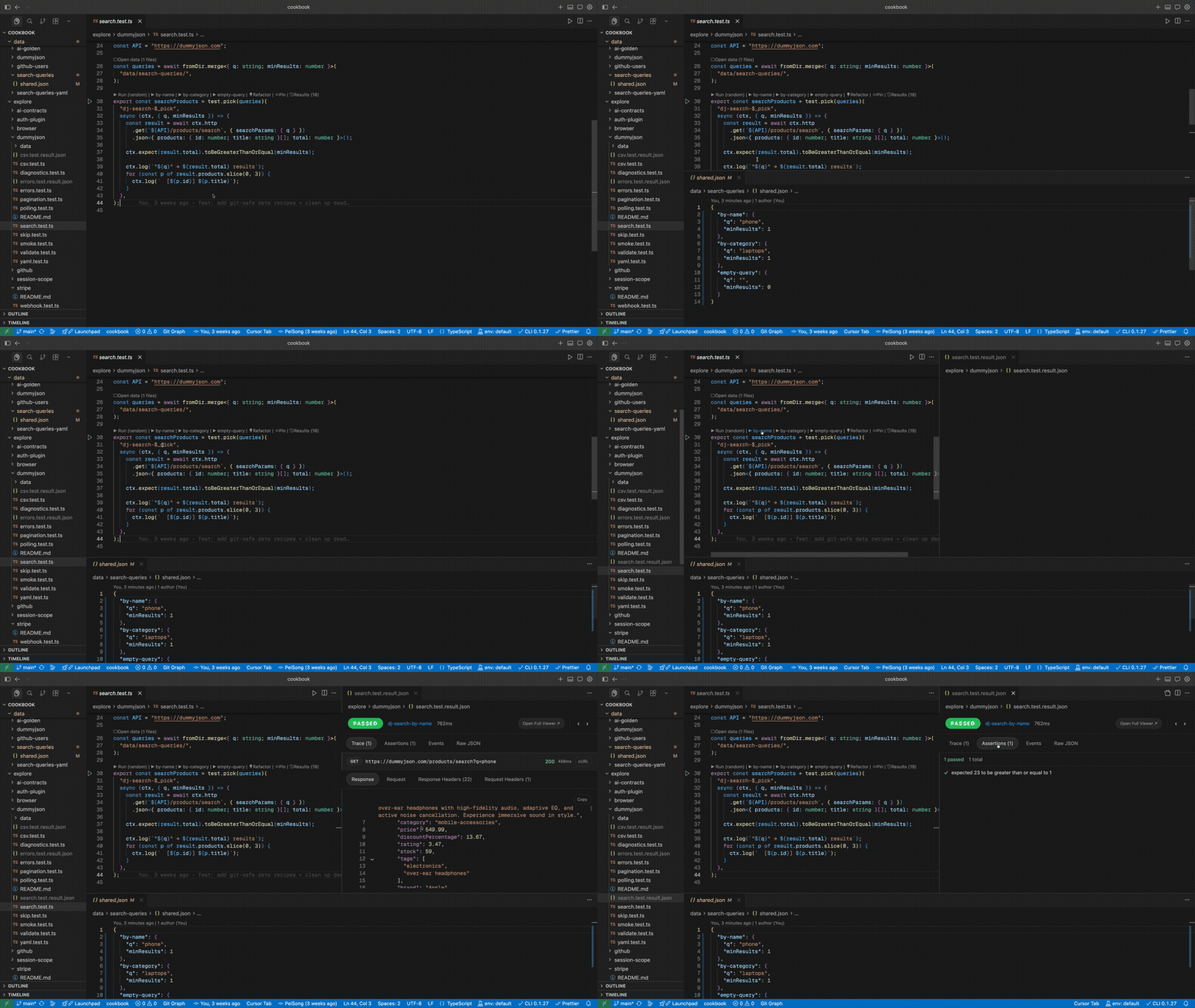
1. Postman replacement — in your editor, in git
explore/ is your API collection in code. Click the gutter play button to send a request, see full response (status, headers, body, timing) in the Result Viewer. Save parameter sets with test.pick, share via git.
No Postman account. No per-seat pricing. No export/import. No tool fragmentation.
2. Visual layer for test results
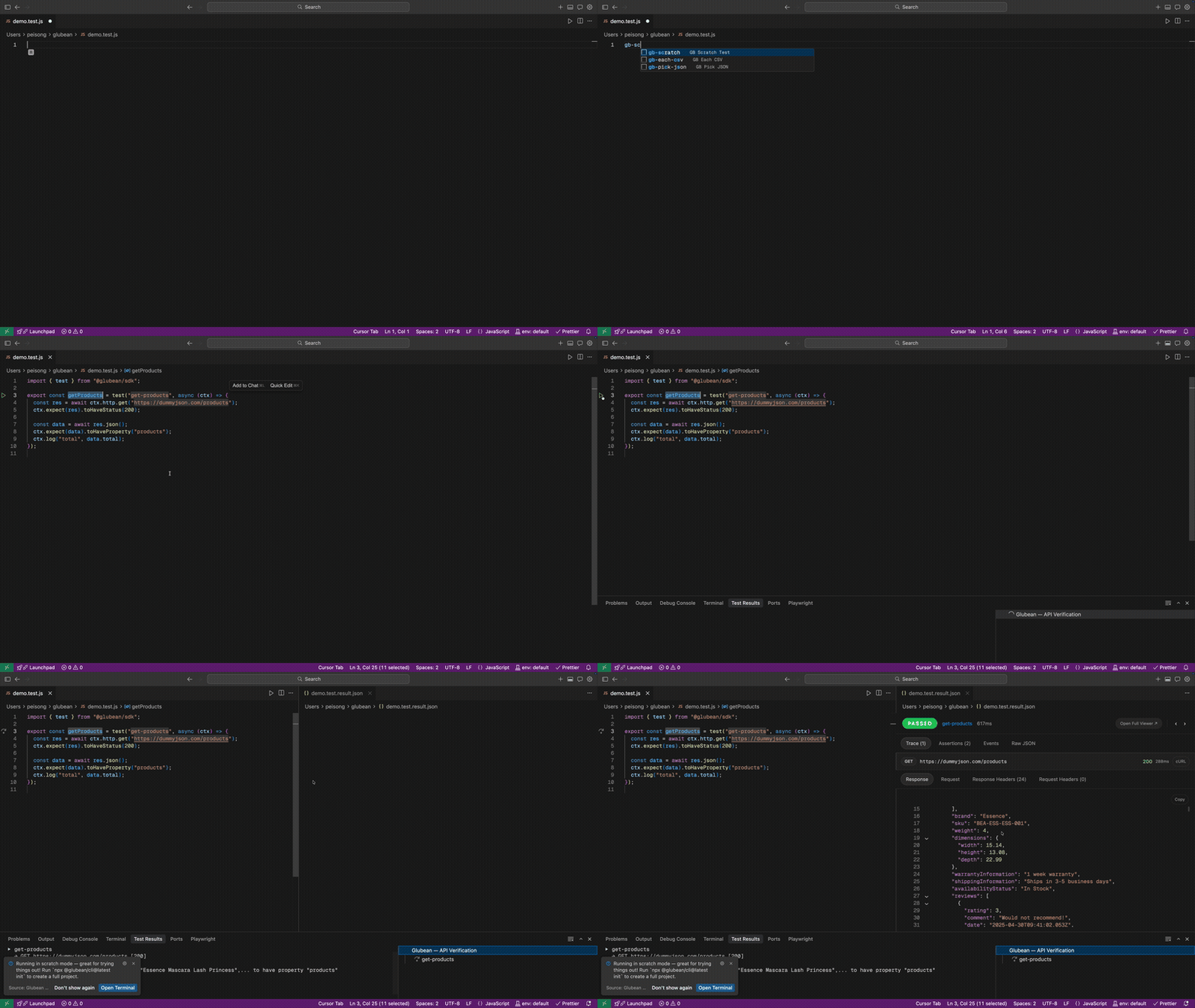
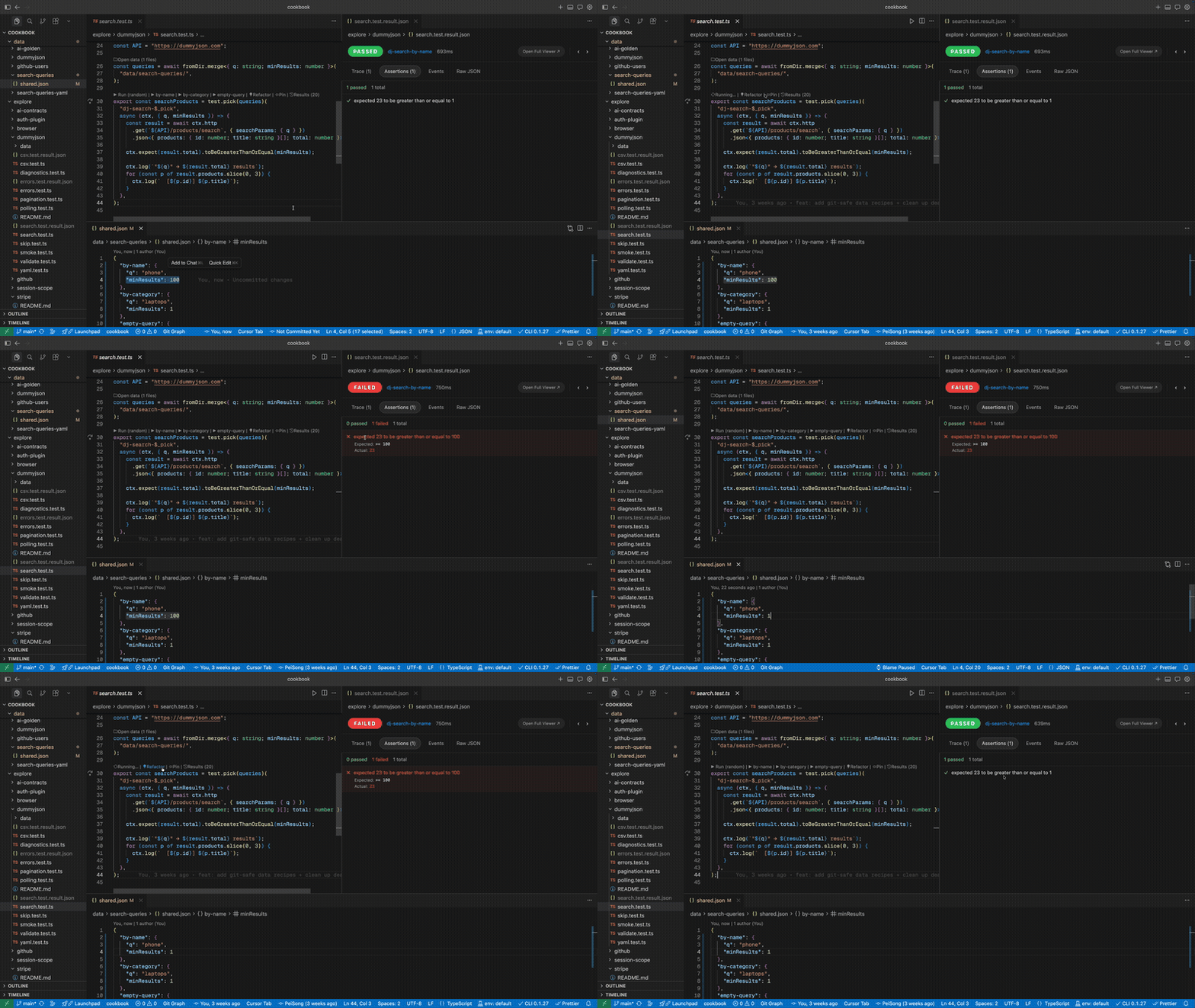
Run tests from the gutter or Test Explorer. Inspect structured traces — HTTP events, metrics, logs, step-by-step state. Debug failures with typed expected vs actual. Compare runs with trace diff.
This is the human review interface for what the SDK, CLI, and AI agents produce.
The key insight
The same TypeScript file works as both an API collection entry (explore/) and a CI regression test (tests/). No export step, no format conversion. Start exploring, add assertions, commit, run in CI.
What changes
| Without Glubean |
With Glubean |
| Postman for exploring, Jest for testing, separate CI config |
One TypeScript file for all three |
| API collection locked in Postman cloud, per-seat pricing |
explore/ in git, free, shared with git push |
| Failures are terminal noise |
Structured traces with typed expected vs actual |
| AI generates a test, you paste it, run it manually |
AI writes → runs via MCP → reads failure → fixes → reruns |
| Request drafts die in tabs |
Same file graduates from draft → test → CI |
Quick start
Prerequisites: Node.js 20+ (download)
1. Install — from the VS Code Marketplace, Open VSX, or download a VSIX for Cursor / VSCodium.
2. Explore an API — create hello.test.js, type gb-scratch, and click Play:
import { test } from "@glubean/sdk";

export const getProducts = test("get-products", async (ctx) => {
  const res = await ctx.http.get("https://dummyjson.com/products");
  ctx.expect(res).toHaveStatus(200);

  const data = await res.json();
  ctx.expect(data).toHaveProperty("products");
  ctx.log("total", data.total);
});
No npm install, no package.json, no setup. The response opens in the Result Viewer right beside your code.
3. Create a project — when you're ready, run npx glubean init to scaffold a project with environments, secrets, CI config, and more.
4. Set up AI — connect Glubean's MCP server and skill:
npx glubean config mcp       # AI can discover, run, and diagnose tests
npx skills add glubean/skill  # AI learns Glubean patterns
The agent writes tests, runs them via MCP, reads structured failures, and fixes until green — in one conversation. Learn more →
Features
| Feature |
Highlights |
| Explore APIs |
Scratch mode, zero config, explore/ as Postman replacement |
| Run tests |
Play buttons, Test Explorer, right-click to debug, rerun failed only |
| Result Viewer |
Traces, assertions, events, response schema — navigate history with prev/next |
| Trace diff |
Compare two runs with native diff to see what changed |
| Data-driven |
test.each + test.pick with JSON/YAML/CSV, CodeLens per case |
| Environments |
Status bar switcher for .env files, auto-loads secrets, hover preview |
| Debugging |
Breakpoints, step-through, Debug Console — real TypeScript |
| AI Integration |
MCP server + skill = AI writes, runs, and fixes tests |
| Diagnostics |
Glubean: Diagnose — explains why something isn't working |
| Glubean Panel |
Pin tests and files for quick access |
| Refactor Hints |
CodeLens suggests extracting inline data, promoting explore→tests |
Documentation
- Quick Start — install and run your first test
- Writing Tests — CodeLens, snippets, data-driven patterns
- Running Tests — play buttons, Test Explorer, Glubean Panel
- Result Viewer — traces, assertions, history, jump to source
- Environments & Secrets —
.env files, secrets, status bar switcher
- AI Integration — MCP server, skill, AI authoring loop
- Debugging — breakpoints, step-through, Debug Console
- Migrate from Postman — phased migration with AI
- Commands & Settings — full reference
Alternative install methods
VS Code Marketplace
Search for Glubean in the Extensions panel, or install from the Marketplace page.
Open VSX (VSCodium, Gitpod, etc.)
Search for Glubean in Open VSX.
Manual VSIX (Cursor, Windsurf, other forks)
Download the .vsix for your platform from GitHub Releases, then:
Cmd+Shift+P (or Ctrl+Shift+P) → Extensions: Install from VSIX... → select the file.
License
MIT

