Salesforce Settings Migrator
Salesforce Settings Migrator is a reusable Visual Studio Code extension for migrating Salesforce custom settings, custom metadata records, named credentials, and external credentials between authenticated orgs.
It was designed to keep the spirit of the existing migration runbook while removing project-specific hard-coded configuration. Instead of relying on predefined JSON files, the extension discovers migratable components directly from the selected source org at runtime.
Connect with the developer
Connect with the developer
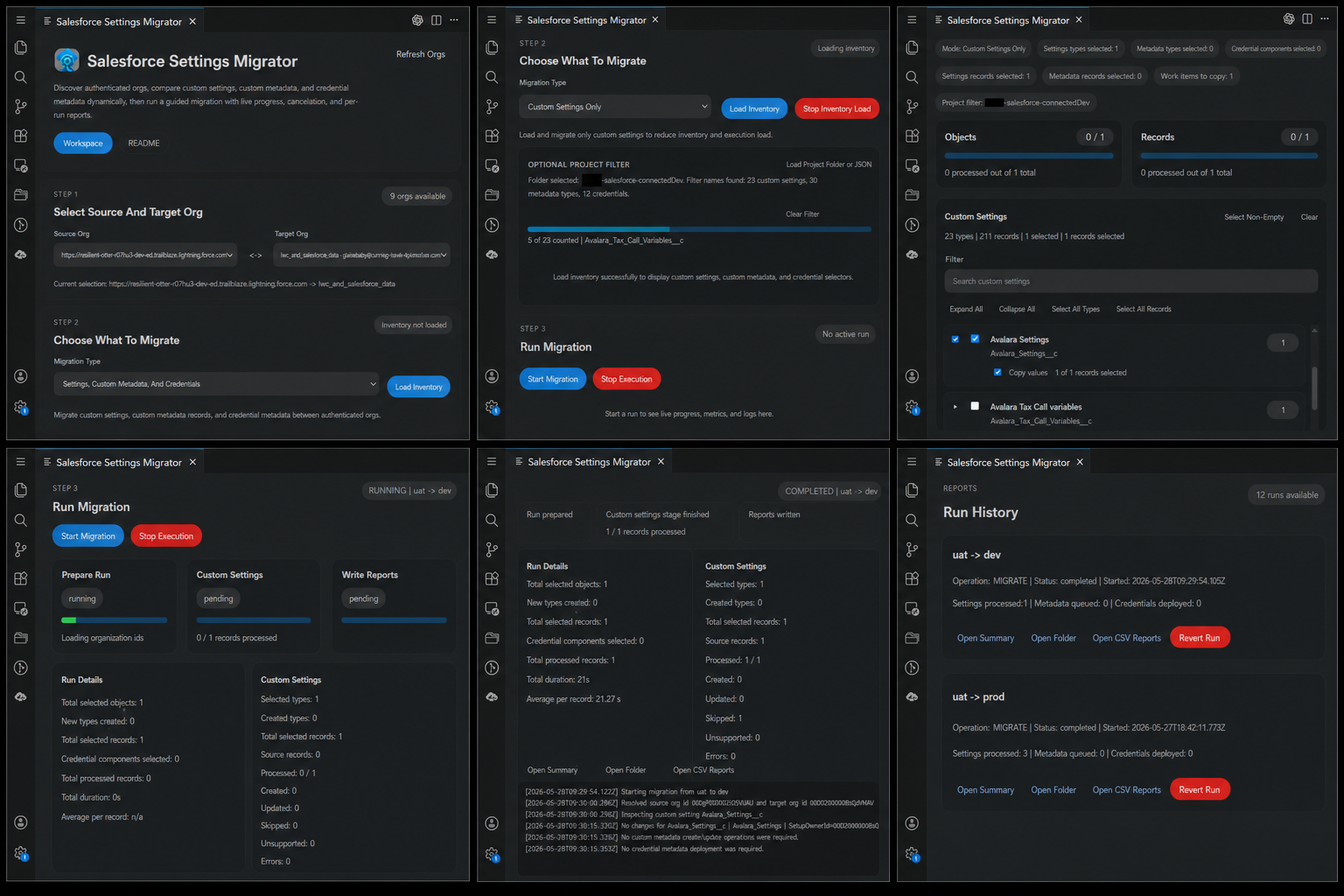
Preview
Features
- Lists the Salesforce orgs currently authenticated in your local Salesforce CLI and suggests sensible source and target defaults.
- Supports four active migration modes: custom settings only, custom metadata only, credentials only, or a combined mode for all three.
- Discovers custom settings, custom metadata types, named credentials, and external credentials dynamically from the selected source org.
- Loads per-component record inventory with counts so you can filter, expand, collapse, and select exactly what should move.
- Supports project-aware filtering from either a JSON file or a project folder scan to narrow inventory to settings, metadata, and credentials used by your project.
- Tracks project matches for supported components so inventory can be aligned with the local codebase when available.
- Migrates custom settings by comparing source and target data and only creating or updating records when needed.
- Migrates custom metadata by generating and executing deployment Apex for the selected records.
- Migrates named credentials and external credentials by retrieving selected metadata into a temporary Salesforce DX project and deploying only the chosen components.
- Shows live run progress with stage indicators, metrics, logs, and stop controls for both inventory loading and migration execution.
- Keeps a run history inside the plugin with actions to open summaries, reveal run folders, open CSV report folders, resume incomplete runs, and revert supported updates.
Scope
This extension is intentionally focused on the same functional area as the existing migrator flow:
- Custom Settings
- Custom Metadata Types and their records
- Named Credentials
- External Credentials
It does not attempt to migrate every Salesforce Metadata API component type such as Apex classes, layouts, flows, or objects. The "metadata" section in the UI refers to record-backed custom metadata types, and the credentials section deploys NamedCredential and ExternalCredential metadata components.
How it works
- The extension reads authenticated orgs from
sf org list --json.
- After you choose a source org, it discovers:
- Custom settings from
EntityDefinition WHERE IsCustomSetting = true
- Custom metadata types from
EntityDefinition WHERE QualifiedApiName LIKE '%__mdt'
- Named credentials from
sf org list metadata --metadata-type NamedCredential
- External credentials from
sf org list metadata --metadata-type ExternalCredential
- It loads field definitions for selected components from
FieldDefinition.
- It queries source records dynamically with the discovered field set.
- It migrates custom settings through Salesforce CLI record create/update commands.
- It migrates custom metadata by generating Execute Anonymous Apex files that enqueue metadata deployments.
- It migrates named credentials and external credentials by retrieving selected metadata into a temporary Salesforce DX project and deploying those exact files to the target org.
- It writes run outputs under the extension storage area in a dedicated folder per run.
Optional project JSON filter
Before loading inventory, use Load Project JSON to choose any JSON file that contains Salesforce component references. The extension scans the file for custom setting API names such as Example_Setting__c, custom metadata type names such as Example_Type__mdt, custom metadata record names such as Example_Type.Record_Name, and credential references such as NamedCredential:Example_Name or ExternalCredential:Example_Name.
When a JSON filter is selected, inventory loading counts and displays only the matching custom settings, custom metadata types, or credentials. If no JSON file is selected, inventory loading discovers all matching components directly from the source org. Use Clear JSON to return to full source-org discovery.
Requirements
- Visual Studio Code
- Salesforce CLI (
sf) installed and available on your PATH
- Source and target orgs authenticated locally
You can verify authentication with:
sf org list
Running the extension
- Open the
sf-settings-migrator folder in a VS Code Extension Development Host, or package it with vsce.
- Open the extension from the Activity Bar:
- click the
Salesforce Settings Migrator icon in the VS Code sidebar
- choose
Open Migrator
- Alternatively, run the command:
Salesforce Settings Migrator: Open
- In the UI:
- select a source org
- select a target org
- optionally load a project folder or JSON filter
- load inventory
- choose the settings, metadata records, and credential components to migrate
- start the migration
Reports
Each run is written to its own timestamped folder. A run folder includes:
run-config.jsoninventory-selection.jsonactivity.logrun-summary.jsonrun-summary.mdcustom-settings-report.jsoncustom-metadata-report.jsoncredentials-report.json- CSV bucket reports for create, update, edit, and error views when available
- a temporary credential deployment project when credential metadata is processed
- generated Apex files when custom metadata deployment is needed
The extension UI exposes run history and actions to:
- open the Markdown summary
- reveal the run folder
- open the CSV reports folder
- resume failed or cancelled migration runs
- revert supported updates from earlier migration runs
Resume and revert behavior
- Resume is available for failed or cancelled migration runs.
- Resume skips completed components and retries only unfinished settings, metadata, or credential components.
- Revert is available for migration runs and restores previous values for supported updated records.
- Revert does not delete records that were newly created by the original run.
Safe behavior and current assumptions
- The extension compares target records and only creates or updates when needed.
- Deletes are not performed.
- Production-like org selections trigger explicit confirmation before inventory loading, migration, resume, or revert actions continue.
- For hierarchy custom settings, org-level
SetupOwnerId values are remapped from source org id to target org id.
- User-scoped or profile-scoped hierarchy settings are not remapped automatically because those ids are not portable between orgs. Those records are reported as skipped with context.

