MASUM CHRONOS // Timer + To-Do Mission Command Center
Launch Chrome App · Source Code · Report an Issue
v1.2.2 | Open-source futuristic productivity app by Masum Billah.
One project, two workspaces: a Focus Timer (Pomodoro, Countdown, Stopwatch) and a full To-Do Mission Command Center, available both as a Chrome-installable Progressive Web App and a VS Code extension. No account, external APIs, paid services, or runtime dependencies.
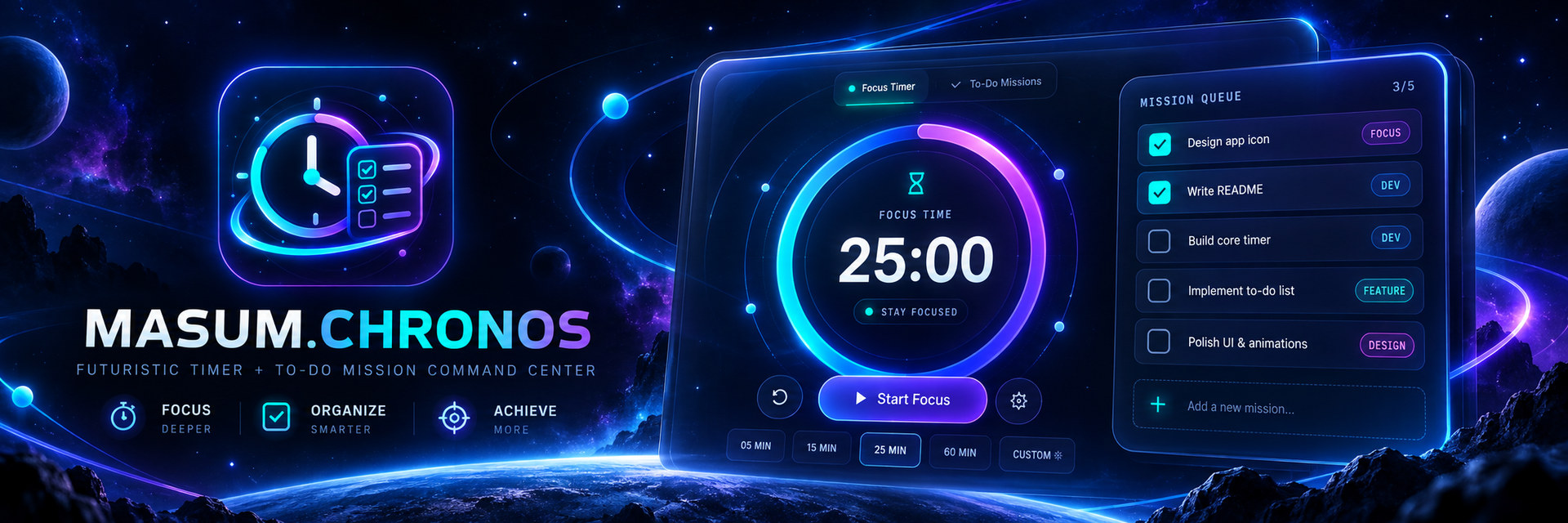
Visual identity — Timer × To-Do
The CHRONOS icon combines a luminous clock face and completed-mission checklist to represent both workspaces. The matching galaxy-themed README banner showcases the Focus Timer and To-Do Mission Command Center together. Marketplace icon: web/icon-192.png; Chrome PWA icon: web/icon-512.png. These replace the previous clock-only icon; timer state and saved missions remain unchanged.
VS Code Marketplace edition (v1.2.2)
Open the Command Palette (Ctrl+Shift+P) and select CHRONOS: Open Focus Command Center, or click the Chronos Status Bar item. Run Pomodoro, Countdown, Stopwatch (with laps) and To-Do Missions inside VS Code. The timer completion chime rings for 10 seconds when audio is enabled and the Webview is active; closed panels cannot reliably produce audio.
No account required. Focus timers and tasks are stored locally. Optional Chrome ↔ VS Code task sync only works on the same computer, and requires starting the loopback bridge with the explicit pairing command; it is off by default. Local sync does not share running timers, focus stats or themes.
Support: Open a GitHub issue or see SUPPORT.md.
v1.2 — Chrome ↔ VS Code Local Task Sync (opt-in)
This feature shares To-Do Missions only between the Chrome/PWA app and the VS Code extension on the same laptop. No public server, paid API, sign-in or cloud storage. Running timers, history/statistics and themes are intentionally separate.
- Update the VS Code extension by installing
releases/masum-chronos-1.2.2.vsix (or use code --install-extension .\releases\masum-chronos-1.2.2.vsix), then reload VS Code.
- Open CHRONOS in VS Code, go to Settings → LOCAL LINK and click START BRIDGE + COPY KEY. VS Code copies a random pairing key to the clipboard. Alternatively use the Command Palette CHRONOS: Start Local Task Sync & Copy Pairing Key.
- In the installed Chrome web app, open Settings → LOCAL LINK, paste the key and click CONNECT once. The browser remembers it locally.
- Keep VS Code open. While both apps run, missions synchronize roughly every 2.5 seconds; after restarting an app, pending local edits are merged on reconnect.
- To stop sharing, click DISCONNECT in Chrome and/or STOP BRIDGE in VS Code. Disabling sync does not delete tasks.
Limits: Works only on one computer with the VS Code bridge open on 127.0.0.1:46469. A paired website origin is https://gitwithmasum.github.io (or the supported localhost:5500 development origin). Some browser policies can block connections from an HTTPS site to a loopback service; if you see OFFLINE, check whether the VS Code bridge is active and Chrome has allowed local network access. Do not share your secret pairing key. This is not cross-device/cloud sync and does not synchronize timers.
Privacy and security: The local bridge listens only on the IPv4 loopback interface, enforces a long random pairing key, restricts accepted browser Origins, validates the Host header, and limits requests to 160 KB. It never sends data to GitHub or another public service. The key is stored in VS Code SecretStorage when available and in Chrome's localStorage after pairing.
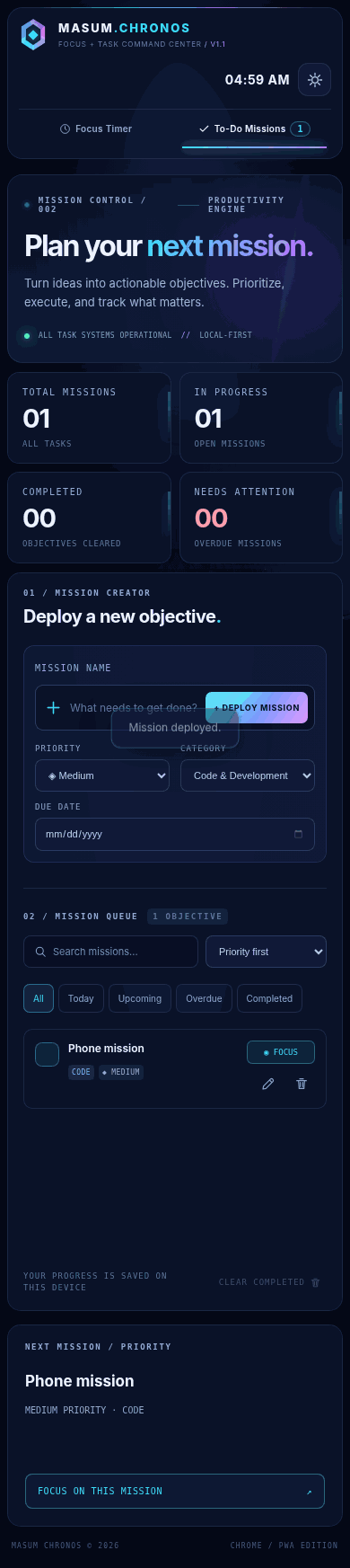
Mission Command Center (new in v1.1)
- Add, edit, delete, reopen and complete missions.
- Priorities: Low, Medium, High, Critical. Categories: Code, Study, Work, Personal.
- Optional due dates and overdue indicators.
- Search, smart filters (All / Today / Upcoming / Overdue / Completed), sorting (priority, due date, recent, oldest).
- Progress wheel, active/completed/overdue counters, next recommended mission.
- One-click Focus on this mission transfers the objective to the timer, keeping the existing timer settings.
- The small mission queue on the timer page uses the same task data as the full To-Do workspace.
- Local-first persistence; automatic migration of existing v1.0 task text/completion states, themes, timer settings, and stats.
10-second completion ringtone (v1.2.1+)
When Focus, Break, or Countdown reaches zero, CHRONOS plays a repeating futuristic four-note chime for 10 seconds. It stops automatically (timed by Web Audio) or immediately when you click SILENCE on the notification banner. Turn it off in Settings → Play 10-second completion ringtone. Chrome/VS Code must allow audio and the app must have been opened and activated at least once; browser autoplay restrictions and fully closed apps prevent reliable sound. Existing app and task data are preserved, and the previous local task-sync system is unchanged.
Focus Timer
- Pomodoro with configurable Focus / Short Break / Long Break, break frequency and optional auto-start.
- Countdown presets (5/15/30/60 min), custom durations, stopwatch laps.
- Animated orbital timer ring and star field, four themes: Nebula, Cyber, Aurora, Minimal.
- Focus session statistics, daily goal, weekly chart, streak, ambient synthesized soundscapes.
Space start/pause, R reset, L stopwatch lap while on the timer page and not typing.- Duration tracked by timestamps: background tab throttling won't change how much time elapsed.
Install in Chrome / Windows (বাংলা)
Project ZIP extract করো, তারপর masum-chronos folder খোলো।
Python 3 থাকলে start-chrome.bat double-click করো। অথবা VS Code terminal-এ:
cd path\to\masum-chronos
python -m http.server 5500 --directory web
Chrome-এ http://localhost:5500 খোলো। App-এর Focus Timer অথবা To-Do Missions tab ব্যবহার করো।
Chrome-এর address bar install icon বা menu → Install page as app দিয়ে PWA install করতে পারো (menu wording Chrome version অনুযায়ী বদলাতে পারে)।
Browser tab বন্ধ করলে background notification নির্ভরযোগ্য থাকবে না; app আবার খুললে clock-based timer deadline reconcile হবে।
No Python? Open web/index.html in Chrome for basic local usage. PWA install, offline service worker and notifications need localhost or HTTPS.
Install the VS Code extension
masum-chronos-1.2.2.vsix download করো।- VS Code →
Ctrl+Shift+P → Extensions: Install from VSIX... → downloaded file select করো।
Ctrl+Shift+P → CHRONOS: Open Focus Command Center, অথবা bottom Status Bar-এর Chronos-এ click করো।
Terminal install:
code --install-extension .\masum-chronos-1.2.2.vsix
To develop/debug the extension: open the repository in VS Code and press F5, then open the command in Extension Development Host.
Packaging alternatives:
npm install -g @vscode/vsce
vsce package --no-dependencies
The included tools/build_vsix.py can generate a VSIX offline without npm.
GitHub repository setup
Recommended repository name: Masum-Chronos.
Suggested GitHub description:
A futuristic all-in-one productivity app featuring a smart To-Do List, Pomodoro Timer, Countdown, Stopwatch, task analytics, and neon UI. Built for Chrome, Windows, and VS Code.
Create an empty public GitHub repository at https://github.com/new with this name (no README/license auto-initialization, since the project already includes both). Then run in the extracted masum-chronos folder:
git init
git branch -M main
git add .
git commit -m "feat: release CHRONOS v1.1 timer and mission control"
git remote add origin https://github.com/gitwithmasum/Masum-Chronos.git
git push -u origin main
GitHub Pages / Live Chrome app
Publishing source: Deploy from a branch → main → / (root). The repository-root index.html is now the full CHRONOS app with a <base href="./web/"> tag, so every script, icon, style and PWA manifest resolves to its real location under web/ without any redirect or 404. The separate /web/ app path also works. The redundant custom Pages Actions deployment was removed because two concurrent publishers alternately replaced site contents and produced intermittent 404 responses.
- Keep GitHub → Settings → Pages → Build and deployment → Source: Deploy from a branch, Branch: main, Folder: / (root).
- Branch pushes trigger the built-in
pages build and deployment job; wait for it to succeed.
- Open https://gitwithmasum.github.io/Masum-Chronos/. It loads the app at the root URL, not README and not a redirect.
- The installed Chrome PWA at
/web/ keeps working. All local tasks and settings use the same site origin; they are not deleted by this deployment change. If an old offline app persists, close and reopen it before trying hard refresh.
10 or 20 minutes, same ring behavior: The timer does not ring while counting down. When its deadline is reached and the app is running with audio enabled, it plays the completion ringtone for exactly 10 seconds (Web Audio scheduled stop), then stops automatically. This also applies to any supported custom countdown duration and focus/break timers. Browser suspension, audio permissions and an entirely closed app can prevent an immediate alarm.
Storage and privacy
- Chrome stores app state in the current site's browser localStorage; VS Code uses Webview state plus
globalState to preserve the UI and its status timer.
- Existing v1.0 data at the same origin is automatically migrated to v1.1. Chrome
localhost data and your new GitHub Pages site's storage belong to different origins, so they will not automatically share or migrate data.
- Chrome and VS Code task lists do not synchronize with each other. Cloud/cross-device sync is not included.
- No tracking scripts, CDNs, login, or remote APIs.
- Up to 300 stored missions per app profile; no push notification for to-do deadlines yet.
Project structure
masum-chronos/
├── index.html                   # GitHub Pages branch-root app entry
├── web/index.html               # Both workspaces, shared accessible markup
├── web/styles.css               # Responsive space-themed UI + animations
├── web/app.js                   # Timer + tasks + migration logic
├── web/sw.js                    # Offline PWA cache
├── web/manifest.webmanifest     # Chrome installable manifest
├── vscode/extension.js          # VS Code secure Webview + timer status
├── previews/                    # Real Chromium screenshots
├── tools/build_vsix.py          # Offline .vsix packer
├── tools/smoke_test.py          # Chromium functional smoke suite
├── start-chrome.bat             # Windows Chrome launcher
├── package.json                 # VS Code extension metadata
└── LICENSE                      # MIT
Quality & security
- No inline interpolation of task titles into HTML; task content is rendered with
textContent.
- VS Code Webview uses a strict Content Security Policy, local resources, and message validation.
- Functional UI smoke suite covers CRUD, filters, timer-to-task linking, theme, mobile overflow, data migration and existing stopwatch/countdown controls.
- Reduced-motion OS preference disables long-running decorative animations.
- Chrome/Windows behavior and full VSIX install must be confirmed on your device before public release. The smoke test uses a local HTML harness in headless Chromium because sandbox restrictions block actual localhost navigation in the build environment.
MIT License · © 2026 Masum Billah
Marketplace packaging & support
This repository has official Marketplace packaging checks on every push. The CI job packages using @vscode/vsce and uploads an installable masum-chronos-1.2.2.vsix as a GitHub Actions artifact. PWA-only files, screenshots, build tools, and test scripts are excluded from the VSIX. The Marketplace publisher ID is gitwithmasum.
For verification on Windows: run npm install --no-save --no-package-lock @vscode/vsce, then npx --no-install vsce package --no-dependencies --out dist/masum-chronos-1.2.2.vsix. Before publishing, verify the Publisher account and configure authentication securely; pushing to GitHub does not publish an extension to Marketplace. See MARKETPLACE.md.

