
GMO Strategy LanguageGMO Strategy language support + simulation execution Installation Launch VS Code Quick Open ( Ctrl+P), paste the following command, and press enter.Copied to clipboard |

GMO Strategy Language for VS Code
GMO Strategy Language (GML) is a domain-specific language (DSL) designed for defining gold trading strategies in the Smart Gold Trading Decision Assistant ecosystem. This extension brings full language support, syntax highlighting, and backtesting capabilities directly into VS Code. Whether you're a beginner writing your first trading rule or an experienced trader building advanced multi-condition strategies, this extension makes the process fast, comfortable, and reliable. 📖 What is GMO Strategy Language?The GMO ecosystem consists of four connected components:
Signal TypesEvery signal produced by GoldAI is color-coded:
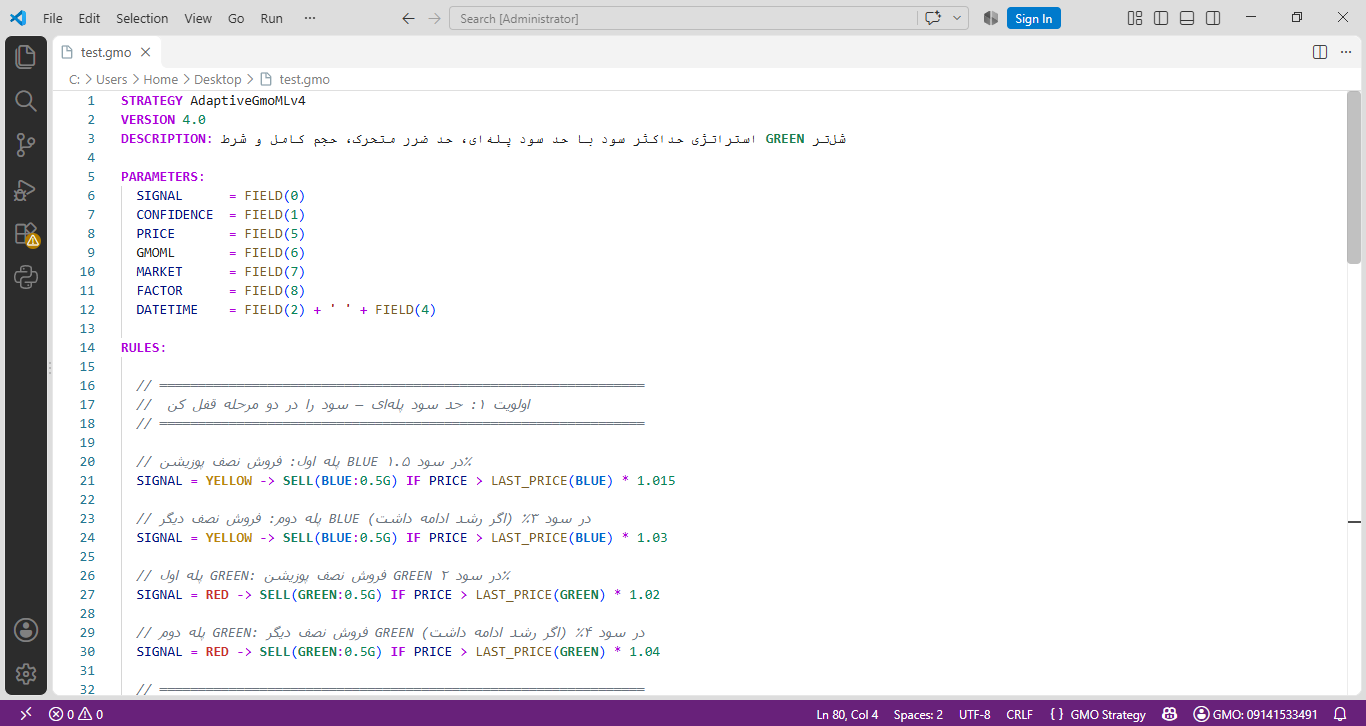
Each signal includes a confidence percentage and a performance index, helping you make informed decisions. ✨ Features🎨 Smart Syntax Highlighting
⚡ Ready-to-Use Snippets
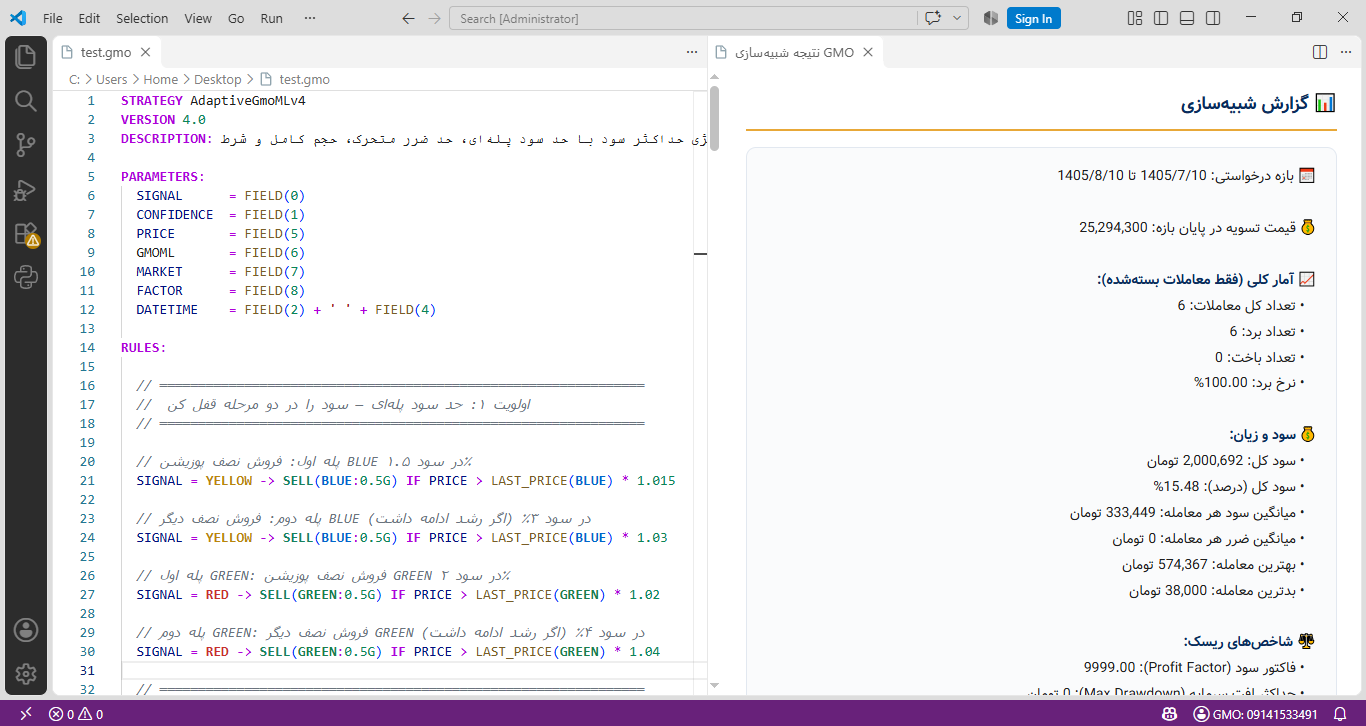
🧪 One-Click Backtesting
🔐 Secure Authentication
💾 Local Storage
🚀 InstallationOption 1: VS Code Marketplace (Recommended)
Option 2: Manual Installation (
|



| Index | Field | Type | Example |
|---|---|---|---|
0 |
Signal name | String | GREEN, RED, BLUE, YELLOW |
1 |
Confidence | Number | 75.5 |
2 |
Gregorian date | Date | 2024/08/05 |
3 |
Hijri Shamsi date | String | 1403/05/15 |
4 |
Time | Time | 14:30:25 |
5 |
Price | Number | 5000000 |
6 |
GmoML recommendation | Number | 0 to 4 |
7 |
Market regime | Number | -1, 0, 1 |
8 |
Signal trigger factor | Number | 0, 1, 2 |
Statistical Functions
| Function | Description |
|---|---|
LAST_CONFIDENCE(SIGNAL) |
Last confidence of the given signal |
LAST_PRICE(SIGNAL) |
Last price of the given signal |
LAST_DATETIME(SIGNAL, offset) |
Last date-time with time offset |
MIN_CONFIDENCE(SIGNAL, N) |
Minimum confidence of the last N signals |
MAX_CONFIDENCE(SIGNAL, N) |
Maximum confidence of the last N signals |
AVG_CONFIDENCE(SIGNAL, N) |
Average confidence of the last N signals |
MIN_PRICE(SIGNAL, N) |
Minimum price of the last N signals |
MAX_PRICE(SIGNAL, N) |
Maximum price of the last N signals |
AVG_PRICE(SIGNAL, N) |
Average price of the last N signals |
Action Functions
Buy:
BUY(1G)                    // Buy 1 gram in default CASH source
BUY(GREEN:1G)              // Buy 1 gram in GREEN source
BUY(BLUE:0.5G, GREEN:0.5G) // Buy in multiple sources
Sell:
SELL(1G)                   // Sell 1 gram from CASH
SELL(GREEN:1G)             // Sell 1 gram from GREEN source
SELL(BLUE:0.5G, GREEN:1G)  // Sell from multiple sources
⚠️ Important:
SELL(1G)only sells from theCASHsource. To sell from other sources, specify them explicitly.
Operators
| Operator | Meaning |
|---|---|
> < >= <= |
Comparison |
= <> |
Equal / Not equal |
AND OR NOT |
Logical operators |
📝 Available Snippets
Type the prefix and press Tab:
| Snippet | Result |
|---|---|
gmo-strategy |
Complete strategy template |
gmo-buy |
A buy rule |
gmo-sell |
A sell rule |
gmo-buy-multi |
Multi-source buy |
gmo-sell-multi |
Multi-source sell |
gmo-last-conf |
LAST_CONFIDENCE(GREEN) |
gmo-last-dt |
LAST_DATETIME(RED, 36H) |
⌨️ Commands & Keyboard Shortcuts
| Command | Shortcut | Description |
|---|---|---|
GMO: Login |
— | Log into your account |
GMO: Logout |
— | Log out |
GMO: Run Backtest |
Ctrl+Shift+B |
Run a backtest simulation |
GMO: Show Token |
— | Debug: view authentication status |
💡 You can also right-click inside any
.gmofile and choose "GMO: Run Backtest".
🎨 Example Strategies
1) Conservative (Simple)
STRATEGY Conservative
VERSION 1.0

PARAMETERS:
  SIGNAL = FIELD(0)

RULES:
  SIGNAL = GREEN -> BUY(1G)
  SIGNAL = RED   -> SELL(1G)
END
2) Upward Confidence
Only trades when the current signal's confidence is higher than the last same-named signal:
STRATEGY UpwardConfidence
VERSION 1.1

PARAMETERS:
  SIGNAL     = FIELD(0)
  CONFIDENCE = FIELD(1)

RULES:
  SIGNAL = GREEN  -> BUY(1G)   IF CONFIDENCE > LAST_CONFIDENCE(GREEN)
  SIGNAL = BLUE   -> BUY(0.5G) IF CONFIDENCE > LAST_CONFIDENCE(BLUE)
  SIGNAL = YELLOW -> SELL(0.5G) IF CONFIDENCE > LAST_CONFIDENCE(YELLOW)
  SIGNAL = RED    -> SELL(1G)  IF CONFIDENCE > LAST_CONFIDENCE(RED)
END
3) Tiered Long-Term
Gradual buying with separate sources:
STRATEGY LongTerm
VERSION 1.0

PARAMETERS:
  SIGNAL = FIELD(0)

RULES:
  SIGNAL = GREEN  -> BUY(1G)
  SIGNAL = BLUE   -> BUY(0.5G)
  SIGNAL = YELLOW -> SELL(BLUE:0.5G)
  SIGNAL = RED    -> SELL(BLUE:0.5G, GREEN:1G)
END
4) Profitable Sale
Only sells when there is at least a 1% profit:
STRATEGY ProfitableSale
VERSION 1.0

PARAMETERS:
  SIGNAL = FIELD(0)
  PRICE  = FIELD(5)

RULES:
  SIGNAL = GREEN  -> BUY(1G)
  SIGNAL = BLUE   -> BUY(1G)
  SIGNAL = YELLOW -> SELL(1G) IF PRICE > LAST_PRICE(BLUE) * 1.01
  SIGNAL = RED    -> SELL(1G) IF PRICE > LAST_PRICE(GREEN) * 1.01
END
5) Market-Aware
Trades only in the direction of the market trend:
STRATEGY MarketAware
VERSION 1.0

PARAMETERS:
  SIGNAL = FIELD(0)
  MARKET = FIELD(7)

RULES:
  SIGNAL = GREEN  -> BUY(1G)   IF MARKET = 1 OR MARKET = 0
  SIGNAL = BLUE   -> BUY(0.5G) IF MARKET = 1
  SIGNAL = RED    -> SELL(1G)  IF MARKET = -1 OR MARKET = 0
  SIGNAL = YELLOW -> SELL(0.5G) IF MARKET = -1
END
6) Hybrid (GMO + GmoML)
Trades only when both the signal and GmoML recommendation agree:
STRATEGY HybridGMO
VERSION 1.1

PARAMETERS:
  SIGNAL     = FIELD(0)
  CONFIDENCE = FIELD(1)
  GmoML      = FIELD(6)

RULES:
  SIGNAL = GREEN  -> BUY(1G)   IF GmoML = 1 AND CONFIDENCE > 70
  SIGNAL = BLUE   -> BUY(0.5G) IF GmoML = 1 OR GmoML = 3
  SIGNAL = RED    -> SELL(1G)  IF GmoML = 2
  SIGNAL = YELLOW -> SELL(0.5G) IF GmoML = 2 OR GmoML = 4
END
📚 For more examples and the complete reference, visit the GMO Strategy Documentation.
🖼️ Screenshots
Editor with Syntax Highlighting
Backtest Result Panel
🐛 Troubleshooting
❓ My .gmo file isn't highlighted
- Make sure the file is saved with the
.gmoextension - The bottom-right corner of VS Code should display GMO Strategy, not Plain Text
- If it shows Plain Text:
Ctrl+Shift+P→Change Language Mode→GMO Strategy - If it still doesn't work: reload VS Code (
Ctrl+Shift+P→Reload Window)
❓ The GMO theme isn't applying
Press Ctrl+K, then Ctrl+T, and choose GMO Strategy from the list.
❓ Ctrl+Shift+B doesn't work
Use the Command Palette instead: Ctrl+Shift+P → type GMO → GMO: Run Backtest
❓ I get an error when running the backtest
- Make sure you're logged in (the Status Bar at the bottom of VS Code should display your phone number)
- If the Status Bar shows "GMO: Login", press
Ctrl+Shift+P→GMO: Login - If your subscription has expired, renew it on the Smart Gold Trading Decision Assistant
❓ The backtest results don't appear
- Open VS Code's Developer Tools:
Help→Toggle Developer Tools→ Console tab - Look for lines starting with
[GMO] - If you see network errors, check your internet connection
❓ Snippets don't work
- Make sure the file has the
.gmoextension - Press
Ctrl+Spacemanually to open the snippet menu - Reload VS Code
🤝 Contributing
Found a bug or have a feature suggestion? Reach out to us through the Smart Gold Trading Decision Assistant platform.
📄 License
Copyright (c) 2026 Ghadiri News Agency — GMO Strategy Language Project.
All rights reserved. This extension is part of the Smart Gold Trading Decision Assistant ecosystem and is the proprietary property of Ghadiri News Agency. Unauthorized use, copying, or distribution is strictly prohibited.
Using this extension requires an active account on the Smart Gold Trading Decision Assistant platform.
🔗 Useful Links
| Resource | Description |
|---|---|
| 🏠 Smart Gold Trading Decision Assistant | Main platform, performance stats |
| 📝 GMO Strategy Introduction | Overview and examples |
| 📚 GMO Strategy Reference | Full function and keyword reference |
| 📊 GMO Panel | Live signals and analyses |
| 🧪 Online Backtest Simulator | Browser-based simulator |
🌐 Persian documentation is available in the GMO Strategy Reference.