Env Inline Values
Display resolved .env variable values inline in your code, regardless of file type.
Env Inline Values detects expressions like ${VAR_NAME} and shows their resolved values directly in the editor, without modifying your files.
It works seamlessly with Dockerfiles, Makefiles, YAML, Shell scripts, .env files, and more.
✨ Features
- 🔍 Detects
${VAR_NAME} patterns in any file
- 📄 Reads
.env from the project root
- 🔁 Resolves nested variables (e.g.
VAR2=${VAR3})
- 🧩 Displays resolved values inline (non-intrusive, editor-only)
- 🔄 Updates automatically when files or
.env change
- ⚙️ Fully configurable via VS Code settings
- 💻 Cross-platform: Windows, Linux, macOS
🧪 Example
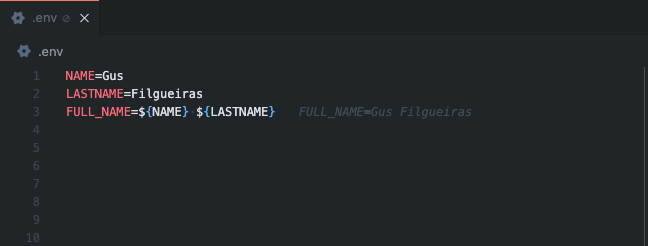
⚠️ The file content is not modified. Values are rendered visually in the editor only.
⚙️ Configuration
You can customize how the extension behaves via VS Code settings:
{
  "envInlineValues.files": [".env", ".yaml", "Makefile"],
  "envInlineValues.textColor": "#495765",
  "envInlineValues.backgroundColor": "",
  "envInlineValues.italic": true
}
Available settings
| Setting |
Description |
Default |
envInlineValues.files |
List of files or extensions where the extension is active |
[".env"] |
envInlineValues.textColor |
Inline text color |
#495765 |
envInlineValues.backgroundColor |
Inline text background color (empty = transparent) |
"" |
envInlineValues.italic |
Render inline text in italic |
true |
🚀 Why use Env Inline Values?
- Avoid constantly switching to
.env files
- Instantly understand resolved values in complex configs
- Works across different file types and stacks
- Lightweight, fast, and non-intrusive
📦 Installation
Install directly from the VS Code Marketplace and reload the editor.
📝 Notes
- The extension reads only the
.env file at the workspace root
- No environment variables are exported or modified
- Designed to be safe, read-only, and performant
📄 License
MIT License

