Every plan Claude Code makes becomes a real Gantt chart.
Phases, tasks, links and milestones that fill in live as Claude works, right next to your code.

It needs GanttPulse 1.8.0, which is free to download. ganttpulse.com
Live marks on the work
Six marks show what each chat is doing this minute: working, waiting for you, waiting on another chat, blocked, not answered or stopped. When a chat needs you, GanttPulse's icon gets a count and the status bar a bell, and Go takes you to that chat.
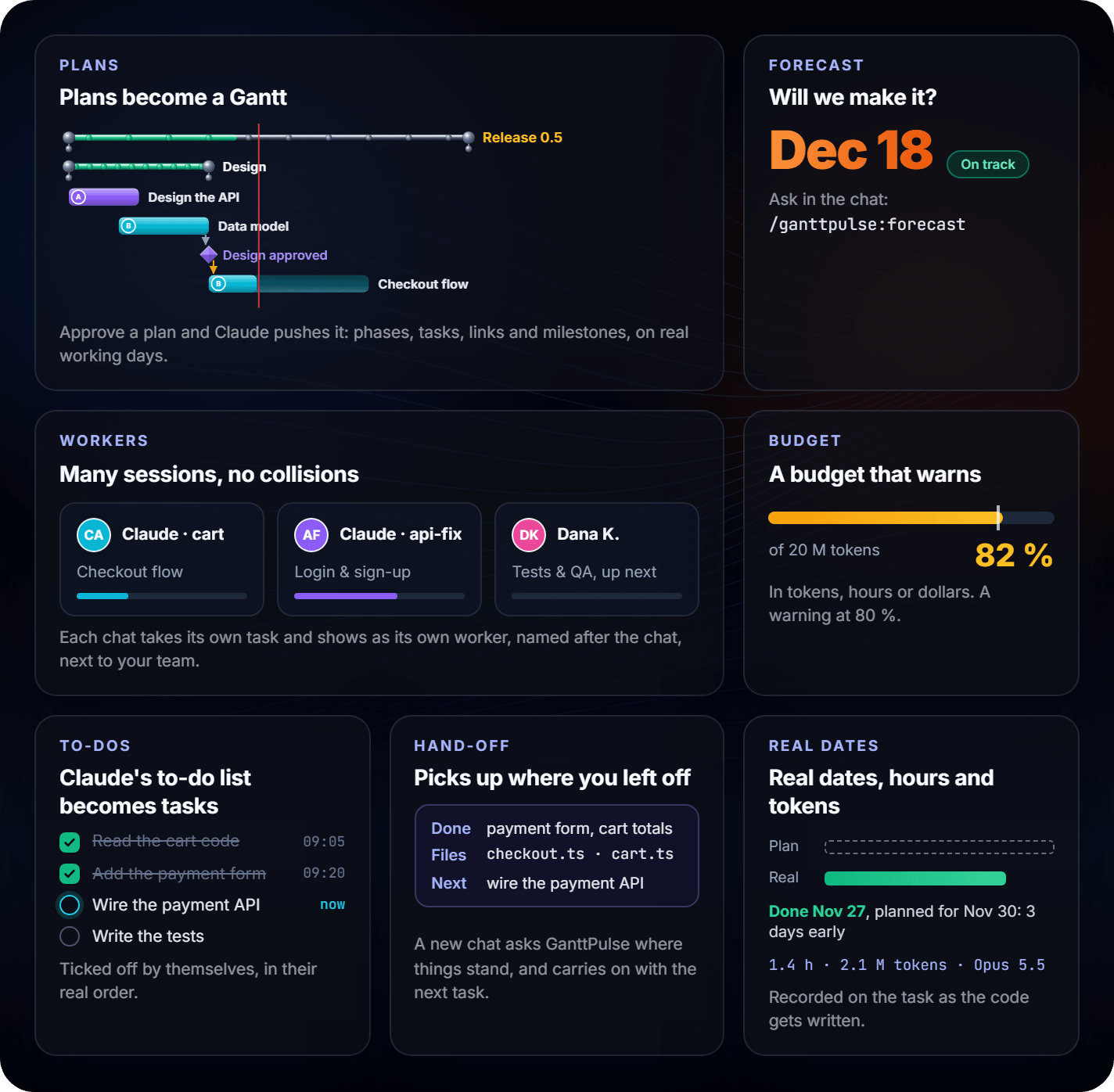
Everything at a glance
Plans, workers, to-dos, hand-offs, forecasts, budgets and real dates, all on one Gantt.
Right next to your code
GanttPulse has its own view in the side bar: the tasks, every chat on your PC and what the work has cost. Click GanttPulse in the status bar and your live Gantt opens in a tab; rest the pointer on it for a quick look at three numbers: tasks, chats and cost. A click on one opens its details in the side view.
See where the tokens go
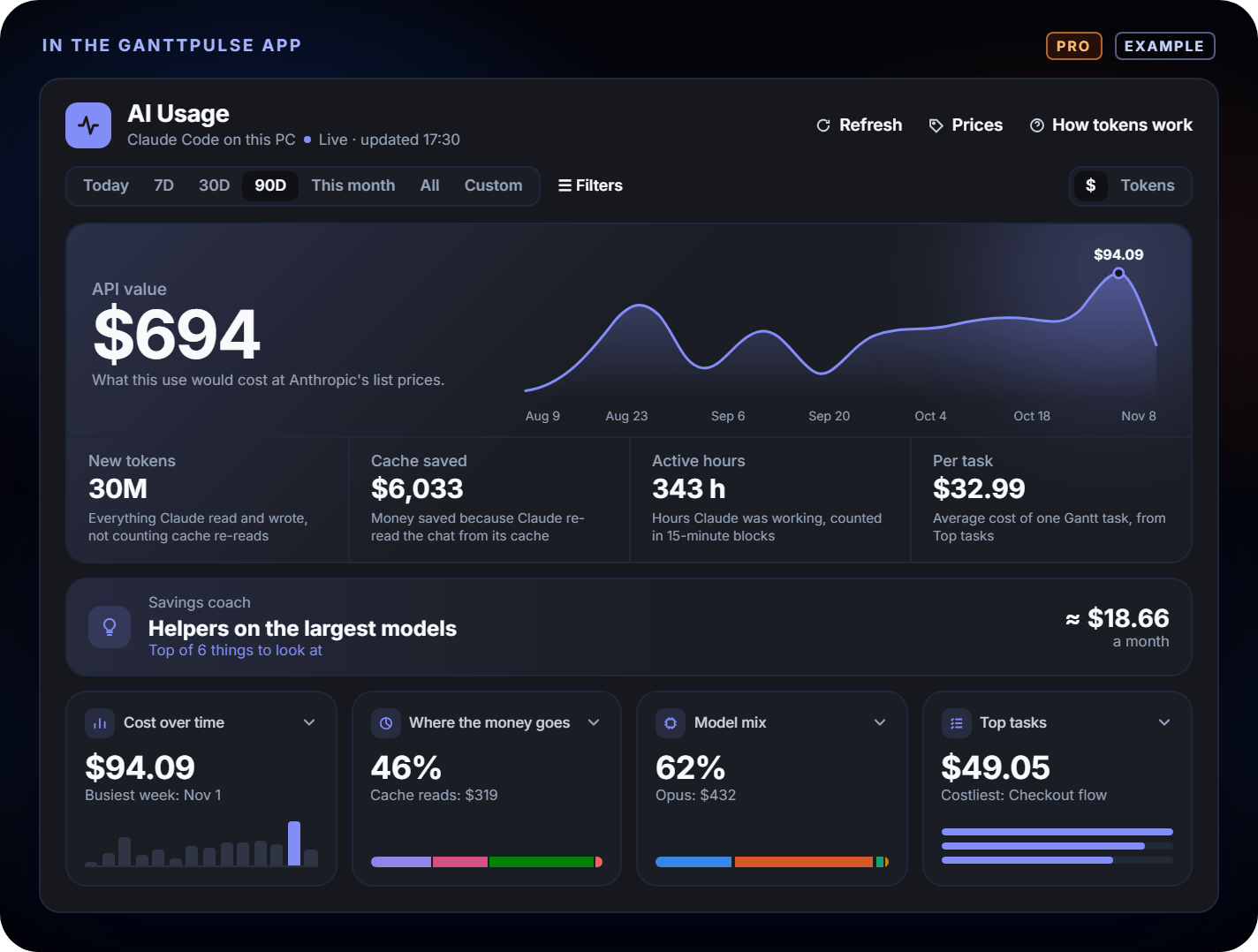
With GanttPulse Pro, the app's AI Usage page shows what Claude's work cost by day, model, chat and task, and a savings coach points at what to change. It reads your own numbers, on your PC, and costs no tokens.
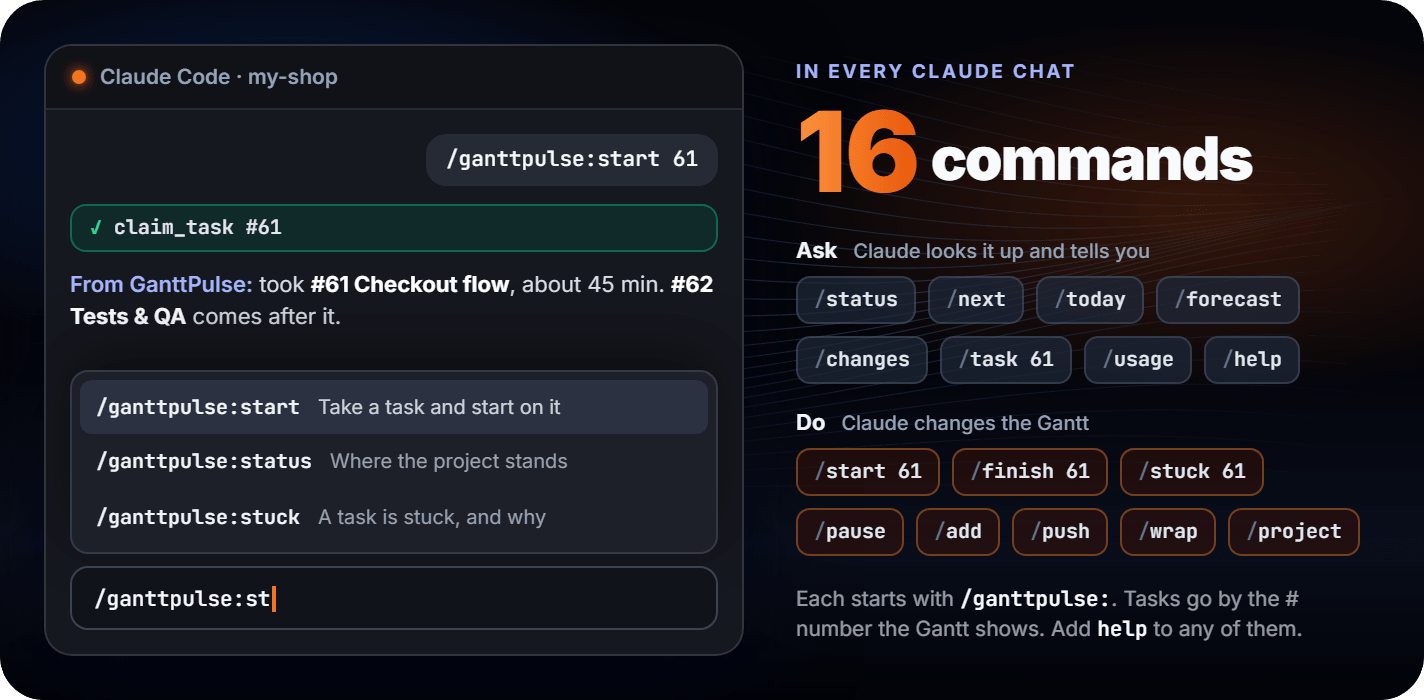
16 commands in the chat
Type /ganttpulse to ask where things stand, or to start, finish, pause or add a task by its # number.
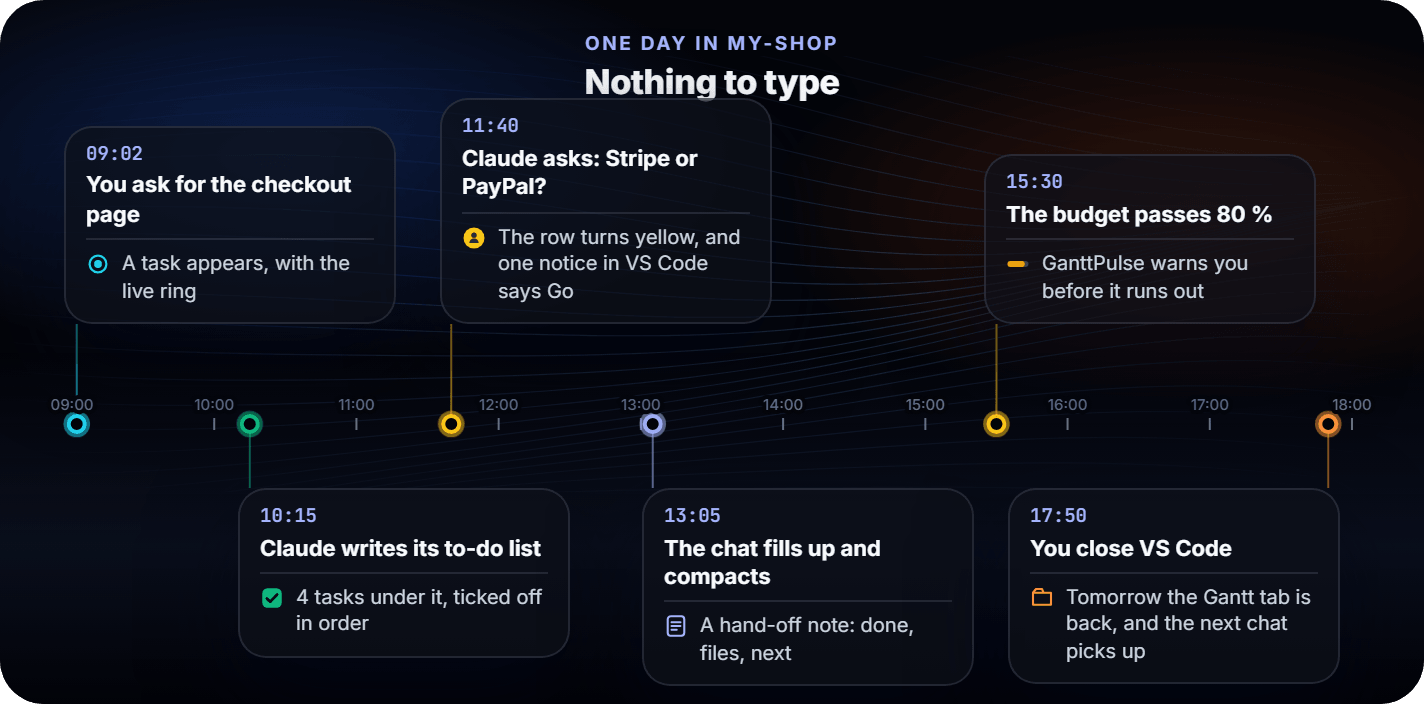
It keeps the Gantt true by itself
To-dos become tasks, a question turns the row yellow, a full chat leaves a hand-off note, and the next chat picks up.
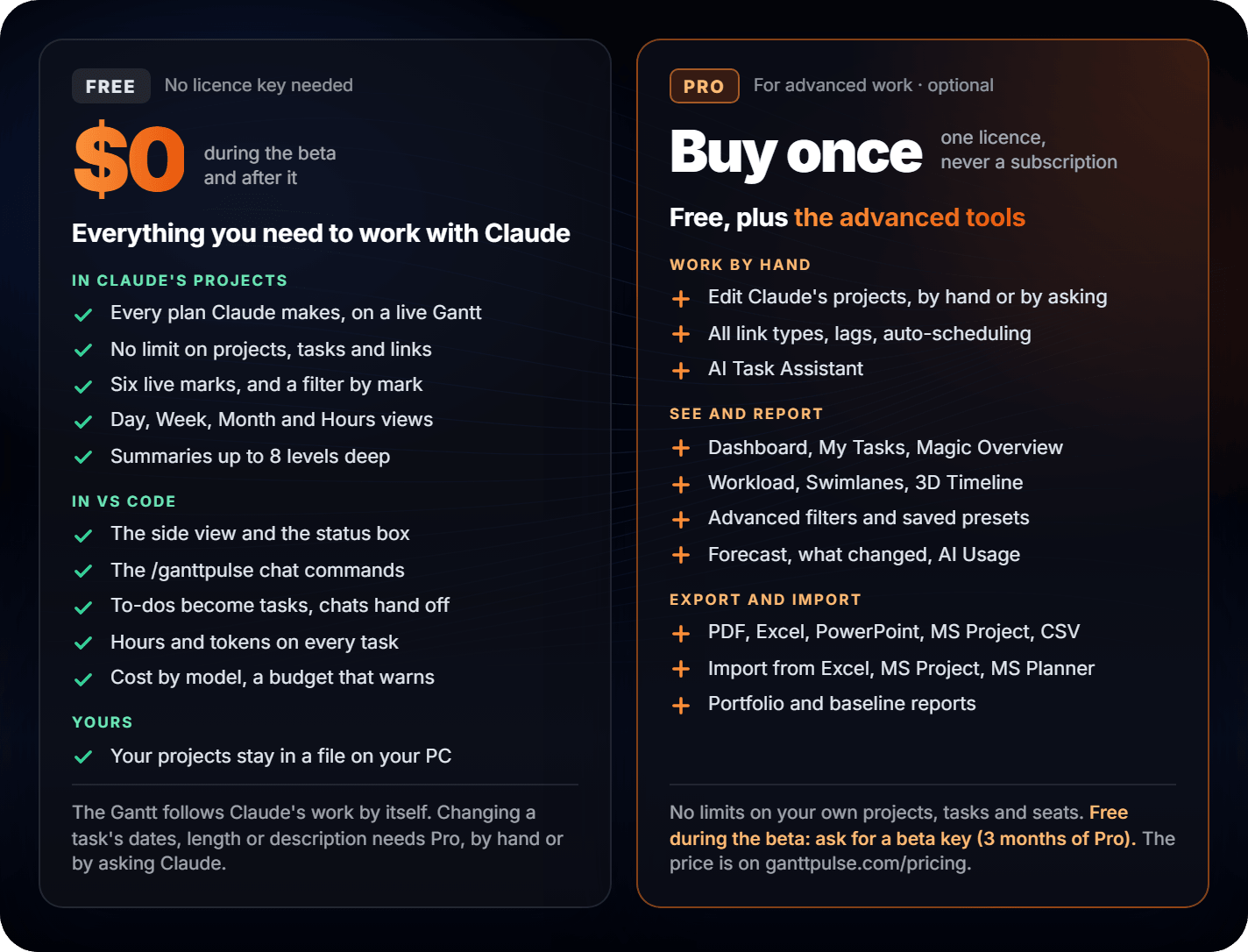
Free to use. Pro is optional.
The free version does the real work, during the beta and after it: every plan Claude makes, live, with no limits. Pro adds the tools for advanced work: editing a plan by hand or by asking Claude, Magic Overview, the dashboard, workload, advanced filters, export to PDF, Excel, PowerPoint and MS Project, and more.
Own your projects
GanttPulse runs on your PC and keeps your projects in a file on your machine. Nothing is ever sent to GanttPulse. Claude Code works as usual: what Claude reads goes to its AI provider.

Get started
- Install GanttPulse. Download GanttPulse, then install it and start it. The free version is all Claude needs.
- Connect Claude Code. In GanttPulse, sign in to Claude's file (claude.db) from the Project list (GanttPulse makes it the first time), then open Settings › Claude Code and click Connect Claude Code.
- Plan with Claude. Start a new Claude session and ask it to plan your next feature. The Gantt shows up by itself.

Good to know
What you need
- Windows
- The Claude Code extension (it installs with this one), and a Claude account to sign in to it
- The GanttPulse desktop app, version 1.8.0 or later. The free version is enough. Start it once before your first plan
Until GanttPulse is on your PC, the plugin stays out of the way: it adds nothing to your Claude chats, and the GanttPulse tab shows how to get it.
If VS Code says Restricted Mode: trust the folder, then reload the window (Ctrl+Shift+P, Reload Window).
Free and Pro
|
Free |
Pro |
| Claude's plans, tasks and links on a live Gantt |
Yes, with no limits |
Yes |
| Live marks, and a filter by mark |
Yes |
Yes |
| Day, Week, Month and Hours views of Claude's projects |
Yes |
Yes |
| Summaries up to 8 levels deep in Claude's projects |
Yes |
Yes |
| The side view, the status box, cost by model, budgets |
Yes |
Yes |
| To-dos as tasks, hand-offs, hours and tokens on every task |
Yes |
Yes |
| The 16 chat commands |
Yes. The forecast, the changes and "done since yesterday" need Pro |
All of them |
| Changing Claude's projects in GanttPulse by hand |
View only: the Gantt follows Claude's work by itself |
Yes |
| Asking Claude to change a task's dates, length or description, or to make a project |
— |
Yes |
| Dashboard, My Tasks, Magic Overview |
— |
Yes |
| Workload, Swimlanes, 3D Timeline Show |
— |
Yes |
| Advanced filters (overdue, unassigned, blocked, over-allocated and more) and saved presets |
The filter by mark |
Yes |
| The deadline forecast and the what-changed report |
— |
Yes |
| The app's AI Usage page |
— |
Yes |
| Export: PDF report, Excel, PowerPoint, MS Project, MS Planner, CSV, a JSON backup; portfolio and baseline reports |
— |
Yes |
| Import from Excel, CSV, MS Project, MS Planner and JSON |
— |
Yes |
| All link types (start-to-start, finish-to-finish, start-to-finish), lags, auto-scheduling |
Finish-to-start |
Yes |
| AI Task Assistant, on your own AI key |
— |
Yes |
| Your own bar colours, email through your own mail server |
— |
Yes |
| Your own projects in GanttPulse |
1 project, 15 tasks, 3 seats, the Week view |
No limits, every view, more project files |
Free needs no licence key. Pro is one licence, bought once: ganttpulse.com/pricing.
What it does on your PC
Programs it runs. Claude Code's own program, to install and update the plugin. Claude Code then runs the plugin with the Node.js that comes with GanttPulse, so you install none: a small server for each chat, and short commands as Claude works, including git to read the branch name. The extension keeps its own copy of that one file (node.exe, about 90 MB) in its own folder. To find GanttPulse's folder it reads GanttPulse's own entry in Windows' list of installed programs, and no other entry; that folder is only read. Where GanttPulse brings no Node.js, your PC's own is used. The GanttPulse app starts only when you click to start it, and switching files stops and restarts it after asking you.
What it reads. Claude Code's chat logs and settings on your PC. While a chat runs, the plugin also sees what you type and Claude's replies, because Claude Code passes them to it.
What it sends, and where. To the GanttPulse app on your PC, or to a server address you set yourself, and nowhere else:
- the plans, tasks and notes Claude writes
- your requests (a task's name and description can come from what you typed, up to 500 characters) and Claude's questions to you
- to-do items, and the names of files a chat edited
- each chat's title, folder path, git branch and pull request
- model and tool names, times and token counts
- the model prices and the discount you set, for the cost the app shows
Switches in Settings turn some of this off.
What goes online. The extension reads Anthropic's public price page only when you click to read it. The pictures on this page come from ganttpulse.com, so viewing the page may reach that site. A download link opens ganttpulse.com in your browser with a short label that says where the click came from (?src=vscode from the extension, ?src=marketplace from this page), so the website can count the downloads that start here. The label is the same for everyone and says nothing about you or your PC.
Click GanttPulse in the status bar to open the Gantt in a tab. Rest the pointer on it for the status box: three numbers, tasks, chats and cost, and a click on one opens its details.
| What you see |
What it means |
| Green |
Claude in this window is connected to GanttPulse |
| Amber |
Connected, but GanttPulse isn't running. Click to start it |
| Gray |
Not connected yet. The status box says what to do |
| A bell and a number |
A chat is waiting for you |
| A plug icon |
You disconnected this folder from the Gantt |
The side view
Click the GanttPulse icon in the activity bar. A count on the icon says how many chats need you.
| Section |
What it shows |
| Overview |
The project, Free or Pro, the tasks done and the next task. A click shows it on the Gantt |
| Tasks |
What is blocked or late, and the deadline |
| Chats |
Every chat on this PC with its task, tokens, cost and time. A click goes to the chat |
| Cost |
The cost for a period you pick, by model and by type, a budget, and Reset to 0 |
| Connection |
Whether Claude is connected in this window, and Disconnect |
| Settings |
Ten switches for what goes on the Gantt |
Drag the line between two sections to make one shorter or taller, and drag a section's name to change the order. A section with many rows scrolls by itself. The last button in the view's title closes all sections.
Marks on the Gantt
Claude's marks sit on the bar and in the task list. In the task list, rest the pointer on one for its words.
| Mark |
What it means |
| A ring in the chat's colour |
A chat is working on this task now |
| Yellow |
A chat is waiting for your answer |
| Indigo, an hourglass |
Waiting on another chat, a build or a person |
| Red |
Blocked, with the reason |
| Orange, a question mark |
A chat asked you something and ended before your answer |
| Gray, two bars |
A chat stopped before the task was finished |
The Markers button in the Gantt's Filters row hides any kind you don't want to see.
Slash commands
Type /ganttpulse in a Claude chat. The first six look something up on the Gantt and tell you, and so does today; the others change it. Add help after any command to see how to use it, such as /ganttpulse:push help:
| Command |
What it shows |
/ganttpulse:status |
Where the project stands |
/ganttpulse:next |
The tasks that can start now |
/ganttpulse:forecast |
Whether the project will make its deadline (Pro) |
/ganttpulse:changes |
What changed in the plan (Pro). Add a day, such as 2026-11-01 |
/ganttpulse:task |
The status of tasks by their # number on the Gantt. Add the numbers, such as 61 71-74 |
/ganttpulse:usage |
Claude's hours, tokens and cost. Add task, day or session |
/ganttpulse:push |
Put a plan on the Gantt. Claude lists the plans in this chat and this folder, you pick one, see its tasks and say yes. Add a plan's name to skip the list |
/ganttpulse:start |
Claude takes a task and starts on it. Add its # number, such as 61, or nothing: Claude names the best next one and asks before it takes it |
/ganttpulse:finish |
A task is done. Add its # number and your note, such as 61 tests pass, or nothing for the task this chat is on |
/ganttpulse:wrap |
End of the day: this chat's done tasks finished, the rest handed back with a note, after one yes |
/ganttpulse:stuck |
A task is stuck. Add its # number and why, such as 61 waiting for the API key |
/ganttpulse:pause |
Put a task aside with a hand-off note, for later or another chat. Add its # number, or nothing for the task this chat is on |
/ganttpulse:add |
One new task, fast, such as fix the login bug, 2h, after 61 |
/ganttpulse:today |
Done since yesterday (Pro), in progress and next, stuck or late |
/ganttpulse:project |
This folder's chats on another project. Add its name, or nothing to pick from the list |
/ganttpulse:help |
Every command, one line each |
Settings
Open them from the extension's gear, Extension Settings, or in Settings › Extensions › GanttPulse. They are the same settings as in Claude Code (/plugin › ganttpulse › Configure), and a change in either place shows in both. A change counts at once, in the chats that are open too: untick the live mark, and it comes off the task at Claude's next action.
| Group |
What you choose |
| What goes on the Gantt |
Plans, milestones, task descriptions, progress, done notes, blockers, the work log, totals on phases |
| How Claude works |
Ask before pushing a plan, Claude's to-do list as tasks, work outside the plan, every request its own task |
| Live marks |
Working now, waiting for you, where was I, the chat's name on tasks |
| Cost and budget |
Token prices, and a budget for each project in tokens, hours or dollars |
If Claude's to-do list doesn't reach the Gantt, the status box says so: click that line, then Turn on in the side view.
Permission
The first time, GanttPulse asks on a page: Let Claude update your Gantt.
- Allow adds one rule for the GanttPulse tools to your Claude Code user settings. Nothing is written in your code folders.
- Not now changes nothing: Claude asks before each change.
You can take the rule out at any time with GanttPulse: Remove the Claude Code permission.
Updates
The extension installs the GanttPulse plugin into Claude Code and updates it with every extension update. After an update, a window still on the old version offers to reload with one click.
Commands in VS Code
Most actions are buttons in the side view and the status box. Four more are in the Command Palette: press Ctrl+Shift+P and type GanttPulse.
| Command |
What it does |
| GanttPulse: Open Gantt |
Opens the Gantt in a tab |
| GanttPulse: Let Claude update your Gantt |
Claude changes the Gantt without asking each time |
| GanttPulse: Remove the Claude Code permission |
Claude asks before each change again |
| GanttPulse: Reinstall the Claude Code plugin |
Fixes the plugin if something goes wrong |
Uninstall
Remove the extension in the Extensions view and restart VS Code. The plugin and its permission rule leave Claude Code too, and the extension's own files on the PC go with them. GanttPulse and your projects stay as they are. A Gantt tab that was open comes back as an empty tab named GanttPulse: close it. Disabling the extension keeps the plugin. With GanttPulse also in another editor on this PC, the plugin stays for it until the last one is removed.
Privacy, support and licences
- Privacy policy. For help, write to support@ganttpulse.com.
- GanttPulse is an independent product. It isn't made by, or affiliated with, Anthropic or Microsoft. Claude and Claude Code are trademarks of Anthropic; other names belong to their owners.
- This extension is under the MIT licence, and
THIRD-PARTY-NOTICES.txt in its folder lists the code it includes from others. The GanttPulse app has its own licence.
| |

