Skip to content
| Marketplace
Sign in
Visual Studio Code>Programming Languages>Autocomplete CopilotNew to Visual Studio Code? Get it now.
Autocomplete Copilot

Autocomplete Copilot

fsiovn

|
5 installs
| (1) | Free
The lightweight open source AI code autocomplete
Installation
Launch VS Code Quick Open (Ctrl+P), paste the following command, and press enter.
Copied to clipboard
More Info

fsiovn - AI Autocomplete

Visual Studio Code Marketplace License Apache 2.0

The lightweight open source AI code autocomplete extension for Visual Studio Code

  • 🚀 Bring Your Own Key (BYOK)

  • 🧩 Supports Visual Studio Code for the Web, Visual Studio Code Desktop and GitHub

  • 🔑 Supports Cerebras and Gemini API key.

Features

  • ✨ AI-generated code

  • ⚡ Inline suggestions

  • 💡 Support for all programming languages

  • 🎯 Generate code with comments

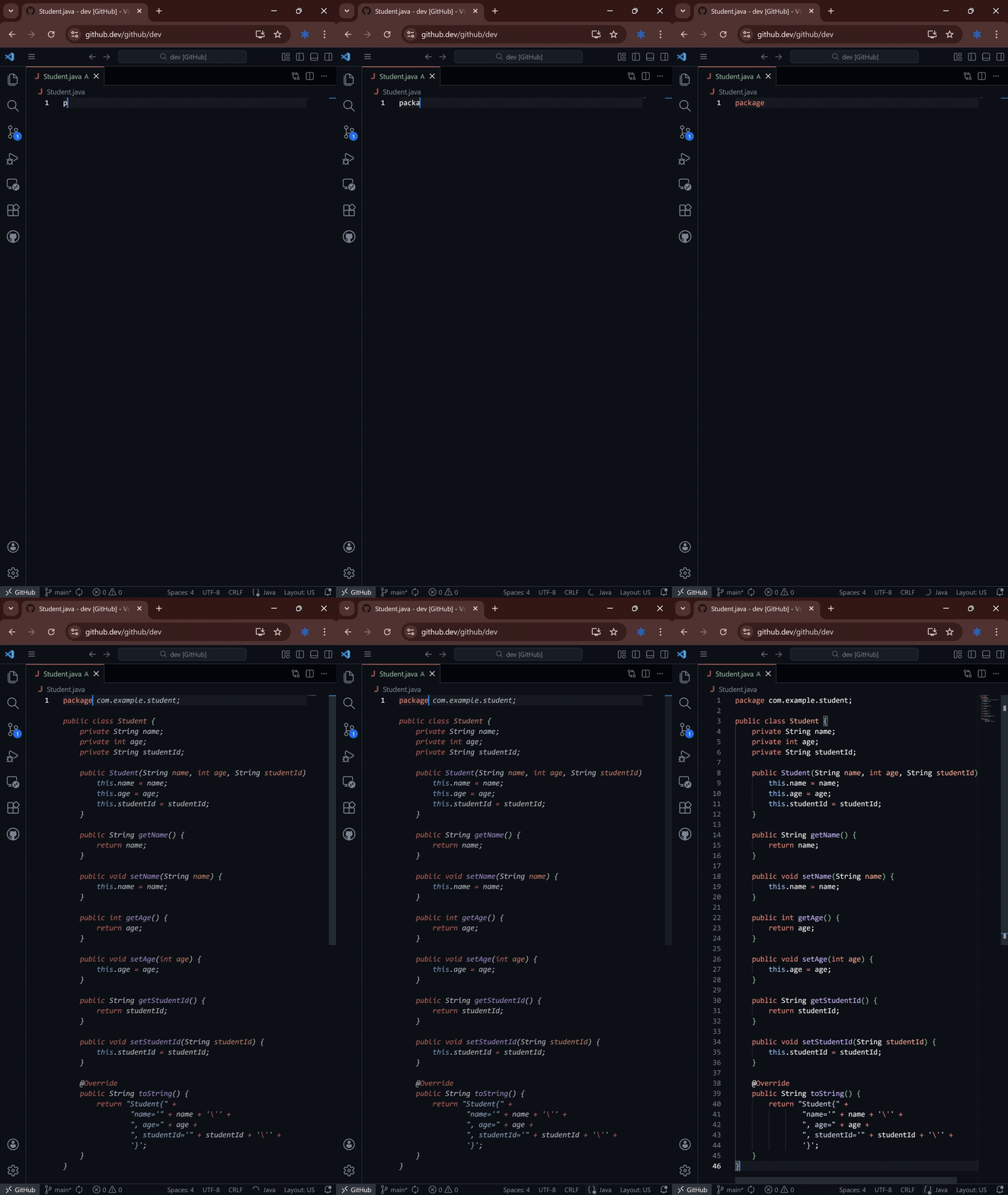
Demo

Demo of AI autocomplete suggesting code in VS Code

Demo of AI autocomplete suggesting code in VS Code

Why choose this extension?

  • 🔓 Open-source and transparent:

    The entire codebase is publicly available, allowing for community contributions and audits.

  • 🏗️ Lightweight and efficient:

    Minimal resource usage ensures smooth performance without slowing down your editor.

  • 🔑 Bring Your Own Key (BYOK):

    Full control over your API keys and data privacy with support for Cerebras and Gemini.

  • 🌐 Cross-platform compatibility:

    Works seamlessly across VS Code Web, Desktop, and GitHub environments.

  • 🤖 Real-time AI suggestions:

    Get intelligent code completions as you type, powered by AI

  • 📄 Comment-to-code generation:

    Write comments and let the AI generate the corresponding code automatically.

  • 🧪 Actively maintained:

    Regular updates and improvements based on user feedback and emerging technologies.

Playground

Works instantly in your browser.

  1. Go to https://vscode.dev or https://github.dev.

  2. Install AI-Autocomplete extension.

  3. Enjoy inline autocomplete.

Setup

  1. Install the extension from the Visual Studio Code Marketplace.

  2. Obtain an API key from Cerebras (recommended) or Gemini.

  3. Open the command palette (Ctrl+Shift+P or Cmd+Shift+P on macOS) and run fsiovn - AI Autocomplete: Input Gemini/Cerebras API key.

  4. Enter your API key when prompted and confirm.

  5. Start coding and enjoy AI-powered autocomplete suggestions in real-time.

Settings

  • Ghost text suggestions settings

    https://code.visualstudio.com/docs/copilot/ai-powered-suggestions#_ghost-text-suggestions-settings

    • editor.inlineSuggest.fontFamily - configure the font for the inline completions.

    • editor.inlineSuggest.showToolbar - enable or disable the toolbar that appears for inline completions.

      • Recommended editor.inlineSuggest.showToolbar is always.
    • editor.inlineSuggest.syntaxHighlightingEnabled - enable or disable syntax highlighting for inline completions.

  • Select model

    Advanced setting - recommended skip this setting

    • Open the command palette (Ctrl+Shift+P or Cmd+Shift+P on macOS) and run fsiovn - AI Autocomplete: Select model.

    • Choose model

      • Recommended model is default

Privacy & Policies

  • Cerebras Policies

  • Gemini API Additional Terms of Service

  • Cloudflare Terms of Use

  • If you use your own API key, we do not collect or store any of your data.

  • If you do not provide an API key, the fsiovn FIM (Fill-in-the-middle) endpoint will be used by default.

    • The fsiovn FIM endpoint is only allowed to be used with the AI Autocomplete extension so all other uses are prohibited.

    • The fsiovn FIM endpoint may collect and store data so use your own API key if you're concerned about privacy.

  • We disclaim all responsibility.

Compare with GitHub Copilot

GitHub Copilot remains a more full-featured product overall.

  • Pros:

    1. Web support:

      GitHub Copilot still doesn't fully support VS Code for the Web (github.dev, vscode.dev).

      This extension works seamlessly in web environments, making it ideal for contributing to public repositories without a local setup.

    2. Lightweight:

      This extension is extremely small - around 40 KB, compared to 33 MB for GitHub Copilot + Copilot Chat.

    3. Focused on autocomplete:

      The extension is dedicated purely to autocomplete. Users who prefer external chat tools (Cline, KiloCode, ClaudeCode, Codex CLI, etc.) can combine them as they like.

    4. Privacy-friendly (BYOK):

      When users bring their own API key, the extension does not collect or store any code or usage data.

    5. No additional subscription needed:

      Users with a Cerebras Code Pro/Max or Gemini subscription don't need a GitHub Copilot plan.

    6. Better free tiers:

      Cerebras and Gemini both offer more generous free tiers compared to GitHub Copilot's current free tier.

  • Cons:

    1. Copilot is generally more capable overall:

      While inline suggestions work similarly, GitHub Copilot tends to perform better in certain scenarios - especially with more advanced features like Next Edit, multi-file reasoning, and deep context understanding.

    2. No built-in chat:

      Unlike Copilot Chat, this extension intentionally does not include an integrated chat experience (though users can combine it with third-party tools if needed).

    3. Model quality depends on user's API key provider:

      Performance will vary depending on whether users choose Cerebras or Gemini and what tier they're on.

Overall, GitHub Copilot remains a more comprehensive solution, but this extension focuses on being lightweight, open-source, and flexible.



Report issue: https://github.com/fsiovn/ai-autocomplete/issues


License Apache 2.0

  • Contact us
  • Jobs
  • Privacy
  • Manage cookies
  • Terms of use
  • Trademarks
© 2025 Microsoft