Tessra
The local-first API client for VS Code.
No login. No cloud sync. No paywalled core workflows.
Tessra is built for developers who want a fast Thunder Client-style workflow inside VS Code without accounts, sync requirements, or pricing gates around everyday features. Data stays on the machine, and network traffic only happens when the user explicitly sends an API request.

▶ Watch the full demo with sound
Recent highlights
- Explicit Protect for environment/workspace variables keeps confirmed values in VS Code SecretStorage. Set value, temporary Reveal, and exact-variable deletion are available in the variable editor; see secret variables.
text/event-stream responses display events while receiving, with Stop and explicit completed/aborted/timeout/error states. The bounded Events/Raw view reports dropped, evicted, and truncated data; long streams still require an explicit timeout choice.- "Stop after headers" closes the response stream once headers arrive, so endless or very large bodies no longer keep the connection open in the background.
- Failed script assertions show the actual and expected values, e.g.
Expected 1 to strictly equal 2.
- The Marketplace page opens with a looping demo recorded in VS Code, plus the full video with sound.
- Requests keep their starting environment; script changes merge only changed keys and preserve concurrent edits with a warning. Switching profiles cancels running HTTP, collection runs, and WebSockets, and discards late results.
- Stop also covers Body preparation. HTTP transport and redirects accept only HTTP/HTTPS; Collection Runner reports WebSocket requests as unsupported (connect from a request tab).
- Multipart fetch code preserves authentication/custom headers. cURL import/export preserves form fields and binary file paths; Postman form export preserves
= and space semantics.
- Closing the request editor immediately after editing preserves its latest draft. Response sections support arrow/Home/End keyboard navigation.
- Stored JSON is checked for structural damage as well as syntax errors, retaining the original and a
.corrupt-* backup when recovery defaults are needed.
- Path Variable URL warnings follow the actual send-time resolution: a Request-local path value is not shown as missing, while the same name in query or other fields can still be unresolved.
- Long JSON / XML / Raw Body editors keep a single textarea scrollbar (no ghost or double scroll) on short windows.
- Narrow Request panels keep Send and More (
...) grouped, and More menus stay fully inside the Webview.
- Path Variables under the URL bar let you override full path-segment
{{variables}} for the current request without editing the Environment.
- Auth sensitive fields support working Reveal / Hide controls for Basic passwords, Bearer tokens, and API Key values.
- Collection Runner supports per-run request selection, with all requests selected by default.
- Tessra remains local-first: no login, no cloud sync, no telemetry.
See the Changelog for full release history.
Scripts run with JSON data boundaries and no host objects/functions exposed to the script realm. Imported scripts still require explicit trust. This hardening is not an OS sandbox for hostile code; see script execution boundaries.
Screenshots
Demo video (with sound)
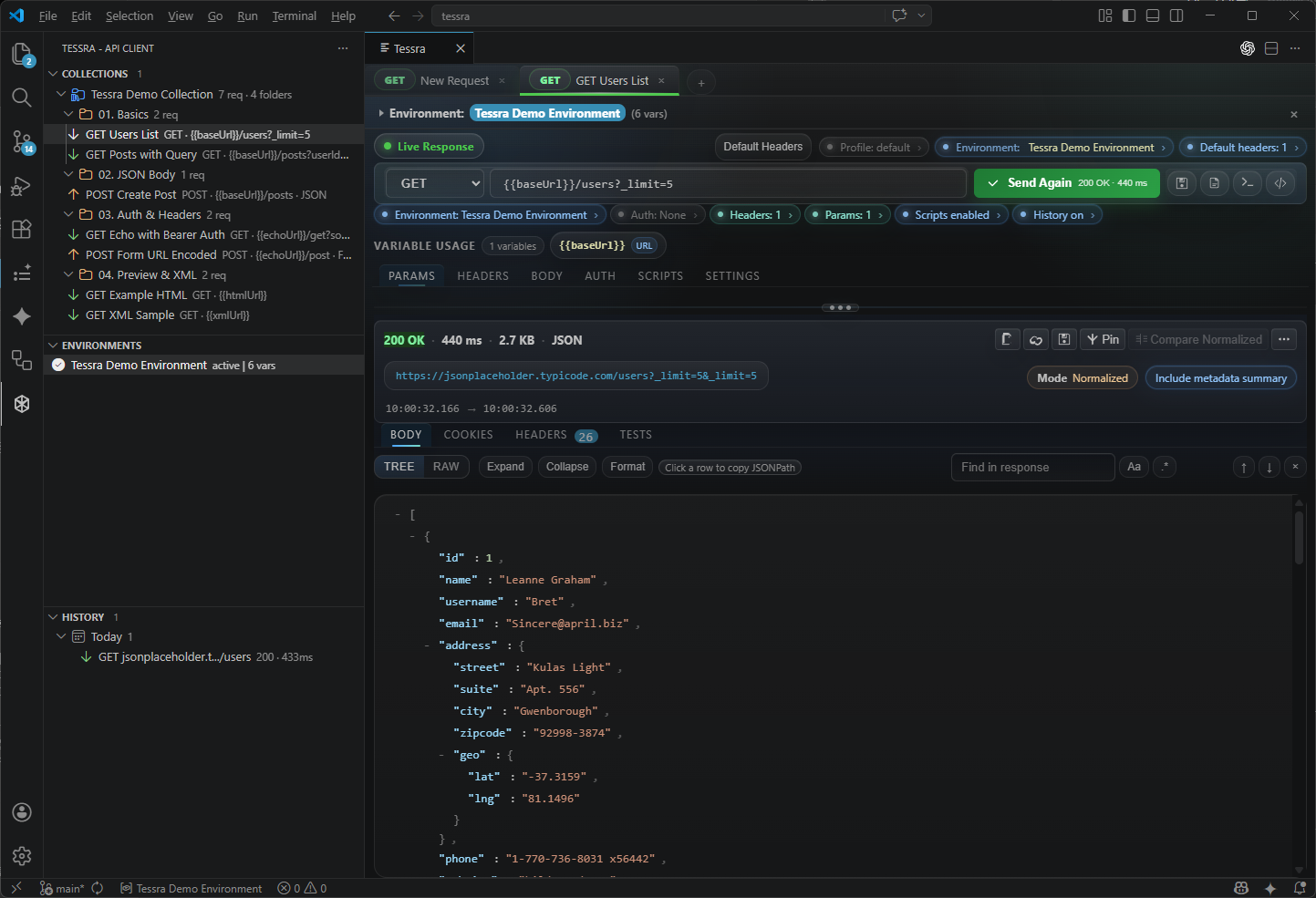
Main workspace
Collections, environments, variables, history, and the response viewer in one local workspace.
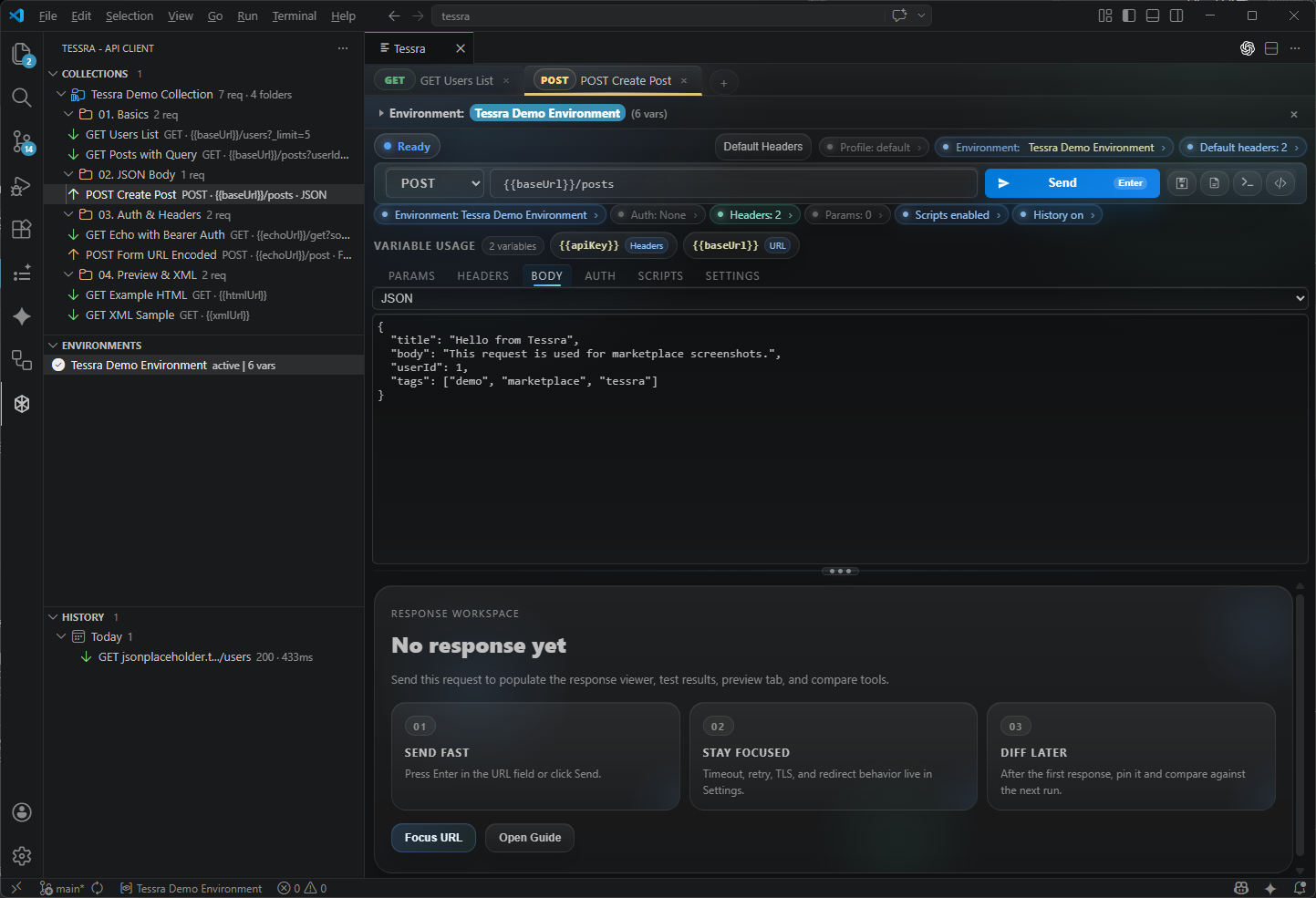
Compose requests
Build requests with params, headers, JSON bodies, auth, scripts, and environment variables.
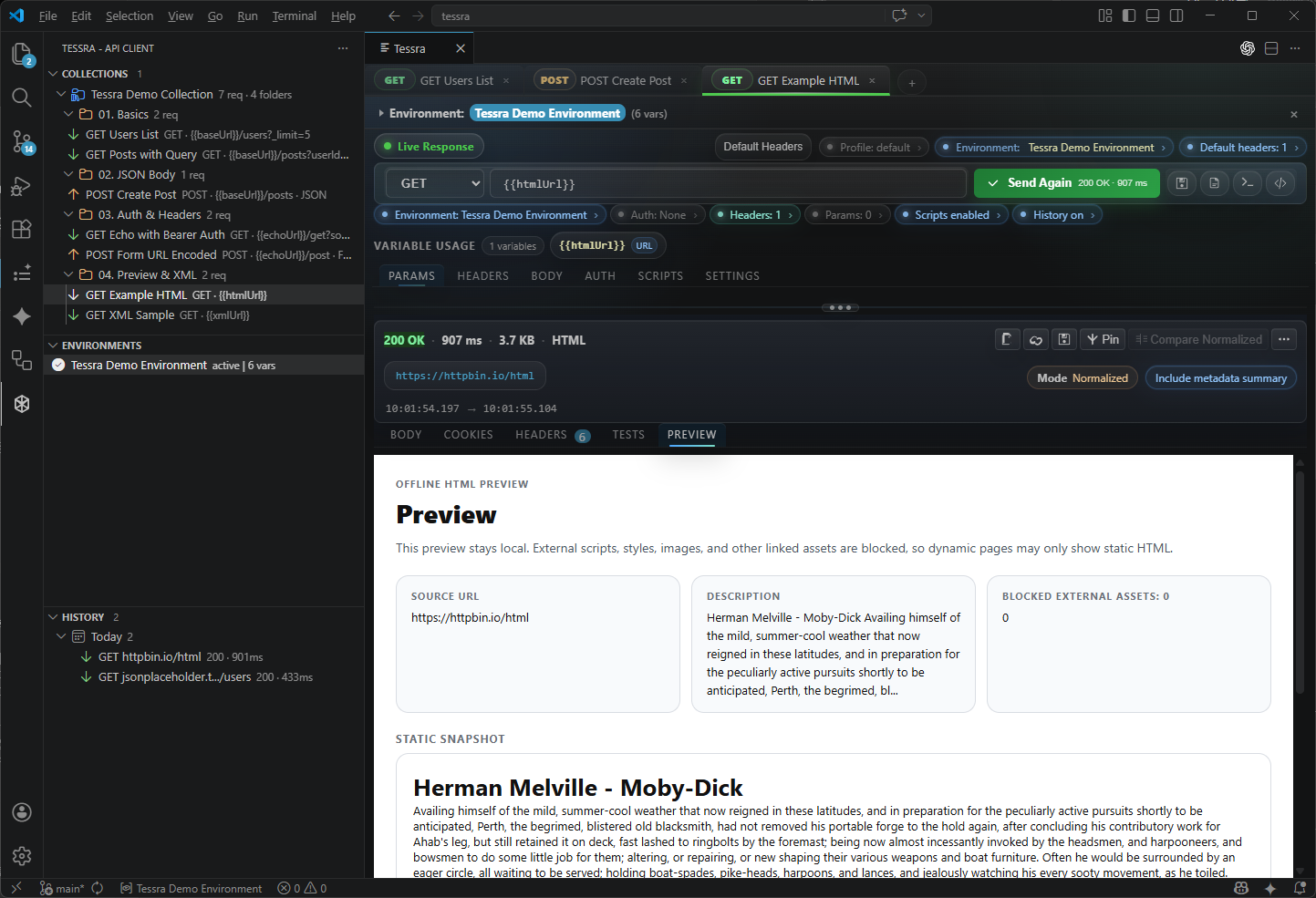
HTML preview
Preview static HTML responses safely inside VS Code.
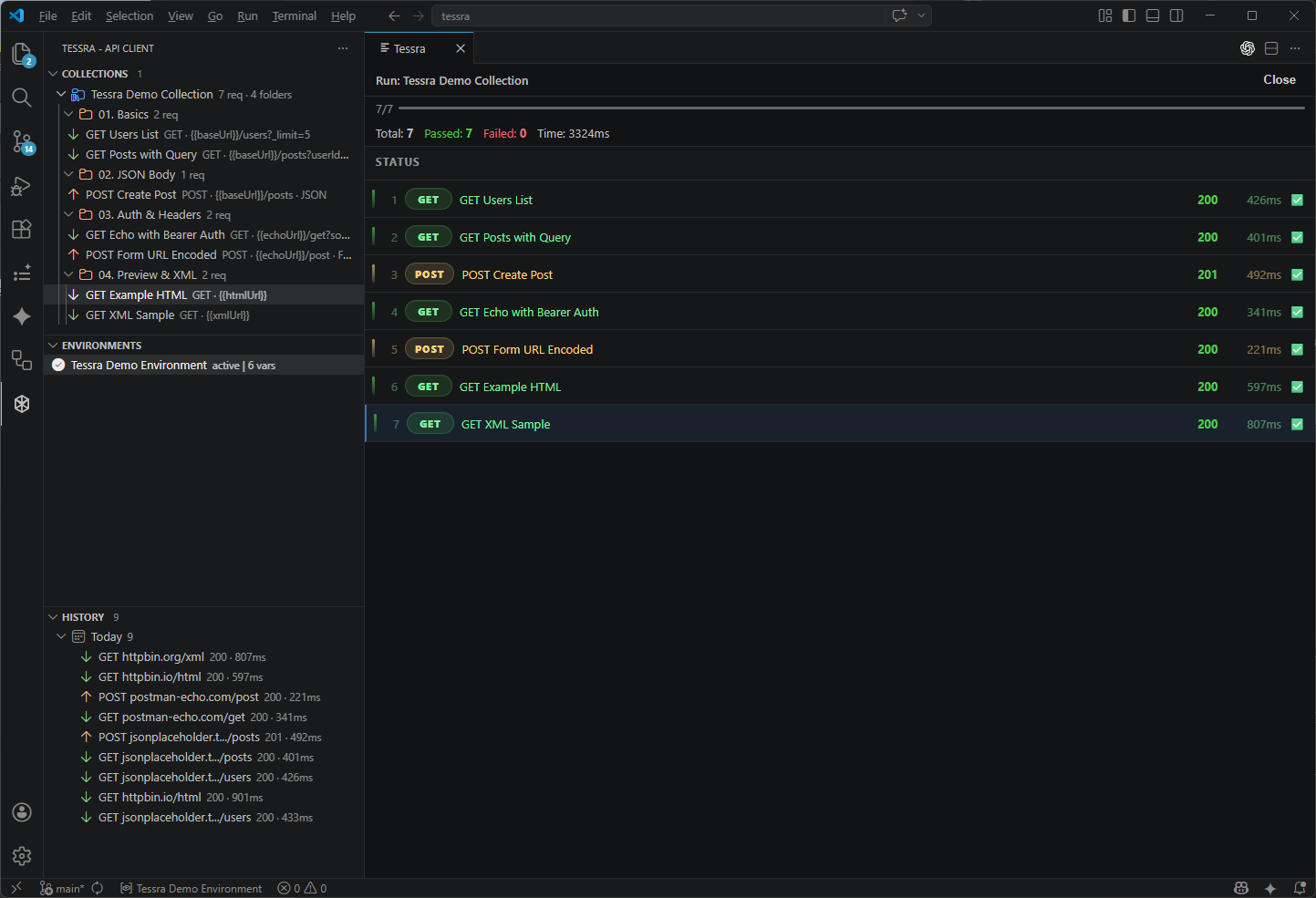
History and collection runner
Group request history by date and run collections with status summaries.
Why Tessra
- Offline-first workflow
- No login required
- No cloud dependency
- Local JSON metadata and VS Code SecretStorage for protected values
- cURL, OpenAPI, and Postman import/export
- Scripts, collections, environments, response compare, and code generation
- WebSocket
ws:// / wss:// connect, message, safety limit, and keepalive workflow
- Built on VS Code Webview + TreeView
- Uses Node.js built-in
http / https / net / tls
Features
Request editing
- HTTP methods:
GET, POST, PUT, PATCH, DELETE, HEAD, OPTIONS
- Multi-tab request editor with pinned tabs
- Re-click the active request editor tab to collapse or restore its body while keeping the tab bar visible
- Improved Body editor undo/redo behavior after sending requests or switching request editor tabs
Enter in the URL field sends the requestCtrl+Enter / Cmd+Enter also sends the request- Cancel in-flight requests without discarding the last good response
- Request stage feedback, richer empty states, status-aware response feedback, and polished response actions
- Quiet status strip for the environment variable count, applied default headers, referenced request variables, scripts, history saving, and risk overrides; click the Environment segment (or strip expand / Environments view) to open the variable editor
- Preflight warnings for unresolved
{{variables}} before you send
- Clickable status chips that jump to the relevant request area, focus it, and briefly highlight the linked card
- Draft change chips that summarize which request sections changed before you save or send
- Variable Usage disclosure (via the request-variable segment) showing where each
{{variable}} is used across the request
- Masked auth and sensitive key/value inputs with reveal controls
- Bulk paste for headers and query params
- Empty-state quick actions for a sample request, the guide, environment switching, and URL focus
WebSocket
ws:// and wss:// tabs are detected from the raw URL or the URL after {{variables}} resolve- Handshake requests use headers, query params, auth, workspace default headers, environment variables, and TLS override settings
- Connect and disconnect from the primary action; the Body tab acts as the outgoing text message composer
- Inbound, outbound, and close diagnostic messages render in a dedicated WebSocket log, with inbound binary frames shown as base64
- WebSocket frame/message size limits protect the extension from oversized text or binary messages
- Optional protocol-level ping keepalive can run at a per-request interval; it is off by default
- For a public echo smoke test, try
wss://ws.ifelse.io
- Public echo servers can change availability or idle timeout policies; if one closes with code
1006, try another endpoint or enable keepalive when the server supports ping/pong
Request settings
- Timeout per logical request, shared across DNS/connection/TLS, upload, response body, redirects, retries and retry waits.
0 is unlimited; pre/post scripts keep their separate limit. Each collection item gets its own budget.
- Follow redirects
- Save to history toggle
- Manage workspace default headers from the request toolbar or Headers tab
- TLS override:
Default, Strict, Insecure
- Maximum response size limit, with a safer default for large responses
- Retry count and retry delay
- Stop after headers
- Skip default headers
- Disable scripts
- Visual risk highlighting for request-specific settings that change safety or behavior
- Automatically opens Preview when the response contains meaningful static HTML
Body types
nonejson (request Body syntax highlighting via a mirror overlay; textarea stays the input source)xml (same mirror overlay with XML highlighting)form-urlencodedform-databinaryraw- Form-data summaries, file chips, and clearer text/file row affordances
- Safe Body type conversion when switching types with non-empty content: Convert / Keep text / Cancel (no auto-convert; nested form payloads and file form-data are rejected; Binary is never invented)
Auth
- No Auth
- Basic Auth
- Bearer Token
- API Key in header or query
Environments
- Environment CRUD
- Active environment switching
{{variable}} resolution- Nested
{{variables}} resolve recursively, with unresolved and circular references reported before send
- Variable autocomplete in URL, headers, body, auth, scripts, and editable text inputs
- Variable resolution for URL, headers, params, body, auth, and file paths
Import Environment from the Environments title bar for Postman Environment JSON or .env files- Workspace-local storage profiles for isolating collections, history, environments, default headers, and saved tabs
Choose Protect on an existing variable to move its current value into VS Code SecretStorage. The editor normally receives only metadata and existence state; Set value uses a native password input, and Reveal is an explicit temporary action cleared when the editor scope/profile changes or the panel closes. Missing values and keychain failures block requests that need the secret instead of sending an empty string.
Protection first persists a recovery marker, then stores and verifies the secret before replacing the current JSON plaintext with a reference. Interrupted or failed protection retains the original for Retry protection or explicit Cancel protection, and blocks its use. Existing variables are never automatically classified. Workspace variables have the same protection controls but remain backup-only; request substitution uses the active environment.
App-generated request metadata, history, code copies, diagnostics, and script logs mask known secret values or retain {{variable}} references. Actual outgoing bytes and received response bodies are preserved. Trusted scripts can read runtime secrets and servers can echo them; arbitrary transformations cannot be reliably detected. Details and recovery instructions: secret variables.
Collections and history
- Collection / folder / request CRUD
- Drag and drop ordering
- Duplicate / Save As
- Run All Requests
- Choose which requests to include before each collection run; all requests are selected by default and the choice applies only to that run
- Live collection runner status with active request highlighting and retry countdowns
- Runner options for delay between requests, multiple iterations, and stop-on-failure behavior
- Runner Stop cancels active requests, retry waits, and inter-request delays
- Rerun failed requests only from the collection runner summary
- Collection runner executions are saved to history when each request's Save to history setting is enabled
- Collection filtering with
method:, host:, and type: tokens
- History pinning and filtering with
status:, method:, host:, and pinned: tokens
- History snapshots store the executed request state plus timing metadata
- History pruning via
tessra.historyMaxItems, with pinned entries preserved
- History Settings action from the History view opens the retention setting directly
- Denser sidebar rows with method/host summaries and collection/folder item counts
Response viewer
- Body / Headers / Cookies / Tests tabs, plus Preview when the response contains meaningful static HTML
- Dynamic HTML pages stay in Body while
Open URL remains available for HTTP/HTTPS resolved pages
- Readable response durations with requested/received timestamps in the response metadata
- Sticky response toolbar for finding text, compare, and response actions
- Quiet status strip with indicators for the active environment variable count, scripts, history saving, applied default headers, referenced request variables, and risk overrides (TLS insecure, defaults skipped, redirects, headers-only); workspace profile lives in strip expand disclosure; Environment segment toggles the inline variable editor
- Find text within the response body with next/previous navigation, case-sensitive mode, and regex mode
- JSON tree viewer with keyboard fold buttons (Enter/Space and Left/Right), preserving original copy/save bytes
- XML formatting with
Pretty, Compact, and Inline Children
- Content-Type based syntax highlighting
- Automatic gzip, deflate, and Brotli response decoding
- Text response charset decoding (including UTF-8, EUC-KR, and Shift_JIS), with warnings and original-byte saving for unsupported charsets or invalid bytes. See the encoding policy.
- Quick copy actions for resolved URL, status line, raw headers, and response body
- Save response body to file
- Response compare with
Raw, Normalized, and Pretty modes
- Response summary Pin / Compare ghost actions, with compact contextual mode/metadata cues (no chip wall)
- Compare settings with ignored headers and ignored JSON paths
- Compare summaries with body line counts and changed / left-only / right-only totals
Server-sent events (SSE)
An HTTP response with Content-Type: text/event-stream opens an incremental Events / Raw view. Events appear during reception; Stop preserves partial reception as aborted, while deadline and transport failures remain timeout/error. Raw copy/save becomes available after the stream ends and includes only the retained byte prefix, with truncation shown. Received content is displayed as text, including vendor JSON or HTML-looking data; it is not interpreted as a command or a vendor-specific protocol.
SSE uses UTF-8 with split multibyte/BOM handling, CR/LF/CRLF lines, blank-line event boundaries, multiple data lines, event, id, retry, and comments. An unfinished final block is reported rather than completed artificially. retry is metadata: Tessra does not reconnect automatically or resend POST after a stream has started, including an HTTP 500 stream.
Limits remain active: 256 KiB per line/event, 512 KiB pending parser data, 500 retained events / 2 MiB event text, and a 1 MiB Raw prefix. Dropped blocks, evicted events, and Raw truncation are explicit. Updates are batched. The configured total network deadline, response-size limit, TLS validation, redirects, and cancellation policies still apply; select timeout=0 yourself for an unlimited deadline. Runner Stop also ends an active stream. See SSE usage and limits.
Scripts
- Pre-request scripts
- Test scripts
pm.test, pm.expect, pm.environment- Script utilities for SHA-256, HMAC-SHA256, Base64, UUID v4, and Unix timestamps
- Imported scripts stay disabled until you explicitly trust them in the request tab
- Script execution timeout is configurable with
tessra.scriptTimeoutMs
- Script logs and test results
- Pass/fail/log summary badges and first-failure highlighting
- Compact Scripts one-liner (
Environment → Pre-request → Send → Tests) with Open Guide, plus insertable examples on each script editor
Example flow:
const body = pm.response.json();
pm.environment.set("sessionKey", String(body.key));
Then use {{sessionKey}} in request 2.
Import / Export
- cURL import handles common compact flags and warns about unsupported or malformed options
- Copy as cURL
- OpenAPI import
- OpenAPI path parameters such as
/users/{userId} import as Tessra placeholders like /users/{{userId}}
- Tessra JSON collection import
- Tessra workspace backup export / import for collections, environments, default headers, variables, and active environment state
- Postman collection import / export
- Postman environment import / export
- Import
.env files as Tessra Environments. Imports are one-time, local, and do not activate or modify the source file.
Workspace Backup / Restore
Use Tessra: Export Workspace Backup and Tessra: Import Workspace Backup from the Command Palette to move a Tessra workspace to another machine. A workspace backup includes collections, environments, the active environment, workspace default headers, and workspace variables.
Workspace variables are preserved in Tessra backups, but request variable resolution is driven by the active environment.
Import replaces data in the current active profile with the backup contents; it is not a merge import. Before restoring, Tessra automatically writes a pre-import backup under globalStorage/backups/tessra-preimport-YYYYMMDD-HHmmss.tessra-backup.json.
Workspace Backup / Restore v1 does not include request history or open tabs / tab state. Explicitly protected variables export only references, including pending conversions. Import/restore creates fresh references and leaves their values needing input, even on the same machine. Postman environment exports retain Tessra reference metadata for this purpose. Plain variables, literal Authorization headers, and other unprotected values can still contain sensitive data; store backups securely. Protection does not scan or remove earlier backups, exports, history, or other copies.
Code generation
fetchaxiosJava HttpURLConnection
Install
Install Tessra from the VS Code Marketplace. For offline environments, install the downloaded .vsix with Extensions: Install from VSIX....
Quick start
- Open Tessra from the Activity Bar
- Run
Tessra: New Request or click +
- Select a method and enter a URL
- Fill in params, headers, body, auth, scripts, or request settings
- Click
Send or press Enter
- Run
Tessra: Import OpenAPI from the Command Palette to turn an OpenAPI JSON file into a collection
Example variable usage:
URL: {{baseUrl}}/users
Header: Authorization: Bearer {{token}}
Body: {"env":"{{envName}}"}
In-app guide
Run Tessra: Open Guide to open the user guide inside VS Code.
Extension settings
tessra.historyMaxItems
- Type:
number
- Default:
500
- Minimum:
50
- Maximum:
5000
- Maximum number of non-pinned history entries to keep
- Pinned entries are preserved, so total history count may exceed this limit
- You can open this setting from the History view title bar with
Tessra: Open History Settings
tessra.allowInsecureCertificates
- Type:
boolean
- Default:
false
- Disables HTTPS certificate validation only when explicitly enabled
- Intended for self-signed local or internal environments
tessra.scriptTimeoutMs
- Type:
number
- Default:
3000
- Minimum:
100
- Maximum:
30000
- Timeout used for pre-request and test scripts, including collection runner executions
tessra.displayLanguage
- Type:
string
- Default:
en
- Supported values:
en, ko, ja
- Controls Tessra panels, prompts, notifications, and the in-app guide
- The in-app guide uses localized guide files when available and falls back to English
- VS Code locale still controls Tessra setting labels and Command Palette titles
- This setting changes the Tessra UI itself, separate from the VS Code locale
- You can also run
Tessra: Change Display Language from the Command Palette
tessra.requestPanelTheme
- Type:
string
- Default:
default
- Supported values:
default, minimal-cool, product, bold-color
- Color/token skin for the Tessra request panel webview (shared Quiet Instrument layout)
- Presets only change accent color, method color intensity, subtle surface tint, and border contrast — not spacing, radius, or component structure
- You can also run
Tessra: Change Request Panel Theme from the Command Palette
tessra.workspaceProfile
- Type:
string
- Default:
default
- Switches the active local storage profile for collections, history, environments, default headers, and saved tabs
- Use
Tessra: Change Workspace Profile to switch or create profiles quickly from the Command Palette
- Keep
default as your everyday workspace, then create a separate profile when another project, imported spec, or experiment should not mix with it
- A good rule of thumb: use profiles for different projects or workflows, and use environments for
local / staging / prod inside the same project
Keyboard shortcuts
Ctrl+T: New request tabCtrl+W: Close current tabEnter: Send request from the URL fieldCtrl+Enter: Send requestCtrl+S / Cmd+S: Save the current requestCtrl+Shift+S / Cmd+Shift+S: Save AsCtrl+F / Cmd+F: Focus response find fieldAlt+1..6: Switch request tabsAlt+Shift+1..5: Switch response tabs
On macOS, use Cmd instead of Ctrl.
Local storage
Local request and variable metadata is stored under VS Code globalStorage as JSON files. Confirmed protected variable values live in VS Code SecretStorage instead. The default profile stores JSON files at the root, and custom workspace profiles use encoded directories under profiles/. Stable profile, environment, variable, and reference identities keep values separated across duplicate names, renames, profile switches, and imports.
collections.jsonhistory.jsonenvironments.jsonactive-environment.jsondefault-headers.jsonvariables.jsontab-state.json
If a stored JSON file cannot be parsed or fails structural validation, Tessra attempts to copy it to a .corrupt-* backup, keeps the original, and warns you. Defaults are shown in memory, but saves to that file are blocked; history recording skips a damaged history file without hiding the HTTP response. Workspace backup export/import also stops if its included stores cannot be fully read. Repair the original or move it aside for recovery, then reload the window to resume saving.
Typical locations:
- Windows:
%APPDATA%\Code\User\globalStorage\tessra.tessra\
- macOS:
~/Library/Application Support/Code/User/globalStorage/tessra.tessra/
- Linux:
~/.config/Code/User/globalStorage/tessra.tessra/
Development
Contributor validation: use npm run ci for local typecheck, unit tests, and build; choose relevant UI regressions as described in Testing. Remote full CI runs only on explicit manual dispatch or before release, following the release verification procedure.
Principles
- No telemetry
- No login
- No cloud sync
- No external CDN in Webview
- Local-first data ownership
| |

