CodeFluent
Comprehensive analytics for Claude Code users — measure your AI collaboration skills, assess your project configuration, and get coached to improve.
CodeFluent parses your local Claude Code session files, scores your prompting behaviors against 11 research-backed fluency behaviors, analyzes conversation patterns and cost efficiency, assesses your project configuration maturity, and provides personalized coaching to make you a more effective AI collaborator.
Getting Started
Requirements
- VS Code 1.85 or later
- Claude Code installed and used (session data in
~/.claude/projects/)
- Anthropic API key — for fluency scoring (set
ANTHROPIC_API_KEY env var, add to workspace .env, or enter when prompted)
- Node.js 22+ — for
ccusage usage data (called via npx)
- GitHub CLI (
gh) — optional, for Quick Wins repo context and issue suggestions
Installation
- Install the
.vsix package:
code --install-extension codefluent-1.2.1.vsix # x-release-please-version
- Open the CodeFluent sidebar by clicking the activity bar icon
- When prompted, enter your Anthropic API key (stored securely in VS Code SecretStorage)
Features
Fluency Scoring
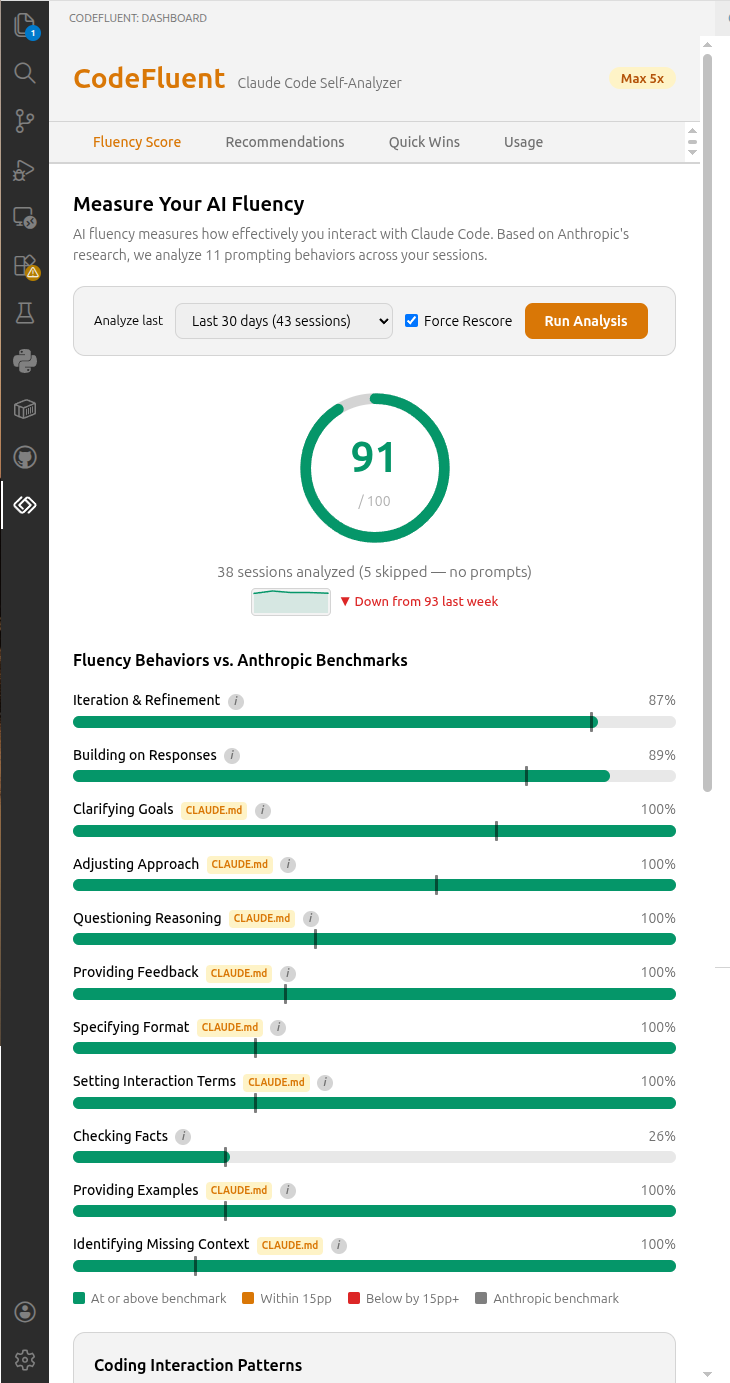
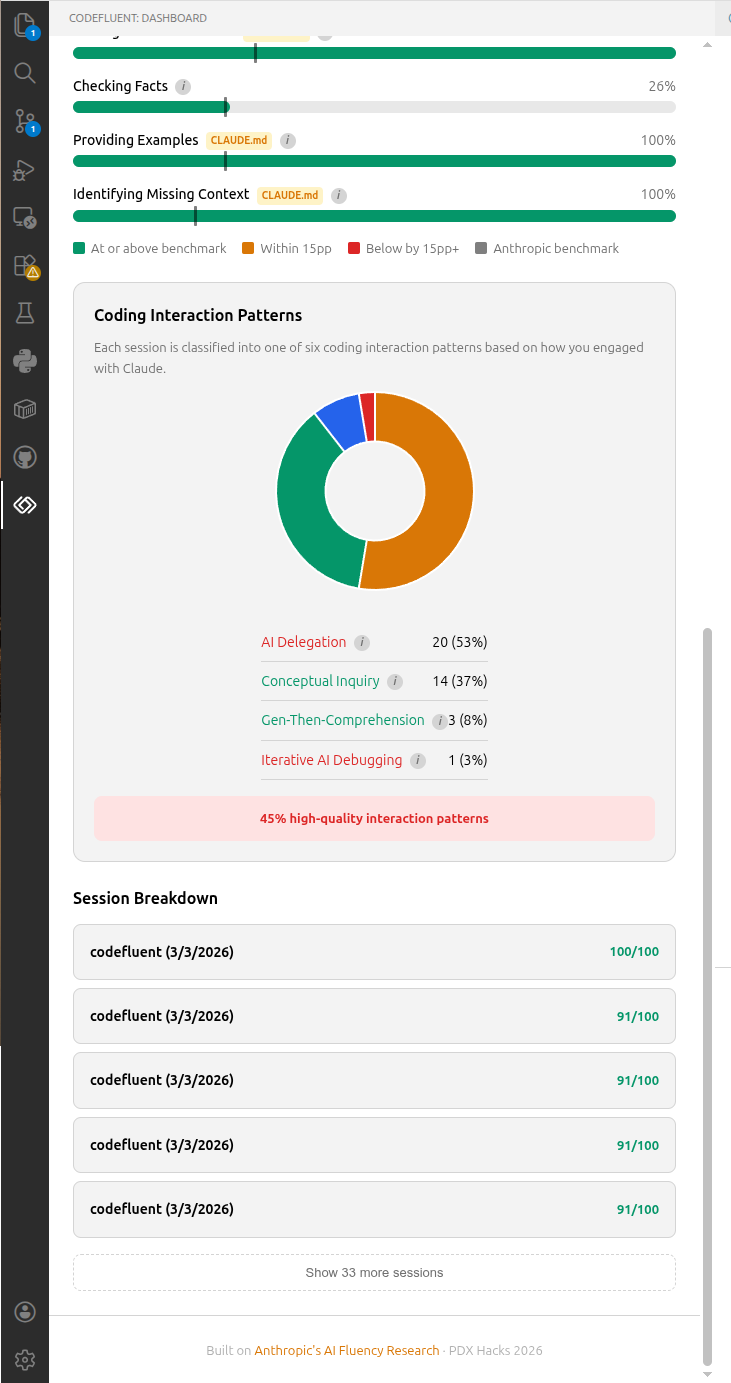
Your prompts are scored (0–100) against 11 behaviors that distinguish effective AI collaborators:
- Specificity, decomposition, context-setting, constraint use
- Iterative refinement, error recovery, verification requests
- And more — each scored individually with actionable feedback
A weekly trend sparkline tracks your score trajectory over time (improving, stable, or declining).
Conversations Tab
Claude Code stores session data as JSONL files, but these files don't correspond to meaningful work units — a single file can span 8+ days of intermittent use. CodeFluent assembles conversations by pooling all messages per project, sorting by timestamp, and splitting into conversations whenever a gap between user prompts exceeds a configurable inactivity threshold (default: 60 minutes, configurable via codefluent.conversation.inactivityGapMinutes). /clear commands force a conversation boundary. Each conversation represents one focused interaction — the same unit of analysis used by Anthropic's AI Fluency Index.
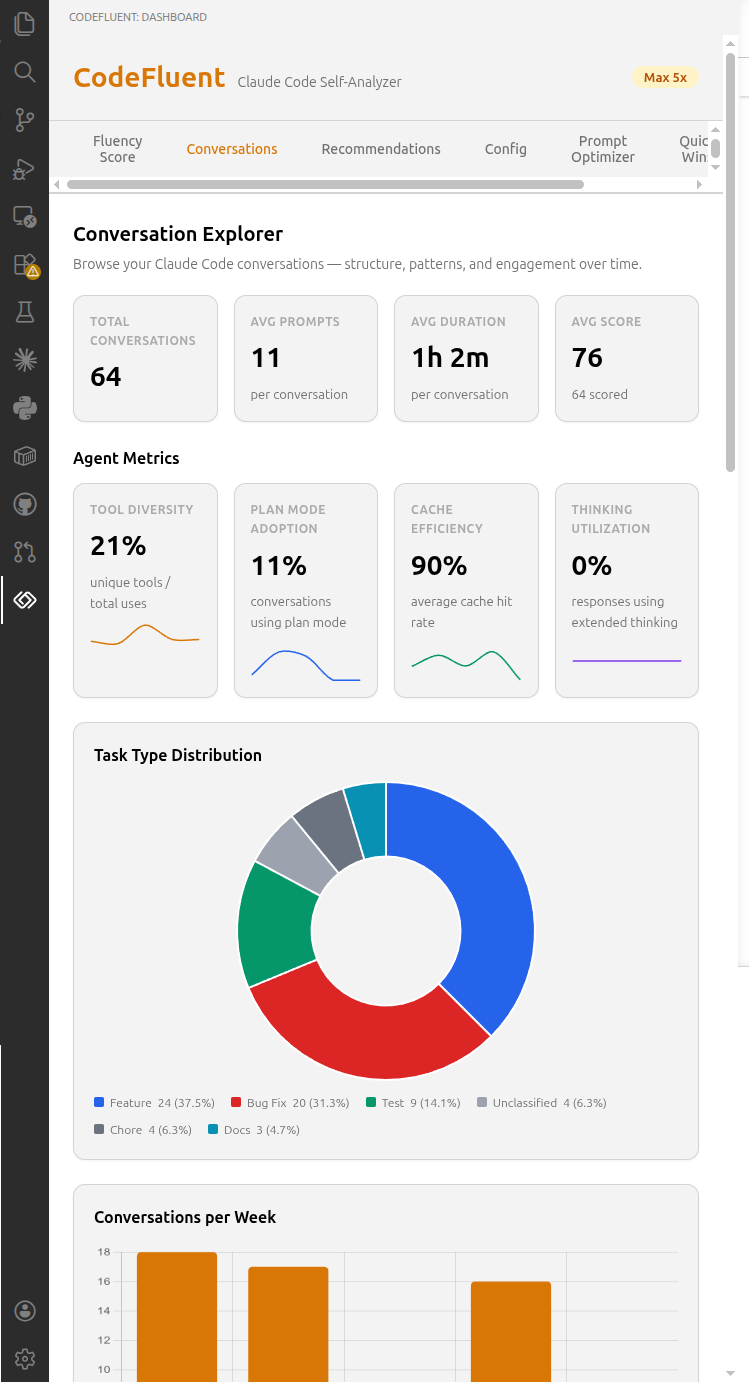
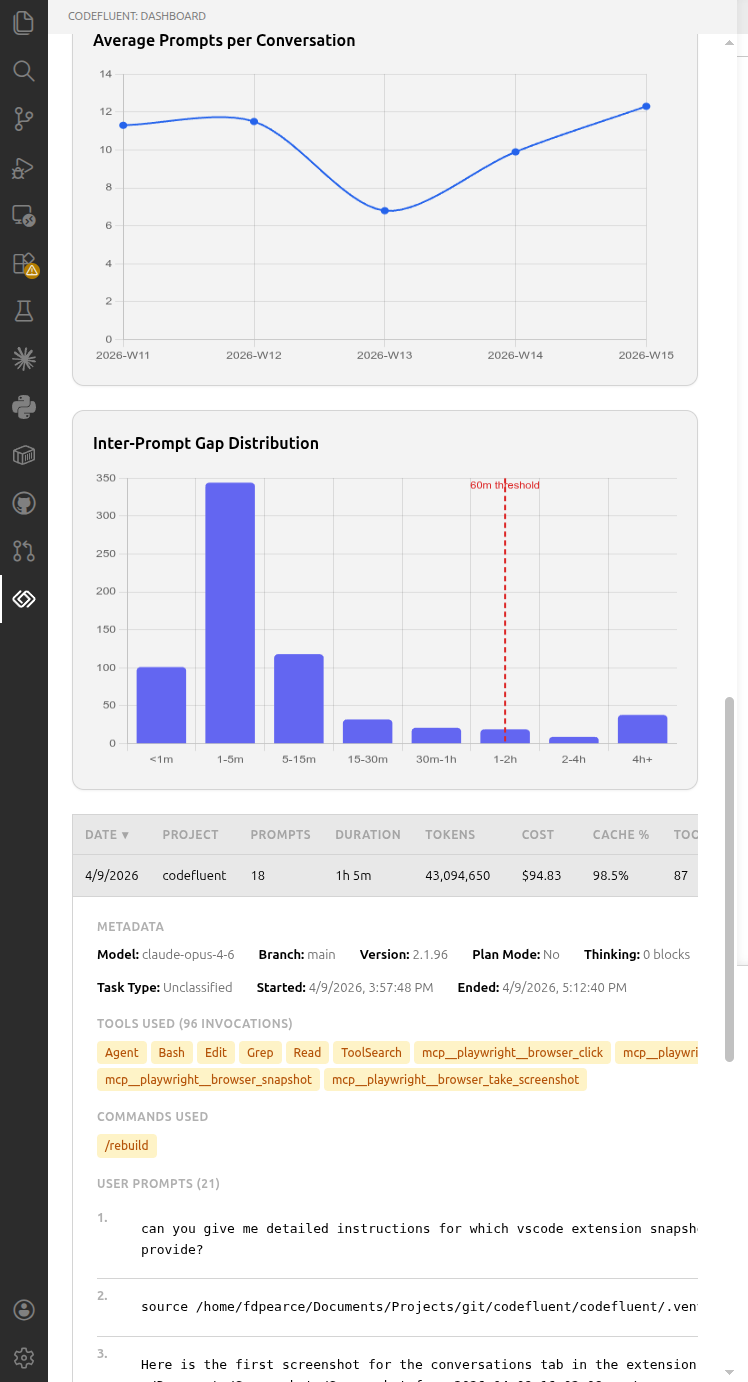
Overview cards track metrics such as total conversations and average prompts per conversation. Agent metric cards with weekly sparklines provide insight into tool diversity, plan mode adoption, cache hit rate, and thinking utilization. A task type doughnut chart classifies conversations across 8 categories.
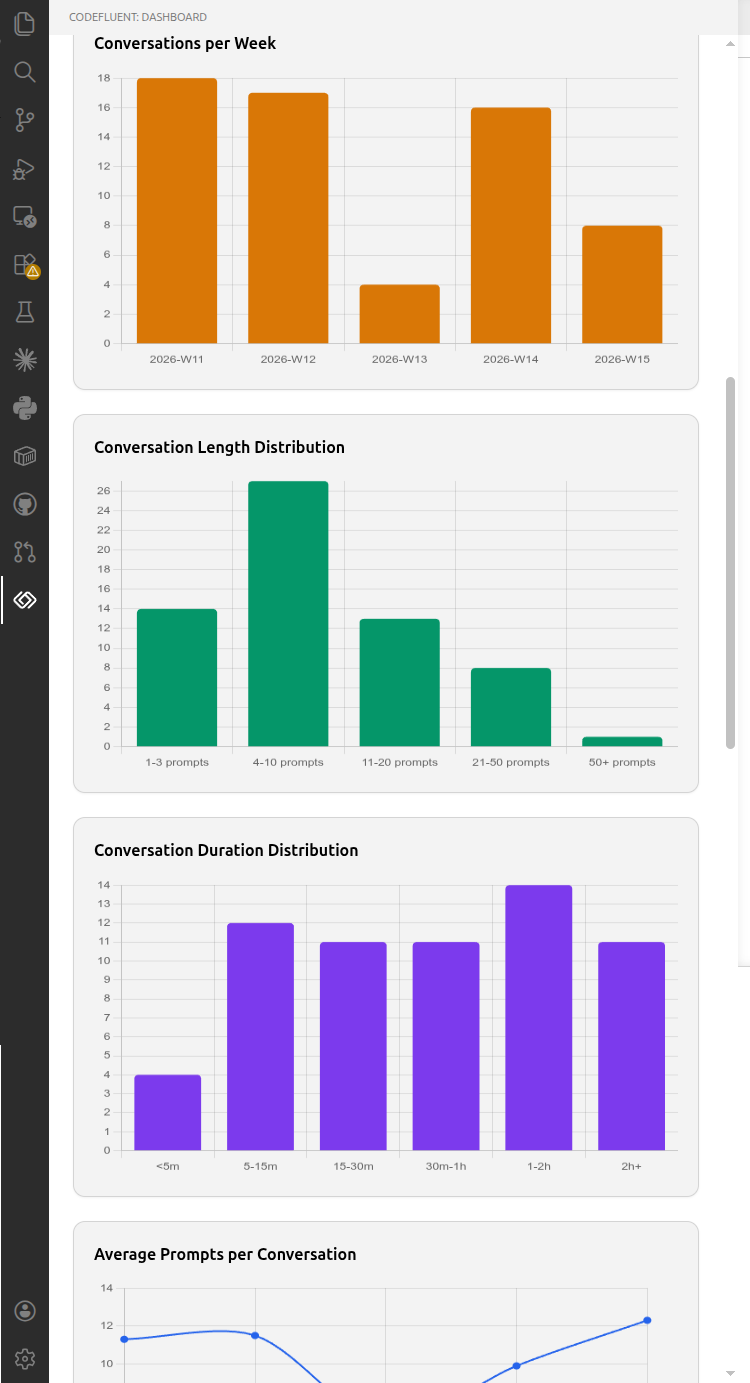
Five interactive charts visualize conversation patterns: conversations/week, length distribution, duration distribution, average prompts/week trend, and inter-prompt gap distribution.
A sortable table lists all conversations with date, project, prompts, duration, tokens, cost, cache%, tools, and score. Click any row to expand a detail view showing metadata, tools used, custom commands/skills invoked, and full user prompts.
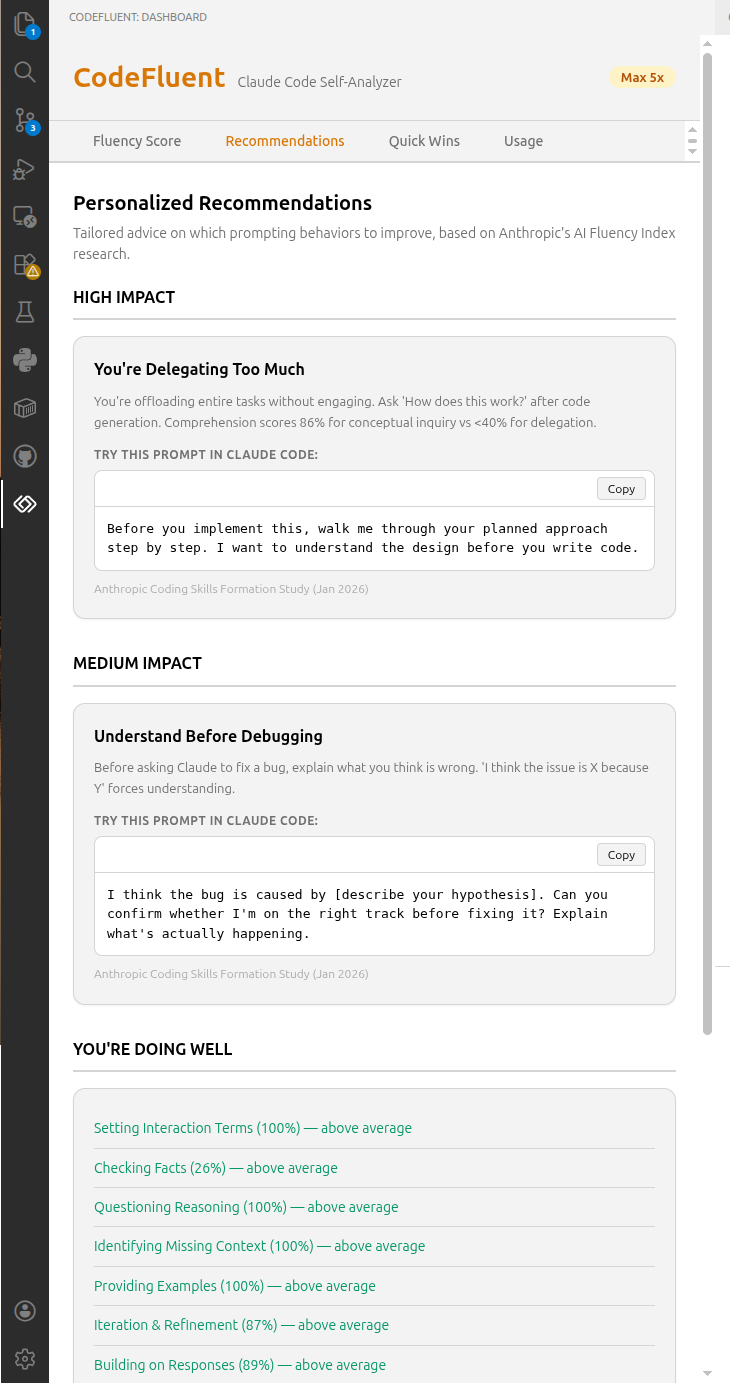
Personalized Recommendations
Tailored coaching based on your weakest fluency behaviors, with high/medium impact categories, concrete prompt examples, and research citations.
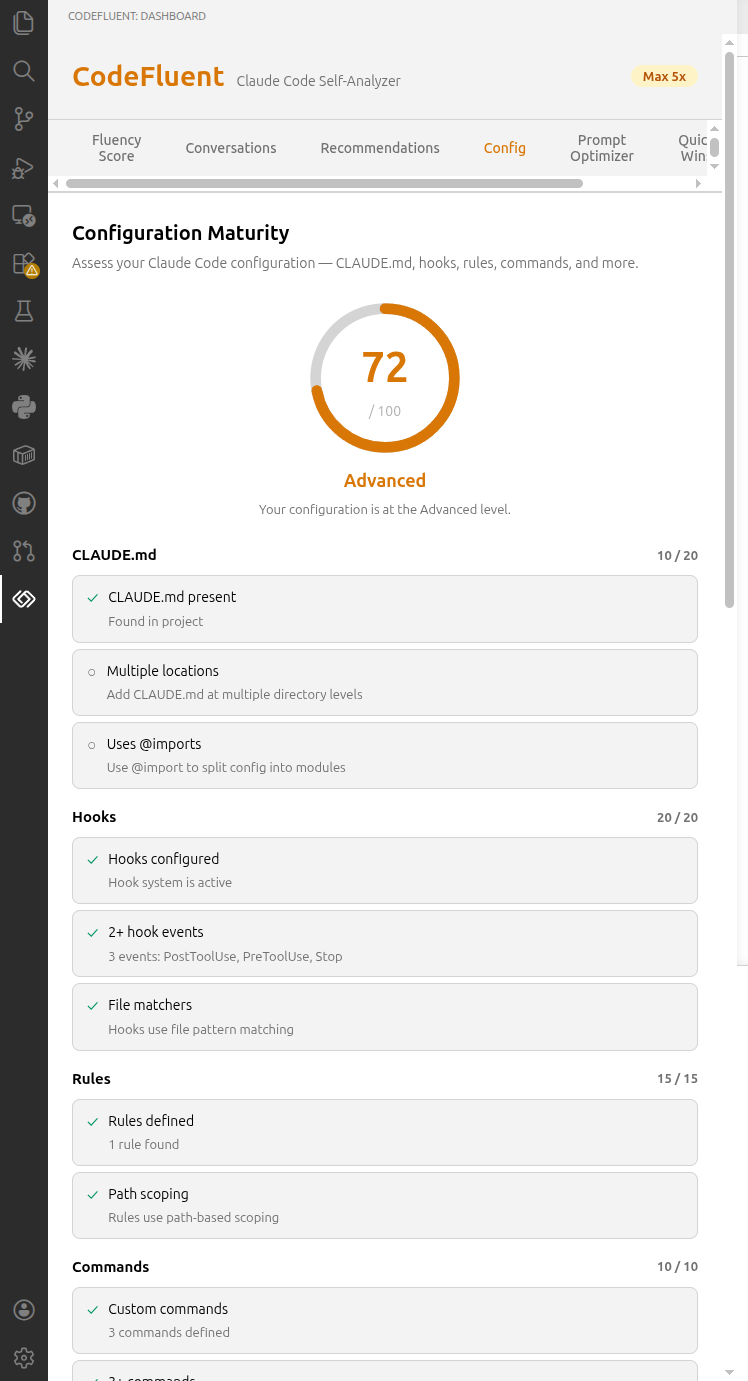
Configuration Maturity
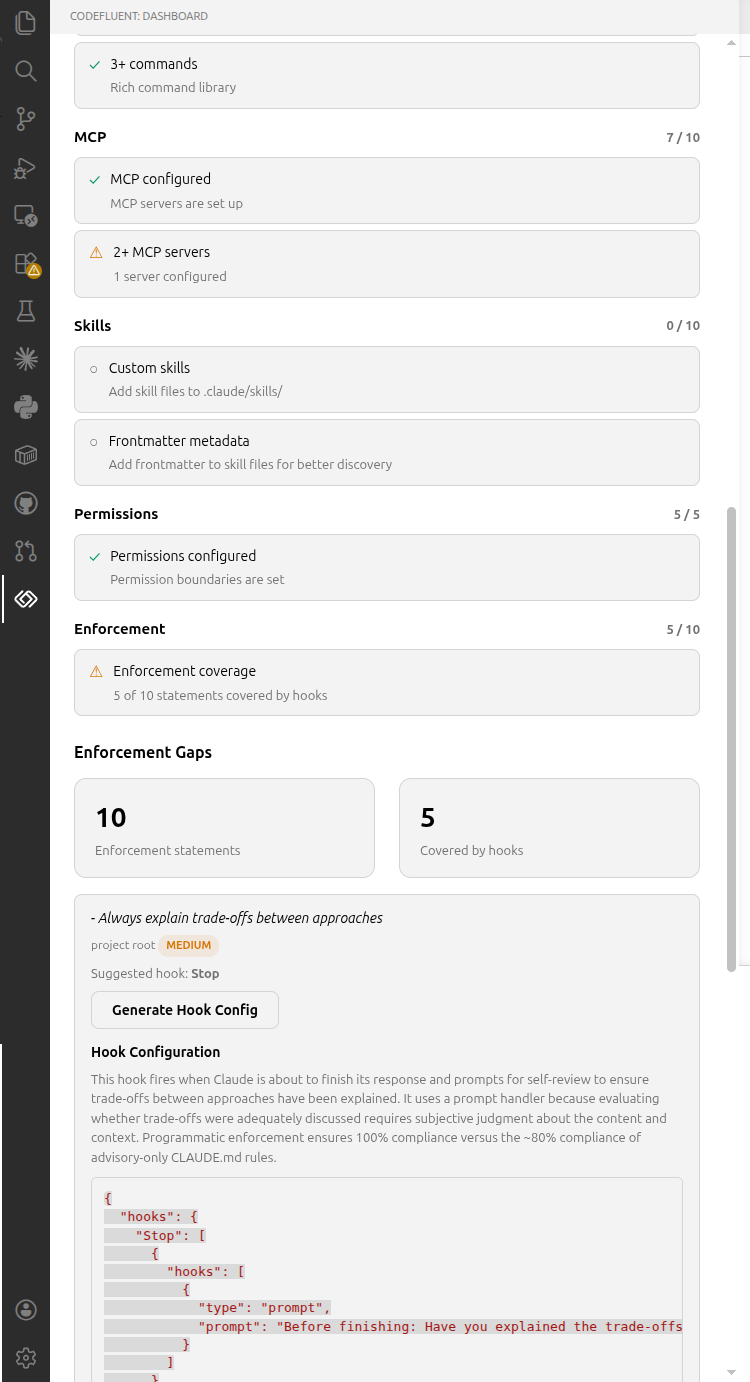
The first tool to assess your Claude Code project configuration maturity. Scans your .claude/ directory and scores your setup (0–100) across 8 weighted categories: CLAUDE.md (20 pts), Hooks (20 pts), Rules (15 pts), Commands (10 pts), MCP (10 pts), Skills (10 pts), Permissions (5 pts), and Enforcement Coverage (10 pts). A tier badge (Beginner / Intermediate / Advanced / Expert) summarizes your maturity level.
Enforcement gap detection identifies rules in your CLAUDE.md that lack programmatic enforcement via hooks. The Configuration Advisor generates ready-to-use hook configurations from enforcement gaps using Claude, with one-click copy to clipboard.
Covers the same configuration competencies tested in the Claude Certified Architect (CCA) exam. This is the foundation for the CCA readiness radar and interaction quality metrics planned for future releases.
Prompt Optimizer
Paste any prompt and get an optimized version back. The optimizer considers your workspace CLAUDE.md config (scoring it on demand if not cached) so it won't add behaviors already covered by project conventions. Shows a side-by-side comparison with before/after effective scores so you can copy or run the improved prompt directly.
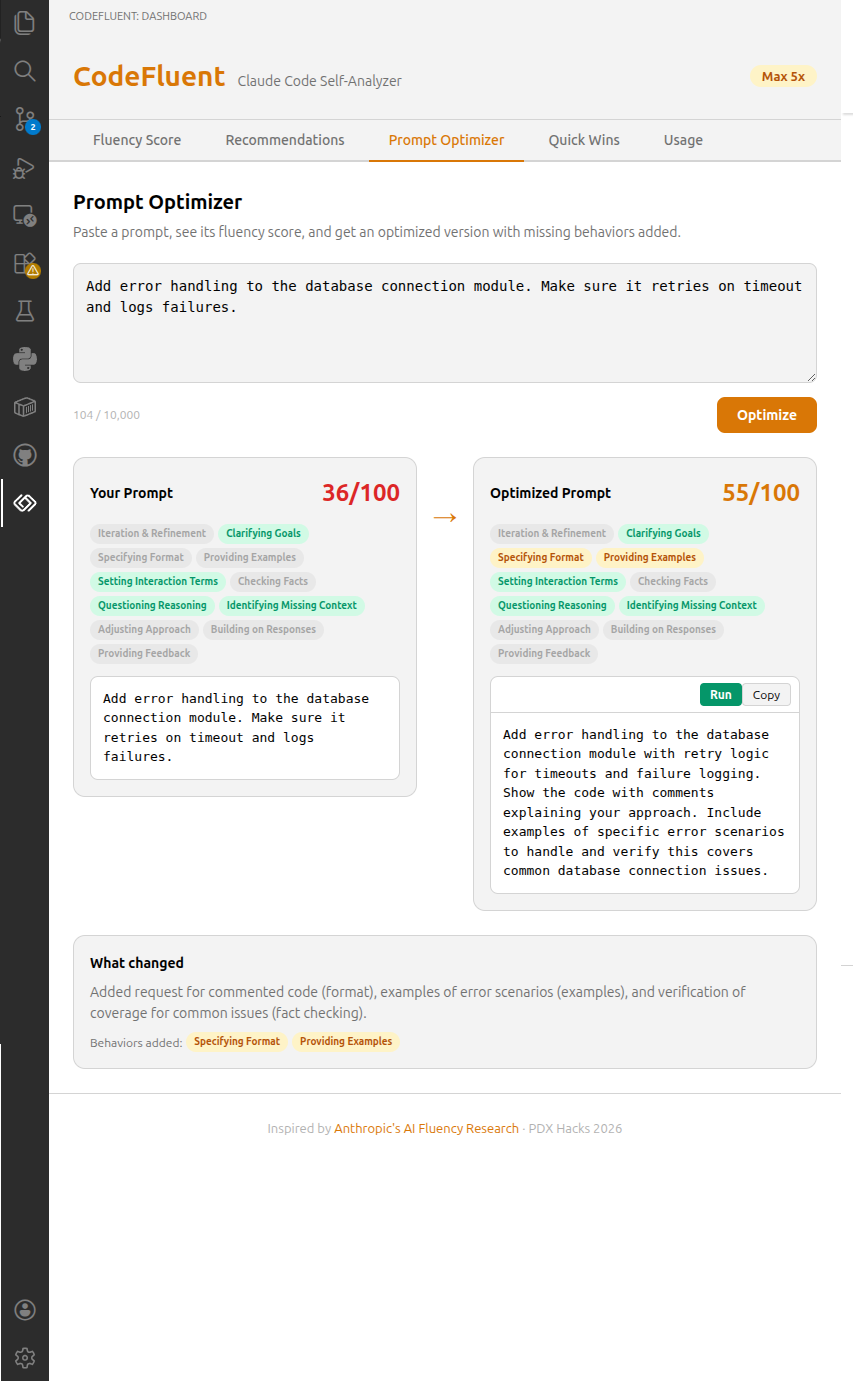
CLAUDE.md Config Scoring
Get credit for 3 meta-interaction behaviors that can be established as project conventions: setting interaction terms, identifying missing context, and questioning reasoning. If your CLAUDE.md defines these (e.g., "push back if wrong"), they boost your effective score via conversation OR config logic, with a "CLAUDE.md" attribution tag in the UI.
Quick Wins
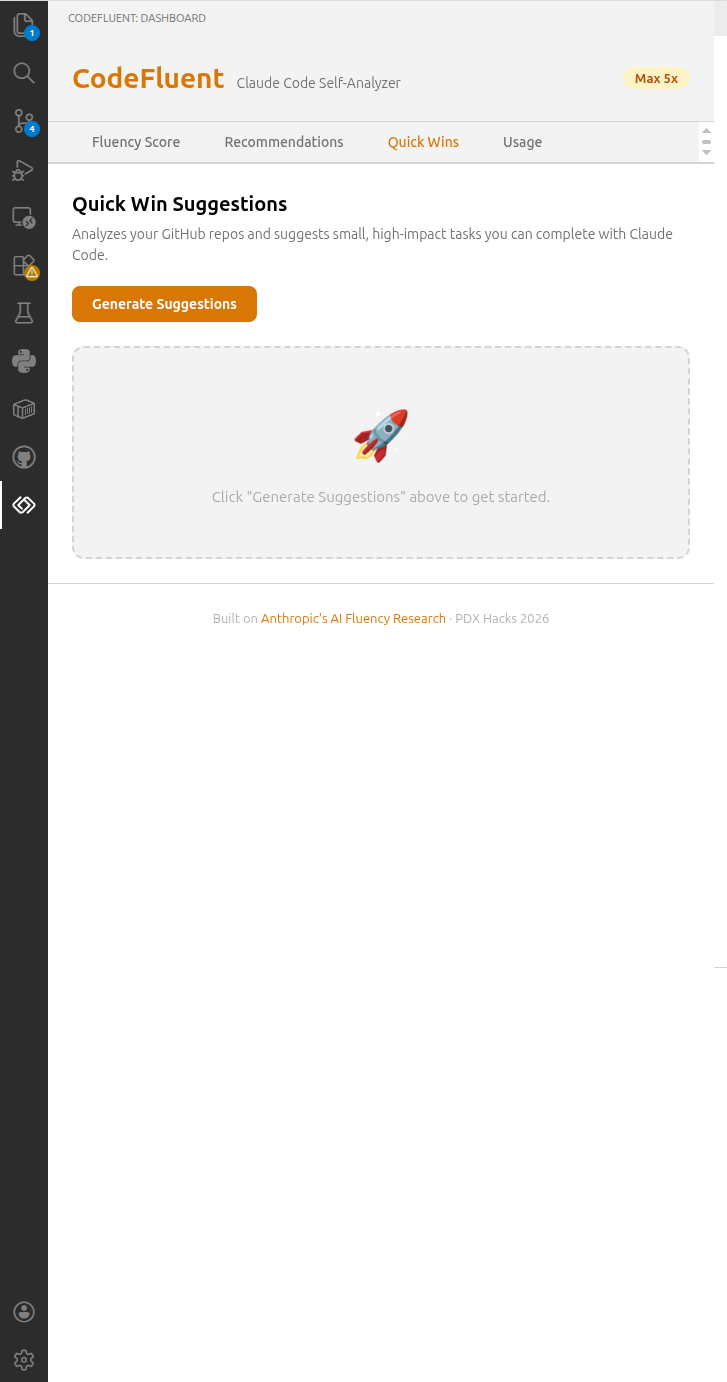
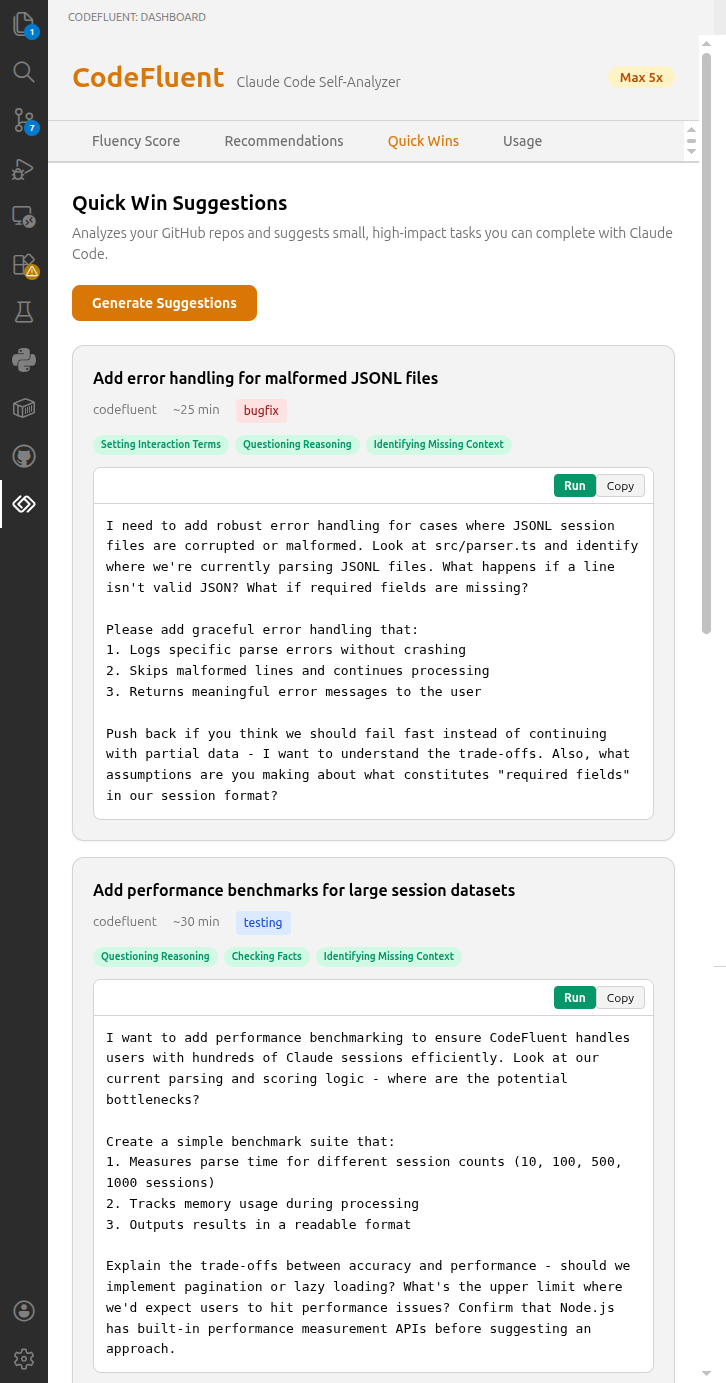
GitHub-repo-scoped task suggestions — CodeFluent detects your current workspace repo, fetches open issues, and suggests high-impact tasks you can launch directly in Claude Code with one click.
Usage Dashboard
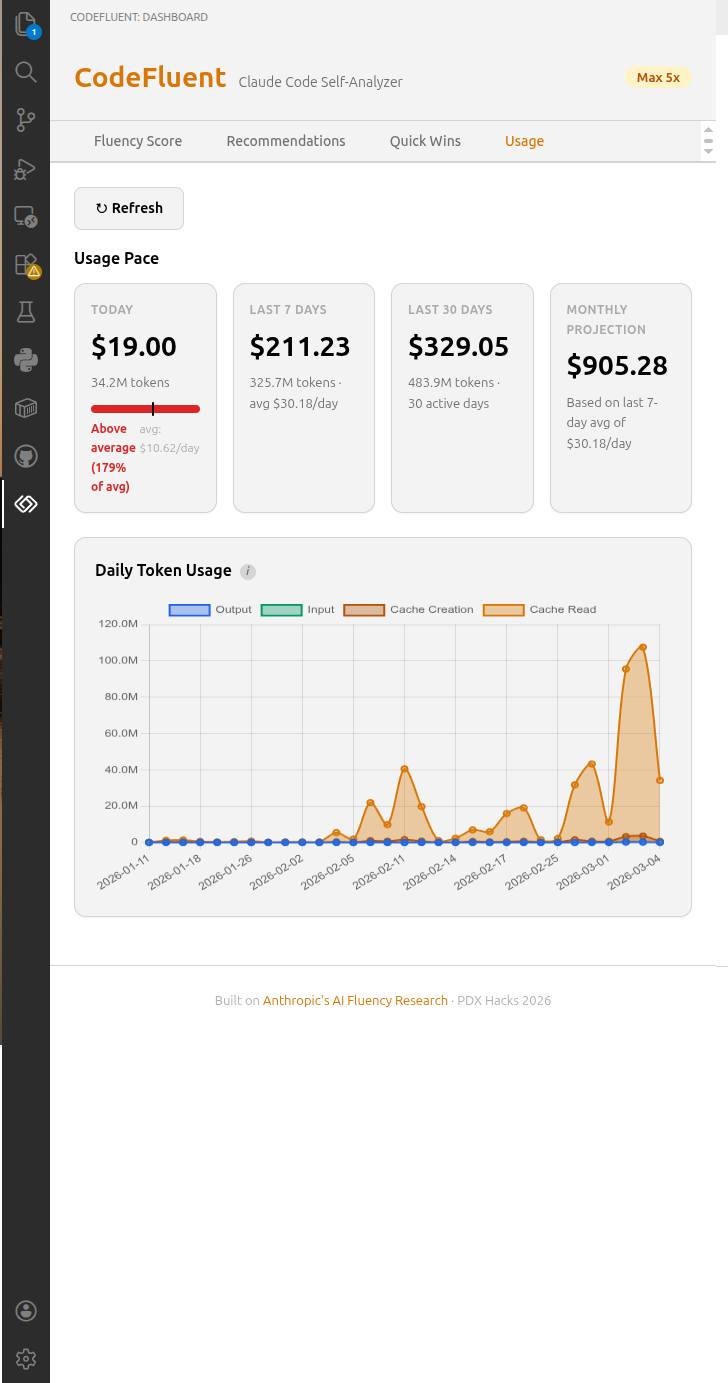
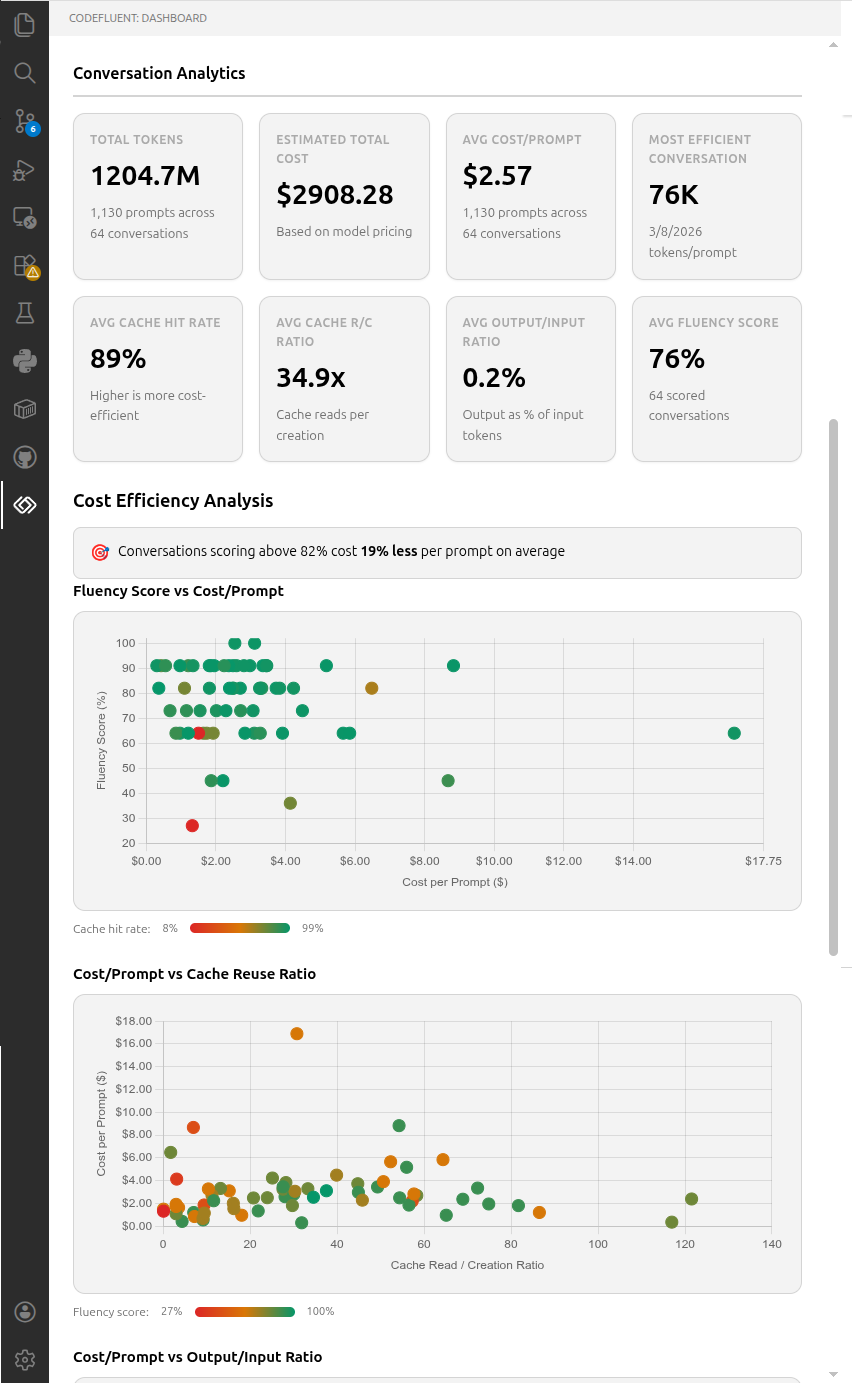
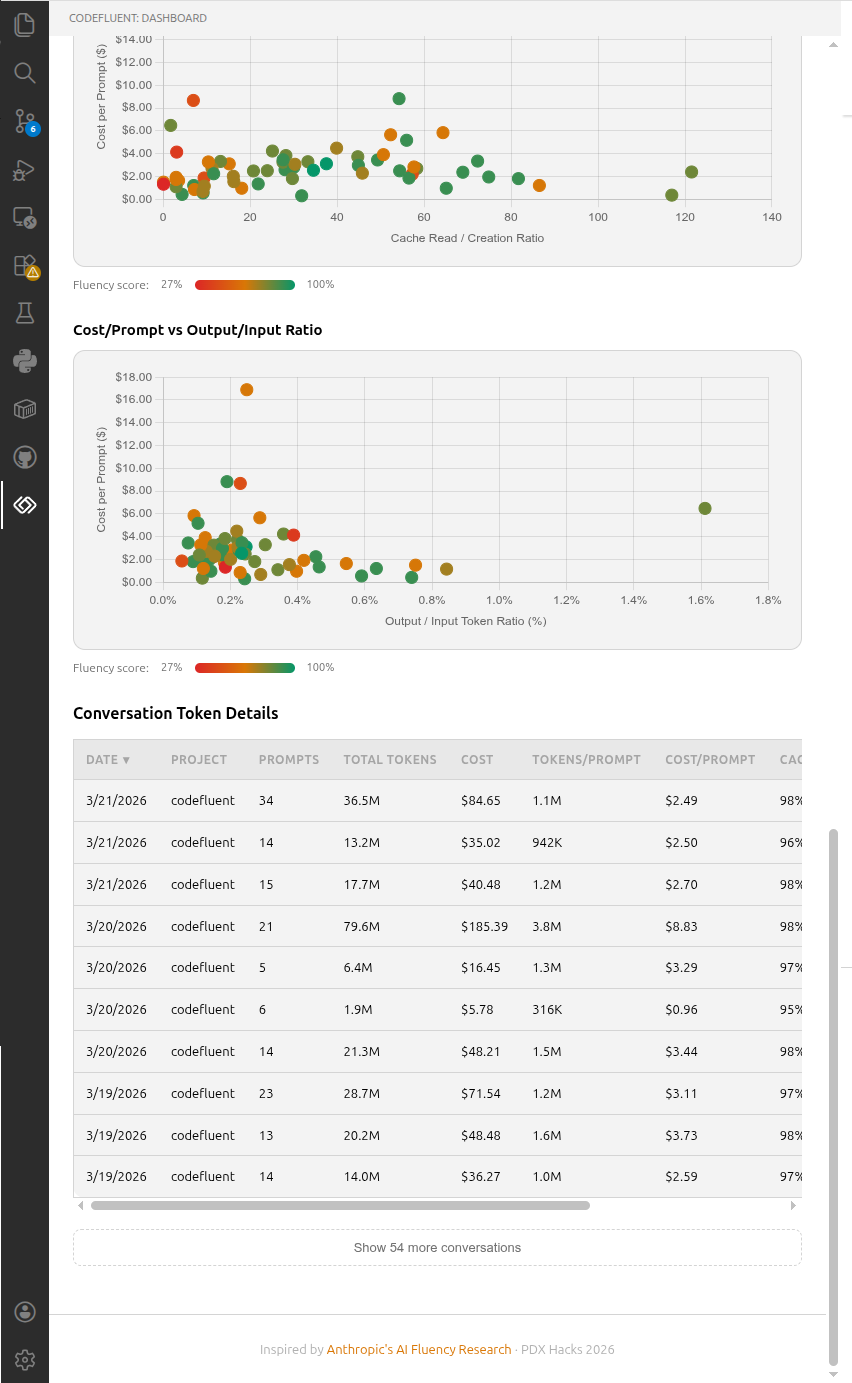
Track daily and monthly token usage, costs, and conversation history. Powered by ccusage. Conversation analytics shows per-conversation efficiency metrics, cost-efficiency scatter charts with fluency score color gradients, and a sortable details table with cost/prompt, cache hit rates, and output/input ratios.
How It Works
- Parse — JSONL session files from
~/.claude/projects/ are parsed to extract user prompts, assistant responses, and token usage metadata. System commands (/clear, /compact, etc.) are filtered out; custom commands and skills are tracked separately.
- Assemble conversations — All messages per project are pooled, sorted by timestamp, and split into conversations at inactivity gaps between user prompts (
codefluent.conversation.inactivityGapMinutes, default: 60 minutes). /clear commands force a conversation boundary. Each conversation is classified by task type (feature, bug fix, refactor, etc.) via heuristic analysis of branch names and prompt keywords.
- Score — User prompts (up to 20 per conversation, max 2000 chars each) are sent to the scoring model (
codefluent.scoring.model, default: claude-sonnet-4-6) with temperature: 0 for deterministic fluency scoring against Anthropic's 11 behaviors and 6 coding interaction patterns
- Config scoring — If a
CLAUDE.md exists, it's scored against 3 config-eligible meta-interaction behaviors. Results are merged via effective = conversation OR config
- Config maturity — The
.claude/ directory is scanned for hooks, rules, commands, skills, MCP servers, CLAUDE.md, and permissions. Enforcement gaps are detected by cross-referencing CLAUDE.md enforcement language against hook configuration.
- Agent metrics — Tool diversity, plan mode adoption, cache hit rate, and thinking utilization are computed from parsed session metadata and aggregated weekly for trend analysis.
- Cache — Scores are cached locally (by conversation ID, content hash, and prompt version) to avoid re-scoring unchanged conversations
- Usage analytics —
ccusage provides all-projects token/cost data; per-conversation efficiency metrics (cost/prompt, cache hit rates, output/input ratios) are computed from parsed JSONL token data
Everything runs locally. No data leaves your machine except the API calls to Anthropic for scoring.
Session Data
Claude Code stores session transcripts as JSONL files at ~/.claude/projects/ by default. If your session data is in a non-default location, set codefluent.sessionDataPath in VS Code settings. Session transcripts are only available from late January 2026 onward — earlier Claude Code usage was not persisted as full transcripts. Subagent sessions (spawned by Claude's Agent tool) are excluded from scoring because they contain AI-generated prompts, not human input.
CodeFluent assembles these raw session files into conversations (see Conversations above) before scoring.
See docs/SESSION_DATA.md for details on data availability, storage format, and scoring scope.
Extension Settings
Search "CodeFluent" in VS Code Settings (Ctrl+,) to configure:
| Setting |
Default |
Description |
codefluent.sessionDataPath |
~/.claude/projects/ |
Custom path to Claude Code session data directory |
codefluent.scoring.model |
claude-sonnet-4-6 |
Model ID for fluency scoring API calls |
codefluent.scoring.maxPromptsPerConversation |
20 |
Maximum prompts per conversation sent for scoring |
codefluent.optimizer.alreadyGoodThreshold |
90 |
Score (0–100) at or above which prompts are considered already effective |
codefluent.conversation.inactivityGapMinutes |
60 |
Minutes of inactivity that defines a conversation boundary |
Warning: Changing inactivityGapMinutes redefines how conversations are assembled, which affects all downstream metrics — fluency scores, analytics, agent metrics, and task classification. Cached scores will become stale and should be re-scored with "Force Rescore" enabled.
API Key
CodeFluent uses the following resolution order:
ANTHROPIC_API_KEY environment variable.env file in your workspace root- VS Code SecretStorage (persisted after first prompt)
Prefer SecretStorage over .env when you have the choice. SecretStorage is backed by your OS keychain and never persists to a readable file. If you enter the key through the interactive prompt, CodeFluent stores it in SecretStorage automatically and you don't need a workspace .env at all. See the Secrets handling note below for why this matters.
Privacy
All data stays on your machine. CodeFluent reads local session files and makes direct Anthropic API calls for scoring — no telemetry, no external servers, no data collection.
Secrets handling
Claude Code persists every tool call and its output to JSONL transcripts at ~/.claude/projects/. If Claude ever reads a .env file during a session (yours or one in your workspace), the contents of that file end up in those transcripts in plaintext — the same transcripts CodeFluent parses. .gitignore does not protect against this.
To reduce the risk, prefer VS Code SecretStorage for your Anthropic API key (see above), scope the key to CodeFluent alone with a monthly spend cap in the Anthropic console, and never paste raw sk-ant-* values into Claude prompts.
The CodeFluent repository itself ships Claude Code hooks that block reads of .env, SSH keys, and other credential files during development — see SECURITY.md for the full policy, an audit one-liner for historical leaks in your existing ~/.claude/projects/, and instructions for deploying the same hooks at user scope to protect all your Claude Code sessions.
Troubleshooting
| Problem |
Solution |
| No sessions found |
Check that ~/.claude/projects/ contains .jsonl session files. Claude Code creates these automatically during use. |
| API key not found |
The extension checks: env var → workspace .env → VS Code secrets → interactive prompt. Make sure ANTHROPIC_API_KEY is set in at least one location. |
| Quick Wins shows no results |
Run gh auth login to authenticate the GitHub CLI. |
| ccusage returns no data |
Click the Refresh button in the Usage tab. Ensure Node.js and npm are on PATH so npx ccusage works. |
| Extension doesn't activate |
Look for the CodeFluent icon in the activity bar. If missing, try reloading the window (Ctrl+Shift+P → "Reload Window"). |
Roadmap
Recently shipped (v1.2):
- Scoring prompt v2.1 — tightened behavior definitions with few-shot examples for borderline cases (iter, QR, providing_feedback, IMC), reaching 92.4%+ overall agreement on the eval golden set
- Sonnet 4.6 migration — scoring/optimizer/quickwins now default to
claude-sonnet-4-6
- LLM task classification — task_type field on every conversation with Cohen's Kappa ≥0.9 vs human labels
- Interaction quality metrics — error recovery pattern detection in conversation flow
Planned (v1.3+):
- CCA readiness radar — 5-axis radar chart mapping your usage to Claude Certified Architect competency domains
- Scoring quality infrastructure — confidence calibration, temperature-zero variance baseline, user feedback signals, cross-model agreement testing
- Outcome metrics — commit quality analysis, MCP integration assessment
See the Release Roadmap for details, or browse open milestones on GitHub.
Research Foundations
CodeFluent's scoring framework is grounded in published Anthropic research:
Contributing
CodeFluent is open source and actively looking for contributors! Whether it's bug fixes, new features, or improving the scoring framework — all contributions are welcome. Check out the open issues for ideas, or see CONTRIBUTING.md for dev setup and guidelines.
License
MIT

