SamPr Basic for MSX — VS Code extension
Work on SamPr Basic programs from VS Code with the same workflow, the same shortcuts and the same files as the editor that runs on the MSX: a project can be copied between a real machine (or an SD card / disk image) and the PC without any conversion.
SamPr Basic is a BASIC compiler and development environment for MSX (MSX1/MSX2, MSX-DOS 1/2) that produces real Z80 code. See the main project and its manual.
What you get
- The real compiler, inside VS Code. The extension runs the very same
QBC.COM / QBCR.COM / QBCB.COM that run on the MSX, inside a small Z80 emulator with a simulated MSX-DOS. The output is the same as on the machine, in a few milliseconds.
- Errors as you type with the compiler's own messages, on the right file and line (also for unsaved text and for multi-file cartridges).
- The same keys:
F5 compile and run, F6 help on the word under the cursor, F7 help index, F8 go to a segment.
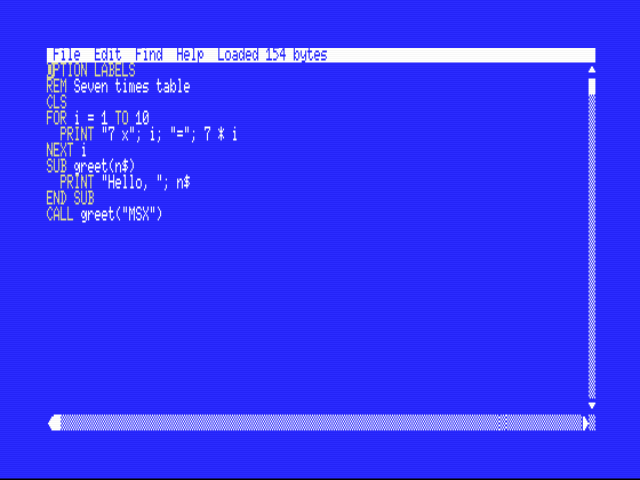
- The same look: the SamPr Basic MSX color theme (white on blue, yellow keywords) and 80-column ruler.
- Online help for every statement and function, shown on hover and on
F6 / F7.
- Outline of
SUB, FUNCTION and labels; snippets; syntax highlighting including __ASM … __ENDASM blocks.
- Run in openMSX for the three kinds of output: DOS programs (
.COM), MSX-BASIC .BIN files and ROM cartridges.
- Multi-file cartridges:
NAME000.SPB, NAME001.SPB… (5 characters + 3 digits) and precompiled NAMEnnn.BIN segments, exactly as on the MSX; F8 saves the current file and jumps to another segment.
Same files on the PC and on the MSX
| File |
Meaning |
NAME.SPB |
SamPr Basic source (text, CR LF line ends; the extension sets this for .spb files) |
NAME.COM |
DOS program produced by the compiler |
NAME.BIN |
MSX-BASIC program (CLEAR 200,&H83FF then BLOAD "NAME.BIN",R) |
NAME.ROM |
ROM cartridge |
NAME000.SPB, NAME001.SPB… NAMEnnn.BIN |
segments of a multi-file cartridge |
Keep names within the MSX 8.3 limit. In the editor on the MSX, Save As accepts up to 8 characters and adds .SPB.
Requirements
- openMSX to run the programs (not needed to compile). Set
samprbasic.openmsx.path if openmsx is not in your PATH.
- To run DOS programs: a folder with
MSXDOS.SYS and COMMAND.COM (not included), set in samprbasic.dosFiles. The extension copies them next to your program, as on a real disk.
Settings
| Setting |
Meaning |
samprbasic.openmsx.path |
full path of openmsx.exe (empty = use PATH) |
samprbasic.dosFiles |
folder with MSXDOS.SYS and COMMAND.COM |
samprbasic.machine |
openMSX machine (default Philips_NMS_8250, MSX2, 80 columns) |
samprbasic.extension |
disk-interface extension for MSX1 machines (e.g. Panasonic_FS-FD1A with Sony_HB-75P) |
samprbasic.askDate |
type a date at the DOS prompt (MSX1 with MSX-DOS 1 asks for it) |
samprbasic.fullSpeedWhenLoading |
run openMSX at full speed during disk access |
Debugger
Set breakpoints in the gutter and press Ctrl+F5 (Debug: SamPr Basic in openMSX), or use Run > Start Debugging with a samprbasic launch configuration (program, stopOnEntry). The extension compiles a temporary copy of the project with OPTION DEBUG (your source is untouched), starts openMSX and attaches to it. You get continue / step over / step into / step out / pause, the call stack with SUB names, locals and parameters, globals and arrays, and expression evaluation (V(2), N$) in Watch and Debug Console. DOS, BIN and ROM cartridge targets are supported. For a cartridge (also with several segments: NAME000.SPB, NAME001.SPB...) the compiler writes a map file (OPTION MAP, added to the temporary copy) and the debugger uses address breakpoints on the ROM, so the cartridge being debugged is identical to the one you ship; breakpoints and stepping work across segments, and the call stack and variables are shown as for the other targets.
Commands
SamPr Basic: Compile and Run (F5), Compile, Help on Word (F6), Help Index (F7), Go to Segment (F8), New Project from Sample, About.
Notes
- Not tried on real MSX hardware; the compiler and runtimes were tested on openMSX (Philips NMS 8250, Sony HB-75P, Panasonic FS-A1ST).
SamPr Basic 1.0 — © 2026 Fausto Pracek. This extension bundles the MIT-licensed z80-emulator (see THIRD-PARTY-NOTICES.txt).
Development
npm install
npm run data      # regenerates help.json, the grammar and the snippets from the project's documentation sources (needs Python)
npm run tools     # copies the compiler/runtime files from ../dist into tools/ (and the samples into samples/)
npm run build     # bundles src/ into dist/extension.js
npm test          # compile + run in openMSX (DOS, BIN, multi-file ROM) and the tests inside a real VS Code
npm run package   # builds the .vsix
src/dos.ts is the MSX-DOS host around the Z80 emulator, src/compile.ts drives the real compilers (including the chain QBC.COM → QBCR.COM/QBCB.COM), src/openmsx.ts launches openMSX and src/extension.ts holds the VS Code integration.

