Flutter Compile — VS Code Extension
Manage multiple Flutter SDK versions, run diagnostics, and monitor engine builds — all from the VS Code sidebar. Supports both Native and FVM backends.
Prerequisites
| Requirement |
How to install |
| flutter_compile CLI |
dart pub global activate flutter_compile |
| VS Code 1.85.0 or later |
code.visualstudio.com |
The CLI must be on your PATH. Run flutter_compile --version to verify.
Installation
- Open Extensions (
Cmd+Shift+X / Ctrl+Shift+X)
- Search Flutter Compile
- Click Install
Or from the command line:
code --install-extension flutterPlaza-com.flutter-compile
Walkthrough
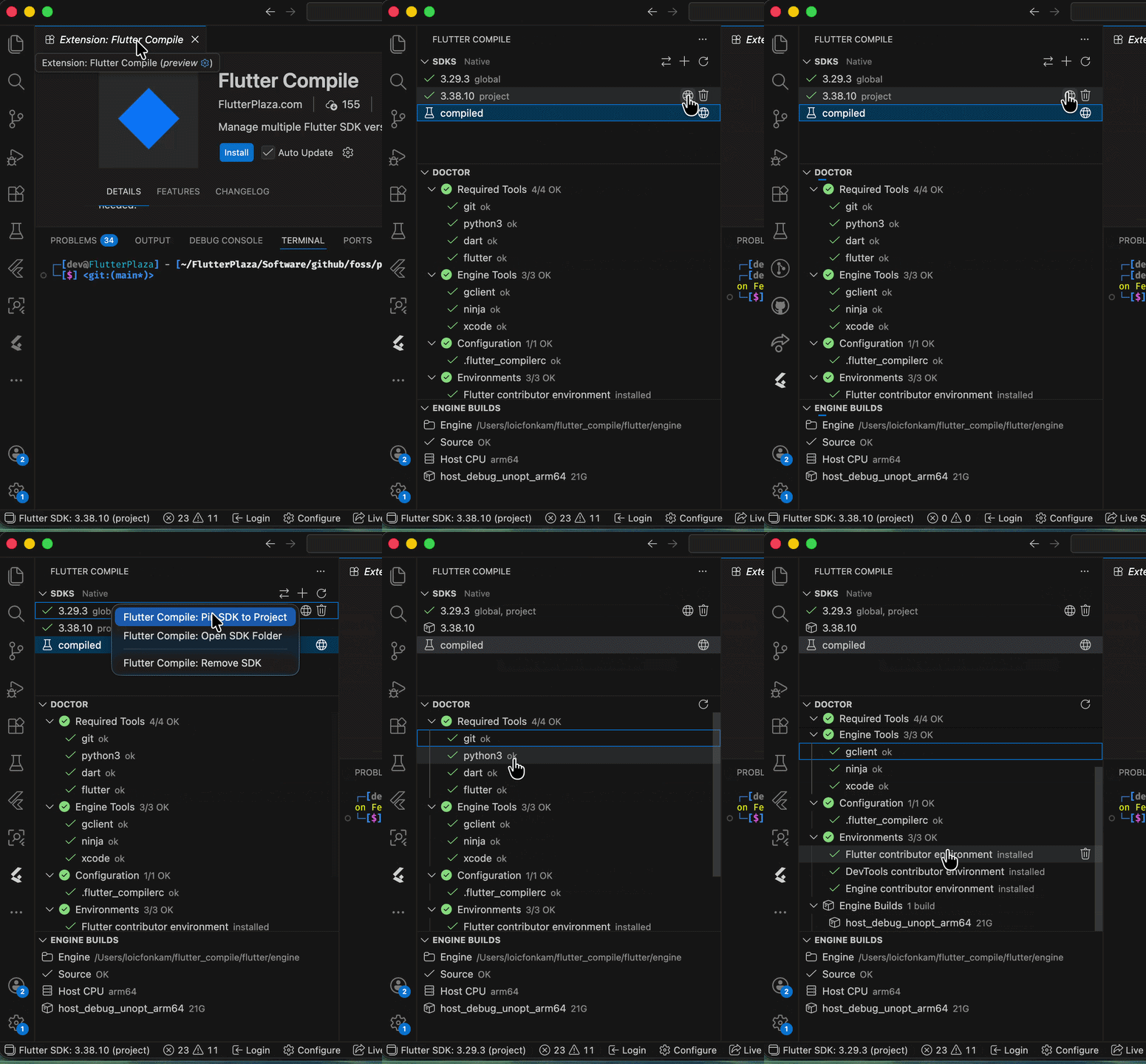
Features
SDK Manager
Browse, install, switch, pin, and remove Flutter SDKs from the sidebar.
| Icon |
Meaning |
| Green checkmark |
Active SDK (global or project-pinned) |
| Package icon |
Installed but inactive |
| Beaker icon |
Locally compiled contributor build |
Actions: Install (+), Set Global, Pin to Project, Open Folder, Remove, Refresh
SDK Manager Toggle (Native / FVM)
Switch between Native and FVM SDK backends with the swap-arrows button in the SDKs view title bar. The view title shows the active mode: "SDKs — Native" or "SDKs — FVM".
Doctor
Grouped diagnostic checks with pass/fail indicators. Click the wrench icon on failing checks to auto-install or configure missing tools.
Categories: Required Tools, Engine Tools, Configuration, Environments
Engine Builds
At-a-glance engine status: engine path, source status, host CPU, and build targets with disk sizes. Initialize, build, and delete engine builds from the sidebar.
Status Bar
Always-visible SDK version indicator. Yellow warning when no SDK is set. Click to open the quick picker.
File Watcher
Watches .flutter-version files — external changes (CLI, other tools) are picked up immediately.
Automatic SDK Path Updates
Switching SDKs automatically updates dart.flutterSdkPath in workspace settings. No restart needed.
Commands
| Command |
Description |
Flutter Compile: Install SDK |
Install a new Flutter SDK version or channel |
Flutter Compile: Select SDK |
Pick from installed SDKs with a quick picker |
Flutter Compile: Switch SDK |
Alias for Select SDK |
Flutter Compile: Switch SDK Manager |
Toggle between Native and FVM backends |
Flutter Compile: Set Global SDK |
Set an SDK as the global default |
Flutter Compile: Pin SDK to Project |
Write .flutter-version for the current workspace |
Flutter Compile: Remove SDK |
Delete an installed SDK from disk |
Flutter Compile: Open SDK Folder |
Reveal an SDK directory in the system file manager |
Flutter Compile: Doctor |
Run diagnostics and print output |
Flutter Compile: Initialize Engine |
Set up the engine build environment |
Flutter Compile: Build Engine |
Build the engine with platform/mode/flag selection |
Flutter Compile: Delete Build |
Delete an engine build output |
Flutter Compile: Install / Configure |
Install or configure a failing doctor check |
Flutter Compile: Uninstall Environment |
Remove a contributor environment |
Flutter Compile: Refresh SDKs / Doctor / Builds / All |
Refresh views |
Code Push
Manage over-the-air updates for your Flutter apps directly from VS Code.
Tree View: Account status, current app, releases, and patches with rollout percentages.
Commands:
| Command |
Description |
Flutter Compile: Code Push Login |
Authenticate with the code push server |
Flutter Compile: Code Push Init |
Initialize code push for the current project |
Flutter Compile: Code Push Release |
Build and upload a baseline release |
Flutter Compile: Code Push Patch |
Build and upload a patch |
Flutter Compile: Code Push Rollback |
Deactivate a patch |
Extension Settings
| Setting |
Type |
Default |
Description |
flutterCompile.sdkManager |
"native" | "fvm" |
"native" |
SDK management backend |
flutterCompile.cliPath |
string |
"flutter_compile" |
Path to the CLI executable |
Troubleshooting
| Problem |
Solution |
| "flutter_compile CLI not found" |
Install: dart pub global activate flutter_compile. Ensure ~/.pub-cache/bin is in PATH. |
| SDK tree is empty |
Click refresh. Run flutter_compile sdk list in a terminal to verify. |
| Doctor shows all red |
Run flutter_compile doctor in a terminal for detailed output. |
| Status bar shows "(none)" |
Use Set Global SDK or Pin SDK to Project. |
| SDK switch not picked up by Dart extension |
Command Palette > Dart: Restart Analysis Server. |
License
BSD-3-Clause. See LICENSE.

