Veyra Query Lens
An index advisor for MongoDB queries, in VS Code.
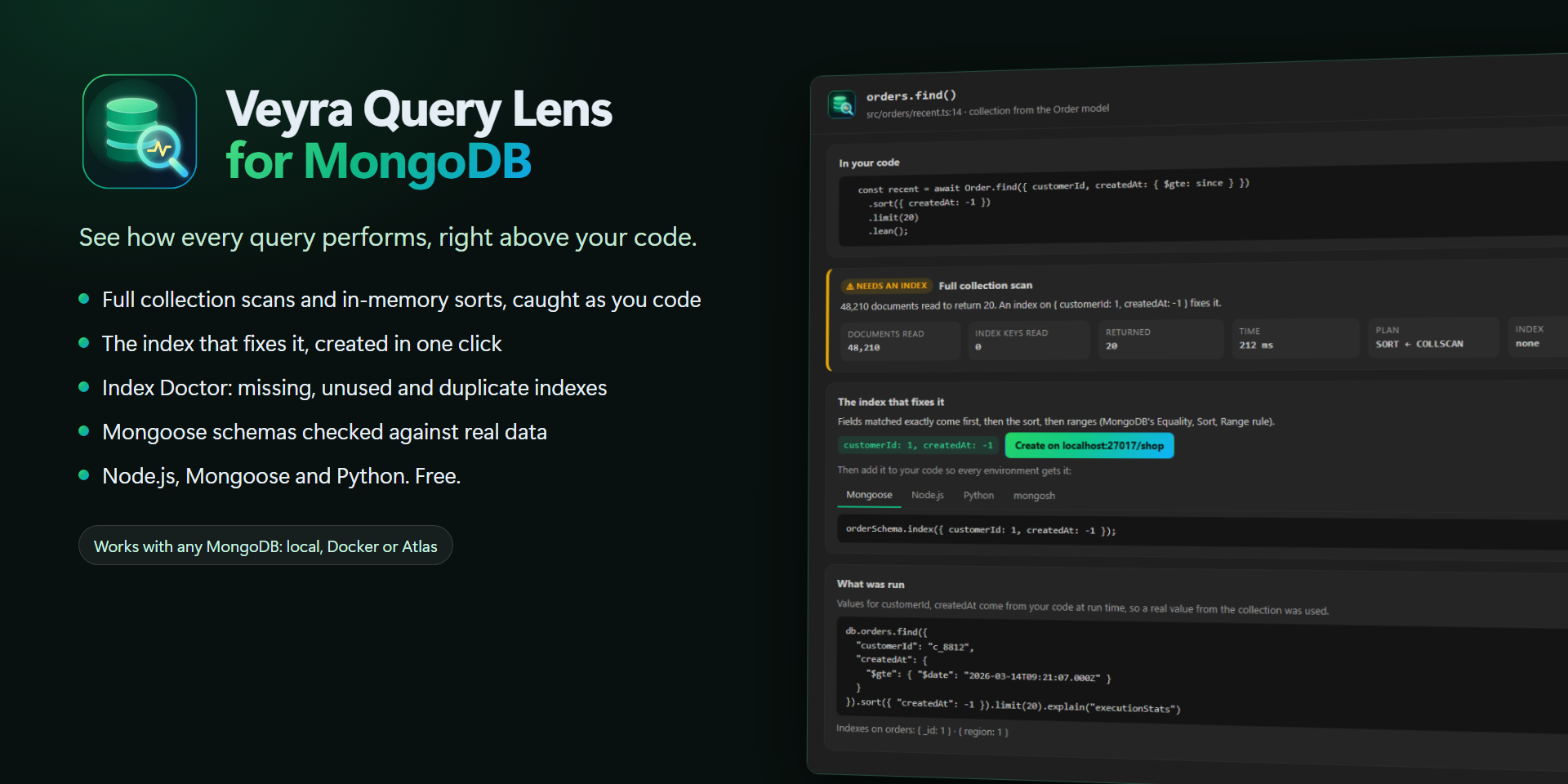
See how every MongoDB query performs, right above your code.
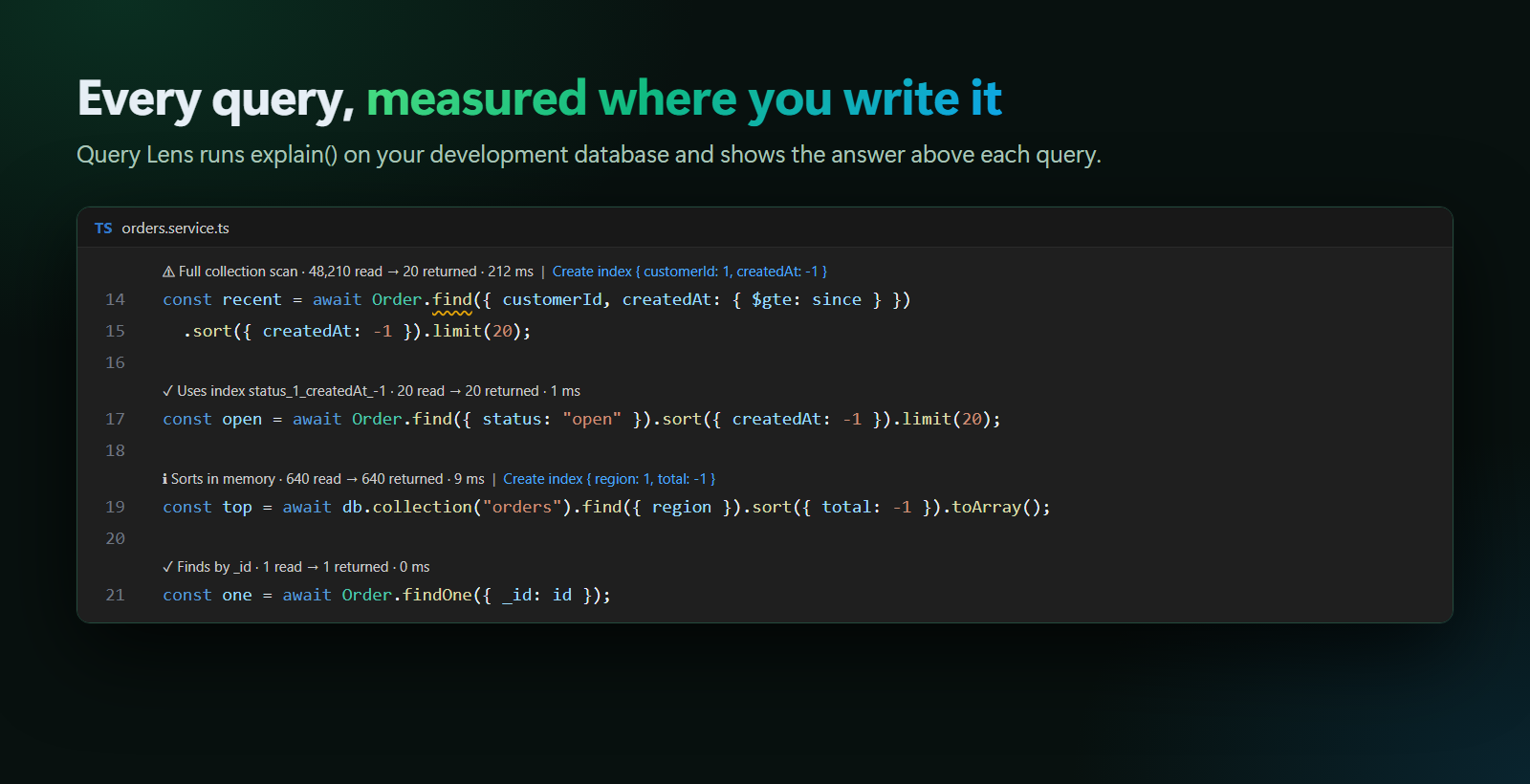
Slow queries usually show up in production, long after the code was written. Query Lens shows them while you write it. It runs explain() for each query in your code against your development database, and puts the answer above the line:
⚠ Full collection scan · 48,210 read → 20 returned · 212 ms   |   Create index { customerId: 1, createdAt: -1 }
const recent = await Order.find({ customerId, createdAt: { $gte: since } }).sort({ createdAt: -1 }).limit(20);
One click creates the index, and the lens turns green. Free, no account, nothing sent anywhere. By the makers of Veyra Studio.
- 🔍 A lens above every query: documents read vs returned, time, and whether an index is used. Full collection scans and in-memory sorts are flagged.
- 🛠️ The index that fixes it, using MongoDB's Equality, Sort, Range rule. Create it in one click, or copy it as Mongoose, Node.js, Python or mongosh code.
- 🩺 Index Doctor: the indexes your code is missing, and the ones nothing uses or that duplicate another, with their size.
- 🧬 Schema drift: your Mongoose schemas compared with real documents: wrong types, missing required fields, and fields Mongoose silently drops.
- 🧠 Works on real app code: values that only exist at run time (
req.params.id) are filled with real values from the collection, so you see the plan your app really gets.
- 🔒 Safe by design: explain only, with a time limit. Nothing is written unless you confirm, and there's a read-only mode.
Read the full guide →
Quick start
- Have a development database running: local, Docker or Atlas.
- Open your project. If its
.env has a local connection string (MONGODB_URI=mongodb://localhost:27017/shop), Query Lens connects by itself. Otherwise run MongoDB Lens: Connect to MongoDB….
- Open a file with queries. Each one gets a lens. Click a lens for the full details.
- Run MongoDB Lens: Open Index Doctor for the whole picture.
Your connection string is kept in VS Code's secret storage, never in settings.
Every query, measured where you write it
| Lens |
Meaning |
✓ Uses index … |
Reads about as many documents as it returns. |
ℹ Full collection scan / Sorts in memory |
Fine at today's size, but it won't stay fast. |
⚠ Full collection scan / Sorts in memory / Index isn't selective |
Reads 1,000+ documents without a good index. Also listed in Problems, with quick fixes. |
Queries are checked automatically on a database on your computer, and with a click (▶ Check this query) anywhere else. Check All Queries checks the whole workspace.
The fix, not just the problem
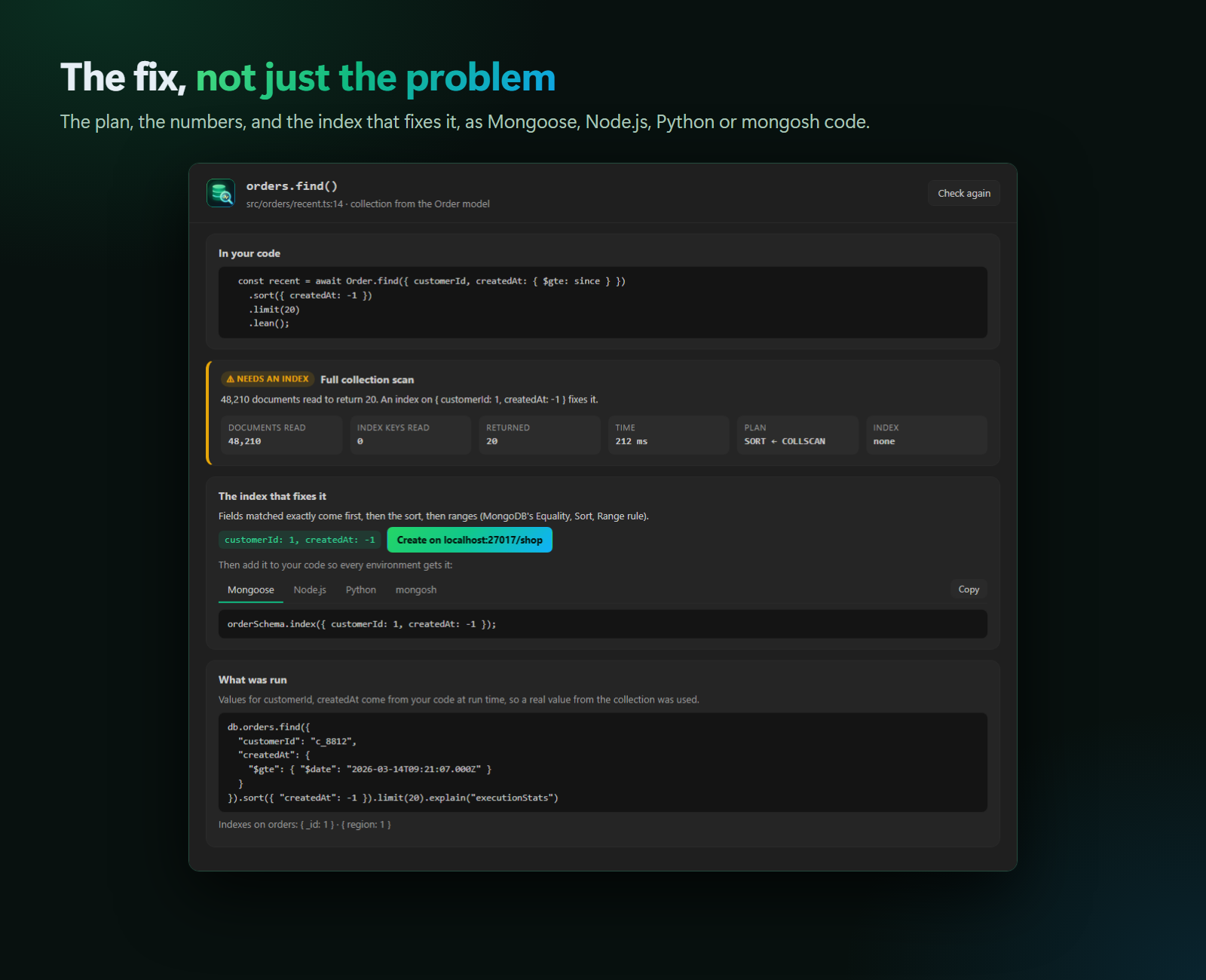
Click a lens to see the plan, the numbers, the exact command that was run, and the suggested index. Create it on your development database, then paste it into your code so every environment gets it:
orderSchema.index({ customerId: 1, createdAt: -1 });
Index Doctor
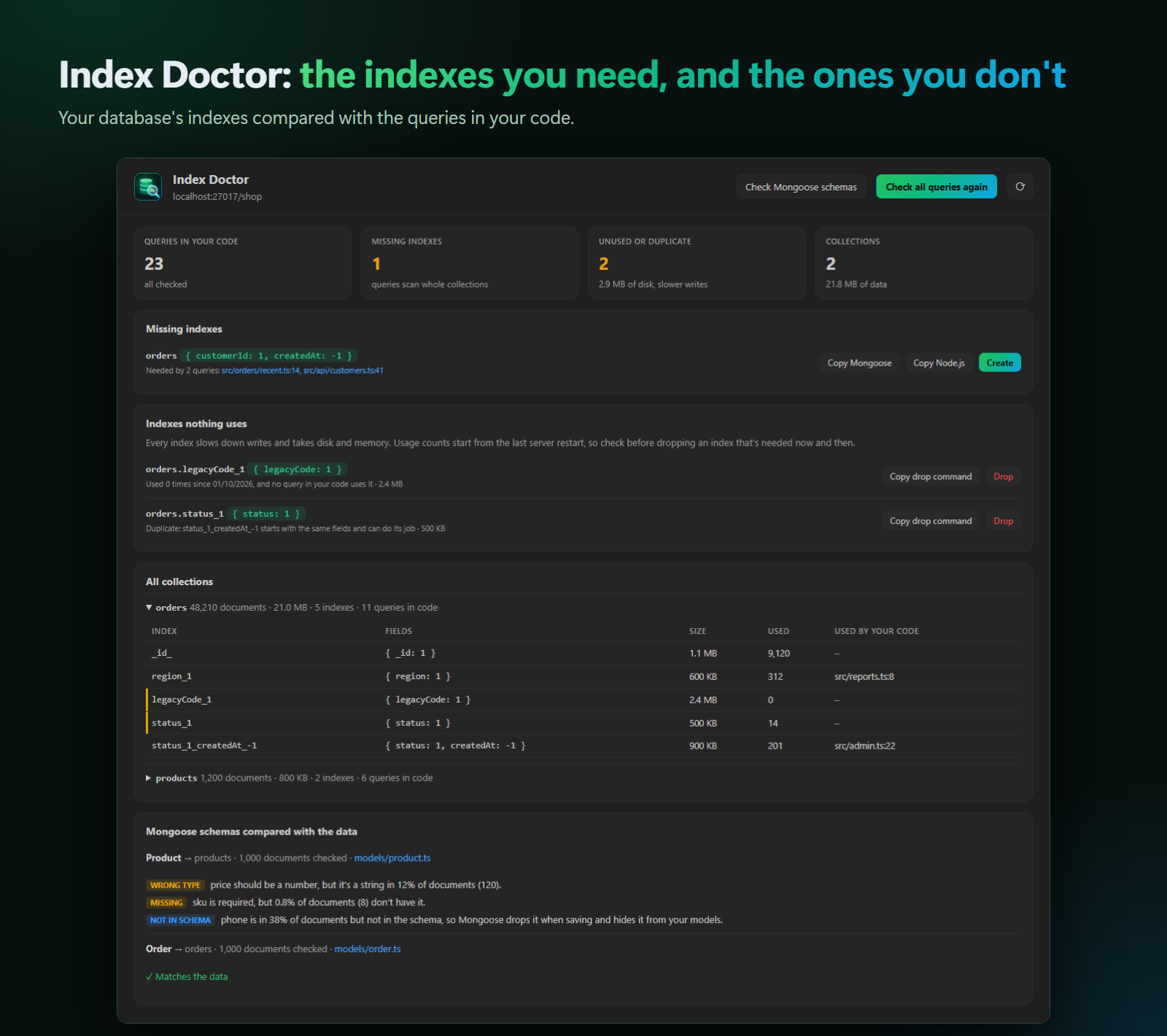
- Missing indexes, with the queries that need each one.
- Indexes nothing uses (0 uses since the server started, and no query in your code needs them) and duplicates (another index starts with the same fields). Every index slows down writes.
- Every collection's indexes, with size, use count, and which queries in your code use them.
Your schema vs. your real data
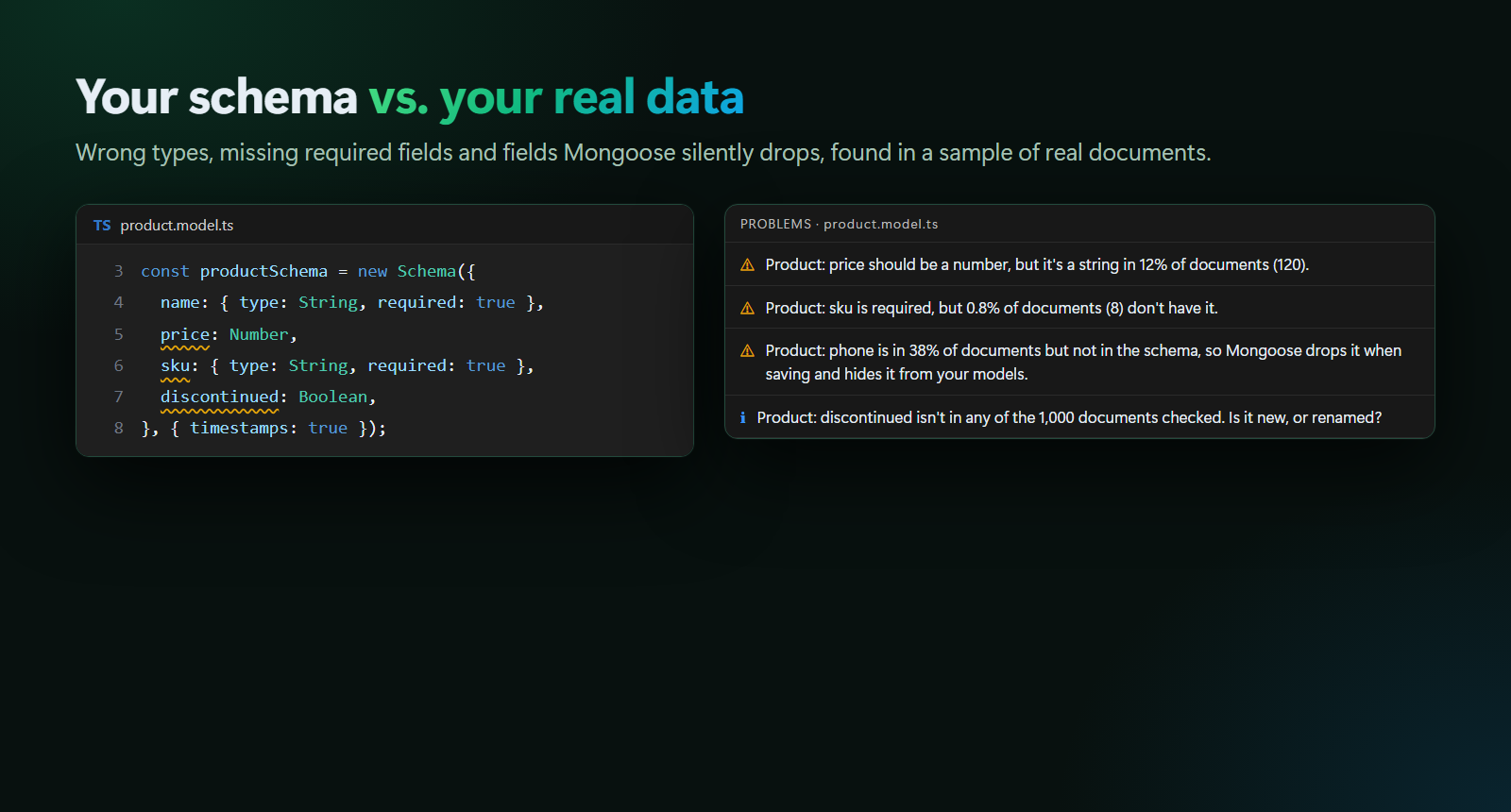
Check Schema Against Data samples real documents and compares them with each Mongoose schema. Findings appear on the schema lines themselves.
Supported code
|
|
| Node.js driver |
db.collection("orders").find(…).sort(…).limit(…), findOne, countDocuments, aggregate([{ $match }, { $sort }]), updateMany… |
| Mongoose |
Order.find(…), .sort("-createdAt"), exists, models from any file, with Mongoose's collection naming |
| PyMongo / Motor |
db.orders.find(…).sort("created_at", DESCENDING), find_one, count_documents, sort= and limit= keywords |
Updates and deletes are never run: Query Lens checks the find() that selects the same documents. If a query is matched to the wrong collection, add // veyra-collection: orders above it.
Safety
- Only
explain(), findOne() (to sample a value), and index and collection statistics are run, each with a time limit (veyraMongo.maxTimeMS, 3 s).
- Indexes are created or dropped only when you confirm, with the database's address shown.
veyraMongo.readOnly turns that off entirely.
- On databases that aren't on your computer, queries are checked only when you click (
veyraMongo.analyze).
- No account, no telemetry. It talks only to the database you connect.
Settings
| Setting |
Default |
|
veyraMongo.analyze |
local |
Check automatically on local databases (local), always (always), or on click (onClick) |
veyraMongo.readOnly |
false |
Never create or drop indexes from VS Code |
veyraMongo.maxTimeMS |
3000 |
Time limit for each explain |
veyraMongo.sampleSize |
1000 |
Documents sampled for the schema check |
veyraMongo.problems |
true |
List findings in the Problems panel |
Learn more
The full guide covers how values are sampled, the index rule, every supported pattern, Index Doctor's caveats, troubleshooting, and how Query Lens works inside. It's also at veyraeditor.com/mongodb/docs.
Found a bug or have an idea? Open an issue. MIT licensed.
MongoDB is a trademark of MongoDB, Inc. Veyra Query Lens is an independent extension and is not made or endorsed by MongoDB, Inc.
| |

